1. ບົດແນະນຳ
This manual provides essential information for the safe and efficient operation of your iFFALCON 40F2A 40-inch Full HD Android Smart LED TV. Please read these instructions thoroughly before using the television and retain them for future reference.
The iFFALCON 40F2A is a 40-inch Full High Definition (1920x1080) Smart LED TV powered by Android, offering a rich entertainment experience with built-in Google Assistant, HDR10 support, and integrated streaming services.

ຮູບພາບ: ທາງຫນ້າ view of the iFFALCON 40F2A 40-inch Full HD Android Smart LED TV.
2. ຕັ້ງຄ່າ
2.1 Unboxing ແລະ Package Contents
ເອົາໂທລະທັດອອກຈາກການຫຸ້ມຫໍ່ຢ່າງລະມັດລະວັງ. ໃຫ້ແນ່ໃຈວ່າມີອຸປະກອນທັງໝົດຢູ່ແລ້ວ:
- 1 x iFFALCON 40F2A LED TV
- 1 x ໂຕະເທິງໂຕະ
- 1 x ຄູ່ມືຜູ້ໃຊ້ (ເອກະສານນີ້)
- 1 x ບັດຮັບປະກັນ
- 1 x ການຄວບຄຸມໄລຍະໄກ
- 2 x ຫມໍ້ໄຟ AAA
2.2 ການຕິດຕັ້ງຂາຕັ້ງ
ຖ້າໃຊ້ຂາຕັ້ງເທິງໂຕະ:
- ວາງໜ້າຈໍໂທລະທັດລົງເທິງພື້ນຜິວທີ່ຮາບພຽງເພື່ອປ້ອງກັນຄວາມເສຍຫາຍ.
- ຈັດວາງວົງເລັບຂາຕັ້ງດ້ວຍຮູສະກູຢູ່ດ້ານລຸ່ມຂອງໂທລະພາບ.
- ຮັບປະກັນຂາຕັ້ງໂດຍໃຊ້ສະກູທີ່ໃຫ້ໄວ້.
- ຍົກໂທລະທັດໃຫ້ຕັ້ງຊື່ຢ່າງລະມັດລະວັງໃນພື້ນຜິວທີ່ມີລະດັບຄວາມໝັ້ນຄົງ.
2.3 ການຕິດຝາ (ທາງເລືອກ)
For wall mounting, consult a professional installer and refer to the wall mount kit's instructions. Ensure the wall mount is compatible with the TV's VESA mounting pattern.
2.4 ການເຊື່ອມຕໍ່ອຸປະກອນພາຍນອກ
Connect your external devices (e.g., set-top box, gaming console, Blu-ray player) to the TV's ports. The TV features HDMI, USB, VGA, and Headphone ports.
- HDMI: ສໍາລັບສຽງແລະວິດີໂອຄວາມລະອຽດສູງ.
- USB: ສໍາລັບການເຊື່ອມຕໍ່ອຸປະກອນເກັບຮັກສາ USB.
- ອີເທີເນັດ: ສໍາລັບການເຊື່ອມຕໍ່ອິນເຕີເນັດແບບມີສາຍ.
- ຫູຟັງ: ສຳລັບສຽງອອກໄປຫາຫູຟັງ.
2.5 ການເຊື່ອມຕໍ່ພະລັງງານ ແລະການຕິດຕັ້ງເບື້ອງຕົ້ນ
- ສຽບແບັດ AAA ທີ່ສະໜອງໃຫ້ໃສ່ໃນການຄວບຄຸມໄລຍະໄກ.
- ເຊື່ອມຕໍ່ສາຍໄຟກັບໂທລະພາບ ແລະຈາກນັ້ນໄປຫາປລັກສຽບໄຟ.
- ກົດປຸ່ມເປີດປິດໃນຣີໂໝດຄວບຄຸມເພື່ອເປີດໂທລະທັດ.
- ປະຕິບັດຕາມຄໍາແນະນໍາໃນຫນ້າຈໍເພື່ອເຮັດສໍາເລັດການຕັ້ງຄ່າເບື້ອງຕົ້ນ, ລວມທັງການເລືອກພາສາ, ການເຊື່ອມຕໍ່ເຄືອຂ່າຍ (Wi-Fi ຫຼື Ethernet), ແລະການເຂົ້າສູ່ລະບົບບັນຊີ Google.
3. ປະຕິບັດການໂທລະພາບ
3.1 ຫນ້າທີ່ຄວບຄຸມໄລຍະໄກ
The remote control provides access to all TV functions. It includes dedicated buttons for popular streaming services like Netflix, Amazon Prime Video, and Zee5, as well as a Google Assistant button for voice commands.

Image: The iFFALCON 40F2A Smart Remote Control, highlighting the Google Assistant and Netflix hotkey buttons.
3.2 ການໂຕ້ຕອບ Android TV
Navigate the Android TV interface using the remote's directional pad and OK button. The home screen displays recommended content, installed applications, and settings.

Image: The Android TV home screen on the iFFALCON 40F2A, showing various apps and features.
3.3 ຜູ້ຊ່ວຍ Google
Press the Google Assistant button on your remote and speak into the microphone to control your TV, search for content, get answers, and manage smart home devices.
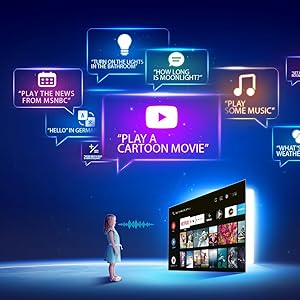
Image: Illustration of using Google Assistant voice commands with the TV.
3.4 ຄໍາຮ້ອງສະຫມັກການຖ່າຍທອດ
Access a wide range of pre-installed streaming applications such as Netflix, Amazon Prime Video, YouTube, Disney+Hotstar, Zee5, and more. Additional apps can be downloaded from the Google Play Store.

Image: The iFFALCON 40F2A displaying various streaming application logos.
3.5 Chromecast Built-in
Use the built-in Chromecast feature to cast content from your compatible smartphone, tablet, or computer directly to your TV screen.

Image: A smartphone casting content to the iFFALCON 40F2A TV via Chromecast.
4. ຄຸນສົມບັດ
4.1 Full HD Display with HDR10
Experience clear and vibrant visuals with Full HD (1920x1080) resolution. HDR10 support enhances contrast and color accuracy, providing a more dynamic picture.

Image: A side-by-side comparison of a scene without HDR10 and with HDR10, showing enhanced detail and color.
4.2 Micro Dimming
Micro Dimming analyzes video content in hundreds of separate zones to adjust brightness and darkness independently, improving contrast and picture quality.

Image: A comparison showing a city skyline without Micro Dimming and with Micro Dimming, highlighting improved contrast.
4.3 iPQ Engine
The iPQ Engine intelligently processes image quality, optimizing brightness, color range, and other visual parameters for a superior viewປະສົບການ.

Image: Visual representation of the iPQ Engine's high brightness precision and intelligent color range control technologies.
4.4 ສຽງ Dolby
Enjoy immersive sound with Dolby Audio. The TV features 20 Watts speakers (10W + 10W) for clear and powerful audio output.

Image: Graphic illustrating the 10W + 10W Dolby Audio speakers for enhanced sound.
4.5 Slim Design
The iFFALCON 40F2A features a sleek and slim design, allowing it to blend seamlessly into any living space.

Image: A hand demonstrating the slim profile of the iFFALCON TV.
5. ບໍາລຸງຮັກສາ
5.1 ການທໍາຄວາມສະອາດຫນ້າຈໍ
ເຊັດໜ້າຈໍຢ່າງອ່ອນໂຍນດ້ວຍຜ້າອ່ອນໆ, ບໍ່ມີເຈັ້ຍ. ສໍາລັບຮອຍແຂງ, ເລັກນ້ອຍ dampໃສ່ຜ້າດ້ວຍນ້ໍາຫຼືເຄື່ອງເຮັດຄວາມສະອາດຫນ້າຈໍພິເສດ. ຫຼີກເວັ້ນການນໍາໃຊ້ສານເຄມີທີ່ຮຸນແຮງຫຼືວັດສະດຸຂັດ.
5.2 ການທໍາຄວາມສະອາດຮ່າງກາຍໂທລະທັດ
Wipe the TV's frame and stand with a soft, dry cloth. Do not use liquid cleaners directly on the TV.
5.3 ການເບິ່ງແຍງທົ່ວໄປ
- ຫຼີກລ້ຽງການເປີດໂທລະພາບໃຫ້ຖືກແສງແດດໂດຍກົງຫຼືອຸນຫະພູມທີ່ສຸດ.
- ຮັບປະກັນການລະບາຍອາກາດຢ່າງພຽງພໍຮອບໂທລະທັດເພື່ອປ້ອງກັນຄວາມຮ້ອນເກີນ.
- ຖອດປລັກໂທລະທັດໃນເວລາມີພະຍຸຟ້າຜ່າ ຫຼືເວລາທີ່ມັນຈະບໍ່ຖືກໃຊ້ເປັນໄລຍະເວລາ.
6. ການແກ້ໄຂບັນຫາ
ຖ້າຫາກທ່ານພົບບັນຫາກັບໂທລະພາບຂອງທ່ານ, ເບິ່ງບັນຫາທົ່ວໄປດັ່ງຕໍ່ໄປນີ້ແລະການແກ້ໄຂ:
| ບັນຫາ | ສາເຫດທີ່ເປັນໄປໄດ້ | ການແກ້ໄຂ |
|---|---|---|
| ບໍ່ມີພະລັງງານ | ສາຍໄຟຖືກຕັດ; ບັນຫາປລັກສຽບໄຟ | Check power cord connection; Try a different outlet; Press power button on TV/remote |
| ບໍ່ມີຮູບ, ແຕ່ສຽງແມ່ນປະຈຸບັນ | ແຫຼ່ງປ້ອນຂໍ້ມູນບໍ່ຖືກຕ້ອງ; ສາຍ HDMI/AV ວ່າງ | ເລືອກແຫຼ່ງປ້ອນຂໍ້ມູນທີ່ຖືກຕ້ອງ; ເຊື່ອມຕໍ່ສາຍໄຟຄືນໃໝ່ຢ່າງປອດໄພ |
| ບໍ່ມີສຽງ, ແຕ່ມີຮູບພາບ | Volume muted or too low; Audio cable issue | Unmute or increase volume; Check audio settings; Reconnect audio cables |
| ການຄວບຄຸມໄລຍະໄກບໍ່ເຮັດວຽກ | ຫມໍ້ໄຟທີ່ຕາຍແລ້ວ; ການຂັດຂວາງ; ບໍ່ໄດ້ຈັບຄູ່ໄລຍະໄກ | Replace batteries; Remove obstructions; Re-pair remote if necessary |
| ບໍ່ສາມາດເຊື່ອມຕໍ່ກັບ Wi-Fi ໄດ້ | ລະຫັດຜ່ານບໍ່ຖືກຕ້ອງ; ບັນຫາເຣົາເຕີ; ໂທລະພາບໄກຈາກເຣົາເຕີເກີນໄປ | Verify password; Restart router; Move TV closer or use Ethernet |
| ແອັບຊ້າ ຫຼືຄ້າງໄວ້ | Insufficient memory; Network issue; App malfunction | Close unused apps; Check internet connection; Clear app cache/data or reinstall app |
ຖ້າບັນຫາຍັງຄົງຢູ່ຫຼັງຈາກພະຍາຍາມແກ້ໄຂເຫຼົ່ານີ້, ກະລຸນາຕິດຕໍ່ຝ່າຍຊ່ວຍເຫຼືອລູກຄ້າ.
7. ຂໍ້ມູນຈໍາເພາະ
Detailed technical specifications for the iFFALCON 40F2A Smart LED TV:

Image: Diagram showing the dimensions of the iFFALCON 40F2A TV.
| ຄຸນສົມບັດ | ຂໍ້ມູນຈໍາເພາະ |
|---|---|
| ຍີ່ຫໍ້ | iFFALCON |
| ຕົວແບບ | 40F2A |
| ຂະໜາດໜ້າຈໍ | 40 ນິ້ວ (102 ຊມ) |
| ເຕັກໂນໂລຊີການສະແດງ | ແຜງ LED, ເກຣດ A+ |
| ຄວາມລະອຽດ | ຄວາມລະອຽດ Full HD (1920 x 1080 ພິກເຊວ) |
| ອັດຕາການໂຫຼດຂໍ້ມູນຄືນໃໝ່ | 60 Hz |
| ເວລາຕອບສະຫນອງ | 8.5 ມິນລິວິນາທີ |
| Viewໃນມຸມ | 178 ອົງສາ |
| ອັດຕາສ່ວນຮູບ | 16:09 |
| ອັດຕາສ່ວນພາບກົງກັນຂ້າມ | 5000:1 |
| ລະບົບປະຕິບັດການ | Android |
| RAM ຂະຫນາດທີ່ຕິດຕັ້ງ | 1 GB |
| ຄວາມອາດສາມາດເກັບຮັກສາດິຈິຕອນ | 8 GB |
| Graphics Coprocessor | Mali470x2 |
| ສຽງອອກ | 20 Watts (Dolby Audio) |
| ເຕັກໂນໂລຊີການເຊື່ອມຕໍ່ | Ethernet, HDMI, USB, Wi-Fi, Bluetooth |
| ການໂຕ້ຕອບຮາດແວ | HDMI, Headphone, USB, VGA |
| ພອດ USB ທັງໝົດ | 1 |
| ແຫຼ່ງພະລັງງານ | AC |
| ວັດtage | 75 ວັດ (ການບໍລິໂພກພະລັງງານໃນໂຫມດ) |
| ຂະໜາດສິນຄ້າ (LxWxH) | 90.5 x 18.5 x 57.7 cm (ມີຂາຕັ້ງ) |
| ນ້ໍາຫນັກລາຍການ | 6.1 ກິໂລ |
| ໝໍ້ໄຟ | ແບດເຕີຣີ້ AAA 2 ອັນ (ລວມສໍາລັບໄລຍະໄກ) |
8. ການຮັບປະກັນແລະການສະຫນັບສະຫນູນ
8.1 ຂໍ້ມູນການຮັບປະກັນ
Your iFFALCON 40F2A TV comes with a ຮັບປະກັນ 1 ປີ from the date of purchase. Please refer to the included Warranty Card for detailed terms and conditions. Retain your purchase receipt as proof of purchase for warranty claims.
8.2 ສະຫນັບສະຫນູນລູກຄ້າ
For technical assistance, service requests, or any inquiries regarding your iFFALCON TV, please contact the manufacturer's customer support. Contact details can typically be found on the warranty card or the official iFFALCON webເວັບໄຊ.


