1. ບົດແນະນຳ
The OttLite Entertain LED Speaker Lamp (Model S83WGW) is a versatile lighting and audio solution designed for various indoor environments. This device integrates an LED lamp with adjustable brightness and color modes, a Bluetooth speaker for wireless audio streaming, and a detachable emergency light feature. This manual provides detailed instructions for the proper setup, operation, and maintenance of your lamp.

Image 1.1: The OttLite Entertain LED Speaker Lamp, showcasing ການອອກແບບປະສົມປະສານຂອງມັນ.
2. ເນື້ອໃນຊຸດ
ກວດສອບວ່າລາຍການທັງຫມົດແມ່ນມີຢູ່ໃນຊຸດ:
- OttLite Entertain LED Speaker Lamp (S83WGW)
- ສາຍໄຟ
3. ຕັ້ງຄ່າ
- ການຫຸ້ມຫໍ່: ເອົາສ່ວນປະກອບທັງຫມົດອອກຈາກການຫຸ້ມຫໍ່ຢ່າງລະມັດລະວັງ.
- ການຈັດວາງ: ວາງ lamp ຢູ່ເທິງພື້ນທີ່ຮາບພຽງທີ່ຫມັ້ນຄົງ.
- ການເຊື່ອມຕໍ່ພະລັງງານ: ເຊື່ອມຕໍ່ສາຍໄຟທີ່ສະໜອງໃຫ້ເຂົ້າກັບ lamp's power input port and then plug it into a standard 120V AC wall outlet. The lamp's internal battery will begin charging automatically.
4. ຄໍາແນະນໍາການດໍາເນີນງານ
4.1. Light Functions
ທamp features touch-activated controls located on the top of the shade for easy adjustment of light settings.
- ເປີດ/ປິດ: Lightly touch the metallic button on the top center of the lamp shade to turn the light on or off.
- ປັບຄວາມສະຫວ່າງ: With the light on, repeatedly touch the metallic button to cycle through three brightness levels.
- ປ່ຽນໂໝດສີ: Press and hold the metallic button for approximately 2 seconds to switch between the three color temperature modes: warm white, bright white, and natural daylight. Release the button when the desired mode is active.
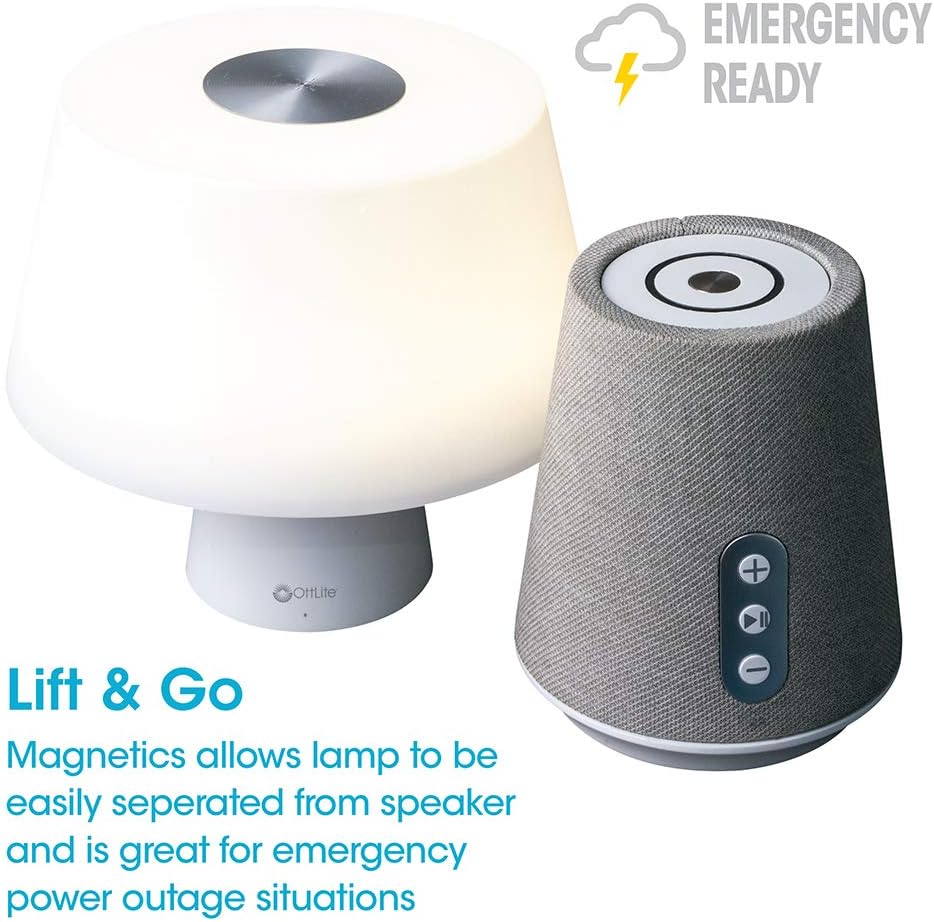
Image 4.1: Activating the lamp's light functions via the touch control on top of the shade.

ຮູບພາບທີ 4.2: ຕົວອັກສອນ lamp offers three distinct color temperature modes for varied lighting needs.
4.2. ລຳໂພງ Bluetooth
The integrated Bluetooth speaker allows for wireless audio playback from compatible devices.
- Power On Speaker: Press the Play/Pause button on the front of the speaker base to turn the speaker on. A tone will indicate it is ready for pairing.
- ການຈັບຄູ່: On your audio device (e.g., smartphone, tablet), enable Bluetooth and search for available devices. Select "OttLite Entertain" from the list. A confirmation tone will sound upon successful pairing.
- ການຄວບຄຸມສຽງ:
- ກົດ + ປຸ່ມເພື່ອເພີ່ມປະລິມານ.
- ກົດ - ປຸ່ມເພື່ອຫຼຸດລະດັບສຽງລົງ.
- ກົດ ຫຼິ້ນ/ຢຸດຊົ່ວຄາວ ປຸ່ມທີ່ຈະຫລິ້ນຫລືຢຸດສຽງ.
- Power Off Speaker: Press and hold the Play/Pause button for approximately 3 seconds to turn the speaker off.

Image 4.3: The speaker base with clearly labeled controls for volume and playback.

Image 4.4: The speaker base highlights its Bluetooth connectivity feature.
4.3. Emergency Light Feature (Lift & Go)
ທamp portion can be detached from the speaker base to function as a portable emergency light.
- Detaching the Light: ຍົກ lamp shade portion straight up from the speaker base. It is held in place by magnets.
- Using the Emergency Light: The detached light will operate on its internal rechargeable battery. Use the touch control on top of the shade to turn it on/off and adjust brightness as described in Section 4.1. The light can provide illumination for 5 to 30+ hours depending on the brightness setting.
- ກຳລັງສາກໃໝ່: To recharge the emergency light, simply place it back onto the speaker base. Ensure it is properly seated for charging to commence.

Image 4.5: The 'Lift & Go' feature allows the lamp to be used as a portable emergency light.
5. ບໍາລຸງຮັກສາ
To ensure the longevity and optimal performance of your OttLite Entertain LED Speaker Lamp, ປະຕິບັດຕາມຄໍາແນະນໍາການບໍາລຸງຮັກສາເຫຼົ່ານີ້:
- ທໍາຄວາມສະອາດ: ຕັດການເຊື່ອມຕໍ່ lamp from the power source before cleaning. Use a soft, dry cloth to wipe down the exterior surfaces. Do not use abrasive cleaners, solvents, or harsh chemicals, as these may damage the finish.
- ການເກັບຮັກສາ: ເມື່ອບໍ່ໄດ້ໃຊ້ເປັນເວລາດົນນານ, ໃຫ້ເກັບຮັກສາ lamp ຢູ່ໃນບ່ອນທີ່ເຢັນ, ແຫ້ງແລ້ງຫ່າງຈາກແສງແດດໂດຍກົງ ແລະອຸນຫະພູມທີ່ຮ້າຍກາດ.
- ການດູແລຫມໍ້ໄຟ: For the internal rechargeable battery, avoid fully discharging it frequently. Recharge the lamp regularly, even if not in constant use, to maintain battery health.
6. ການແກ້ໄຂບັນຫາ
ຖ້າທ່ານພົບບັນຫາກັບ l ຂອງທ່ານamp, ເບິ່ງຂັ້ນຕອນການແກ້ໄຂບັນຫາຕໍ່ໄປນີ້:
| ບັນຫາ | ສາເຫດທີ່ເປັນໄປໄດ້ | ການແກ້ໄຂ |
|---|---|---|
| Lamp ແສງບໍ່ເປີດ. | ບໍ່ສຽບ; ພະລັງງານ outage; internal battery depleted; faulty connection. | Ensure power cable is securely plugged in. Check power outlet. Recharge the lamp by placing it on the base. |
| Bluetooth speaker does not connect. | Speaker not in pairing mode; device Bluetooth off; already connected to another device. | Ensure speaker is on and in pairing mode. Turn Bluetooth on your device. Disconnect from other devices. |
| Emergency light does not work when detached. | Internal battery depleted. | Place the light back on the speaker base to recharge its internal battery. |
| Poor audio quality from speaker. | Device too far from speaker; interference; low battery. | Move device closer to speaker. Avoid obstacles. Ensure speaker is charged. |
7. ຂໍ້ມູນຈໍາເພາະ
| ຄຸນສົມບັດ | ລາຍລະອຽດ |
|---|---|
| ໝາຍເລກຕົວແບບ | S83WGW |
| ຍີ່ຫໍ້ | OttLite |
| ຂະໜາດສິນຄ້າ | 3.12"D x 3.12"W x 10.87"H |
| ນ້ໍາຫນັກລາຍການ | 2.6 ປອນ |
| ປະເພດແຫຼ່ງແສງ | LED |
| ວັດtage | 3 ວັດ |
| ຄວາມສະຫວ່າງ | 337 Lumen |
| ອຸນຫະພູມສີ | 5000 Kelvin (ກາງເວັນ) |
| ວິທີການຄວບຄຸມ | ແຕະ |
| ແຫຼ່ງພະລັງງານ | Corded Electric (with rechargeable battery for emergency light) |
| ໝໍ້ໄຟ | ແບັດເຕີຣີ Lithium Ion 1 ອັນ (ລວມ) |
| ວັດສະດຸ | ພາດສະຕິກ |
| UPC | 761712019116 |
8. ການຮັບປະກັນແລະການສະຫນັບສະຫນູນ
For warranty information or technical support, please refer to the official OttLite webເວັບໄຊ ຫຼືຕິດຕໍ່ພະແນກບໍລິການລູກຄ້າຂອງເຂົາເຈົ້າ. ຮັກສາໃບຮັບເງິນການຊື້ຂອງທ່ານໄວ້ເປັນຫຼັກຖານການຊື້ສໍາລັບການຮຽກຮ້ອງການຮັບປະກັນໃດໆ.
ຂໍ້ມູນຕິດຕໍ່: ກະລຸນາໄປຢ້ຽມຢາມ OttLite's official store page for current support options and contact details.


