1. ບົດແນະນຳ
This manual provides detailed instructions for the installation, operation, and maintenance of your Overmax Camspot 3.7 Full HD Wireless Indoor Camera. Please read this manual thoroughly before using the product to ensure proper function and safety. Keep this manual for future reference.
2. ເນື້ອໃນຊຸດ
ກວດສອບວ່າອົງປະກອບທັງໝົດມີຢູ່ໃນຊຸດ:
- Overmax Camspot 3.7 Wireless Indoor Camera
- ສາຍໄຟກັບອະແດບເຕີ
- Mounting Kit (screws, wall plugs, bracket)
- ຄູ່ມືຜູ້ໃຊ້ (ເອກະສານນີ້)
3. ຜະລິດຕະພັນເກີນview
ຮູ້ຈັກກັບອົງປະກອບ ແລະ ອິນເຕີເຟດຂອງກ້ອງຖ່າຍຮູບ.
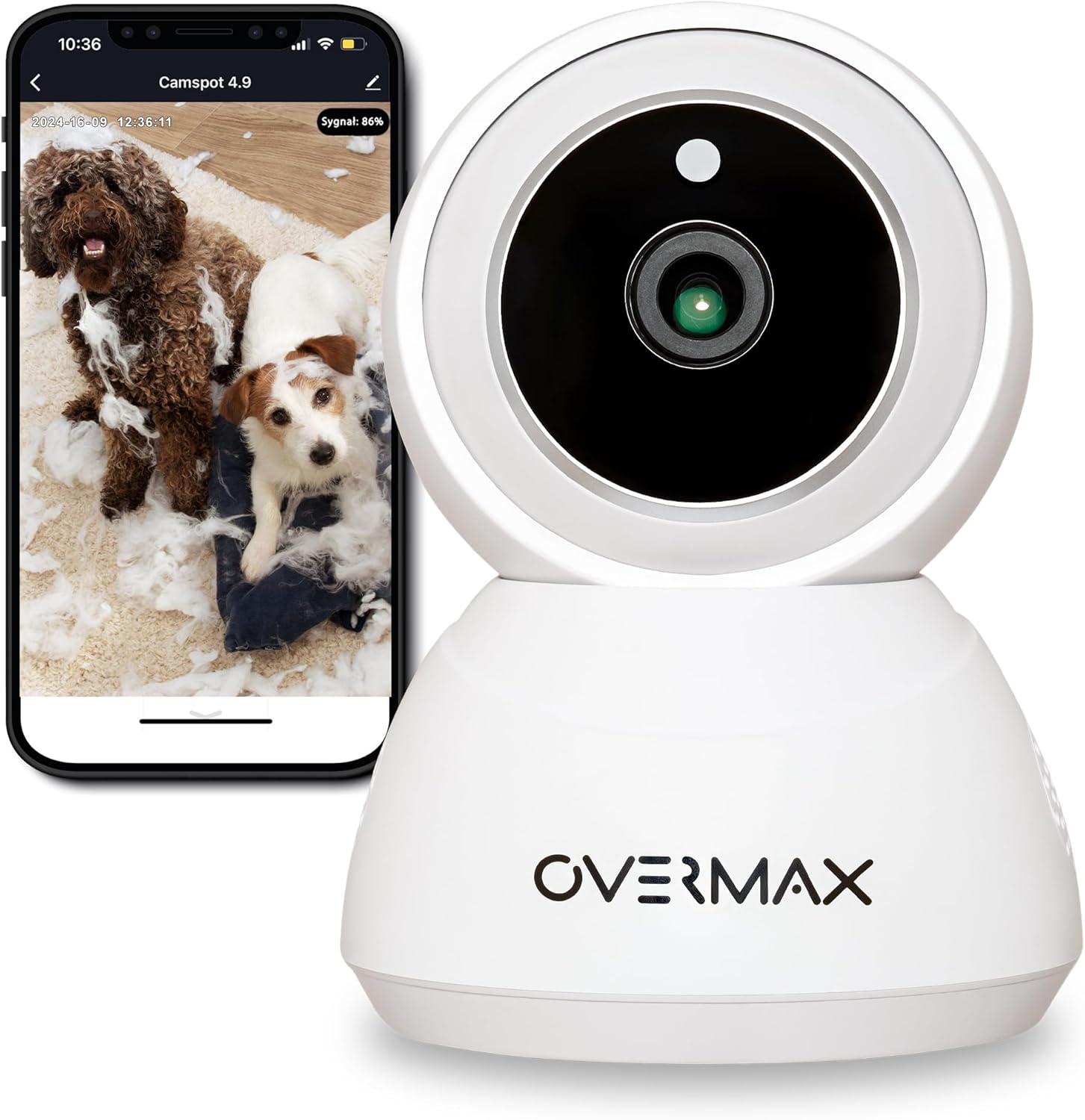
ຮູບ 3.1: ດ້ານຫນ້າ view of the Overmax Camspot 3.7 camera with a smartphone showing the live video feed.

ຮູບ 3.2: ຂ້າງ view of the Overmax Camspot 3.7 camera, showing its dome shape and speaker grille.

ຮູບ 3.3: ດ້ານຫລັງ view of the camera, highlighting the LAN port, Reset button, and DC 5V power input.

ຮູບທີ 3.4: View of the camera with the microSD card slot visible, located beneath the lens assembly.
4. ຕັ້ງຄ່າ
4.1 ການຕິດຕັ້ງທາງດ້ານຮ່າງກາຍ
The Camspot 3.7 can be placed on a flat surface or mounted to a wall or ceiling.
- ເລືອກສະຖານທີ່: ເລືອກສະຖານທີ່ທີ່ໃຫ້ຄວາມຕ້ອງການ viewing angle and is within range of your Wi-Fi network or an Ethernet connection.
- ການຕິດຕັ້ງ (ທາງເລືອກ):
- Attach the mounting bracket to the desired surface using the provided screws and wall plugs.
- Secure the camera to the mounting bracket. Ensure it is firmly attached.

Figure 4.1: The Overmax Camspot 3.7 camera shown mounted on a wall bracket, illustrating a typical installation.
4.2 ການຕິດຕັ້ງແອັບ ແລະ ການສ້າງບັນຊີ
The Overmax Control app is required to operate the camera.
- ດາວໂຫລດ App ໄດ້: ຊອກຫາ "Overmax Control" in your smartphone's app store (iOS or Android) and download it.
- ສ້າງບັນຊີ: ເປີດແອັບ ແລະ ປະຕິບັດຕາມຄຳແນະນຳໃນໜ້າຈໍເພື່ອສ້າງບັນຊີຜູ້ໃຊ້ໃໝ່.

Figure 4.2: The Overmax Camspot 3.7 camera alongside a smartphone displaying the 'CONTROL' app logo, indicating the required application for setup and operation.
4.3 Power On and Network Connection
- ເປີດ: Connect the power cable to the camera's DC 5V port and plug the adapter into a power outlet. The camera will power on and initiate its startup sequence.
- ການເຊື່ອມຕໍ່ເຄືອຂ່າຍ:
- Wi-Fi: Follow the in-app instructions to connect the camera to your 2.4GHz Wi-Fi network.
- ອີເທີເນັດ (ທາງເລືອກ): Connect an Ethernet cable from your router to the camera's LAN port for a wired connection.
4.4 ການຈັບຄູ່ກ້ອງຖ່າຍຮູບ
Once the camera is powered on and the app is installed, proceed with pairing:
- ເພີ່ມອຸປະກອນ: In the Overmax Control app, tap the "Add Device" or "+" icon.
- Select Camera Type: Choose the appropriate camera model (Camspot 3.7).
- ສະແກນລະຫັດ QR: The app will prompt you to scan a QR code. Position your smartphone's screen with the QR code approximately 15-20 cm in front of the camera lens. The camera will emit a sound upon successful scanning.
- ສຳເລັດການຕິດຕັ້ງ: Follow any remaining on-screen prompts in the app to finalize the pairing process.

Figure 4.3: The Overmax Camspot 3.7 camera positioned to scan a QR code displayed on a smartphone, a common method for device pairing.
5. ຄໍາແນະນໍາການດໍາເນີນງານ
5.1 ດໍາລົງຊີວິດ View
Access the live video feed from your camera through the Overmax Control app. This allows real-time monitoring of the camera's surroundings.
5.2 ການຄວບຄຸມການເລື່ອນ/ອຽງ
The Camspot 3.7 features motorized pan and tilt capabilities.
- ການຫມຸນແນວນອນ: 355 ອົງສາ
- ການຫມຸນແນວຕັ້ງ: 120 ອົງສາ
Use the directional controls within the Overmax Control app to adjust the camera's viewໃນມຸມຫ່າງໄກສອກຫຼີກ.

Figure 5.1: Diagram illustrating the camera's extensive pan (355°) and tilt (120°) rotation range.
5.3 ສຽງສອງທາງ
The camera is equipped with a microphone and speaker, enabling two-way communication. You can listen to the camera's environment and speak through the camera using the app.
5.4 ການກວດຈັບການເຄື່ອນໄຫວ ແລະ ການຕິດຕາມອັດຕະໂນມັດ
The camera can detect moving objects and automatically track their movement within its field of view. Configure motion detection sensitivity and alerts in the app settings.
5.5 ວິໄສທັດກາງຄືນ
The Camspot 3.7 features infrared technology for clear viewing in low-light or complete darkness, with a night vision range of up to 10 meters. The camera automatically switches to night mode when ambient light is insufficient.
5.6 ການບັນທຶກແລະການເກັບຮັກສາ
The camera supports two primary storage methods for video recordings:
- ກາດ MicroSD: Insert a microSD card (up to 128GB, not included) into the designated slot for local storage. This allows for continuous recording for up to 3 weeks.
- Cloud Storage: The camera supports real-time cloud storage for recordings. Refer to the app for subscription details and options.
5.7 Smart Home ປະສົມປະສານ
The Camspot 3.7 is compatible with Google Home and Amazon Alexa. Follow the instructions within the respective smart home apps to integrate your camera for voice control and automation.
5.8 Baby Monitor Function
Utilize the camera's features, including two-way audio and night vision, to monitor an infant. The app provides a comprehensive interface for this purpose.

Figure 5.2: The Overmax Camspot 3.7 camera shown with a smartphone displaying the app's control interface, including options for screenshot, speaking, recording, cloud storage, and direction control.
6. ບໍາລຸງຮັກສາ
- ທໍາຄວາມສະອາດ: ໃຊ້ຜ້າອ່ອນໆແຫ້ງເພື່ອທຳຄວາມສະອາດເລນກ້ອງຖ່າຍຮູບ ແລະ ຕົວກ້ອງ. ຢ່າໃຊ້ສານເຄມີທີ່ຮຸນແຮງ ຫຼື ນ້ຳຢາທຳຄວາມສະອາດທີ່ມີສີຂັດ.
- ການອັບເດດເຟີມແວ: Regularly check the Overmax Control app for available firmware updates to ensure optimal performance and security.
- ການຈັດການການເກັບຮັກສາ: ແຕ່ລະໄລຍະview and manage recordings on your microSD card or cloud storage to free up space if needed.
7. ການແກ້ໄຂບັນຫາ
- ກ້ອງຖ່າຍຮູບບໍ່ໄດ້ເຊື່ອມຕໍ່ກັບ Wi-Fi:
- ໃຫ້ແນ່ໃຈວ່າເຄືອຂ່າຍ Wi-Fi ຂອງທ່ານແມ່ນ 2.4GHz. ກ້ອງຖ່າຍຮູບບໍ່ຮອງຮັບເຄືອຂ່າຍ 5GHz.
- Check Wi-Fi password for correctness.
- ຍ້າຍກ້ອງຖ່າຍຮູບເຂົ້າໄປໃກ້ກັບເຣົາເຕີ.
- ຣີສະຕາດກ້ອງຖ່າຍຮູບ ແລະເຣົາເຕີຂອງທ່ານ.
- ບໍ່ມີຊີວິດ View:
- Verify internet connection on your smartphone and the camera.
- ກວດສອບວ່າກ້ອງຖ່າຍຮູບເປີດຢູ່ ແລະ ເຊື່ອມຕໍ່ກັບເຄືອຂ່າຍແລ້ວຫຼືບໍ່.
- ປິດເປີດແອັບຄືນໃໝ່.
- ກວດຈັບການເຄື່ອນໄຫວບໍ່ເຮັດວຽກ:
- ກວດສອບໃຫ້ແນ່ໃຈວ່າການກວດສອບການເຄື່ອນໄຫວໄດ້ຖືກເປີດໃຊ້ງານໃນການຕັ້ງຄ່າ app.
- ປັບການຕັ້ງຄ່າຄວາມອ່ອນໄຫວ.
- Check for obstructions in the camera's view.
- ບັດ MicroSD ບໍ່ໄດ້ບັນທຶກ:
- ໃຫ້ແນ່ໃຈວ່າແຜ່ນ microSD ຖືກໃສ່ຢ່າງຖືກຕ້ອງ.
- Format the microSD card through the app.
- Check if the card is full or corrupted.
- ກ້ອງຖ່າຍຮູບບໍ່ຕອບສະໜອງ:
- Press and hold the Reset button (located at the back) for approximately 5-10 seconds to factory reset the camera. You will need to re-pair it after a reset.
8. ຂໍ້ມູນຈໍາເພາະ
| ຄຸນສົມບັດ | ຂໍ້ມູນຈໍາເພາະ |
|---|---|
| ຊື່ຕົວແບບ | Overmax Camspot 3.7 |
| ຄວາມລະອຽດວິດີໂອ | Full HD (1080p) |
| ເລນ | 3.6 ມມ |
| ເຟຣມຕໍ່ວິນາທີ (FPS) | 25-30 |
| ການບີບອັດວິດີໂອ | H.264 |
| ການຫມຸນແນວນອນ | 355° |
| ການຫມູນວຽນແນວຕັ້ງ | 120° |
| ຂອບເຂດວິໄສທັດກາງຄືນ | ສູງສຸດ 10 ແມັດ (ອິນຟາເຣດ) |
| ຮອງຮັບ MicroSD Card | ສູງສຸດ 128 GB |
| ການເຊື່ອມຕໍ່ | Wi-Fi (2.4GHz), ອີເທີເນັດ |
| ລະບົບທີ່ຮອງຮັບ | Windows XP/7/8/10, Android, iOS, Mac |
| ສຽງສອງທາງ | Yes (Microphone, 1W Speaker) |
| ກວດຈັບການເຄື່ອນໄຫວ | Yes (Automatic Detector) |
| ການສະຫນອງພະລັງງານ | 12 Volts, 1 Watt |
| ຂະໜາດ (L x W x H) | 8.5 x 8.2 x 10.5 cm |
| ນ້ຳໜັກ | 180 ກຣາມ |
| ວັດສະດຸ | ໂລຫະ |
| ສີ | ສີຂາວ |
9. ການຮັບປະກັນແລະການສະຫນັບສະຫນູນ
Overmax products are covered by a manufacturer's warranty. For specific warranty terms and conditions, please refer to the warranty card included in your package or visit the official Overmax webເວັບໄຊ.
For technical support, troubleshooting assistance, or any product-related inquiries, please contact Overmax customer service through the contact information provided on the official website or within the Overmax Control application.


