ແນະນຳ
Thank you for choosing COBY True Wireless Sport Earbuds. These earbuds are designed to provide a seamless audio experience with advanced features like Bluetooth 5.3 connectivity, automatic pairing, and intuitive controls, perfect for active lifestyles. This manual will guide you through the setup, operation, maintenance, and troubleshooting of your new earbuds to ensure optimal performance and longevity.
1. ເນື້ອໃນຊຸດ
ກ່ອນທີ່ທ່ານຈະເລີ່ມຕົ້ນ, ກະລຸນາກວດສອບວ່າລາຍການທັງໝົດຢູ່ໃນຊຸດ:
- COBY True Wireless Sport Earbuds
- ກ່ອງສາກ
- ສາຍສາກ
- 2 Extra Pairs of Ear Gels (S/M)
- ຄູ່ມືຜູ້ໃຊ້ (ເອກະສານນີ້)
2. ຄູ່ມືການຕິດຕັ້ງ
2.1 ການສາກຫູຟັງ ແລະ ເຄສ
For first-time use, fully charge the earbuds and the charging case. The charging case holds two extra charges, providing up to 15 hours of total battery life.
- Place the earbuds into their respective slots in the charging case. Ensure they are seated correctly.
- Connect the charging cable to the charging port on the case and the other end to a USB power source (e.g., wall adapter, computer USB port).
- The LED indicators on the case and earbuds will show charging status. Once fully charged, the indicators will change or turn off.

Image: Earbuds securely placed within the charging case, ready for charging.

Image: The earbuds displayed alongside their open charging case, illustrating how they fit.
2.2 Initial Pairing (Auto-Pairing)
Your COBY earbuds feature auto-pairing for convenience.
- ກວດໃຫ້ແນ່ໃຈວ່າໄດ້ສາກຫູຟັງແລ້ວ.
- ເປີດກ່ອງສາກໄຟ. ຫູຟັງເອຍບັດຈະເຂົ້າສູ່ໂໝດຈັບຄູ່ໂດຍອັດຕະໂນມັດ.
- ໃນອຸປະກອນຂອງທ່ານ (ໂທລະສັບສະຫຼາດ, ແທັບເລັດ, ແລະອື່ນໆ), ໄປທີ່ການຕັ້ງຄ່າ Bluetooth ແລະເປີດໃຊ້ Bluetooth.
- ຊອກຫາ available devices and select "COBY CETW570WH" (or similar name) from the list.
- ເມື່ອເຊື່ອມຕໍ່ແລ້ວ, ທ່ານຈະໄດ້ຍິນສຽງຢືນຢັນ, ແລະຫູຟັງເອຍບັດຈະພ້ອມໃຫ້ໃຊ້.
- After the initial pairing, the earbuds will automatically connect to your last paired device when removed from the case.
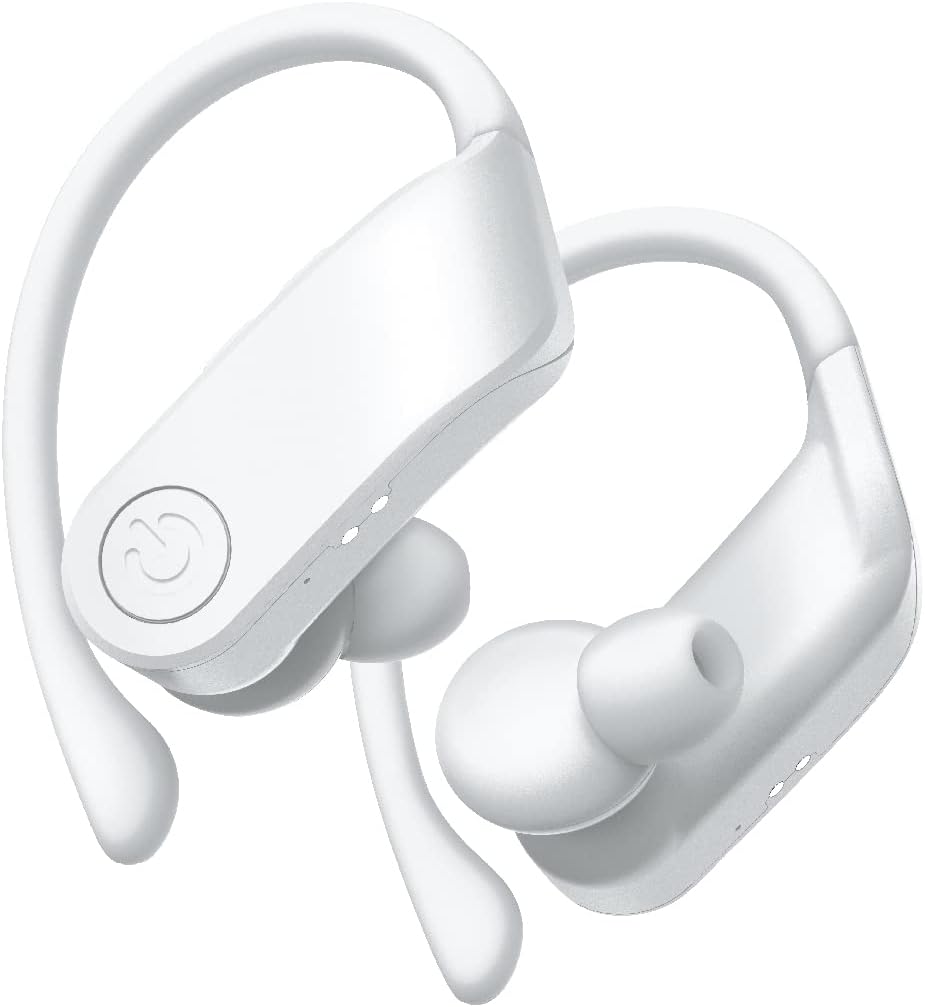
ຮູບພາບ: A close-up view of the white COBY True Wireless Sport Earbuds, highlighting their design.
3. ຄໍາແນະນໍາການດໍາເນີນງານ
3.1 ການໃສ່ຫູຟັງ
These earbuds are designed with rubberized ear hooks for a secure and comfortable fit, especially during sports and exercise.
- ລະບຸຫູຟັງຊ້າຍ (L) ແລະຂວາ (R).
- ສຽບຫູຟັງໃສ່ຊ່ອງຫູຂອງເຈົ້າຄ່ອຍໆ.
- Adjust the ear hook over the top of your ear until it feels snug and stable.
- Ensure a good seal in your ear canal for optimal sound quality and bass response.
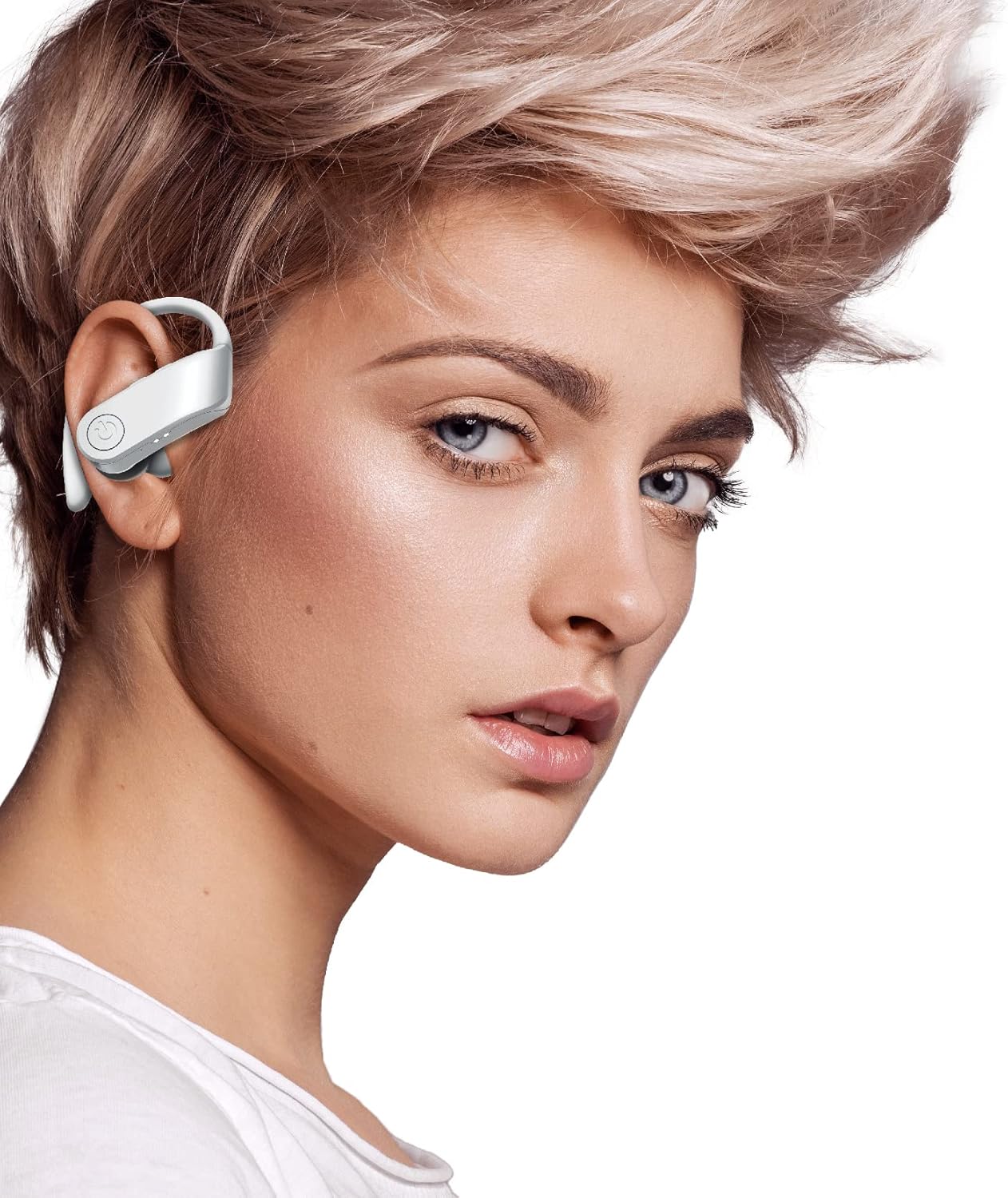
Image: A person wearing one of the COBY True Wireless Sport Earbuds, demonstrating the secure fit with the ear hook.
3.2 Playback and Call Controls
ຫູຟັງເອຍບັດມີປຸ່ມຄວບຄຸມທີ່ເຂົ້າໃຈງ່າຍເພື່ອຈັດການສຽງ ແລະການໂທຂອງທ່ານ:
| ການປະຕິບັດ | ການຄວບຄຸມ |
|---|---|
| ຫຼິ້ນ/ຢຸດດົນຕີ | Single press on either earbud button |
| ຕິດຕາມຕໍ່ໄປ | Double press on the Right earbud button |
| ເພງກ່ອນໜ້າ | Double press on the Left earbud button |
| ຕອບ/ວາງສາຍ | Single press on either earbud button |
| ປະຕິເສດການໂທ | Press and hold either earbud button for 2 seconds |
| ເປີດໃຊ້ຜູ້ຊ່ວຍສຽງ (Siri/Google Assistant) | Triple press on either earbud button |
3.3 Automatic Disconnection
To disconnect the earbuds from your device and begin charging, simply place them back inside the charging case and close the lid. They will automatically power off and start charging.
4. ການບໍາລຸງຮັກສາແລະການດູແລ
Proper care will extend the life of your earbuds and ensure consistent performance.
- ທໍາຄວາມສະອາດ: Use a soft, dry, lint-free cloth to clean the earbuds and charging case. Do not use abrasive cleaners, alcohol, or chemical solvents. Regularly clean the ear tips and charging contacts to prevent debris buildup.
- ການເກັບຮັກສາ: ເມື່ອບໍ່ໄດ້ໃຊ້ງານ, ໃຫ້ເກັບຮັກສາຫູຟັງໄວ້ໃນກ່ອງສາກໄຟສະເໝີເພື່ອປົກປ້ອງພວກມັນຈາກຝຸ່ນ, ສິ່ງສົກກະປົກ ແລະ ຄວາມເສຍຫາຍ.
- ການດູແລຫມໍ້ໄຟ: ເພື່ອຮັກສາອາຍຸແບັດເຕີຣີ, ຫຼີກເວັ້ນການຖອດຫູຟັງຫູຟັງ ແລະເຄສໃສ່ເລື້ອຍໆ. ໄລ່ໃຫ້ເຂົາເຈົ້າເປັນປົກກະຕິ, ເຖິງແມ່ນວ່າບໍ່ໄດ້ຢູ່ໃນການນໍາໃຊ້ຢ່າງຕໍ່ເນື່ອງ. ເກັບຮັກສາໄວ້ໃນບ່ອນທີ່ເຢັນ, ແຫ້ງ, ຫ່າງຈາກອຸນຫະພູມທີ່ສຸດ.
- ຄວາມຕ້ານທານນ້ໍາ: While designed for sport, these earbuds are sweat-proof. Avoid submerging them in water or exposing them to heavy rain.
5. ການແກ້ໄຂບັນຫາ
ຖ້າທ່ານພົບບັນຫາໃດໆກັບຫູຟັງເອຍບັດຂອງທ່ານ, ກະລຸນາອ້າງອີງເຖິງວິທີແກ້ໄຂທົ່ວໄປຕໍ່ໄປນີ້:
| ບັນຫາ | ການແກ້ໄຂ |
|---|---|
| ຫູຟັງບໍ່ຈັບຄູ່ກັບອຸປະກອນ |
|
| ບໍ່ມີສຽງຈາກຫູຟັງອັນໜຶ່ງ ຫຼືທັງສອງ |
|
| ກ່ອງສາກບໍ່ສາກຫູຟັງ |
|
| ຄຸນນະພາບສຽງບໍ່ດີ ຫຼື ການເຊື່ອມຕໍ່ບໍ່ຕໍ່ເນື່ອງ |
|
6. ຂໍ້ມູນຈໍາເພາະ
| ຄຸນສົມບັດ | ລາຍລະອຽດ |
|---|---|
| ຊື່ຕົວແບບ | CETW570WH |
| ເຕັກໂນໂລຊີການເຊື່ອມຕໍ່ | ໄຮ້ສາຍ (Bluetooth) |
| ລຸ້ນ Bluetooth | 5.3 |
| Range ໄຮ້ສາຍ | ສູງເຖິງ 33 ຟຸດ (10 ແມັດ) |
| ອາຍຸແບັດເຕີຣີ (ຫູຟັງ) | ສູງສຸດເຖິງ 5 ຊົ່ວໂມງຕໍ່ການສາກໄຟ |
| ເວລາຫຼິ້ນທັງໝົດ (ພ້ອມກໍລະນີ) | ສູງສຸດ 15 ຊົ່ວໂມງ |
| ປະເພດການຄວບຄຸມ | Button Control, Siri, Google Assistant |
| ການຈັດວາງຫູ | In Ear with Hook |
| ວັດສະດຸ | Acrylonitrile Butadiene Styrene (ABS) |
| ຂະໜາດສິນຄ້າ | 5 x 2.24 x 6.46 ນິ້ວ |
| ນ້ໍາຫນັກລາຍການ | 10 ອອນ |
| UPC | 643620020470 |
7. ການຮັບປະກັນແລະການສະຫນັບສະຫນູນ
COBY products are designed for reliability and performance. For information regarding warranty coverage, please refer to the warranty card included in your product packaging or visit the official COBY webເວັບໄຊ. ຮັກສາຫຼັກຖານການຊື້ຂອງທ່ານສໍາລັບການຮ້ອງຂໍການຮັບປະກັນ.
For technical support, troubleshooting assistance, or to inquire about replacement parts, please contact COBY customer service through their official webເວັບໄຊ ຫຼືຂໍ້ມູນຕິດຕໍ່ທີ່ສະໜອງໃຫ້ຢູ່ໃນເອກະສານຜະລິດຕະພັນຂອງທ່ານ.
ໝາຍ ເຫດ: ຂໍ້ມູນສະເພາະແມ່ນມີການປ່ຽນແປງໂດຍບໍ່ຕ້ອງແຈ້ງ.


