ແນະນຳ
The Amazon Echo Show 5 (2nd Gen, 2021 release) is a smart display designed to simplify your daily routines and enhance your connected home experience. This certified refurbished device has been tested and certified to function like new, offering all the features of a new unit.
With Alexa built-in, you can manage your day, stay entertained, and connect with others using just your voice. The compact 5.5-inch screen provides visual feedback for alarms, timers, news, video calls, and more.

Image: The Echo Show 5 on a nightstand, illustrating its use as a smart display for time and daily information.
ຕັ້ງຄ່າ
Setting up your Echo Show 5 is a straightforward process. The device is designed for simple setup, allowing you to connect to your Wi-Fi network with ease.
ມີຫຍັງຢູ່ໃນກ່ອງ:
- Echo Show 5 ອຸປະກອນ
- ຕົວແປງໄຟ Glacier White (15W) ພ້ອມສາຍ (4.9 ft.)
- ຄູ່ມືເລີ່ມຕົ້ນໄວ
ຂັ້ນຕອນການຕິດຕັ້ງເບື້ອງຕົ້ນ:
- ປລັກອິນ: Connect the power adapter to your Echo Show 5 and plug it into a wall outlet.
- ປະຕິບັດຕາມຄໍາແນະນໍາໃນຫນ້າຈໍ: The device will power on and guide you through the initial setup process on its touch screen.
- ເຊື່ອມຕໍ່ກັບ Wi-Fi: Select your Wi-Fi network from the list and enter the password. The Echo Show 5 supports dual-band 802.11a/b/g/n/ac Wi-Fi networks.
- Sign In to Amazon Account: ເຂົ້າສູ່ລະບົບດ້ວຍບັນຊີ Amazon ຂອງທ່ານ.
- ປັບແຕ່ງການຕັ້ງຄ່າສ່ວນຕົວ: Customize settings such as time zone, device name, and privacy preferences.
- ດາວໂຫລດ app Alexa: For full functionality and advanced controls, download the Alexa app on your Fire OS, Android, or iOS device. The app is also accessible via a web ຕົວທ່ອງເວັບ.
Amazon's Wi-Fi simple setup technology helps streamline the connection process, making it easier to get your device up and running quickly.
ການປະຕິບັດງານ Echo Show ຂອງທ່ານ 5
The Echo Show 5 offers a wide range of functionalities, primarily controlled by voice commands to Alexa and through its interactive touch screen.
Daily Assistance:
- ໂມງປຸກ ແລະ ໂມງຈັບເວລາ: Set alarms and timers with voice commands.
- Calendar & News: Check your calendar, get news updates, and view weather forecasts.
- ສິ່ງທີ່ເຮັດປະຈຳ: Create routines to automate actions, such as gradually turning on compatible lights in the morning.
ການຄວບຄຸມເຮືອນອັດສະລິຍະ:
Manage compatible smart home devices using the interactive display, your voice, or motion detection.
- ກ້ອງຖ່າຍຮູບໃນຕົວ: Use the 2 MP camera to look in on your home when you're away.
- ການຄວບຄຸມອຸປະກອນ: Control lights, cameras, and other smart devices.

Image: A man carrying a laundry basket, with an Echo Show 5 in the foreground, demonstrating how the device can be used to control smart home devices, possibly through motion detection.
ການສື່ສານ:
- ໂທວິດີໂອ: Make video calls to friends and family who have the Alexa app or an Echo device with a screen using the 2 MP camera.
- ປະກາດ: Send announcements to other compatible devices in your home.

Image: The Echo Show 5 displaying an active video call, highlighting its communication capabilities.
ບັນເທີງ:
- ການຖ່າຍທອດ: Play TV shows and movies from services like Prime Video and Netflix on the 5.5-inch screen.
- ດົນຕີ ແລະສຽງ: Stream music from Amazon Music, Apple Music, Spotify, and others.
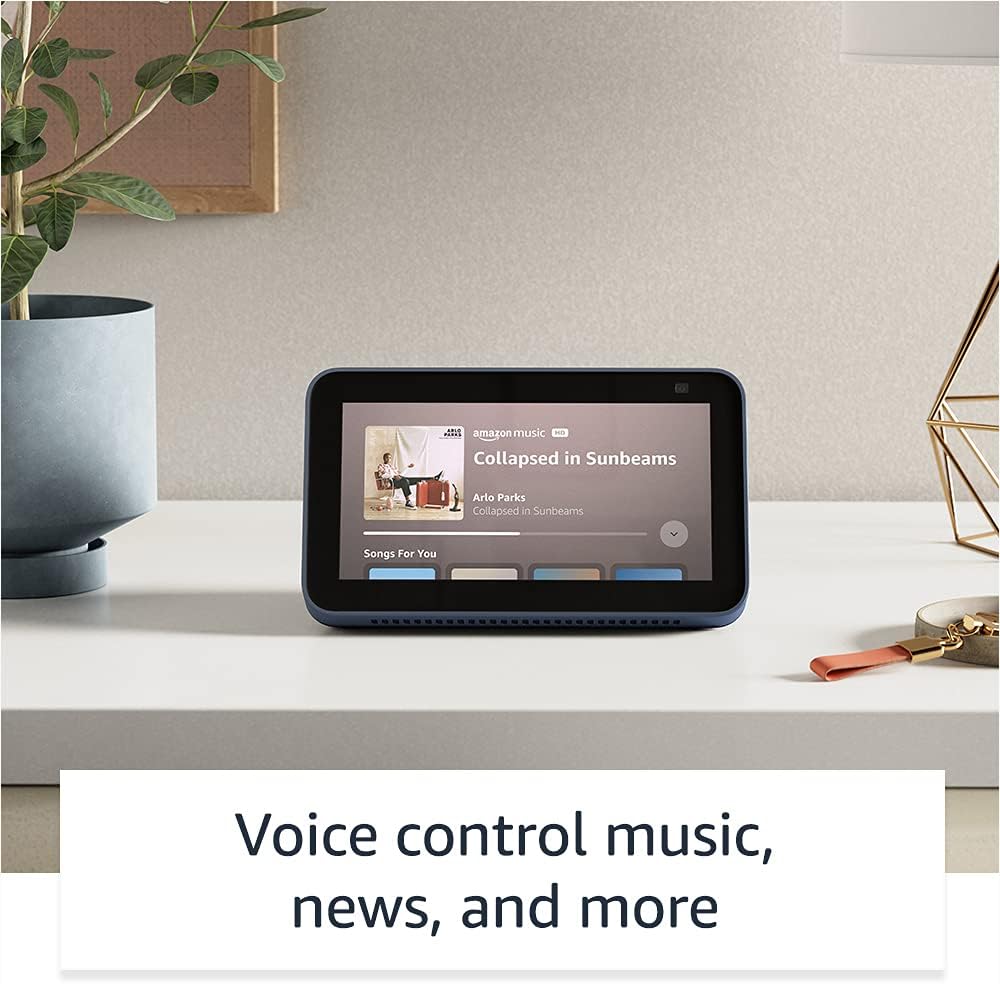
Image: The Echo Show 5 displaying a music playback screen, demonstrating its entertainment features.
ການປັບແຕ່ງສ່ວນຕົວ:
- ກອບຮູບດິຈິຕອນ: Use Amazon Photos to turn your home screen into a digital photo frame.

Image: The Echo Show 5 displaying a personal photo, illustrating its use as a digital photo frame.
ຄຸນນະສົມບັດຄວາມເປັນສ່ວນຕົວ:
Echo Show 5 ຖືກອອກແບບດ້ວຍການຄວບຄຸມຄວາມເປັນສ່ວນຕົວຫຼາຍຊັ້ນ:
- ປຸ່ມປິດໄມ/ກ້ອງ: ປຸ່ມກົດເພື່ອຕັດການເຊື່ອມຕໍ່ໄມໂຄຣໂຟນ ແລະກ້ອງຖ່າຍຮູບທາງອີເລັກໂທຣນິກ.
- Shutter ກ້ອງຖ່າຍຮູບໃນຕົວ: A physical shutter to cover the camera lens.
- Voice Recording Controls: ຄວາມສາມາດ view ແລະລຶບການບັນທຶກສຽງຂອງທ່ານ.
- ເຕັກໂນໂລຊີ Wake Word: The device only begins listening after detecting your chosen wake word.
- ຕົວຊີ້ບອກການຖ່າຍທອດ: ຕົວຊີ້ບອກທາງພາບຈະສະແດງເມື່ອສຽງ ຫຼືວິດີໂອຖືກຖ່າຍທອດໃສ່ຄລາວ.

ຮູບພາບ: A close-up view of the Echo Show 5's top, highlighting the physical camera shutter button for privacy control.
ຄຸນນະສົມບັດການເຂົ້າເຖິງ:
Echo Show 5 ປະກອບມີຄຸນສົມບັດການຊ່ວຍເຂົ້າເຖິງຕ່າງໆເພື່ອປັບແຕ່ງ Alexa ໃຫ້ກັບຄວາມສາມາດຂອງທ່ານ. ເຫຼົ່ານີ້ສາມາດເຂົ້າເຖິງໄດ້ໂດຍຜ່ານ ການຕັ້ງຄ່າ → ການເຂົ້າໃຊ້ງານ ໃນອຸປະກອນຂອງທ່ານ.
- ແຕະໃສ່ Alexa: Interact with Alexa via touch through on-screen tiles or a keyboard.
- ການຟັງແບບປັບຕົວ: ໃຫ້ເວລາຫຼາຍກວ່າທີ່ຈະເວົ້າໃຫ້ຈົບກ່ອນທີ່ Alexa ຈະຕອບ.
- ອັດຕາການເວົ້າທີ່ຕ້ອງການ: ຄວບຄຸມວ່າ Alexa ເວົ້າໄວ ຫຼືຊ້າປານໃດ.
- ຄຳບັນຍາຍ: Alexa Captioning, Call Captioning, ແລະ Closed Captioning ໃຫ້ຂໍ້ຄວາມສໍາລັບເນື້ອຫາທີ່ສະຫນັບສະຫນູນ.
- ສະແດງ ແລະບອກ: ຊ່ວຍລະບຸຜະລິດຕະພັນສຳລັບຜູ້ໃຊ້ທີ່ຕາບອດ ຫຼື ມີຄວາມບົກຜ່ອງທາງສາຍຕາ.
- ສຽງView ຕົວອ່ານໜ້າຈໍ: Enables access for blind or visually impaired users.
- ຕົວຂະຫຍາຍໜ້າຈໍ: ຊູມເຂົ້າ/ອອກ ແລະເລື່ອນຮອບໜ້າຈໍ.
- ແຈ້ງເຕືອນເມື່ອຢູ່ໃກ້: ຫຼິ້ນສຽງການແຈ້ງເຕືອນເມື່ອກວດພົບຢູ່ໃກ້ກັບອຸປະກອນ.
- Kindle ອ່ານດັງໆ: Alexa ສາມາດອ່ານປຶ້ມ Kindle ຂອງທ່ານດັງໆ.
- ຂໍ້ຄວາມເວລາຈິງ: Type live text during a video call.
- ການຕັ້ງຄ່າເພີ່ມເຕີມສຳລັບການປີ້ນສີ, ການແກ້ໄຂສີ, ສຽງຮ້ອງຂໍ ແລະ ອື່ນໆ.
ບໍາລຸງຮັກສາ
The Certified Refurbished Echo Show 5 has undergone rigorous testing and certification to ensure it looks and works like new. Regular maintenance is minimal.
- ທໍາຄວາມສະອາດ: ເຊັດໜ້າຈໍ ແລະ ດ້ານນອກຂອງອຸປະກອນອອກຄ່ອຍໆດ້ວຍຜ້າອ່ອນໆ, ບໍ່ມີເຈັ້ຍ. ຫຼີກລ້ຽງການເຮັດຄວາມສະອາດຂັດຫຼືສີດ.
- ອັບເດດຊອບແວ: Ensure your device is connected to Wi-Fi to receive automatic software security updates, which are guaranteed for at least four years after the device is last available for purchase as a new unit.
ການແກ້ໄຂບັນຫາ
ຖ້າທ່ານພົບບັນຫາກັບ Echo Show 5 ຂອງທ່ານ, ພິຈາລະນາຂັ້ນຕອນການແກ້ໄຂບັນຫາທົ່ວໄປຕໍ່ໄປນີ້:
- ວົງຈອນພະລັງງານ: Unplug the device from the power outlet, wait for 30 seconds, and then plug it back in.
- ກວດເບິ່ງການເຊື່ອມຕໍ່ Wi-Fi: Ensure your Wi-Fi network is active and the device is connected. You can check network status in the device settings.
- Verify Internet Connectivity: Confirm your internet service is working by testing other devices on the same network.
- Check Microphone/Camera: Ensure the mic/camera off button is not activated and the camera shutter is open if you are trying to use these features.
- ແອັບ Alexa: Use the Alexa app on your smartphone or tablet to manage device settings, check for updates, and access further support resources.
- ຄຳສັ່ງສຽງ: Speak clearly and ensure you are within range of the device's microphones.
For more detailed troubleshooting or specific issues, refer to the help section within the Alexa app or visit the official Amazon support webເວັບໄຊ.
ຂໍ້ມູນຈໍາເພາະ
| ຄຸນສົມບັດ | ລາຍລະອຽດ |
|---|---|
| ຂະໜາດ | 5.8" x 3.4" x 2.9" (148ມມ x 86ມມ x 73ມມ) |
| ນ້ຳໜັກ | 14.5 ອໍ (410 ກຣາມ) |
| ຈໍສະແດງຜົນ | ໜ້າ ຈໍ ສຳ ພັດ 5.5” |
| ກ້ອງຖ່າຍຮູບ | ກ້ອງຖ່າຍຮູບ 2 MP ມີ shutter ໃນຕົວ |
| WiFi ເຊື່ອມຕໍ່ | Dual-band wifi (802.11a/b/g/n/ac). Does not support ad-hoc networks. |
| ການເຊື່ອມຕໍ່ Bluetooth | A2DP support for audio streaming; AVRCP for voice control of connected mobile devices. PIN-code speakers not supported. |
| ສຽງ | ລຳໂພງທີ່ມີຂະໜາດເຕັມ 1.65 ນິ້ວ |
| ໂຮງງານຜະລິດ | MediaTek MT 8163 |
| ລຸ້ນ | Echo Show 5 (ຮຸ່ນທີ 2) - ປ່ອຍ 2021 |
| ພາສາ | Alexa ເວົ້າພາສາອັງກິດແລະແອສປາໂຍນ |
ການຮັບປະກັນແລະການສະຫນັບສະຫນູນ
Your Certified Refurbished Echo Show 5 comes with the same limited warranty as a new device. For specific details regarding your warranty, please refer to the documentation included with your device or visit the official Amazon website for Certified Refurbished Amazon devices.
For customer support, troubleshooting, and to manage your device settings, utilize the Alexa app on your compatible smartphone or tablet. You can also find extensive support resources and FAQs on the Amazon support webເວັບໄຊ.
ອັບເດດຄວາມປອດໄພຊອບແວ: This device receives guaranteed software security updates until at least four years after the device is last available for purchase as a new unit on Amazon's webສະຖານທີ່.
ເອກະສານທີ່ກ່ຽວຂ້ອງ - Echo Show 5 (ລຸ້ນທີ 2, ປີ 2021)
 |
Amazon Echo Show 8 (2nd Gen) ຄູ່ມືເລີ່ມຕົ້ນດ່ວນ ຄູ່ມືເພື່ອເລີ່ມຕົ້ນດ້ວຍ Amazon Echo Show 8 (2nd Gen), ຄອບຄຸມການຕັ້ງຄ່າ, ຄຸນສົມບັດ ແລະຄວາມເປັນສ່ວນຕົວ. |
 |
Amazon Echo Show 8 (2nd Gen) ຄູ່ມືຜູ້ໃຊ້ ຄູ່ມືຜູ້ໃຊ້ທີ່ສົມບູນແບບສໍາລັບ Amazon Echo Show 8 (2nd Gen), ລາຍລະອຽດການຕັ້ງຄ່າ, ລັກສະນະຄວາມເປັນສ່ວນຕົວ, ຄໍາສັ່ງສຽງ, ແລະຄໍາແນະນໍາສໍາລັບການນໍາໃຊ້ Alexa. |
 |
ຄໍາແນະນໍາການນໍາໃຊ້ຍີ່ຫໍ້ Amazon Echo & Alexa ສໍາລັບຄູ່ຮ່ວມງານພາຍນອກ ຄໍາແນະນໍາຢ່າງເປັນທາງການສໍາລັບຄູ່ຮ່ວມງານພາຍນອກກ່ຽວກັບການນໍາໃຊ້ທີ່ເຫມາະສົມຂອງຊັບສິນຍີ່ຫໍ້ Amazon Echo ແລະ Alexa, ລວມທັງໂລໂກ້, typography, ສີ, ແລະການເປັນຕົວແທນໃນອຸປະກອນການຕະຫຼາດ. ຮັບປະກັນຄວາມສອດຄ່ອງແລະຄວາມຊື່ສັດຂອງຍີ່ຫໍ້. |
 |
Amazon Echo Show 8 (2nd Gen) ຄູ່ມືການເລີ່ມຕົ້ນດ່ວນ: ການຕິດຕັ້ງແລະຄຸນສົມບັດ ຮຽນຮູ້ວິທີຕັ້ງຄ່າ ແລະໃຊ້ Amazon Echo Show 8 ຂອງທ່ານ (ຮຸ່ນທີ 2). ຄູ່ມືນີ້ກວມເອົາຄຸນສົມບັດຂອງອຸປະກອນ, ການຄວບຄຸມຄວາມເປັນສ່ວນຕົວ, ແລະຄໍາສັ່ງ Alexa ທີ່ສໍາຄັນສໍາລັບວຽກງານປະຈໍາວັນ. |
 |
Amazon Echo Show 5 (2nd Gen) ຄູ່ມືເລີ່ມຕົ້ນດ່ວນ ຄູ່ມືເລີ່ມຕົ້ນໄວສໍາລັບ Amazon Echo Show 5 (ຮຸ່ນທີ 2), ກວມເອົາການຕິດຕັ້ງ, ລັກສະນະຄວາມເປັນສ່ວນຕົວ, ແລະການນໍາໃຊ້ພື້ນຖານກັບ Alexa. |
 |
Amazon Echo Show 5 (2nd Gen) ຄູ່ມືເລີ່ມຕົ້ນດ່ວນ ເລີ່ມຕົ້ນດ້ວຍ Amazon Echo Show 5 (ລຸ້ນທີ 2) ຂອງທ່ານ. ຄູ່ມືນີ້ກວມເອົາການຕັ້ງຄ່າ, ຄຸນສົມບັດຂອງອຸປະກອນ, ການຄວບຄຸມຄວາມເປັນສ່ວນຕົວ, ແລະ ວິທີການໃຊ້ Alexa ສຳລັບຄວາມບັນເທີງ, ເຮືອນອັດສະລິຍະ, ແລະ ການສື່ສານ. |