1. ບົດແນະນຳ
ຂອບໃຈສໍາລັບການຊື້asing the SHARP ES-PW11E-S Washing Machine. This manual provides essential information for the safe and efficient use of your appliance. Please read it thoroughly before operation and keep it for future reference.
This washing machine features a unique hole-less tub design for enhanced cleanliness and water saving, inverter technology for quiet and efficient operation, and Plasmacluster technology for tub hygiene.
2. ຂໍ້ມູນຄວາມປອດໄພ
- Always ensure the power plug is securely inserted into the outlet.
- ຢ່າໃຊ້ເຄື່ອງດ້ວຍມືປຽກ.
- Keep children away from the appliance during operation. The child lock feature can be activated to prevent unintended operation.
- Do not wash items that are not suitable for machine washing.
- In case of malfunction, unplug the machine immediately and contact customer support.
- Ensure proper ventilation during drying cycles to prevent moisture buildup.
3. ຜະລິດຕະພັນເກີນview
3.1 ລັກສະນະທີ່ສໍາຄັນ
- Hole-less Tub: Prevents black mold intrusion and saves water.
- ເທກໂນໂລຍີ Inverter: ໃຫ້ການດຳເນີນງານທີ່ງຽບສະຫງົບ ແລະ ປະຫຍັດພະລັງງານ.
- Plasmacluster Technology: Helps keep the tub clean and hygienic.
- Ultrasonic Washer: For quick and gentle spot washing without damaging fabrics.
- COCORO WASH: Wi-Fi enabled smart features for convenient washing information and AI-assisted course selection.
- Wide Mouth & Low Body Design: ອຳນວຍຄວາມສະດວກໃນການໂຫຼດ ແລະ ຖອດເຄື່ອງຊັກຜ້າໃຫ້ງ່າຍ.
3.2 ອົງປະກອບ
ຮູ້ຈັກກັບສ່ວນປະກອບຫຼັກໆຂອງເຄື່ອງຊັກຜ້າຂອງທ່ານ.

ຮູບພາບ: ແຜງຄວບຄຸມ. This image shows a close-up of the touch control panel, displaying various settings and options for washing and drying cycles.

Image: Ultrasonic Washer. This image highlights the integrated ultrasonic washer, designed for pre-treating stains or washing small items.

Image: Control Panel and Dimensions. This diagram illustrates the layout of the control panel buttons and provides a detailed dimensional drawing of the washing machine, including width, depth, and height.
4. ການຕິດຕັ້ງແລະການຕິດຕັ້ງ
4.1 ເງື່ອນໄຂການຈັດວາງ
Ensure adequate space for installation and operation. The following dimensions are crucial:
- External Dimensions (W×D×H): 600×650×1050mm. (Width includes drain hose, height includes water supply hose.)
- Installable Waterproof Pan (Inner Depth): 540mm or more.
- ການເກັບກູ້ຂັ້ນຕ່ຳ: A width of at least 10cm more than the product dimensions is required for carrying in and installation.

Image: Installation Requirements. This image provides a visual guide for checking installation space, including required clearances for doorways, staircases, and the waterproof pan. It emphasizes needing at least 10cm extra width for transport.
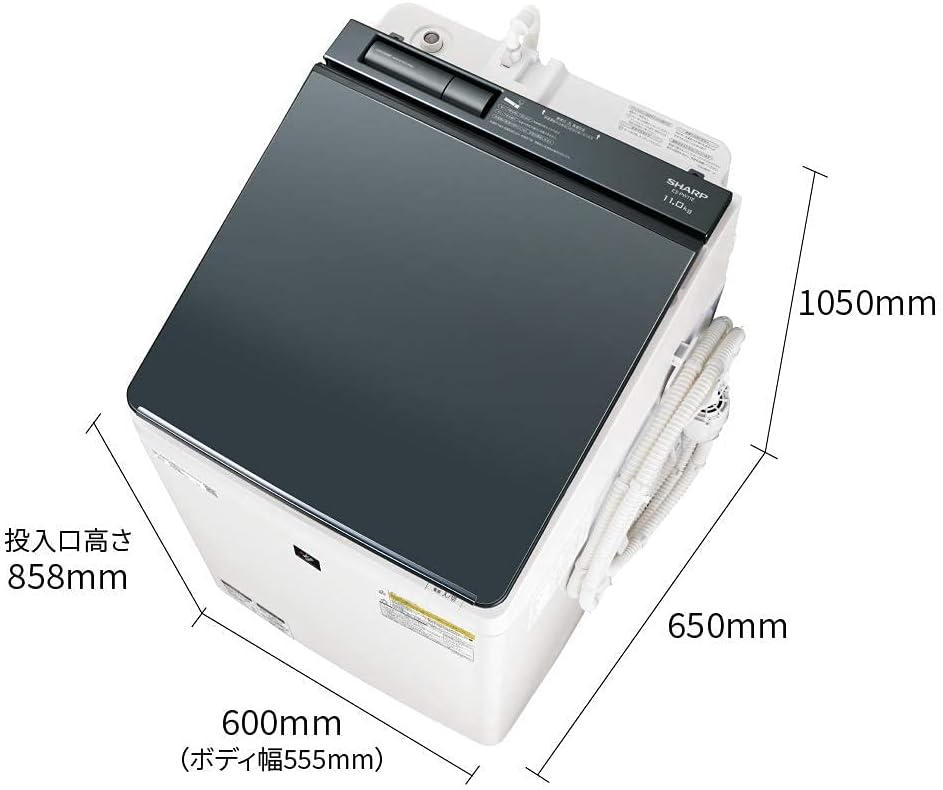
ຮູບພາບ: ຂະຫນາດຜະລິດຕະພັນ. This image shows the overall dimensions of the washing machine, including width (600mm), depth (650mm), and height (1050mm), with an emphasis on the loading port height (858mm).
4.2 ທໍ່ເຊື່ອມຕໍ່
- ທໍ່ນ້ຳປະປາ: Connect the water supply hose to the faucet and the machine's inlet. Ensure a secure, leak-free connection.
- ທໍ່ລະບາຍນໍ້າ: Position the drain hose correctly to allow for proper water drainage. The drain hose can be routed to the left, right, or rear.
- Bath Water Pump: If using the included bath water pump, connect it as per the separate instructions provided with the pump.
5. ຄໍາແນະນໍາການດໍາເນີນງານ
5.1 ການດໍາເນີນງານພື້ນຖານ
- ເປີດ/ປິດ: Press the power button to turn the machine on or off.
- ເລີ່ມຕົ້ນ / ພັກໄວ້: Press the Start/Pause button to begin or temporarily stop a cycle.
- ລັອກເດັກ: Activate the child lock to prevent accidental operation. While active, only power on/off operations are possible.
5.2 ການເລືອກວິທີການຊັກລ້າງ
Choose the appropriate course based on your laundry type and soil level.

Image: Wash Courses. This image illustrates specialized wash courses, such as the 'Hot Air Plus Stubborn Stain Course' for tough dirt (useful for pet clothing) and the '10-Minute Wash Course' for light stains, assisting with daily chores.
- Standard Course: For everyday laundry. (Approx. 46 minutes for wash cycle).
- Hot Air Plus Stubborn Stain Course: Effectively removes persistent dirt, even suitable for pet clothing.
- ຫຼັກສູດລ້າງໜ້າ 10 ນາທີ: Convenient for lightly soiled items or quick washes.
- Wash to Dry Course: Combines washing and drying. (Approx. 220 minutes).
5.3 Using the Ultrasonic Washer
The integrated ultrasonic washer can be used for pre-treating stains or washing small, delicate items. Refer to the specific instructions for its use in the full manual.
5.4 Hanger Drying
This feature allows you to dry clothes on hangers, helping to reduce wrinkles.

Image: Hanger Drying and Plasmacluster Tub Clean. This image demonstrates the hanger drying function, which helps prevent wrinkles. It also illustrates the Plasmacluster Tub Clean Course, which uses water flow and Plasmacluster ions to clean the tub and pulsator.
6. ບໍາລຸງຮັກສາ
6.1 Plasmacluster Tub Clean Course
Regularly use the Plasmacluster Tub Clean Course to maintain hygiene and prevent mold growth in the tub and behind the pulsator. This course uses water flow and Plasmacluster ions for thorough cleaning.
6.2 ການທໍາຄວາມສະອາດທົ່ວໄປ
- ເຊັດດ້ານນອກຂອງເຄື່ອງໃຫ້ອ່ອນໆ, ງamp ຜ້າ.
- Clean the detergent and fabric softener dispensers regularly to prevent residue buildup.
- Check and clean the lint filter after each drying cycle.
7. ການແກ້ໄຂບັນຫາ
ຖ້າທ່ານພົບບັນຫາໃດໆ, ກະລຸນາອ້າງອີງເຖິງບັນຫາ ແລະ ວິທີແກ້ໄຂທົ່ວໄປຕໍ່ໄປນີ້ກ່ອນທີ່ຈະຕິດຕໍ່ບໍລິການ.
| ບັນຫາ | ສາເຫດທີ່ເປັນໄປໄດ້ | ການແກ້ໄຂ |
|---|---|---|
| ເຄື່ອງບໍ່ເລີ່ມຕົ້ນ | Power cord unplugged; Door not closed properly; Child lock active. | Check power connection; Ensure door is fully closed; Deactivate child lock. |
| ການສັ່ນສະເທືອນ / ສຽງລົບກວນຫຼາຍເກີນໄປໃນລະຫວ່າງການປັ່ນປ່ວນ | ເຄື່ອງບໍ່ລະດັບ; ຊັກລີດແຈກຢາຍບໍ່ສະໝ່ຳສະເໝີ; ບໍ່ໄດ້ເອົາສະຖານທີ່ຂົນສົ່ງ. | Adjust leveling feet; Redistribute laundry; Remove shipping bolts (if applicable). |
| ນ້ໍາຮົ່ວ | Hose connections loose; Drain hose blocked or improperly positioned. | Check and tighten all hose connections; Clear any blockages in the drain hose and ensure proper positioning. |
| ເຄື່ອງນຸ່ງຫົ່ມບໍ່ແຫ້ງຢ່າງຖືກຕ້ອງ | Lint filter clogged; Overloaded dryer; Incorrect drying course selected. | Clean lint filter; Reduce load size; Select appropriate drying course. |
For other error codes or persistent issues, please consult the comprehensive troubleshooting section in the full user manual or contact SHARP customer support.
8. ຂໍ້ມູນຈໍາເພາະ
| ຄຸນສົມບັດ | ລາຍລະອຽດ |
|---|---|
| ຍີ່ຫໍ້ | ແຫຼມ |
| ຕົວແບບ | ES-PW11E-S |
| ຄວາມອາດສາມາດ | 11 ກິໂລກຣາມ |
| External Dimensions (W×D×H) | 600 × 650 × 1050 ມມ |
| ນ້ຳໜັກສິນຄ້າ | 55 ກິໂລກຣາມ |
| Operating Noise (Wash) | 39 dB |
| Operating Noise (Spin) | 38 dB |
| Operating Noise (Dry) | 44 dB |
| Approximate Wash Time | 46 minutes (50/60Hz) |
| Approximate Wash-to-Dry Time | 220 minutes (50/60Hz) |
| ຄຸນນະສົມບັດພິເສດ | Inverter, Hole-less Tub, Plasmacluster, Ultrasonic Washer, COCORO WASH |
| ປະເພດແຜງຄວບຄຸມ | ແຕະ |
| ຕໍາແໜ່ງປະຕູ | ການໂຫຼດສູງສຸດ |
| ອຸປະກອນເສີມ | Instruction manual, warranty card, bath water pump, drying (deodorizing) parent-child hanger |
9. ການຮັບປະກັນແລະການສະຫນັບສະຫນູນ
Your SHARP ES-PW11E-S Washing Machine comes with a manufacturer's warranty. Please refer to the included warranty card for details on coverage and duration.
For technical assistance, service requests, or to purchase replacement parts, please contact SHARP customer support. Contact information can typically be found on the warranty card or the official SHARP webເວັບໄຊ.