ແນະນຳ
This manual provides instructions for the ZdalaMit RM-YD035 Replacement Remote Control, designed for use with various Sony Bravia TV models. This remote control requires no programming; simply insert batteries, and it is ready for use.
ຄໍາແນະນໍາການຕິດຕັ້ງ
1. ການຕິດຕັ້ງຫມໍ້ໄຟ
The RM-YD035 remote control operates on two (2) AAA size alkaline batteries (not included). Follow these steps to install them:
- ຊອກຫາຝາປິດຊ່ອງໃສ່ຫມໍ້ໄຟຢູ່ດ້ານຫຼັງຂອງຣີໂໝດຄວບຄຸມ.
- ກົດລົງໃນແຖບແລະເລື່ອນຝາປິດ.
- ໃສ່ໝໍ້ໄຟ AAA ສອງໜ່ວຍ, ຮັບປະກັນຈຸດບວກ (+) ແລະ ລົບ (-) ສອດຄ່ອງຖືກຕ້ອງກັບເຄື່ອງໝາຍພາຍໃນຊ່ອງ.
- ເລື່ອນຝາປິດຊ່ອງໃສ່ໝໍ້ໄຟຄືນໃສ່ບ່ອນເກົ່າຈົນກວ່າມັນຈະກົດຢ່າງປອດໄພ.
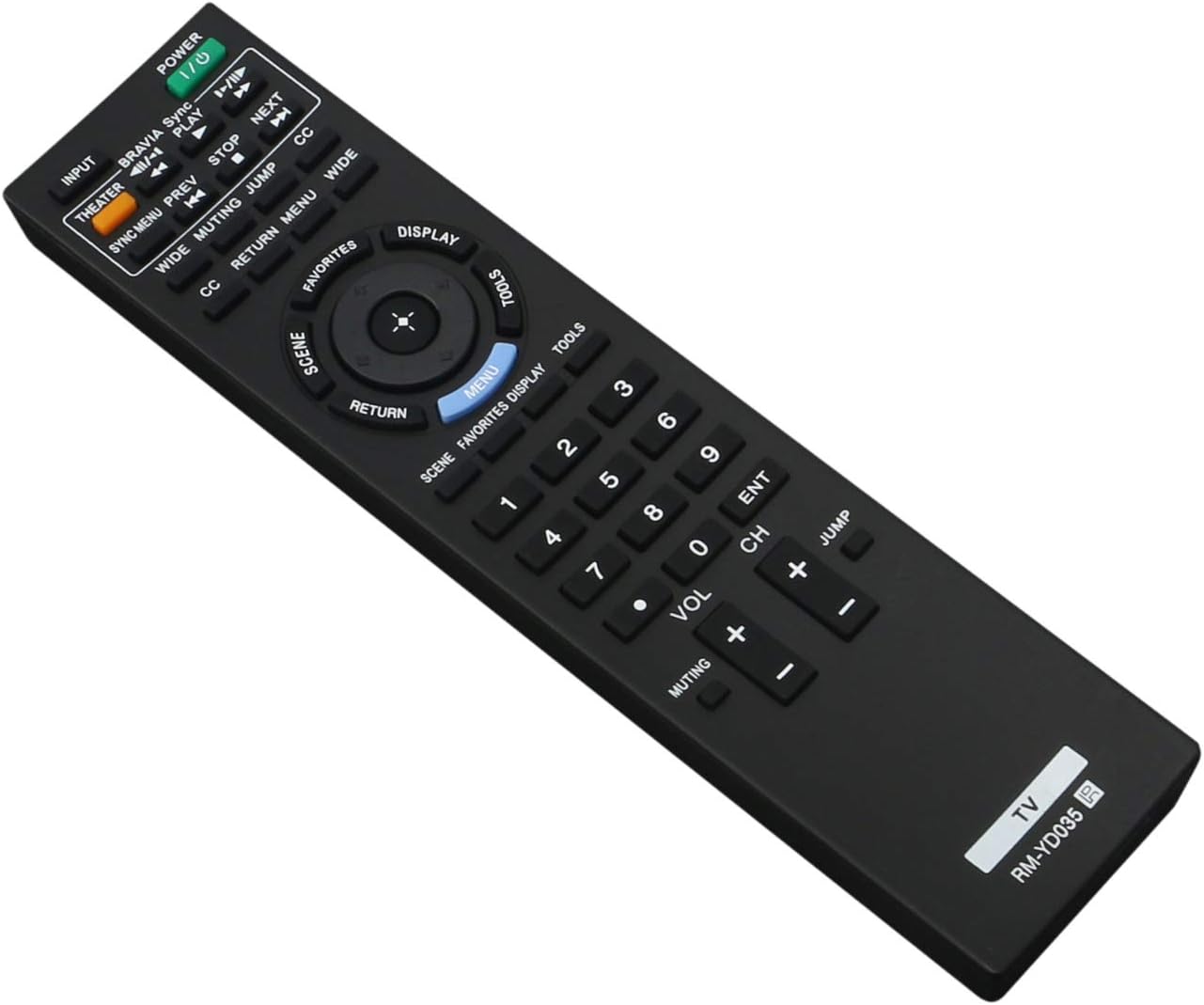
Image: The ZdalaMit RM-YD035 remote control. The battery compartment is located on the back of the device.
2. ການນໍາໃຊ້ຄັ້ງທໍາອິດ
After installing the batteries, the remote control is ready to use. Point the remote directly at your Sony Bravia TV and press the ພະລັງງານ button to turn on the television.
ຄໍາແນະນໍາການດໍາເນີນງານ
The RM-YD035 remote control provides full functionality for your compatible Sony Bravia TV. Below is a general overview of key buttons and their functions:

ຮູບພາບ: ທາງຫນ້າ view of the ZdalaMit RM-YD035 remote control, highlighting the layout of all control buttons.
- ພະລັງງານ (ປຸ່ມສີຂຽວ): ເປີດ ຫຼືປິດໂທລະພາບ.
- ການປ້ອນຂໍ້ມູນ: ເລືອກແຫຼ່ງສັນຍານເຂົ້າ (ເຊັ່ນ: HDMI 1, AV, Component).
- ໂຮງລະຄອນ: Activates Theater mode for optimized picture and sound settings.
- BRAVIA Sync / PLAY: Controls BRAVIA Sync compatible devices and playback functions.
- PREV / NEXT / STOP: ການຄວບຄຸມການຫຼິ້ນສື່.
- CC (Closed Caption): ເປີດ ຫຼື ປິດຄຳບັນຍາຍ.
- ກວ້າງ: ປັບອັດຕາສ່ວນໜ້າຈໍ.
- ປິດສຽງ: ປິດສຽງ ຫຼືປິດສຽງໂທລະພາບ.
- ໂດດ: ສະຫຼັບລະຫວ່າງປັດຈຸບັນ ແລະກ່ອນໜ້າ viewed ຊ່ອງ.
- ກັບຄືນ: ກັບຄືນໄປຫາໜ້າຈໍ ຫຼືເມນູກ່ອນໜ້າ.
- ເມນູ: ເປີດເມນູຫຼັກຂອງໂທລະພາບ.
- ການສະແດງ: ສະແດງຂໍ້ມູນໃນຫນ້າຈໍກ່ຽວກັບໂຄງການໃນປັດຈຸບັນຫຼືການປ້ອນຂໍ້ມູນ.
- ລາຍການທີ່ມັກ: Accesses your favorite channels or content.
- ເຄື່ອງມື: Provides quick access to common TV functions and settings.
- Directional Pad (Up, Down, Left, Right) & ENT (Enter): ນຳທາງຜ່ານເມນູ ແລະຢືນຢັນການເລືອກ.
- ປຸ່ມຕົວເລກ (0-9): Directly selects channels or enters numerical values.
- VOL (+/-): ປັບລະດັບສຽງ.
- CH (+/-): ປ່ຽນຊ່ອງຂຶ້ນ ຫຼື ລົງ.
ບໍາລຸງຮັກສາ
ການເຮັດຄວາມສະອາດການຄວບຄຸມໄລຍະໄກ
To clean the remote control, gently wipe it with a soft, dry cloth. Do not use liquid cleaners, sprays, or abrasive materials, as these may damage the remote's surface or internal components.
ການປ່ຽນແບັດ
Replace batteries when the remote control's response becomes sluggish or stops working. Always replace both batteries at the same time with new AAA alkaline batteries. Do not mix old and new batteries or different types of batteries.
ການເກັບຮັກສາ
ຖ້າການຄວບຄຸມຫ່າງໄກສອກຫຼີກຈະບໍ່ຖືກໃຊ້ເປັນໄລຍະເວລາທີ່ຍາວນານ, ໃຫ້ຖອດແບດເຕີລີ່ອອກເພື່ອປ້ອງກັນການຮົ່ວໄຫຼແລະຄວາມເສຍຫາຍທີ່ອາດເກີດຂື້ນກັບອຸປະກອນ.
ການແກ້ໄຂບັນຫາ
ການຄວບຄຸມໄລຍະໄກບໍ່ຕອບສະຫນອງ
- ກວດສອບຫມໍ້ໄຟ: Ensure batteries are inserted correctly with the correct polarity (+/-) and are not depleted. Replace with fresh AAA alkaline batteries if necessary.
- Line of Sight: Make sure there are no obstructions between the remote control and the TV's infrared sensor. The remote requires a clear line of sight to function.
- ໄລຍະທາງ: Ensure you are within the effective operating range of the TV's infrared sensor.
- ພະລັງງານໂທລະທັດ: ຢືນຢັນວ່າໂທລະທັດເປີດຢູ່ ແລະບໍ່ໄດ້ຢູ່ໃນໂໝດສະແຕນບາຍ.
ປຸ່ມສະເພາະບໍ່ເຮັດວຽກ
If only certain buttons are not functioning, try replacing the batteries first. If the issue persists, ensure the remote is clean and free of debris that might obstruct button presses. If the problem continues, the remote control may require replacement.
ຂໍ້ມູນຈໍາເພາະຂອງຜະລິດຕະພັນ
| ຄຸນສົມບັດ | ລາຍລະອຽດ |
|---|---|
| ໝາຍເລກຕົວແບບ | RM-YD035 |
| ຍີ່ຫໍ້ | ZdalaMit |
| ຂະໜາດສິນຄ້າ | 6.9 x 2 x 0.6 ນິ້ວ |
| ນ້ໍາຫນັກລາຍການ | 2.12 ອອນ |
| ຕ້ອງໃຊ້ແບັດເຕີຣີ | 2 x AAA (ບໍ່ລວມ) |
| ອຸປະກອນທີ່ເຂົ້າກັນໄດ້ | Television (Sony Bravia) |
| ສີ | ດຳ |
| ຄຸນນະສົມບັດພິເສດ | Ergonomic |
ການຮັບປະກັນແລະການສະຫນັບສະຫນູນ
For any questions, concerns, or support regarding your ZdalaMit RM-YD035 Replacement Remote Control, please contact the seller or manufacturer directly. Refer to your purchase documentation for specific warranty information and contact details.


