1. ບົດແນະນຳ
The Waveshare JetRacer Pro AI Kit is a high-speed AI racing robot designed for advanced robotics and artificial intelligence education and development. This professional version offers enhanced performance and durability, making it suitable for high school AI teaching and professional racing applications. It supports the DonkeyCar open-source project, utilizing deep learning neural network frameworks like Keras/TensorFlow and the OpenCV computer vision library for autonomous driving capabilities.

Figure 1: Assembled Waveshare JetRacer Pro AI Kit.
ວິດີໂອ 1: ຫຼາຍກວ່າview of the JetRacer Pro AI Kit features and capabilities.
2. ເນື້ອໃນແພັກເກດ
ກວດສອບວ່າອົງປະກອບທັງໝົດທີ່ລະບຸໄວ້ຂ້າງລຸ່ມນີ້ແມ່ນລວມຢູ່ໃນການຫຸ້ມຫໍ່ຂອງທ່ານ. ຖ້າມີລາຍການໃດຂາດຫາຍໄປ ຫຼື ເສຍຫາຍ, ກະລຸນາຕິດຕໍ່ຝ່າຍສະໜັບສະໜູນລູກຄ້າ.

Figure 2: Contents of the JetRacer Pro AI Kit package. Includes chassis, battery holder, camera, cables, tools, and track map.
- JetRacer Pro Chassis (pre-assembled base)
- Battery Holder (for 18650 batteries, batteries not included)
- High-Definition Wide Angle Camera
- ພັດລົມເຢັນ
- Dual-Band WiFi Module
- ຕົວຄວບຄຸມ Gamepad ແບບໄຮ້ສາຍ
- ຜູ້ດັດແປງພະລັງງານ USB
- Screwdriver and Wrench
- Various Cables and Connectors
- Track Map (3m x 2m)
- Mounting Hardware (screws, standoffs)
Note: 18650 batteries are NOT included. Ensure battery length is less than 67mm; some protected batteries may not fit.
3. Chassis Structure
The JetRacer Pro features a robust and high-performance chassis designed for stability and speed. Key components include:
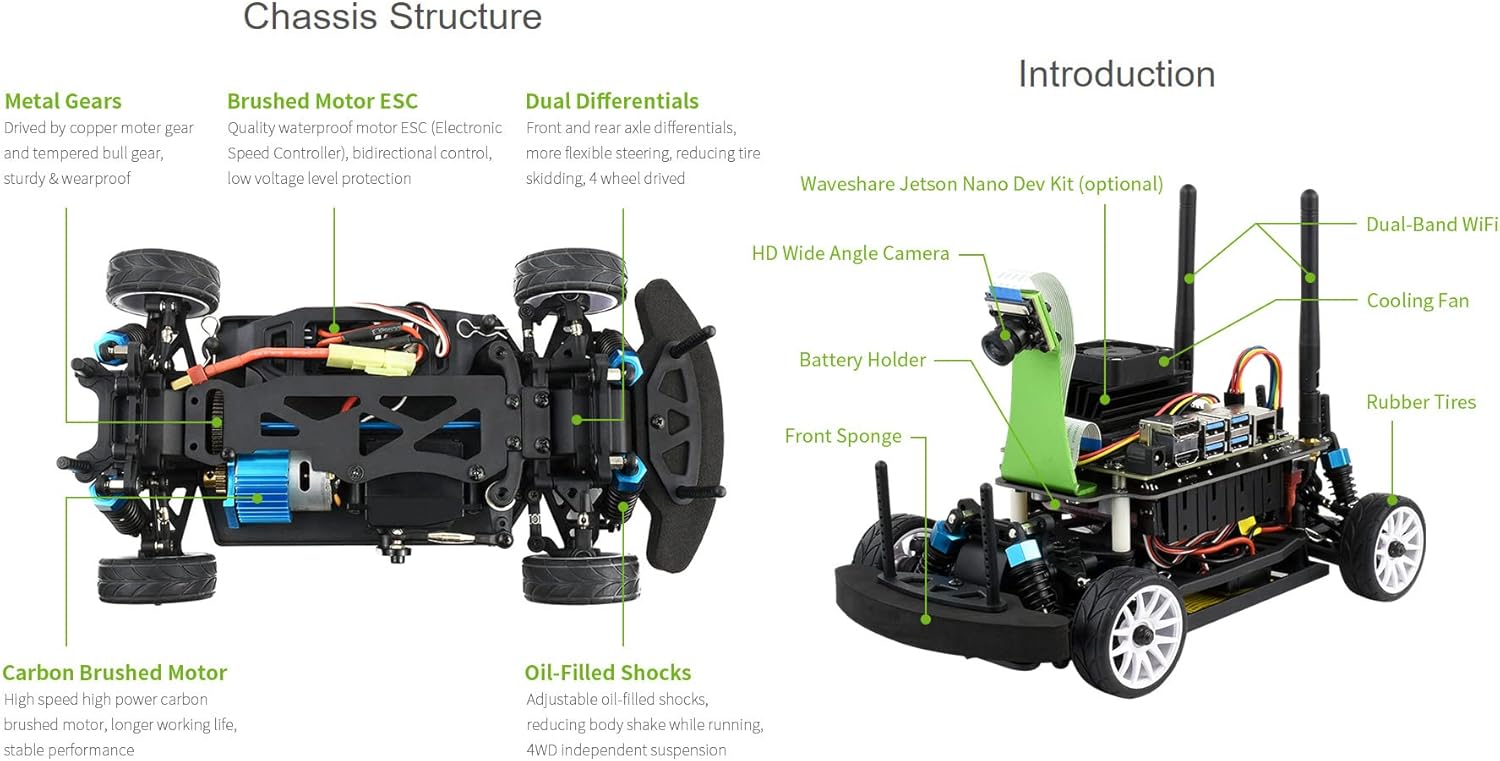
ຮູບທີ 3: ລະເບີດ view of the chassis highlighting key structural and mechanical components.
- Metal Gears: Driven by copper motor gears and tempered bull gear for sturdy and wear-proof operation.
- Brushed Motor ESC: Quality waterproof electronic speed controller with bidirectional control and low-voltage level protection.
- Dual Differentials: Front and rear axle differentials for more flexible steering, reducing tire skidding, and enabling 4-wheel drive.
- Carbon Brushed Motor: High-speed high-power carbon brushed motor for longer working life and stable performance.
- Oil-Filled Shocks: Adjustable oil-filled shocks reduce body shake while running, providing 4WD independent suspension.
- Crashproof Sponge: Provides better protection for the car during impacts.
4. Jetson Nano Integration
The JetRacer Pro AI Kit is designed to be powered by an NVIDIA Jetson Nano Dev Kit (optional, not included). The Jetson Nano serves as the embedded AI computer, providing extensive AI support and powerful CPU performance necessary for complex AI tasks such as deep learning and computer vision.

Figure 4: The Jetson Nano Dev Kit, an optional component for AI processing.
The Jetson Nano module, with 16GB eMMC and 4GB RAM, is a small, powerful computer capable of delivering 472 GFLOPS for running modern AI algorithms. It is widely used for deep learning, computer vision, GPU computing, multimedia processing, and supports popular AI frameworks such as TensorFlow, PyTorch, Caffe/Caffe2, Keras, and MXNet.
5. Autonomous Driving Capabilities
The JetRacer Pro AI Kit excels in autonomous driving, particularly with its support for the DonkeyCar open-source project. This allows for deep learning-based intelligent line patrol driving and other self-driving functionalities.

Figure 5: The JetRacer Pro AI Kit utilizing deep learning for autonomous driving, including data collection, model training, and self-driving execution.
The process involves collecting data via the onboard camera, training a driving model using deep learning neural networks, and then deploying the trained model for autonomous navigation.
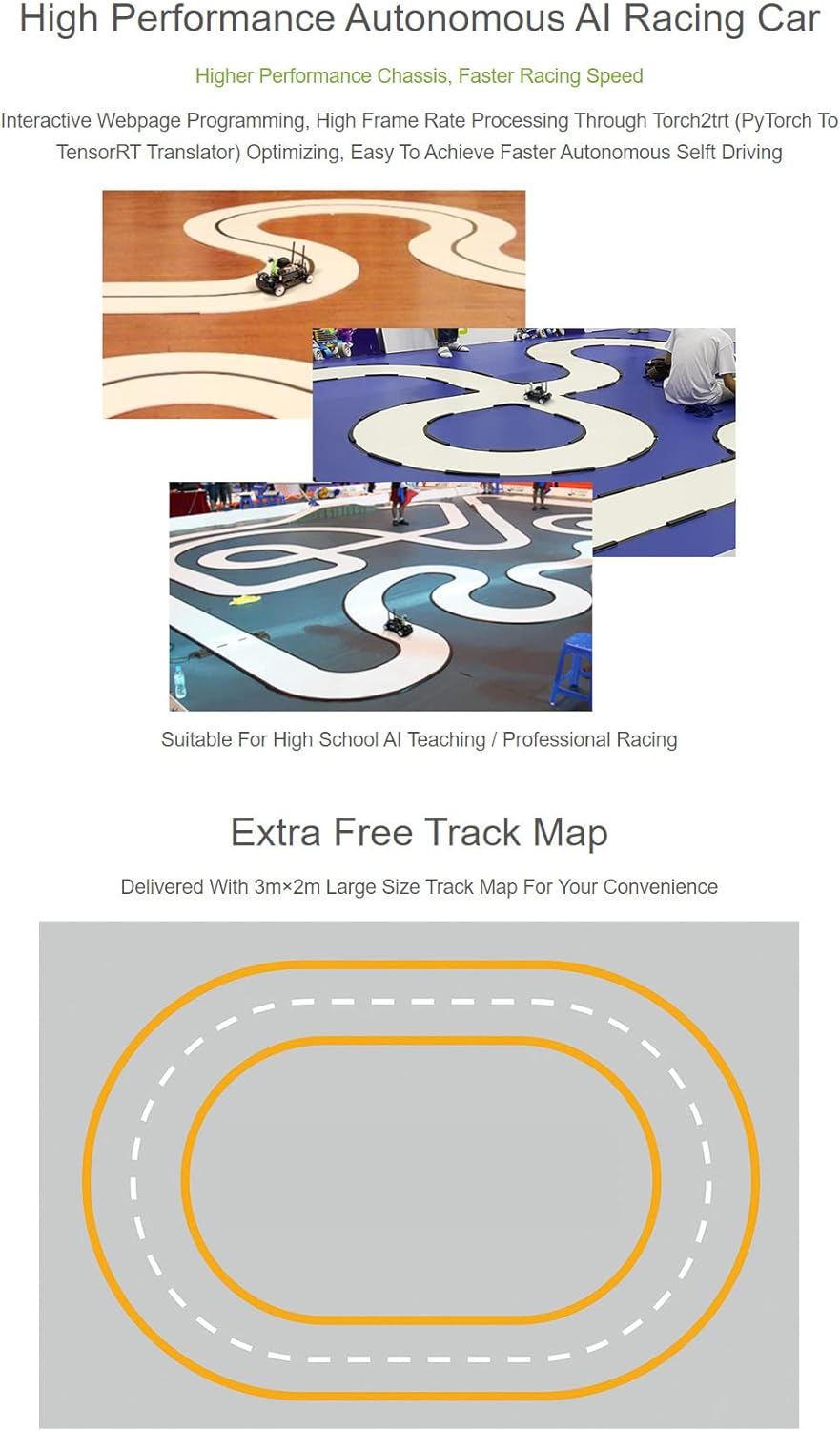
Figure 6: The JetRacer Pro AI Kit demonstrating high-performance autonomous line patrol driving on the provided track map.
6. Expansion Board and Camera
The highly integrated JetRacer Pro expansion board simplifies assembly and provides essential functionalities for the robot. It includes features for power management and control.

Figure 7: The expansion board with auto buck-boost regulator, battery protection, battery voltage monitor, motor driver, and OLED display. Also shown is the 8MP 160° FOV camera.
- Auto Buck-Boost Regulator: Manages power efficiently.
- ການປົກປ້ອງຫມໍ້ໄຟ: Ensures safe operation and longevity of batteries.
- ຫມໍ້ໄຟ Voltage ຕິດຕາມກວດກາ: Allows real-time monitoring of battery status.
- Motor Driver: Controls the robot's motors.
- ຈໍສະແດງຜົນ OLED: Provides visual feedback and information.
The kit includes an 8MP 160° FOV camera with a Sony IMX219 High Quality Sensor, capable of 3280×2464 resolution. This camera is crucial for computer vision tasks and data collection for AI models.
7. Connectivity and Teleoperation
The JetRacer Pro AI Kit features Dual-Band Wireless AC8265 for high-speed WiFi and stable Bluetooth 4.2 communication, ensuring low latency control.
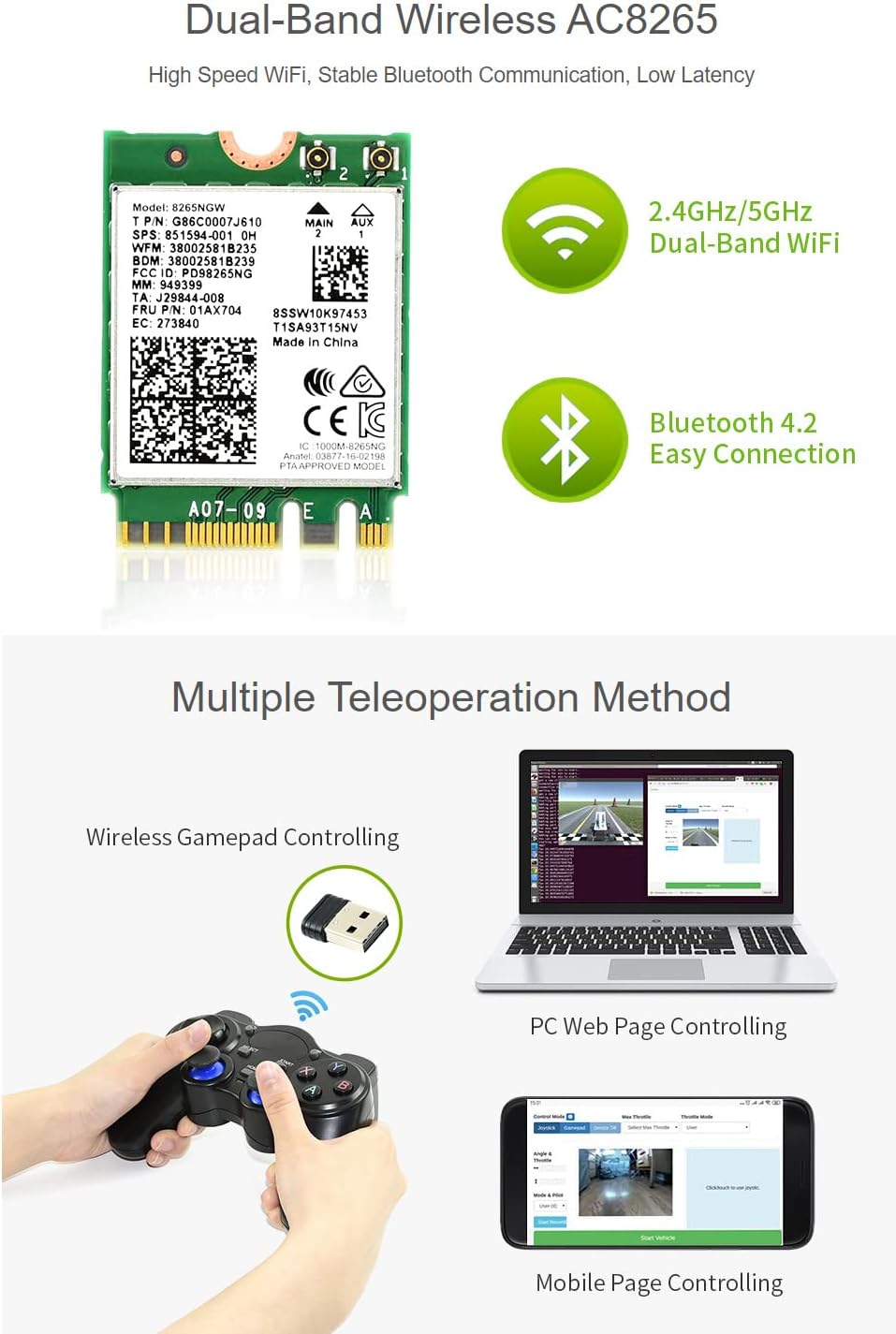
Figure 8: The Dual-Band Wireless AC8265 module and various teleoperation methods including wireless gamepad, PC web page, and mobile page controlling.
Multiple teleoperation methods are supported:
- Wireless Gamepad Controlling: Use the included gamepad for direct, intuitive control.
- PC Web Page Controlling: Control the robot via a web interface on a personal computer.
- Mobile Page Controlling: Operate the robot using a web interface accessible from a mobile device.
8. ຄູ່ມືການຕິດຕັ້ງ
8.1. ການຕິດຕັ້ງຫມໍ້ໄຟ
- ໃຫ້ແນ່ໃຈວ່າຫຸ່ນຍົນຖືກປິດ.
- Open the battery compartment on the chassis.
- Insert 18650 batteries (not included) into the battery holder, observing correct polarity. Ensure batteries are less than 67mm in length.
- ປິດຊ່ອງໃສ່ຫມໍ້ໄຟຢ່າງປອດໄພ.
8.2. Jetson Nano Installation (Optional)
If using a Jetson Nano Dev Kit, carefully mount it onto the designated area on the expansion board. Connect the necessary power and data cables as per the detailed assembly instructions provided with the kit (refer to the Waveshare wiki for specific steps).
8.3. Camera and Antenna Connection
- Connect the camera ribbon cable to the camera module and the Jetson Nano (or expansion board) port.
- Attach the dual-band WiFi antennas to their respective connectors on the expansion board.
8.4. ການເປີດເຄື່ອງເບື້ອງຕົ້ນ
After all connections are secure, switch on the robot. Observe the OLED display for boot-up information.
9. ຄໍາແນະນໍາການດໍາເນີນງານ
9.1. Teleoperation
To manually control the JetRacer Pro, use one of the following methods:
- ເກມແພັດໄຮ້ສາຍ: Pair the gamepad with the robot. Refer to the gamepad's manual for pairing instructions. Use the joystick and buttons to control movement and steering.
- PC/Mobile Web ການໂຕ້ຕອບ: Connect your PC or mobile device to the robot's WiFi network. Open a web browser and navigate to the robot's IP address (usually displayed on the OLED or found via network scan). Use the on-screen controls to drive the robot.
9.2. Autonomous Driving (DonkeyCar)
For autonomous driving, ensure the DonkeyCar software is properly installed and configured on your Jetson Nano. This typically involves:
- ການເກັບກຳຂໍ້ມູນ: Drive the robot manually to collect training data (images and corresponding steering/throttle inputs).
- Model Training: Use the collected data to train a deep learning model on the Jetson Nano.
- Autonomous Mode: Switch the robot to autonomous mode, allowing it to navigate based on the trained model.
Detailed instructions for DonkeyCar setup and operation can be found on the official DonkeyCar documentation and Waveshare's product wiki.
10. ບໍາລຸງຮັກສາ
- ທໍາຄວາມສະອາດ: Regularly clean the chassis and wheels to remove dust and debris. Use a soft, dry cloth. Avoid using liquids directly on electronic components.
- ການດູແລຫມໍ້ໄຟ: Store 18650 batteries in a cool, dry place. Do not overcharge or over-discharge. Remove batteries if the robot will not be used for an extended period.
- ການກວດສອບອົງປະກອບ: Periodically check all screws, connections, and moving parts for looseness or wear. Tighten screws as needed.
- ອັບເດດຊອບແວ: Keep the Jetson Nano operating system and DonkeyCar software updated to ensure optimal performance and access to new features.
11. ການແກ້ໄຂບັນຫາ
- ຫຸ່ນຍົນບໍ່ເປີດ:
- Check battery charge and ensure they are correctly inserted with proper polarity.
- Verify all power connections to the expansion board and Jetson Nano.
- No Response to Controls:
- Ensure the gamepad is paired and charged.
- Verify WiFi connection for web- ການຄວບຄຸມໂດຍອີງໃສ່.
- Check motor driver connections and software status.
- Autonomous Driving Issues:
- Ensure the camera is properly connected and functioning.
- Verify that the trained AI model is loaded and active.
- Check for sufficient lighting conditions on the track.
- Unstable Driving:
- Inspect wheels and suspension for damage or loose parts.
- Recalibrate steering and throttle if necessary.
12. ຂໍ້ມູນຈໍາເພາະ
| ຄຸນສົມບັດ | ລາຍລະອຽດ |
|---|---|
| ໝາຍເລກຕົວແບບ | JetRacer Pro AI Kit |
| ຜູ້ຜະລິດ | Waveshare |
| ຂະໜາດແພັກເກັດ | 13.78 x 7.83 x 7.72 ນິ້ວ |
| ນ້ໍາຫນັກລາຍການ | 5.99 ປອນ |
| ກ້ອງຖ່າຍຮູບ | 8MP 160° FOV, Sony IMX219 Sensor, 3280×2464 Resolution |
| ການເຊື່ອມຕໍ່ໄຮ້ສາຍ | Dual-Band Wireless AC8265 (2.4GHz/5GHz WiFi, Bluetooth 4.2) |
| ແຫຼ່ງພະລັງງານ | 18650 Batteries (not included, max length 67mm) |
| ວັດສະດຸ Chassis | ເສັ້ນໄຍກາກບອນ |
| Suspension | 4WD Independent Suspension with Oil-Filled Shocks |
13. ການຮັບປະກັນແລະການສະຫນັບສະຫນູນ
Specific warranty details and direct support contact information are not provided in the available product data. For warranty claims or technical assistance, please refer to the official Waveshare webເວັບໄຊທ໌ ຫຼື ຕິດຕໍ່ຮ້ານຄ້າປີກທີ່ຊື້ຜະລິດຕະພັນມາ.


