1. ບົດແນະນຳ
This manual provides instructions for the Amazon Echo Buds (newest model), wireless earbuds featuring Active Noise Cancellation (ANC) and integrated Alexa voice control. Please read this manual thoroughly to ensure proper setup, operation, and maintenance of your device.

Image: Amazon Echo Buds, their charging case, and a compatible wireless charging pad.
2. ເນື້ອໃນຊຸດ
Verify that all items are present in your Echo Buds package:
- Echo Buds (Left and Right earbuds)
- ກ່ອງສາກ
- 4 pairs of ear tips (various sizes)
- 2 pairs of wing tips (various sizes)
- ສາຍ USB-C
- ຄູ່ມືເລີ່ມຕົ້ນດ່ວນ
3. ຕັ້ງຄ່າ
3.1 Charging the Echo Buds
Before first use, fully charge your Echo Buds and their charging case.
- Place the Echo Buds into the charging case. Ensure they are seated correctly.
- Connect the USB-C cable to the charging case and a power adapter (not included).
- Alternatively, if you have a wireless charging case, place the case on a Qi-certified wireless charging pad.
- The LED indicator on the case will show charging status. A full charge typically takes a few hours.

Image: Amazon Echo Buds inside their open charging case, next to a wireless charging pad.
3.2 ການຈັບຄູ່ກັບອຸປະກອນຂອງທ່ານ
To pair your Echo Buds with a smartphone or tablet:
- Open the charging case with the Echo Buds inside. The LED on the case should pulse blue, indicating pairing mode.
- On your smartphone, go to Bluetooth settings and select 'Echo Buds' from the list of available devices.
- ປະຕິບັດຕາມການກະຕຸ້ນໃນຫນ້າຈໍໃດຫນຶ່ງເພື່ອສໍາເລັດຂະບວນການການຈັບຄູ່.
3.3 Alexa App Setup and Fit Test
For full functionality, install the Alexa app on your smartphone.
- ດາວໂຫຼດ ແລະເປີດແອັບ Alexa.
- Follow the in-app instructions to add your Echo Buds as a new device.
- The app will guide you through a fit test to help you choose the best ear tips and wing tips for optimal sound and Active Noise Cancellation.
4. Operating the Echo Buds
4.1 ແຕະການຄວບຄຸມ
The Echo Buds feature customizable touch controls:
- ທໍ່ດຽວ: ຫຼິ້ນ/ຢຸດສຽງ, ຮັບສາຍ/ວາງສາຍ.
- ແຕະສອງເທື່ອ: Skip track, Decline call, Toggle Active Noise Cancellation/Passthrough.
- ເທບ Triple: ໄປທີ່ເພງກ່ອນໜ້າ.
- ກົດຄ້າງໄວ້: Access voice assistant (Alexa, Siri, Google Assistant).
Customize these controls within the Alexa app.
4.2 Active Noise Cancellation (ANC) and Passthrough Mode
Echo Buds utilize Active Noise Cancellation to reduce background noise and Passthrough Mode to allow ambient sounds to be heard.
- ANC: ຫຼຸດຜ່ອນສິ່ງລົບກວນຈາກພາຍນອກເພື່ອປະສົບການສຽງທີ່ໜ້າປະທັບໃຈ.
- ຜ່ານ: ອະນຸຍາດໃຫ້ທ່ານໄດ້ຍິນສິ່ງອ້ອມຂ້າງຂອງທ່ານໂດຍບໍ່ຕ້ອງຖອດຫູຟັງຫູຟັງ.
Toggle between ANC and Passthrough mode using the touch controls or the Alexa app.

Image: An Echo Bud with a visual representation of sound waves, illustrating the effect of active noise cancellation.
4.3 ການນໍາໃຊ້ Alexa
With the Alexa app installed and Echo Buds connected, you can use Alexa hands-free.
- Simply say "Alexa" followed by your command.
- Examples: "Alexa, play music," "Alexa, what's the weather?" "Alexa, call Sara."

Image: A smartphone displaying an active call screen, with an Echo Bud and its charging case on a table, demonstrating the 'Alexa, call Sara' feature.
4.4 Audio Personalization
The Alexa app offers Audio Personalization to fine-tune sound output to your hearing preferences. This feature is for enhancing audio enjoyment and is not intended for diagnosing or treating hearing conditions.
5. ບໍາລຸງຮັກສາ
5.1 ການທໍາຄວາມສະອາດ
Regular cleaning helps maintain sound quality and device longevity.
- ເຊັດຫູຟັງຫູຟັງ ແລະ ກະເປົ໋າສາກໄຟດ້ວຍຜ້າແພອ່ອນໆ, ແຫ້ງ, ບໍ່ມີເຈັ້ຍ.
- Remove ear tips and clean them with a damp ຜ້າ ແລະ ສະບູ່ອ່ອນໆ ຖ້າຈຳເປັນ, ຈາກນັ້ນເຊັດໃຫ້ແຫ້ງສະນິດກ່ອນທີ່ຈະຕິດຄືນ.
- ຢ່າໃຊ້ວັດສະດຸຂັດຫຼືສານເຄມີທີ່ຮຸນແຮງ.
5.2 ການຕໍ່ຕ້ານນ້ໍາ
The Echo Buds (earbuds only) have an IPX4 rating, meaning they are tested to withstand water splashing from any direction. They are not designed for submersion in water or exposure to pressurized water jets. The charging case is not water-resistant.
5.3 ການດູແລຫມໍ້ໄຟ
ເພື່ອເພີ່ມອາຍຸແບັດເຕີຣີໃຫ້ສູງສຸດ:
- ຫຼີກເວັ້ນອຸນຫະພູມທີ່ຮຸນແຮງ.
- Store the earbuds in their charging case when not in use.
- Charge the case regularly.
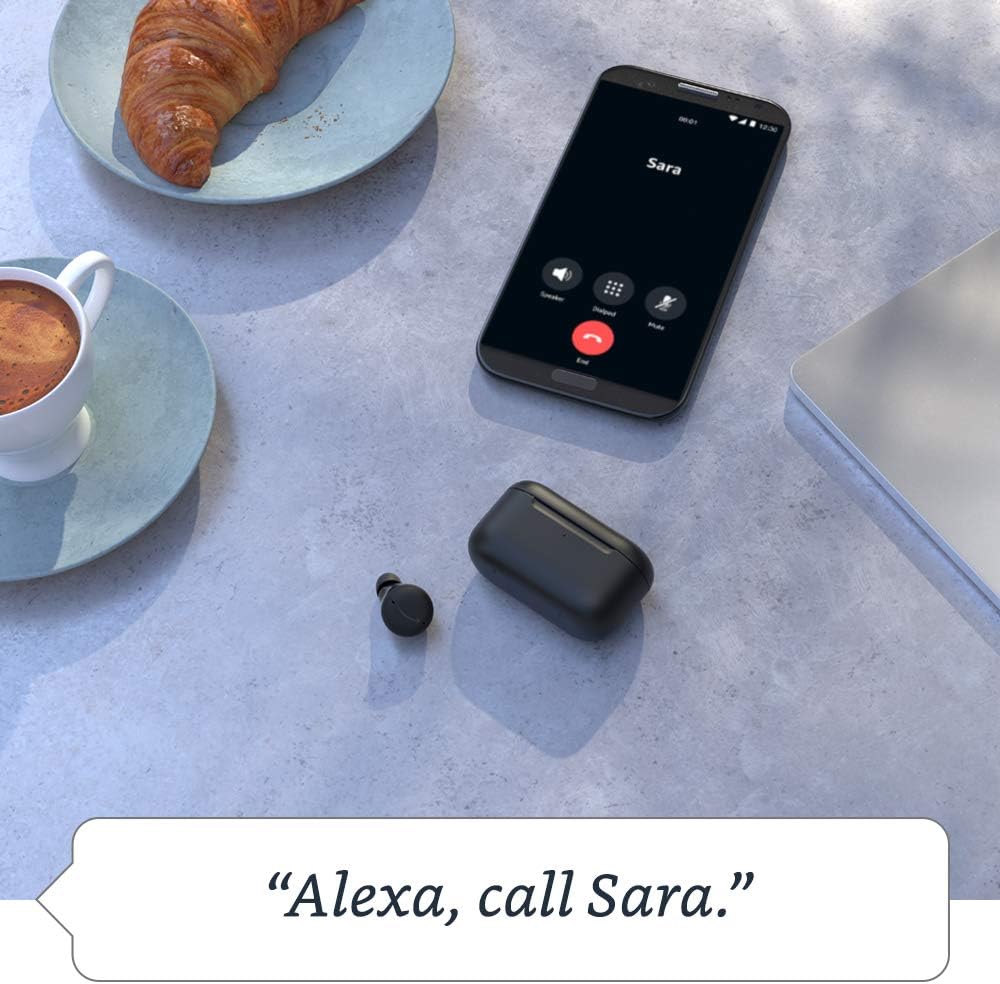
Image: An Echo Buds charging case resting on a wireless charging pad, positioned on a wooden desk alongside an Echo Show device, illustrating charging capabilities.
6. ການແກ້ໄຂບັນຫາ
6.1 ບັນຫາທົ່ວໄປ ແລະການແກ້ໄຂ
- ບໍ່ມີສຽງ: Ensure earbuds are charged, properly seated in ears, and connected via Bluetooth. Check volume levels on your device.
- ບັນຫາການຈັບຄູ່: Ensure earbuds are in pairing mode (blue pulsing light). Turn Bluetooth off and on again on your device. Try forgetting the device and re-pairing.
- Active Noise Cancellation ບໍ່ເຮັດວຽກ: Ensure a proper seal with the correct ear tips. Verify ANC is enabled in the Alexa app or via touch controls.
- ບັນຫາໄມໂຄຣໂຟນ: Ensure earbuds are clean and not obstructed. Check microphone settings in the Alexa app.
6.2 Resetting Echo Buds
If issues persist, you may need to reset your Echo Buds. Refer to the Alexa app for specific instructions on how to perform a factory reset, as the process may vary slightly.

Image: A smartphone displaying the Alexa app interface, showing the battery percentage of the left and right Echo Buds and the charging case, along with options for ANC and muting microphones.
7. ຂໍ້ມູນຈໍາເພາະ
| ຄຸນສົມບັດ | ຂໍ້ມູນຈໍາເພາະ |
|---|---|
| ຂະ ໜາດ ຫູຟັງ | 20.0 x 19.1 x 19.1 mm (without ear tip or wing tip) |
| ຂະໜາດຂອງກໍລະນີ | 66.8 x 28.6 x 39.1 ມມ |
| ນ້ ຳ ໜັກ ຕຸ້ມຫູ | 5.7 g (without ear tip or wing tip) |
| ນ້ຳໜັກກໍລະນີ | 44.4 g (47.6 g for wireless charging case) |
| ການເຊື່ອມຕໍ່ | Bluetooth 5.0, Wi-Fi or mobile data via Alexa app |
| ໂຮງງານຜະລິດ | Realtek RTL8763C Bluetooth System on Chip, NXP Digital Signal Processor |
| ລໍາໂພງ | ໄດເວີ 5.7 ມມ |
| ໄມໂຄຣໂຟນ | 3 per earbud (2 external beamforming, 1 internal) |
| ການຕໍ່ຕ້ານນ້ໍາ | IPX4 (ຫູຟັງຫູຟັງເທົ່ານັ້ນ) |
| ເຊັນເຊີ | Accelerometer, proximity, touch, hall (case) |
| ອາຍຸແບັດເຕີຣີ (ANC ເປີດ) | Up to 5 hours music playback (15 hours total with case) |
| ອາຍຸແບັດເຕີຣີ (ANC ປິດ) | Up to 6.5 hours music playback (19.5 hours total with case) |
| ສາກດ່ວນ | 15-min charge provides up to 2 hours music playback |
| ການສາກໄຟໄຮ້ສາຍ | Qi-certified wireless charging pads compatible (with wireless charging case) |
| ຄຸນສົມບັດຄວາມເປັນສ່ວນຕົວ | Wake word technology, streaming indicator, mute button in Alexa app, voice recording management |
8. ການຮັບປະກັນແລະການສະຫນັບສະຫນູນ
8.1 ການຮັບປະກັນຈໍາກັດ
Your Amazon Echo Buds come with a 1-year limited warranty and service. Optional extended warranties (1-year, 2-year, and 3-year) may be available for purchase separately in the U.S. Use of Echo Buds is subject to these terms.
8.2 ສະຫນັບສະຫນູນລູກຄ້າ
For further assistance, troubleshooting, or warranty claims, please visit the Amazon support website or contact Amazon customer service directly. The Alexa app also provides resources and diagnostic tools.


