1. ການຕິດຕັ້ງແລະການຕິດຕັ້ງ
1.1 ເນື້ອໃນຊຸດ
ກ່ອນການຕິດຕັ້ງ, ໃຫ້ກວດສອບວ່າອົງປະກອບທັງໝົດມີຢູ່ໃນຊຸດ:
- CAMECHO Android 10.0 Car Stereo Unit
- ສາຍໄຟ
- USB Cables (2x)
- GPS Antenna
- ສາຍ RCA ຂາເຂົ້າ/ຂາອອກ
- ຫລັງ View Camera (Waterproof with 12 IR lights)
- Stents (Mounting Brackets)
- ຄູ່ມືຜູ້ໃຊ້

ຮູບພາບ: ຫຼາຍກວ່າview of included accessories such as USB cables, power cable, GPS antenna, camera input cable, RCA input/output cables, mounting stents, and the user manual.
1.2 Unit Dimensions and Installation
The main unit is a double DIN car stereo with a 9.7-inch vertical touchscreen. Ensure your vehicle's dashboard opening is compatible with the unit's dimensions.
- ຂະໜາດຫົວໜ່ວຍ: 21.8(L) x 22.2(H) x 5(D) cm
- ຂະໜາດໜ້າຈໍ: 9.7 ນິ້ວ

Image: Detailed diagram illustrating the physical dimensions of the car stereo unit and a visual comparison of horizontal versus vertical screen installation effects in a vehicle dashboard.
1.3 ແຜນວາດສາຍ
Connect the power, speaker, and accessory wires according to the provided wiring diagram. Incorrect wiring can damage the unit or your vehicle's electrical system. Consult a professional if you are unsure about any connections.
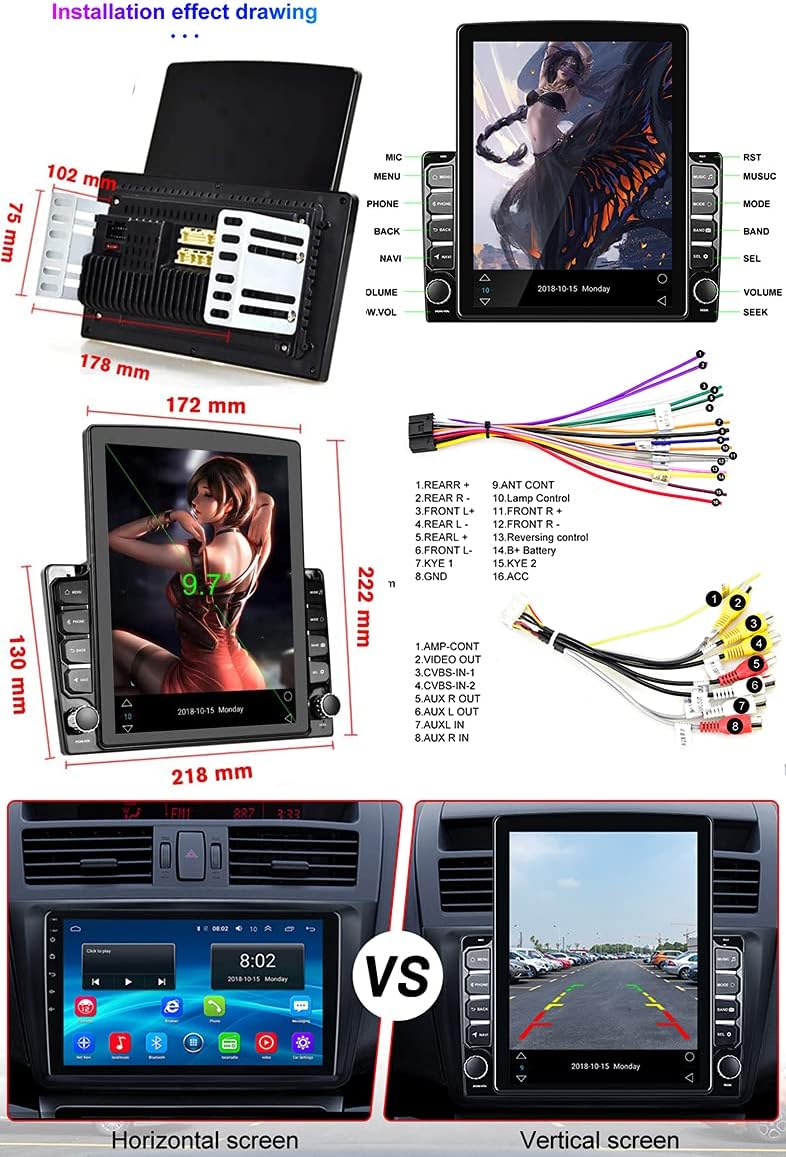
Image: Comprehensive wiring diagram indicating connections for power, speakers, camera input, USB, and other peripheral devices.
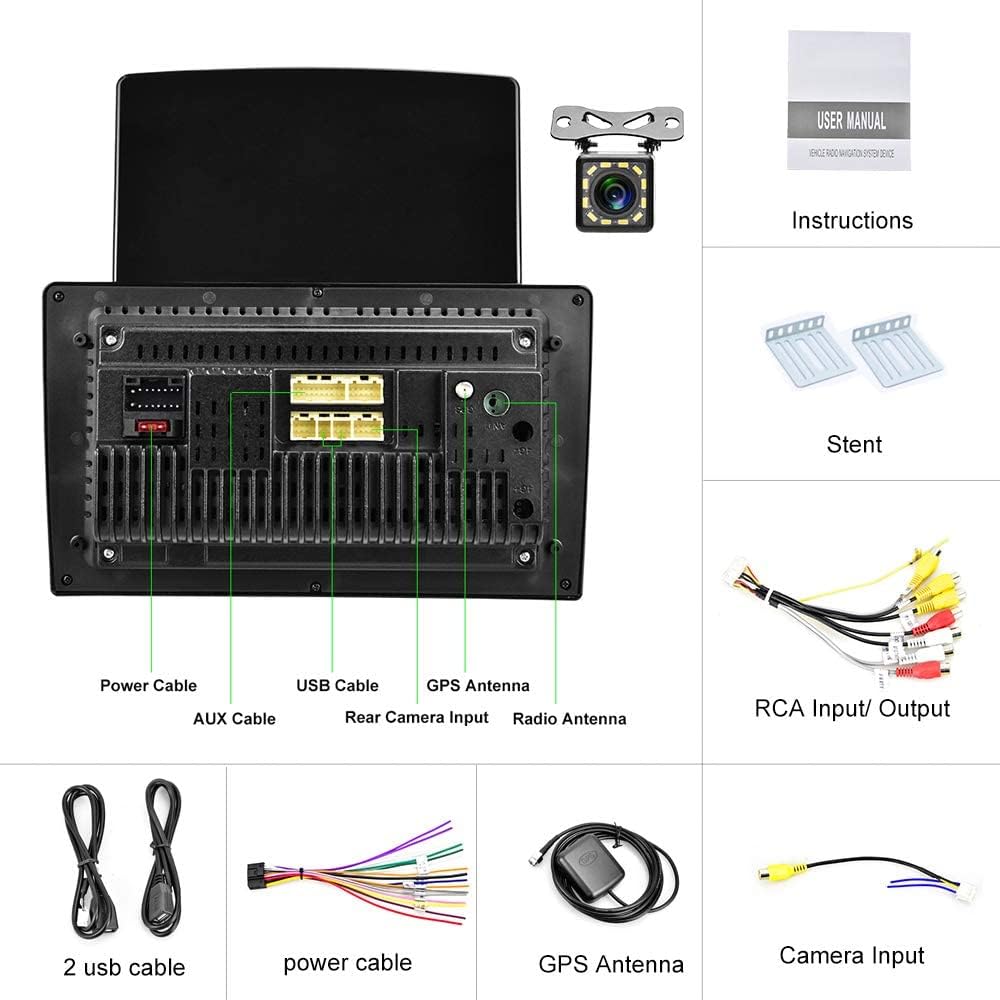
ຮູບພາບ: ດ້ານຫລັງ view of the car stereo unit, highlighting the various input and output ports including power, USB, GPS antenna, and rear camera input.
2. ຄໍາແນະນໍາການດໍາເນີນງານ
2.1 ການດໍາເນີນງານພື້ນຖານ
- ເປີດ/ປິດ: Press and hold the power button (usually labeled 'VOL' or 'PWR') on the unit's front panel.
- ການຄວບຄຸມລະດັບສຽງ: Use the physical volume knob on the unit or the touchscreen controls.
- ໜ້າຈໍສຳຜັດ: Navigate the Android interface by tapping, swiping, and pinching on the 9.7-inch capacitive touchscreen.
2.2 ການທໍາງານ Bluetooth
The unit supports Bluetooth 4.0 for hands-free calling and A2DP for high-quality music streaming. Pair your smartphone to the car stereo to access these features.
- ການຈັບຄູ່: ໄປທີ່ການຕັ້ງຄ່າ Bluetooth ໃນເຄື່ອງສຽງລົດ ແລະ ໂທລະສັບຂອງທ່ານ. ຊອກຫາ available devices and select 'CAMECHO' (or similar device name). Confirm the pairing code if prompted.
- ໂທຟຣີ: Once paired, you can make and receive calls directly from the car stereo. The phone book can be synchronized automatically.
- ການຫຼິ້ນເພງ: Stream audio from your phone to the car stereo via Bluetooth.

Image: The car stereo's screen showing the Bluetooth interface, demonstrating hands-free calling and music streaming capabilities, alongside a smartphone displaying an active call.
2.3 GPS Navigation
The unit comes with pre-installed navigation software. You can use online navigation via WiFi or download offline maps.
- ການນໍາທາງອອນໄລນ໌: Connect to a WiFi hotspot to use online mapping services.
- ແຜນທີ່ອອບໄລນ໌: The unit includes a map APK named "Here wego". Download free maps manually for offline use. Older versions may have iGo/Sygic maps pre-installed.

Image: The car stereo's screen showing a detailed GPS navigation map, indicating its navigational capabilities.
2.4 ການເຊື່ອມຕໍ່ WiFi
Connect the car stereo to a WiFi network to access online features, download apps, and browse the internet.
- ການເຊື່ອມຕໍ່ກັບ WiFi: Go to Settings > Network & Internet > Wi-Fi. Select your desired network and enter the password.
- ການຕິດຕັ້ງແອັບ: Once connected, you can install various Android applications from the app store.

Image: The car stereo's screen showcasing a grid of application icons, demonstrating the unit's WiFi connectivity and ability to run various Android apps.
2.5 ຟັງຊັນ Mirror Link
Mirror Link allows you to display your smartphone's screen on the car stereo. This feature supports both iOS and Android devices.
- ອຸປະກອນ iOS: Connect via WiFi for one-way projection (phone to stereo).
- ອຸປະກອນ Android: Connect via WiFi or USB data cable for two-way connection (control phone from stereo, and vice-versa).

Image: The car stereo's screen mirroring content from a smartphone, illustrating the Mirror Link function with a video playing simultaneously on both devices.
2.6 FM / RDS Radio
Tune into your favorite radio stations. The RDS function provides additional information like station name, song title, and traffic announcements.
- ປບັ: Use the touchscreen interface to scan for stations or manually enter frequencies.
- RDS: Radio Data System automatically displays relevant information when available.

Image: The car stereo's screen showing the FM radio interface, including the current frequency and RDS (Radio Data System) information.
2.7 ດ້ານຫຼັງ View ການປ້ອນຂໍ້ມູນກ້ອງຖ່າຍຮູບ
The included waterproof rear view ກ້ອງຖ່າຍຮູບຈະສະແດງດ້ານຫຼັງໂດຍອັດຕະໂນມັດ view on the stereo screen when the vehicle is put into reverse gear, assisting with parking.
- ການຕິດຕັ້ງ: Connect the camera to the dedicated 'Rear Camera Input' port on the stereo unit and ensure proper power connection.
- ຈໍສະແດງຜົນອັດຕະໂນມັດ: The screen will automatically switch to the camera view ເມື່ອເກຍປີ້ນກັບກັນ.

Image: The car stereo's screen displaying the live feed from the rear view camera, complete with parking guidelines, as seen in a parking lot scenario.
2.8 ການຄວບຄຸມພວງມາໄລ
The unit supports steering wheel control, allowing you to manage audio and other functions without taking your hands off the wheel. This requires proper wiring and configuration.

Image: The car stereo's screen displaying the settings menu for configuring steering wheel controls, allowing users to map functions to their vehicle's steering wheel buttons.
2.9 Color Button Light
Customize the color of the physical buttons on the unit to match your vehicle's interior lighting or your personal preference.

Image: The car stereo's screen displaying the interface for customizing the color of the physical buttons, featuring a color palette and adjustment sliders.
2.10 ການຫຼີ້ນວີດີໂອຄືນ
The unit supports video playback. Ensure video files are in a compatible format. You can play videos from USB drives or through Mirror Link.
Video: A demonstration of the car stereo's multimedia capabilities, likely showing the user interface or a feature in action.
3. ບໍາລຸງຮັກສາ
3.1 ການທໍາຄວາມສະອາດຫນ່ວຍງານ
ເພື່ອຮັກສາປະສິດທິພາບແລະຮູບລັກສະນະທີ່ດີທີ່ສຸດ:
- Use a soft, dry cloth to wipe the screen and unit exterior.
- ສໍາລັບ smudges stubborn, ເລັກນ້ອຍ dampເຊັດຜ້າດ້ວຍນ້ຳ ຫຼື ນ້ຳຢາທຳຄວາມສະອາດທີ່ໃຊ້ກັບໜ້າຈໍໄດ້.
- Avoid using abrasive cleaners, solvents, or harsh chemicals, as these can damage the screen and finish.
3.2 ການປັບປຸງຊອບແວ
Periodically check for software updates to ensure your unit has the latest features and bug fixes. Updates are typically available through the manufacturer's website or via an over-the-air (OTA) update if the unit is connected to WiFi.
4. ການແກ້ໄຂບັນຫາ
If you encounter issues with your CAMECHO car stereo, refer to the following common problems and solutions:
| ບັນຫາ | ສາເຫດທີ່ເປັນໄປໄດ້ | ການແກ້ໄຂ |
|---|---|---|
| ບໍ່ມີພະລັງງານ | ສາຍໄຟບໍ່ຖືກຕ້ອງ, ຟິວເປົ່າ, ບັນຫາຫມໍ້ໄຟລົດ. | Check power connections (ACC, B+, GND). Verify vehicle fuses. Ensure battery is charged. |
| ບໍ່ມີສຽງ | ສາຍລຳໂພງຖືກຕັດການເຊື່ອມຕໍ່, ລະດັບສຽງຕ່ຳເກີນໄປ, ແຫຼ່ງສຽງບໍ່ຖືກຕ້ອງ. | Check speaker wiring. Increase volume. Select correct audio source (FM, Bluetooth, USB). |
| ບັນຫາການເຊື່ອມຕໍ່ Bluetooth | ບໍ່ສາມາດຄົ້ນພົບໂທລະສັບໄດ້, ການຈັບຄູ່ບໍ່ຖືກຕ້ອງ, ການລົບກວນ. | ກວດໃຫ້ແນ່ໃຈວ່າ Bluetooth ເປີດຢູ່ໃນອຸປະກອນທັງສອງ. ລຶບການຈັບຄູ່ກ່ອນໜ້າ ແລະຈັບຄູ່ຄືນໃໝ່. ຍ້າຍໄປໃກ້ກັບຫນ່ວຍບໍລິການ. |
| GPS ບໍ່ເຮັດວຽກ / ບໍ່ຖືກຕ້ອງ | ເສົາອາກາດ GPS ບໍ່ເຊື່ອມຕໍ່, ສັນຍານບໍ່ດີ, ແຜນທີ່ລ້າສະໄຫມ. | Ensure GPS antenna is securely connected and placed in an unobstructed location. Update maps if necessary. |
| ກ້ອງຫຼັງບໍ່ສະແດງ | Camera wiring issue, reverse trigger wire not connected. | Verify camera video input and power connections. Ensure the reverse trigger wire is correctly connected to the vehicle's reverse light circuit. |
| Unit Unstable in Dash | Improper mounting, missing cage. | Ensure the provided brackets are securely fastened to the unit and the vehicle's dash. If a mounting cage is required for your vehicle, it may need to be purchased separately. |
ຖ້າບັນຫາຍັງຄົງຢູ່ຫຼັງຈາກພະຍາຍາມແກ້ໄຂເຫຼົ່ານີ້, ກະລຸນາຕິດຕໍ່ຝ່າຍຊ່ວຍເຫຼືອລູກຄ້າ.
5. ຂໍ້ມູນຈໍາເພາະ
| ຄຸນສົມບັດ | ລາຍລະອຽດ |
|---|---|
| ຍີ່ຫໍ້ | CAMECHO |
| ໝາຍເລກຕົວແບບ | Pantalla 9,7 Pulgadas |
| ລະບົບປະຕິບັດການ | Android 10.0 |
| ຂະໜາດໜ້າຈໍ | 9.7 ນິ້ວ |
| ປະເພດການສະແດງ | Capacitive Touchscreen, Vertical Display |
| ເຕັກໂນໂລຊີການເຊື່ອມຕໍ່ | Bluetooth, WiFi, USB, FM Radio |
| ລຸ້ນ Bluetooth | 4.0 (ພ້ອມ A2DP) |
| GPS ນໍາທາງ | Supports online/offline maps (e.g., Here wego, iGo/Sygic) |
| Mirror Link | Supports iOS (one-way) and Android (two-way) |
| ເຄື່ອງຮັບສັນຍານວິທະຍຸ | FM with RDS |
| ການປ້ອນຂໍ້ມູນກ້ອງຫຼັງ | Yes, includes waterproof camera with 12 IR lights |
| ຮູບແບບການອອກສຽງ | Stereo, Subwoofer output support |
| ຈໍານວນຊ່ອງ | 4 |
| ພະລັງງານຜົນຜະລິດ | 45 ວັດ |
| ສີ | ດຳ |
| ຂະໜາດສິນຄ້າ (L x W x H) | 25 x 4 x 14.5 cm |
| ນ້ໍາຫນັກລາຍການ | 1.63 ກິໂລກຣາມ |
6. ການຮັບປະກັນແລະການສະ ໜັບ ສະ ໜູນ
6.1 ການຮັບປະກັນຂອງຜູ້ຜະລິດ
This CAMECHO car stereo unit comes with a ການຮັບປະກັນຂອງຜູ້ຜະລິດ 1 ປີ. ການຮັບປະກັນນີ້ກວມເອົາຂໍ້ບົກພ່ອງຂອງວັດສະດຸແລະການເຮັດວຽກພາຍໃຕ້ການນໍາໃຊ້ປົກກະຕິ. ກະລຸນາຮັກສາຫຼັກຖານການຊື້ຂອງທ່ານສໍາລັບການຮຽກຮ້ອງການຮັບປະກັນ.
The availability of spare parts is currently unavailable. Software updates are not guaranteed beyond the initial release.
6.2 ສະຫນັບສະຫນູນລູກຄ້າ
For technical assistance, warranty claims, or further inquiries, please contact CAMECHO customer support through the retailer where the product was purchased or refer to the official CAMECHO webເວັບໄຊສໍາລັບຂໍ້ມູນຕິດຕໍ່.
When contacting support, please have your product model number (Pantalla 9,7 Pulgadas) and purchase date ready.