1. ບົດແນະນຳ
This manual provides instructions for the ZdalaMit Replacement Remote Control, model 101018E0055. This remote is designed to be compatible with various JVC Roku Smart TV models, offering a direct replacement without the need for complex programming. Its ergonomic design ensures comfortable handling.
Compatible JVC Roku TV Models include:
- LT-49MAW598
- LT-55MAW595
- LT-32MAW388
- LT-65MAW595
- LT-32MAW205
- LT-43MAW595
- LT-70MAW795
- LT-50MAW595
2. ຕັ້ງຄ່າ
The ZdalaMit Replacement Remote Control requires no programming or pairing. Simply install the batteries, and it will be ready for immediate use with your compatible JVC Roku Smart TV.
2.1 ການຕິດຕັ້ງຫມໍ້ໄຟ
- ຊອກຫາຝາປິດຊ່ອງໃສ່ຫມໍ້ໄຟຢູ່ດ້ານຫຼັງຂອງຣີໂໝດຄວບຄຸມ.
- ເລື່ອນຝາປິດລົງລຸ່ມ ຫຼືກົດປຸ່ມ ແລະຍົກເພື່ອເປີດຊ່ອງໃສ່.
- Insert two (2) new 1.5V AAA alkaline batteries, ensuring the positive (+) and negative (-) terminals match the diagrams inside the compartment.
- ປ່ຽນຝາປິດຊ່ອງໃສ່ແບັດເຕີລີໂດຍການເລື່ອນມັນກັບຄືນໃສ່ບ່ອນເກົ່າຈົນກວ່າມັນຈະກົດຢ່າງປອດໄພ.

ຮູບພາບ: ມຸມ view of the ZdalaMit Replacement Remote Control, highlighting its buttons and ergonomic shape. The battery compartment is located on the back.
ໝາຍເຫດ: Batteries are not included with the remote control. Always use new alkaline batteries for optimal performance.
3. ການດໍາເນີນງານ
This section describes the functions of the buttons on your ZdalaMit Replacement Remote Control.
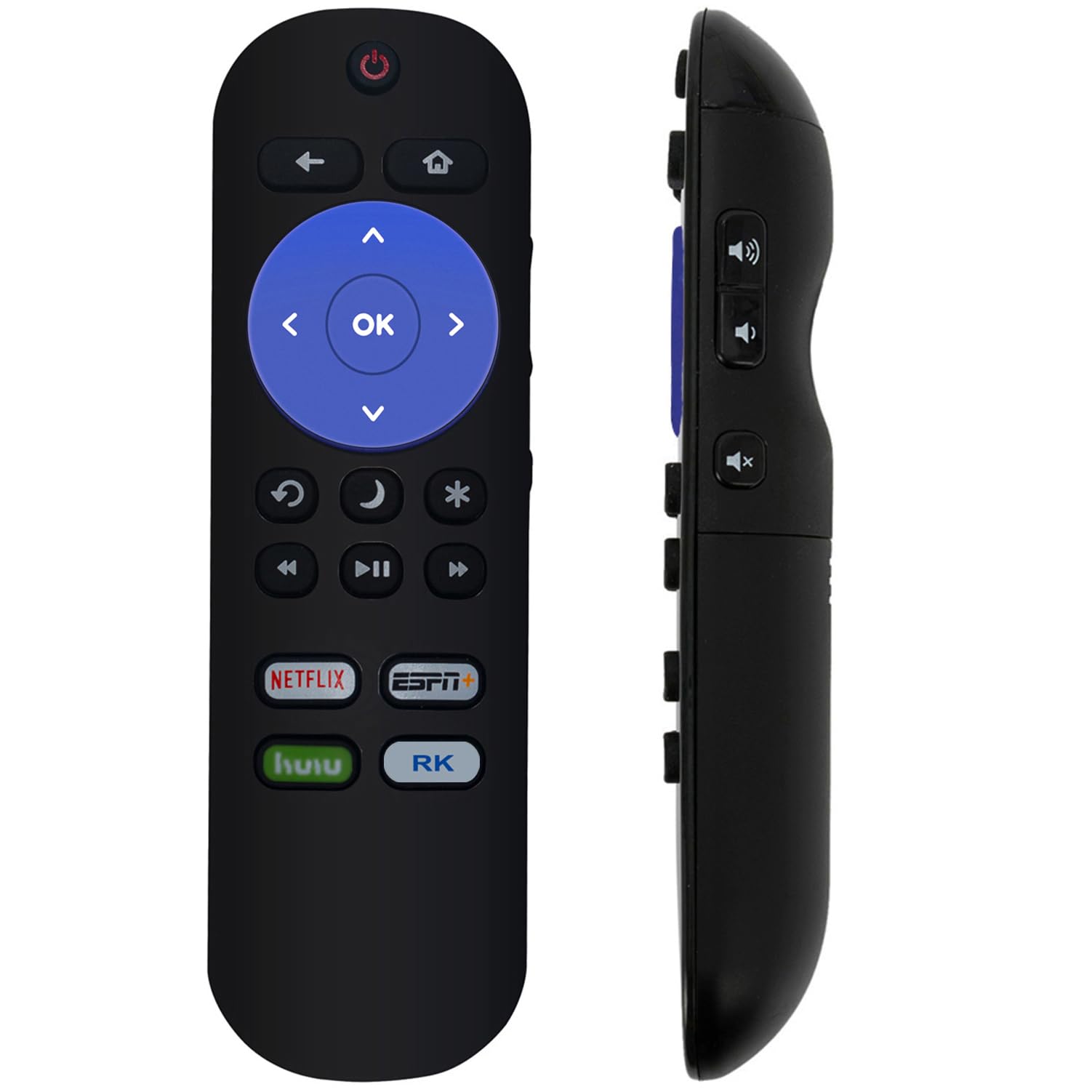
ຮູບພາບ: ທາງຫນ້າ view of the ZdalaMit Replacement Remote Control, displaying all functional buttons.
| ປຸ່ມ | ຟັງຊັນ |
|---|---|
| ພະລັງງານ (⏻) | ເປີດ ຫຼືປິດໂທລະພາບ. |
| ກັບຄືນໄປບ່ອນ (↶) | ກັບຄືນໄປຫາໜ້າຈໍ ຫຼືເມນູກ່ອນໜ້າ. |
| ຫນ້າທໍາອິດ (⌂) | Navigates to the Roku Home screen. |
| ແຜ່ນທິດທາງ (ຂຶ້ນ, ລົງ, ຊ້າຍ, ຂວາ) | ນຳທາງຜ່ານເມນູ ແລະເນື້ອຫາ. |
| OK | ຢືນຢັນການເລືອກ. |
| ຖອຍຫຼັງ (⏮) | Rewinds video playback. |
| ຫຼິ້ນ/ຢຸດ (⏯) | Plays or pauses video playback. |
| ໄປໄວ (⏭) | Fast forwards video playback. |
| Replay (↻) | Replays the last few seconds of content. |
| ນອນ (🌙) | ເປີດໃຊ້ງານຟັງຊັນຕັ້ງເວລານອນຂອງໂທລະພາບ. |
| Star (✱) | Accesses options or settings within certain apps. |
| Netflix | ເຂົ້າເຖິງແອັບພລິເຄຊັນ Netflix ໂດຍກົງ. |
| ESPN+ | Direct access to the ESPN+ application. |
| ຮູລູ | Direct access to the Hulu application. |
| RK (Roku Channel) | Direct access to The Roku Channel application. |
4. ບໍາລຸງຮັກສາ
4.1 ການທົດແທນຫມໍ້ໄຟ
Replace batteries when the remote's response becomes sluggish or stops working. Refer to section 2.1 for battery installation instructions. Always replace both batteries simultaneously with new 1.5V AAA alkaline batteries.
4.2 ການທໍາຄວາມສະອາດ
ເພື່ອເຮັດຄວາມສະອາດເຄື່ອງຄວບຄຸມໄລຍະໄກ, ຄ່ອຍໆເຊັດພື້ນຜິວຂອງມັນດ້ວຍຜ້າອ່ອນໆ, ແຫ້ງ. ສໍາລັບຝຸ່ນ stubborn, ເລັກນ້ອຍ dampen ຜ້າທີ່ມີນ້ໍາ. ຫຼີກເວັ້ນການໃຊ້ສານເຄມີທີ່ຮຸນແຮງ, ເຄື່ອງເຮັດຄວາມສະອາດຂັດ, ຫຼືຄວາມຊຸ່ມຊື່ນຫຼາຍເກີນໄປ, ເພາະວ່າສິ່ງເຫຼົ່ານີ້ສາມາດທໍາລາຍຫ່າງໄກສອກຫຼີກ.
4.3 ການເກັບຮັກສາ
ເກັບຮັກສາເຄື່ອງຄວບຄຸມໄລຍະໄກໄວ້ໃນບ່ອນທີ່ເຢັນ, ແຫ້ງ, ຫ່າງຈາກແສງແດດໂດຍກົງແລະອຸນຫະພູມທີ່ຮຸນແຮງ. ຖ້າຫ່າງໄກສອກຫຼີກຈະບໍ່ຖືກໃຊ້ເປັນໄລຍະເວລາ, ແນະນໍາໃຫ້ຖອດຫມໍ້ໄຟອອກເພື່ອປ້ອງກັນການຮົ່ວໄຫຼແລະຄວາມເສຍຫາຍທີ່ອາດເກີດຂື້ນ.
5. ການແກ້ໄຂບັນຫາ
| ບັນຫາ | ສາເຫດທີ່ເປັນໄປໄດ້ | ການແກ້ໄຂ |
|---|---|---|
| ໄລຍະໄກບໍ່ຕອບສະໜອງ. | ແບັດເຕີຣີຕາຍ ຫຼື ຕິດຕັ້ງບໍ່ຖືກຕ້ອງ. | Replace batteries with new 1.5V AAA alkaline batteries, ensuring correct polarity. |
| ຣີໂໝດມີຂອບເຂດຈຳກັດ ຫຼື ການຕອບສະໜອງບໍ່ຕໍ່ເນື່ອງ. | Weak batteries; Obstruction between remote and TV; Remote sensor on TV is blocked. | Replace batteries. Ensure a clear line of sight between the remote and the TV. Remove any objects blocking the TV's remote sensor. |
| ປຸ່ມສະເພາະບໍ່ເຮັດວຽກ. | Dirt or debris under the button; Remote malfunction. | Clean the remote as described in section 4.2. If the issue persists, the remote may need replacement. |
| ຣີໂໝດບໍ່ສາມາດຄວບຄຸມໂທລະພາບໄດ້. | Incompatible TV model; Remote malfunction. | Verify your JVC Roku TV model is listed in the compatible models section (Section 1). If compatible and troubleshooting steps above fail, contact support. |
6. ຂໍ້ມູນຈໍາເພາະ
| ໝາຍເລກຕົວແບບ | 101018E0055 |
| ຍີ່ຫໍ້ | ZdalaMit |
| ອຸປະກອນທີ່ເຂົ້າກັນໄດ້ | JVC Roku Smart Televisions (Specific models listed in Section 1) |
| ການສະຫນອງພະລັງງານ | 2 x 1.5V AAA Alkaline Batteries |
| ຂະໜາດສິນຄ້າ | 5 x 1.2 x 0.5 ນິ້ວ (ໂດຍປະມານ) |
| ນ້ໍາຫນັກລາຍການ | 1.41 ອອນສ໌ (ປະມານ) |
| ສີ | ດຳ |
| ຄຸນນະສົມບັດພິເສດ | ການອອກແບບ Ergonomic |
7. ສະຫນັບສະຫນູນ
If you encounter any issues not covered in this manual or require further assistance, please contact the seller or manufacturer for support. Refer to your purchase documentation for specific contact details.


