1. ຜະລິດຕະພັນເກີນview
The Baseus Heyo Rotation Countdown Timer is a versatile digital timer designed for various scenarios, including kitchen cooking, study, work, and exercise. It features an intuitive rotary adjustment, a clear LCD display, and intelligent energy-saving functions.

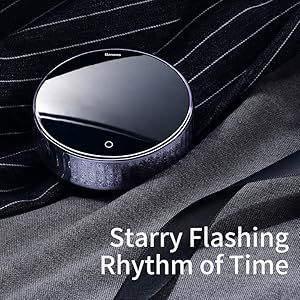
ຮູບພາບ 1.1: ດ້ານຫນ້າ view of the Baseus Heyo Rotation Countdown Timer, showcasing its sleek design and clear digital display.
2. ຄຸນນະສົມບັດທີ່ສໍາຄັນ
- Intuitive Rotary Adjustment: Easily set time by rotating the outer ring, supporting both countdown and count-up functions.
- Clear LCD Digital Display: Large, easy-to-read numbers for minutes and seconds.
- ລະດັບສຽງທີ່ສາມາດປັບໄດ້: Three volume settings (Loud, Low, Mute) to suit different environments.
- ການປະຢັດພະລັງງານອັດສະລິຍະ: The display dims after 5 seconds of inactivity and shuts down after another 5 seconds to conserve battery life.
- ສະນະແມ່ເຫຼັກ: Allows for convenient placement on metallic surfaces like refrigerators or whiteboards.
- ວັດສະດຸທົນທານ: Constructed from Acrylonitrile Butadiene Styrene for longevity.
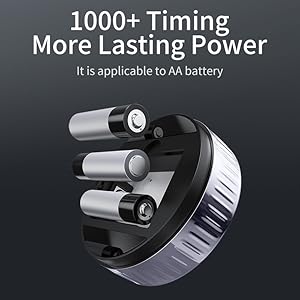
Image 2.1: Demonstrates the easy rotation mechanism for efficient timing adjustments.

Image 2.2: Illustrates the adjustable volume settings located on the back of the timer.
3. ຕັ້ງຄ່າ
3.1. ເນື້ອໃນຊຸດ
- Baseus Heyo Rotation Countdown Timer (1 unit)
- ຄູ່ມືຜູ້ໃຊ້ (ເອກະສານນີ້)
- ໝາຍເຫດ: ໝໍ້ໄຟ AAA ບໍ່ໄດ້ລວມເອົາ ແລະຕ້ອງໄດ້ຊື້ແຍກຕ່າງຫາກ.
3.2. ການຕິດຕັ້ງຫມໍ້ໄຟ
- ຊອກຫາຊ່ອງໃສ່ຫມໍ້ໄຟຢູ່ດ້ານຫຼັງຂອງເຄື່ອງຈັບເວລາ.
- ເປີດຝາປິດຫມໍ້ໄຟ.
- ໃສ່ຫມໍ້ໄຟ AAA ສາມ (3) ໜ່ວຍ, ຮັບປະກັນການຂົ້ວທີ່ຖືກຕ້ອງ (+/-).
- Close the battery cover securely. The LCD display will light up, indicating successful installation.
ຮູບພາບ 3.1: View of the battery compartment, showing where to insert three AAA batteries.
4. ຄໍາແນະນໍາການດໍາເນີນງານ
4.1. ເປີດ/ປິດ
The timer automatically powers on when batteries are installed. It enters an energy-saving mode after 5 seconds of inactivity and fully shuts down after another 5 seconds of no operation. To reactivate, simply rotate the dial or press the "O" button.
4.2. Setting the Timer (Countdown)
- ປັບເວລາ: Rotate the outer ring clockwise to increase the time (minutes and seconds) and counter-clockwise to decrease it. The adjustable range is 00:00 to 99:55.
- Start Countdown: Once the desired time is set, press the "O" button on the front of the timer to begin the countdown.
- ຢຸດຊົ່ວຄາວ/ສືບຕໍ່: Press the "O" button again during a countdown to pause it. Press it once more to resume.
- ຕັ້ງຄ່າ ໃໝ່: To reset the timer to 00:00, press and hold the "O" button for approximately 3 seconds.
- ໂມງປຸກ: When the countdown reaches 00:00, the timer will sound an alarm according to the selected volume setting.
4.3. Using as a Stopwatch (Count-up)
- Ensure the timer display is at 00:00. If not, reset it by holding the "O" button.
- Press the "O" button to start counting up from 00:00.
- Press the "O" button again to pause the count-up.
- Press and hold the "O" button to reset the stopwatch.
4.4. ປັບລະດັບສຽງ
On the back of the timer, there is a switch to adjust the alarm volume. Select from three modes:
- ດັງ: For noisy environments or when a strong alert is needed.
- ຕ່ຳ: For quiet environments or subtle alerts.
- ປິດສຽງ: The display will blink when the time is up, providing a silent notification. Ideal for libraries, offices, or study areas.
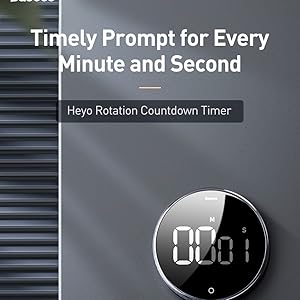
Image 4.1: The timer can be conveniently placed on magnetic surfaces for easy visibility.

Image 4.2: The timer is suitable for various settings, including professional and educational environments.
5. ບໍາລຸງຮັກສາ
- ທໍາຄວາມສະອາດ: ເຊັດໂມງຈັບເວລາດ້ວຍຜ້າອ່ອນໆແລະແຫ້ງ. ຢ່າໃຊ້ນໍ້າຢາທໍາຄວາມສະອາດທີ່ມີສານຂັດ ຫຼື ແຊ່ນໍ້າ.
- ການປ່ຽນແບັດເຕີຣີ: Replace batteries when the display becomes dim or the timer functions erratically. Always use new AAA batteries.
- ການເກັບຮັກສາ: Store the timer in a cool, dry place when not in use for extended periods. Remove batteries if storing for more than a month to prevent leakage.
- ຫຼີກລ້ຽງສະພາບທີ່ຮ້າຍແຮງ: Do not expose the timer to extreme temperatures, direct sunlight, or high humidity.
6. ການແກ້ໄຂບັນຫາ
| ບັນຫາ | ສາເຫດທີ່ເປັນໄປໄດ້ | ການແກ້ໄຂ |
|---|---|---|
| ຈໍສະແດງຜົນຫວ່າງເປົ່າ ຫຼືມືດ. | ຫມໍ້ໄຟຕ່ໍາຫຼືຕາຍ; ການຕິດຕັ້ງຫມໍ້ໄຟບໍ່ຖືກຕ້ອງ. | ປ່ຽນແບັດ AAA ໃໝ່, ຮັບປະກັນການຂົ້ວທີ່ຖືກຕ້ອງ. |
| ໂມງຈັບເວລາບໍ່ເລີ່ມ/ຢຸດ. | "O" button not pressed firmly; timer in sleep mode. | Press the "O" button firmly. Rotate the dial to wake the timer from sleep mode. |
| ໂມງປຸກບໍ່ມີສຽງ. | Volume set to Mute; low battery. | Check the volume switch on the back and set it to Loud or Low. Replace batteries if needed. |
| Numbers are incorrect or flickering. | Faulty unit; very low battery. | ປ່ຽນແບັດເຕີຣີ. ຖ້າບັນຫາຍັງຄົງຢູ່, ໃຫ້ຕິດຕໍ່ຫາຝ່າຍຊ່ວຍເຫຼືອລູກຄ້າ. |
7. ຂໍ້ມູນຈໍາເພາະ
- ໝາຍເລກຕົວແບບ: ACDJS-01
- ຍີ່ຫໍ້: Baseus
- ວັດສະດຸ: Acrylonitrile Butadiene Styrene (ABS)
- ສີ: ດຳ
- ຂະໜາດ: ຂະໜາດ 5 cm (ເລິກ) x 5 cm (ກວ້າງ) x 3 cm (ສູງ)
- ນ້ໍາຫນັກລາຍການ: 150 ກຣາມ
- ຊ່ວງເວລາ: 00:00 - 99:55
- ແຫຼ່ງພະລັງງານ: 3 x ຫມໍ້ໄຟ AAA (ບໍ່ລວມ)
- ຈໍານວນການຕັ້ງຄ່າ: 4 (referring to volume settings and timing modes)
- ປະເທດຕົ້ນກໍາເນີດ: ຈີນ
- UPC: 738633769932
8. ການຮັບປະກັນແລະການສະຫນັບສະຫນູນ
Baseus products are manufactured with high-quality standards. For warranty information and customer support, please refer to the warranty card included with your purchase or visit the official Baseus webເວັບໄຊ. ກະລຸນາເກັບຮັກສາໃບຮັບການຊື້ຂອງທ່ານສໍາລັບການຮຽກຮ້ອງການຮັບປະກັນ.
ຜູ້ຜະລິດ: Baseus, Store2508, Dankuni, West Bengal
ຜູ້ນໍາເຂົ້າ / Packer: MP International - Authorised Distributor
For technical assistance or inquiries, please contact your local distributor or the seller.


