
ແນະນຳ
Thank you for choosing the LiNKFOR UHF Wireless Microphone System. This system is designed to provide clear, high-fidelity audio for various applications, including outdoor events, weddings, conferences, karaoke, and parties. With stable UHF signal transmission and high-sensitivity sound capture, it ensures an excellent audio experience. Please read this manual thoroughly before use to ensure proper operation and to maximize the product's lifespan.
ຂໍ້ມູນຄວາມປອດໄພ
- This package contains only the wireless microphone system. An additional audio device (speaker or amplifier) is required to output sound.
- The output volume depends on the power output of your speakers. We do not recommend using this microphone with speakers less than 15 watts.
- Do not use the microphone too close to the receiver to avoid sound interference.
- Keep the receiver away from metal objects or any digital devices (such as computers, mobile phones, etc.) to avoid potential sources of interference.
- Do not cover the microphone head with your hand, as this may damage it or affect performance.
- For optimal performance and to reduce plosives, we recommend using a foam cover on the microphone.
ເນື້ອໃນຊຸດ
ກະລຸນາກວດເບິ່ງແພັກເກດຢ່າງລະມັດລະວັງເພື່ອຮັບປະກັນວ່າສິນຄ້າທັງໝົດມີຢູ່:
- 1 x ໄມໂຄຣໂຟນໄຮ້ສາຍ
- ໄມໂຄຣໂຟນມືຖື 2 ອັນ
- ເສົາອາກາດ 2 x
- 1 x Batteries (AA, quantity 4 needed for microphones)
- ສາຍສຽງ 1 ເສັ້ນ (6.35 ມມ)
- 1 x Certified Power Adapter
- 1 x 3.5mm Male to 6.35mm Female Stereo Adapter
- 1 x ຄູ່ມືຜູ້ໃຊ້
ສິນຄ້າເກີນview
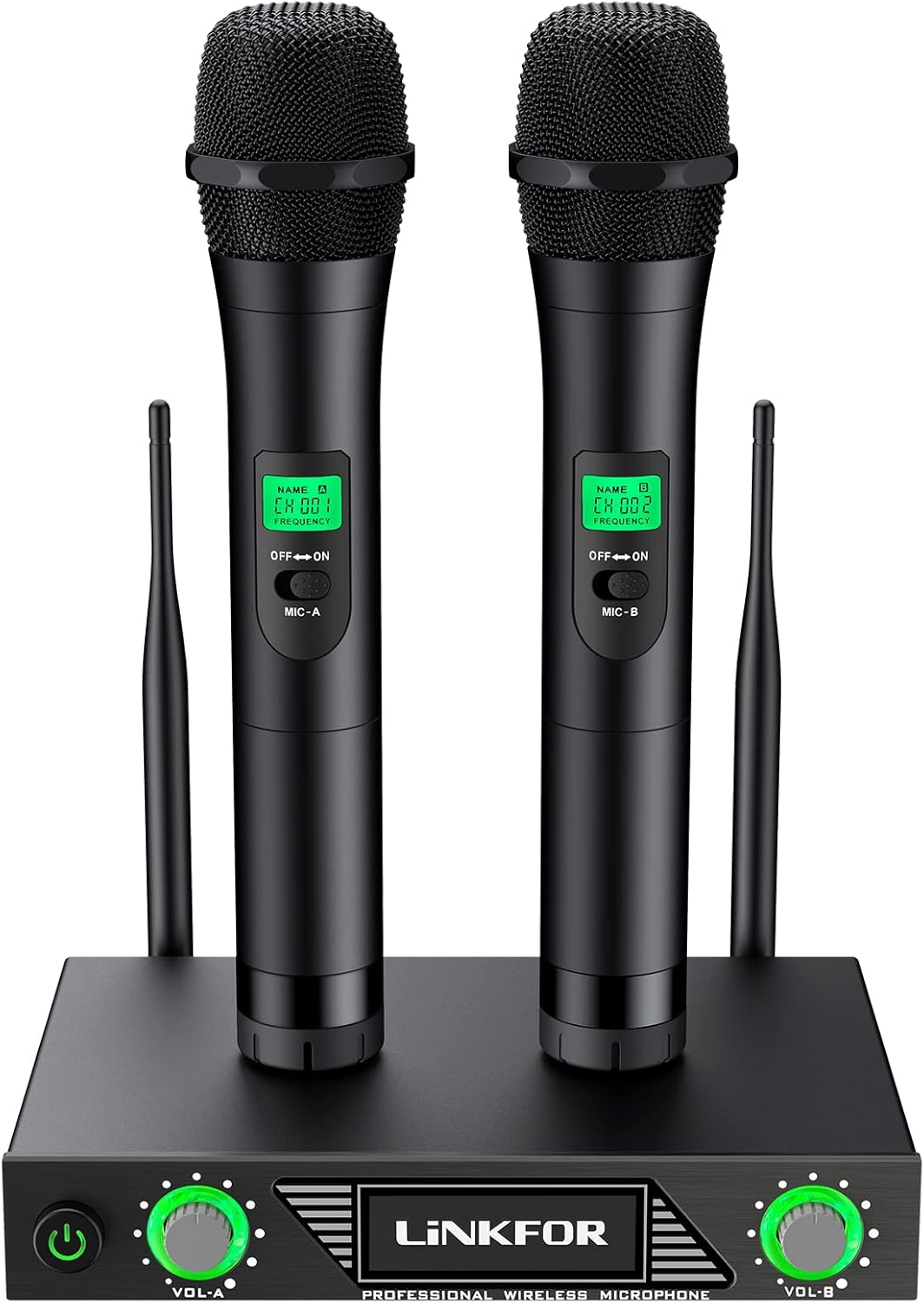
Figure 1: Complete LiNKFOR UHF Wireless Microphone System

ຮູບທີ 2: ລາຍລະອຽດ view of the receiver and microphones
ອົງປະກອບທີ່ສໍາຄັນ:
- ຕົວຮັບໄຮ້ສາຍ: The central unit that receives signals from the microphones. Features power button, volume controls (Vol-A, Vol-B), and input/output ports.
- ໄມໂຄຣໂຟນມືຖື: Two dynamic, non-directional microphones with ON/OFF switches and LCD displays showing channel/frequency.
- ເສົາອາກາດ: Two antennas for stable UHF signal reception.
- Power Adapter: For powering the receiver.
- Audio Cables/Adapters: For connecting the receiver to an ampລຳ ໂພງທີ່ມີຊີວິດຊີວາຫຼືມີການເຄື່ອນໄຫວ.
ຄໍາແນະນໍາການຕິດຕັ້ງ
Follow these steps to set up your LiNKFOR Wireless Microphone System:
- ພະລັງງານໃຫ້ຕົວຮັບ: Plug the receiver's power adapter into a power outlet and then into the receiver. Turn on the receiver.
- Connect to Audio Output: Use the provided audio cable to connect the receiver's output jack to the input jack of your amplifier ຫຼືລໍາໂພງທີ່ໃຊ້ວຽກ.
- If your speaker has a 3.5mm jack, use the included 6.35mm to 3.5mm adapter.
- Connect Background Audio (Optional): To play background music, connect your TV, PC, DVD, VOD, or other audio devices to your ampລຳ ໂພງທີ່ມີຊີວິດຊີວາຫຼືມີການເຄື່ອນໄຫວ.
- Connect External Speaker (If applicable): If using a passive speaker, connect it to your amplifier using an audio cable to produce sound. (Skip this step if using active speakers).
- ໃສ່ແບັດເຕີຣີໄມໂຄຣໂຟນ: Insert 2 AA batteries into each handheld microphone. Ensure correct polarity.
- ໄມໂຄຣໂຟນທີ່ເປີດ: Turn on the handheld microphones. They should automatically connect to the receiver.

Figure 3: User enjoying the wireless microphone system.
ຄໍາແນະນໍາການດໍາເນີນງານ
Once setup is complete, you can begin using your microphone system:
- ການປັບລະດັບສຽງ: Use the volume knobs on the receiver (Vol-A for Microphone A, Vol-B for Microphone B) to adjust the individual microphone volumes.
- ການນຳໃຊ້ໄມໂຄຣໂຟນ: ຖືໄມໂຄຣໂຟນໃຫ້ຫ່າງຈາກປາກຂອງທ່ານປະມານ 2-6 ນິ້ວເພື່ອໃຫ້ສາມາດຮັບສຽງໄດ້ດີທີ່ສຸດ.
- ເສລີພາບໃນການເຄື່ອນໄຫວ: The wireless design allows you to move freely within the transmission range (up to 60m, ideally 80m).
- ຄຸນະພາບສຽງ: The system is equipped with a sound filter and high-sensitivity sound head to effectively filter excessive external noise and capture strong, clear audio.

Figure 4: The system is suitable for various performance settings.
ບໍາລຸງຮັກສາ
- ທໍາຄວາມສະອາດ: ໃຊ້ຜ້າອ່ອນໆແຫ້ງເພື່ອທຳຄວາມສະອາດເຄື່ອງຮັບສັນຍານ ແລະ ໄມໂຄຣໂຟນ. ຢ່າໃຊ້ນ້ຳຢາທຳຄວາມສະອາດ ຫຼື ວັດສະດຸຂັດ.
- ການເກັບຮັກສາ: ເມື່ອບໍ່ໄດ້ໃຊ້ງານເປັນເວລາດົນ, ໃຫ້ຖອດແບັດເຕີຣີອອກຈາກໄມໂຄຣໂຟນ ແລະ ເກັບຮັກສາລະບົບໄວ້ໃນບ່ອນທີ່ເຢັນ ແລະ ແຫ້ງ.
- ຊີວິດຫມໍ້ໄຟ: The microphones offer a long battery life (typically 2 to 8 hours). Replace batteries when performance degrades.
ການແກ້ໄຂບັນຫາ
How to Avoid Interference:
- Microphone Proximity: Do not use the microphone too close to the receiver to prevent sound interference (feedback).
- ຕຳແໜ່ງຜູ້ຮັບ: Keep the receiver away from metal objects or any digital devices (e.g., computers, mobile phones) to avoid potential interference sources.
- ການຈັດການໄມໂຄຣໂຟນ: Do not cover the microphone head with your hand, as this can cause damage or affect sound quality.
- Low Volume/No Sound:
- Ensure the receiver is powered on and connected correctly to your amplifier / ລໍາໂພງ.
- Check if the microphones are turned on and have fresh batteries.
- Verify the volume levels on both the receiver and your amplifier / ລໍາໂພງ.
- ຢືນຢັນວ່າ amplifier/speaker has sufficient power (recommended 15 watts or more).
- ສຽງບິດເບືອນ:
- Reduce the microphone volume on the receiver or the ampມີຊີວິດຊີວາ.
- Ensure the microphone is not too close to your mouth or the speaker.
- Check for strong electromagnetic interference from other devices nearby.
ຂໍ້ມູນຈໍາເພາະ
| ຄຸນສົມບັດ | ຂໍ້ມູນຈໍາເພາະ |
|---|---|
| ຍີ່ຫໍ້ | LinkFOR |
| ໝາຍເລກຕົວແບບ | XUNVC467uk |
| ຕົວປະກອບແບບຟອມໄມໂຄຣໂຟນ | ມືຖື |
| ເຕັກໂນໂລຊີການເຊື່ອມຕໍ່ | UHF |
| ຊ່ວງຄວາມຖີ່ຂອງບັນທຸກ | 500-599 MHz |
| ຊ່ວງໄດນາມິກ | > 80 dB |
| TH.D at 1 KHz | < 0.5% |
| ການຕອບສະໜອງຄວາມຖີ່ | 40 Hz - 18 KHz (±3 dB) |
| ລະດັບສຽງອອກ | 0 ~ ±400mv (Mix), 0 ~ ±200mv (Individual) |
| ຊ່ວງອຸນຫະພູມ | -10 °C ຫາ 50 °C |
| ອັດຕາສ່ວນສັນຍານເຖິງສຽງດັງ | 80 dB |
| ຈໍານວນຊ່ອງ | 2 |
| ແຫຼ່ງພະລັງງານ | ໃຊ້ພະລັງງານຈາກແບັດເຕີຣີ (ໄມໂຄຣໂຟນ), ອະແດບເຕີ AC (ເຄື່ອງຮັບສັນຍານ) |
| Battery Type (Microphones) | AA (ຕ້ອງການ 4 ອັນ) |
| ວັດສະດຸ | ໂລຫະ |
| ນ້ໍາຫນັກລາຍການ | 1732 ກຣາມ |
| ຂະໜາດ (L x W x H) | 21 x 15.5 x 4.5 ຊັງຕີແມັດ |
| ການນໍາໃຊ້ທີ່ແນະນໍາ | ຄາຣາໂອເກະ |
ການຮັບປະກັນແລະການສະຫນັບສະຫນູນ
For warranty information and technical support, please refer to the contact details provided on the LiNKFOR official webເວັບໄຊ ຫຼືຕິດຕໍ່ຮ້ານຂາຍຍ່ອຍຂອງທ່ານ. ຮັກສາໃບຮັບເງິນການຊື້ຂອງທ່ານໄວ້ເປັນຫຼັກຖານການຊື້ສໍາລັບການຮຽກຮ້ອງການຮັບປະກັນໃດໆ.


