1. ບົດແນະນຳ
The Autopilot APCET2 is a versatile temperature controller designed for both cooling and heating applications. It features automatic day and night set points, detected by a built-in photocell, allowing for precise temperature management. Easy-to-use knobs facilitate setting adjustments, and a Memory-lock feature ensures consistent performance by preventing accidental changes to set points.
ຄຸນນະສົມບັດທີ່ສໍາຄັນ:
- Controls heating or cooling equipment with both day/night set points.
- Includes a 20-foot remote precision temperature sensor.
- Temperature control differential of +/- 3°F.
- Built-in photocell for automatic day/night detection.
- Temperature control range: 50°F–100°F (10°C–38°C).
- Electric power source.
2. ຂໍ້ມູນຄວາມປອດໄພ
ກະລຸນາອ່ານ ແລະ ເຂົ້າໃຈຄຳແນະນຳດ້ານຄວາມປອດໄພທັງໝົດກ່ອນທີ່ຈະໃຊ້ງານອຸປະກອນນີ້. ການບໍ່ປະຕິບັດຕາມຄຳແນະນຳເຫຼົ່ານີ້ອາດຈະເຮັດໃຫ້ເກີດໄຟຟ້າຊັອດ, ໄຟໄໝ້ ຫຼື ການບາດເຈັບສາຫັດ.
- ໃຊ້ພາຍໃນເຮືອນເທົ່ານັ້ນ: This device is intended for indoor use in dry locations. Do not expose to water or high humidity.
- ການປະເມີນຄ່າໄຟຟ້າ: Ensure the connected device's electrical rating does not exceed the thermostat's maximum load (1800 watts, 15 amps at 120V AC).
- ການຕັ້ງພື້ນທີ່ເຫມາະສົມ: Always plug the thermostat into a properly grounded 3-prong outlet.
- ຫຼີກເວັ້ນການໂຫຼດເກີນ: Do not plug multiple high-power devices into the thermostat using a power strip or adapter.
- ການຈັດວາງເຊັນເຊີ: Position the temperature sensor away from direct heat sources, cold drafts, or direct sunlight to ensure accurate readings.
- ທໍາຄວາມສະອາດ: Disconnect power before cleaning. Use a dry cloth; do not use liquid cleaners.
- ເດັກນ້ອຍແລະສັດລ້ຽງ: ຮັກສາອຸປະກອນໃຫ້ໄກຈາກເດັກນ້ອຍ ແລະສັດລ້ຽງ.
3. ຜະລິດຕະພັນເກີນview
The Autopilot APCET2 thermostat features a user-friendly design with clearly labeled controls and indicators.
ດ້ານໜ້າ View:
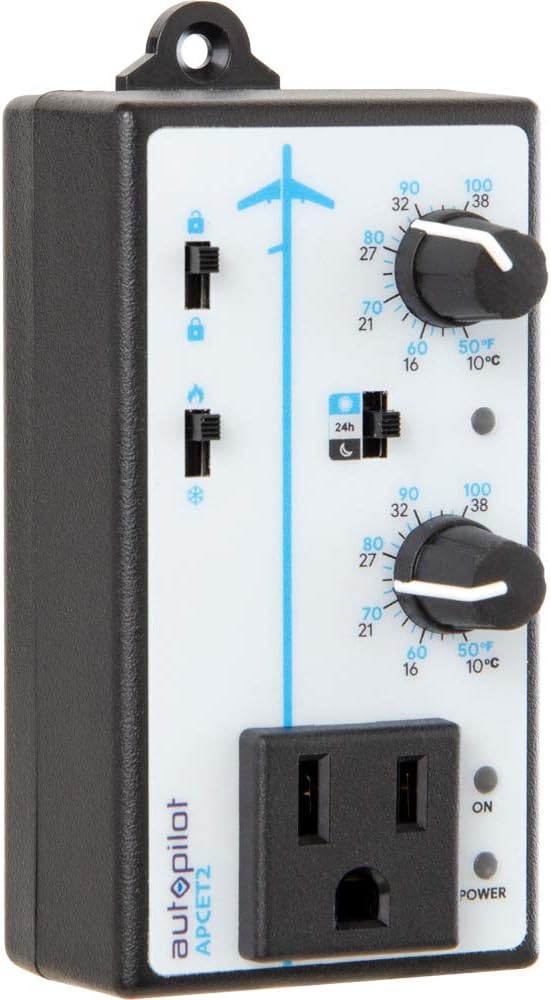
ຮູບທີ 3.1: ດ້ານໜ້າ view of the Autopilot APCET2 thermostat. This image displays the main control panel, including the two temperature setting knobs, the day/night mode switch, the heating/cooling mode switch, and the integrated power outlet for connecting your device. The "ON" and "POWER" indicator lights are also visible.
- Day/Night Temperature Knobs: Two separate knobs for setting desired temperatures for day and night cycles.
- Day/Night Mode Switch: Toggles between 24-hour operation or automatic day/night detection via photocell.
- Heating/Cooling Mode Switch: Selects whether the thermostat controls a heating or cooling device.
- ປລັກໄຟຟ້າປະສົມປະສານ: Where the controlled device is plugged in.
- ແສງສະຫວ່າງຕົວຊີ້ວັດພະລັງງານ: ຈະສະຫວ່າງຂຶ້ນເມື່ອເຄື່ອງໄດ້ຮັບພະລັງງານ.
- Output Indicator Light: Illuminates when power is being supplied to the connected device.
ກັບຄືນໄປບ່ອນ View:

ຮູບທີ 3.2: ກັບຄືນໄປບ່ອນ view of the Autopilot APCET2 thermostat. This image shows the standard 3-prong power plug for connecting the thermostat to a wall outlet, along with the screws for potential wall mounting.
- ປລັກສຽບໄຟ: Standard 3-prong plug for connecting to a 120V AC wall outlet.
- Mounting ຂຸມ: For optional wall mounting.
ຂະໜາດ:
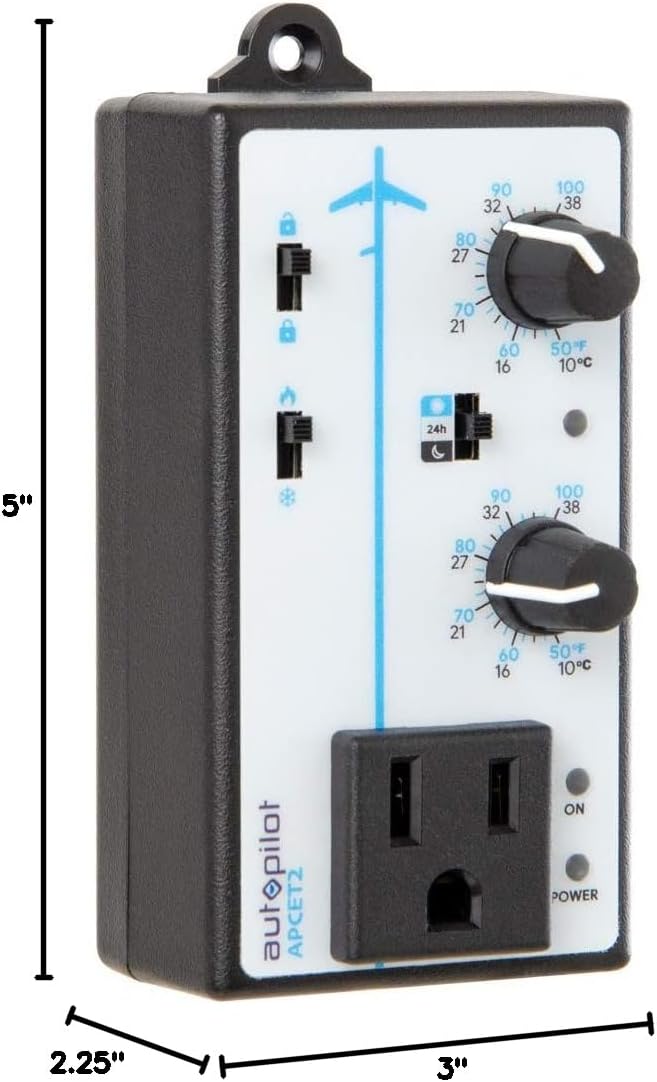
ຮູບທີ 3.3: Dimensions of the Autopilot APCET2 thermostat. The image indicates the device measures approximately 3 inches deep, 2.25 inches wide, and 5 inches high.
4. ຄໍາແນະນໍາການຕິດຕັ້ງ
- ຖອດອຸປະກອນອອກ: Carefully remove the Autopilot APCET2 thermostat and its components from the packaging.
- Connect the Temperature Sensor: Plug the 20-foot remote precision temperature sensor into the designated port on the side of the thermostat. Ensure a secure connection.
- ຈັດຕຳແໜ່ງເຊັນເຊີ: Place the temperature sensor in the area where you want to monitor and control the temperature. Avoid placing it in direct sunlight, near heat sources, or in drafts, as this can affect accuracy.
- Plug in the Thermostat: Insert the 3-prong plug of the Autopilot APCET2 thermostat into a standard 120V AC grounded wall outlet. The Power indicator light should illuminate.
- ເຊື່ອມຕໍ່ອຸປະກອນຂອງທ່ານ: Plug the heating or cooling device you wish to control into the integrated power outlet on the front of the thermostat.
- ກວດສອບເບື້ອງຕົ້ນ: ຮັບປະກັນວ່າການເຊື່ອມຕໍ່ທັງໝົດແມ່ນປອດໄພກ່ອນທີ່ຈະດໍາເນີນການຕໍ່ໄປ.
5. ຄໍາແນະນໍາການດໍາເນີນງານ
The Autopilot APCET2 offers flexible temperature control with day and night settings and heating/cooling modes.
5.1 Selecting Operating Mode (Heating or Cooling)
- ຄົ້ນຫາສະຖານທີ່ Heating/Cooling Mode Switch on the front panel (typically marked with flame and snowflake icons).
- ເລື່ອນສະຫຼັບໄປຫາ ໄອຄອນແປວໄຟ ສໍາລັບ ໂໝດທຳຄວາມຮ້ອນ. In this mode, the connected device will turn ON when the temperature drops below the set point and turn OFF when it rises above the set point (considering the +/- 3°F differential).
- ເລື່ອນສະຫຼັບໄປຫາ ໄອຄອນ snowflake ສໍາລັບ ໂໝດເຮັດຄວາມເຢັນ. In this mode, the connected device will turn ON when the temperature rises above the set point and turn OFF when it drops below the set point (considering the +/- 3°F differential).
5.2 ການກຳນົດອຸນຫະພູມກາງເວັນ ແລະ ກາງຄືນ
The thermostat allows for distinct day and night temperature settings.
- Day Temperature Setting: ໃຊ້ upper knob (associated with the sun icon) to set your desired daytime temperature. Rotate the knob clockwise to increase the temperature and counter-clockwise to decrease it. The range is 50°F–100°F (10°C–38°C).
- Night Temperature Setting: ໃຊ້ lower knob (associated with the moon icon) to set your desired nighttime temperature. Rotate the knob clockwise to increase the temperature and counter-clockwise to decrease it. The range is 50°F–100°F (10°C–38°C).
5.3 Day/Night Detection Mode
The thermostat can automatically switch between day and night settings using its built-in photocell.
- ຄົ້ນຫາສະຖານທີ່ ສະຫຼັບໂໝດກາງເວັນ/ກາງຄືນ (typically marked with a 24h icon and sun/moon icons).
- ເລື່ອນສະຫຼັບໄປຫາ sun/moon icon ສໍາລັບ ກວດຈັບກາງເວັນ/ກາງຄືນອັດຕະໂນມັດ. The built-in photocell will detect ambient light levels and automatically switch between your set day and night temperatures.
- ເລື່ອນສະຫຼັບໄປຫາ 24h icon ສໍາລັບ 24-Hour Operation. In this mode, the thermostat will continuously use the Day Temperature Setting, regardless of light conditions.
5.4 Memory-Lock Feature
The Memory-lock feature prevents accidental changes to your set points.
- ເຖິງ ລັອກ the settings, slide the small switch next to the padlock icon to the ຕໍາແຫນ່ງລັອກ. This will prevent the temperature knobs from being accidentally adjusted.
- ເຖິງ ປົດລັອກ the settings, slide the switch to the ຕຳ ແໜ່ງ ປົດລັອກ.
6. ບໍາລຸງຮັກສາ
Regular maintenance ensures optimal performance and longevity of your Autopilot APCET2 thermostat.
- ທໍາຄວາມສະອາດ: Disconnect the thermostat from the power outlet before cleaning. Use a soft, dry cloth to wipe the exterior. Do not use abrasive cleaners, solvents, or immerse the unit in water.
- ການດູແລເຊັນເຊີ: Keep the temperature sensor clean and free from dust or debris. Ensure the sensor cable is not pinched or damaged.
- ການເກັບຮັກສາ: If storing the device for an extended period, disconnect it from power, clean it, and store it in a cool, dry place.
7. ການແກ້ໄຂບັນຫາ
If you encounter issues with your Autopilot APCET2 thermostat, refer to the following common problems and solutions:
| ບັນຫາ | ສາເຫດທີ່ເປັນໄປໄດ້ | ການແກ້ໄຂ |
|---|---|---|
| Device not turning ON/OFF at set temperature. | Incorrect mode selected (Heating/Cooling). Temperature differential not met. Thermostat not receiving power. Connected device is faulty or not powered. | Verify the Heating/Cooling switch is in the correct position. Allow for the +/- 3°F temperature differential. Check if the thermostat is securely plugged into a live outlet and the Power indicator is ON. Test the connected device by plugging it directly into a wall outlet. |
| Temperature settings cannot be adjusted. | Memory-lock feature is engaged. | Slide the Memory-lock switch to the unlocked position. |
| Day/Night mode not switching automatically. | Photocell mode not selected. Photocell is obstructed or in constant light/darkness. | Ensure the Day/Night Mode switch is set to the sun/moon icon. Check that the photocell (small sensor on the front) is not covered and is exposed to natural light changes. |
| ການອ່ານອຸນຫະພູມບໍ່ຖືກຕ້ອງ. | Temperature sensor improperly placed or damaged. | Relocate the sensor away from direct heat, cold drafts, or sunlight. Inspect the sensor and cable for damage. |
ຖ້າບັນຫາຍັງຄົງຢູ່ຫຼັງຈາກພະຍາຍາມແກ້ໄຂເຫຼົ່ານີ້, ກະລຸນາຕິດຕໍ່ຝ່າຍຊ່ວຍເຫຼືອລູກຄ້າ.
8. ຂໍ້ມູນຈໍາເພາະ
| ຍີ່ຫໍ້ | Autopilot |
| ຊື່ຕົວແບບ | Advanced Day & Night Cooling or Heating |
| ໝາຍເລກຕົວແບບ | APCET2 |
| ຂະໜາດສິນຄ້າ | 3"D x 2.25"W x 5"H |
| ປະເພດການຄວບຄຸມ | Knob & Push Button |
| ຄຸນນະສົມບັດພິເສດ | Lockable (Memory-lock) |
| ສີ | ດຳ |
| ການນໍາໃຊ້ສະເພາະ | Temperature Control in Grow Rooms, Controlling Heating and Cooling Equipment |
| ປະເພດການຄວບຄຸມອຸນຫະພູມ | ສາມາດຕັ້ງໂປຣແກຣມໄດ້ |
| ອົງປະກອບລວມ | 20' remote precision temperature sensor |
| ແຫຼ່ງພະລັງງານ | ໄຟຟ້າ |
| ສະບັບtage | 120 ໂວນ |
| ວັດtage | 1800 ວັດ |
| ນ້ໍາຫນັກລາຍການ | 8.1 ອອນ |
| ໄລຍະການຄວບຄຸມອຸນຫະພູມ | 50°F–100°F (10°C–38°C) |
| ອຸນຫະພູມແຕກຕ່າງ | +/- 3 ° F |
| ປະເພດການສະແດງ | ຈໍ LCD |
| ແສງຫຼັງ | ແມ່ນແລ້ວ |
| ປະເພດການຕິດຕັ້ງ | ຕິດຝາ |
9. ການຮັບປະກັນແລະການສະຫນັບສະຫນູນລູກຄ້າ
For warranty information or technical assistance, please contact Autopilot customer support. Refer to the product packaging or the official Autopilot webເວັບໄຊສໍາລັບລາຍລະອຽດການຕິດຕໍ່ໃນປະຈຸບັນຫຼາຍທີ່ສຸດ.
When contacting support, please have your product model number (APCET2) and purchase information readily available.


