1. ບົດແນະນຳ
The ChunHee WI02 Window Speaker Intercom System is designed to facilitate clear, dual-way voice communication through glass or partition barriers. This system is ideal for environments such as banks, hospitals, offices, and service windows where direct interaction is limited. It incorporates automatic dual-way intercommunication technology, eliminating the need for manual switching during conversations. The system features adjustable volume controls for both the internal and external speakers, along with a high-sensitive microphone for clear, natural sound, enhanced by anti-interruption and noise reduction capabilities.

Image 1: ChunHee WI02 Window Speaker Intercom System components.
2. ສິ່ງທີ່ຢູ່ໃນກ່ອງ
ກະລຸນາກວດສອບວ່າລາຍການທັງຫມົດທີ່ລະບຸໄວ້ຂ້າງລຸ່ມນີ້ແມ່ນລວມຢູ່ໃນຊຸດຂອງທ່ານ:
- 1 x Dual-way Counter Interphone (Main Unit)
- 1 x External Speaker
- 1 x Power Supply (DC12V power adapter)
- 1 x ຄູ່ມືການສອນ
- 1 x 3M Double Sided Tape (for external speaker mounting)
- 4 x Locating pieces (for cable management)

Image 2: Package contents of the ChunHee WI02 Window Speaker Intercom System.
3. ຄຸນລັກສະນະຂອງຜະລິດຕະພັນ
- Dual-Way Intercommunication: Automatic identification of speech signals for seamless two-way conversation without manual intervention.
- ລະດັບສຽງທີ່ສາມາດປັບໄດ້: Independent knob controls for both inner and outer speaker volumes, allowing for optimal sound levels.
- High-Sensitive Microphone: Ensures clear and loud voice transmission, specifically designed for counter communication.
- Anti-Interference & Noise Reduction: Advanced microcomputer technology minimizes static and background noise for clear audio.
- ໄມໂຄຣໂຟນແບບຍືດຫຍຸ່ນ: The main unit features a flexible gooseneck microphone for easy positioning.
- ການຕິດຕັ້ງງ່າຍດາຍ: Simple connection process for quick setup.
- ຄໍາຮ້ອງສະຫມັກກ້ວາງ: Suitable for various settings including banks, hospitals, offices, ticket booths, and service windows.

Image 3: Dual-way Intercom Functionality.

Image 4: Volume Adjustable Controls.

Image 5: Clear Sound Quality.

Image 6: Flexible Microphone Design.
4. ຄໍາແນະນໍາການຕິດຕັ້ງ
Follow these steps to set up your ChunHee WI02 Window Speaker Intercom System:
- Position the Main Unit: Place the main unit (counter interphone) on the inside of the window or barrier, within easy reach of the operator.
- Position the External Speaker: Mount the external speaker on the outside of the window or barrier. Use the provided 3M double-sided tape for secure attachment. Ensure the speaker is positioned where the external party will be speaking.
- Connect the External Speaker: Plug the external speaker cable into the 'Outer' port on the back of the main unit.
- ເຊື່ອມຕໍ່ການສະຫນອງພະລັງງານ: Connect the DC12V power adapter to the 'Power' input on the back of the main unit, then plug the adapter into a standard electrical outlet.
- ເປີດ: Flip the 'ON/OFF' switch on the back of the main unit to the 'ON' position. The Power LED on the front panel should illuminate.
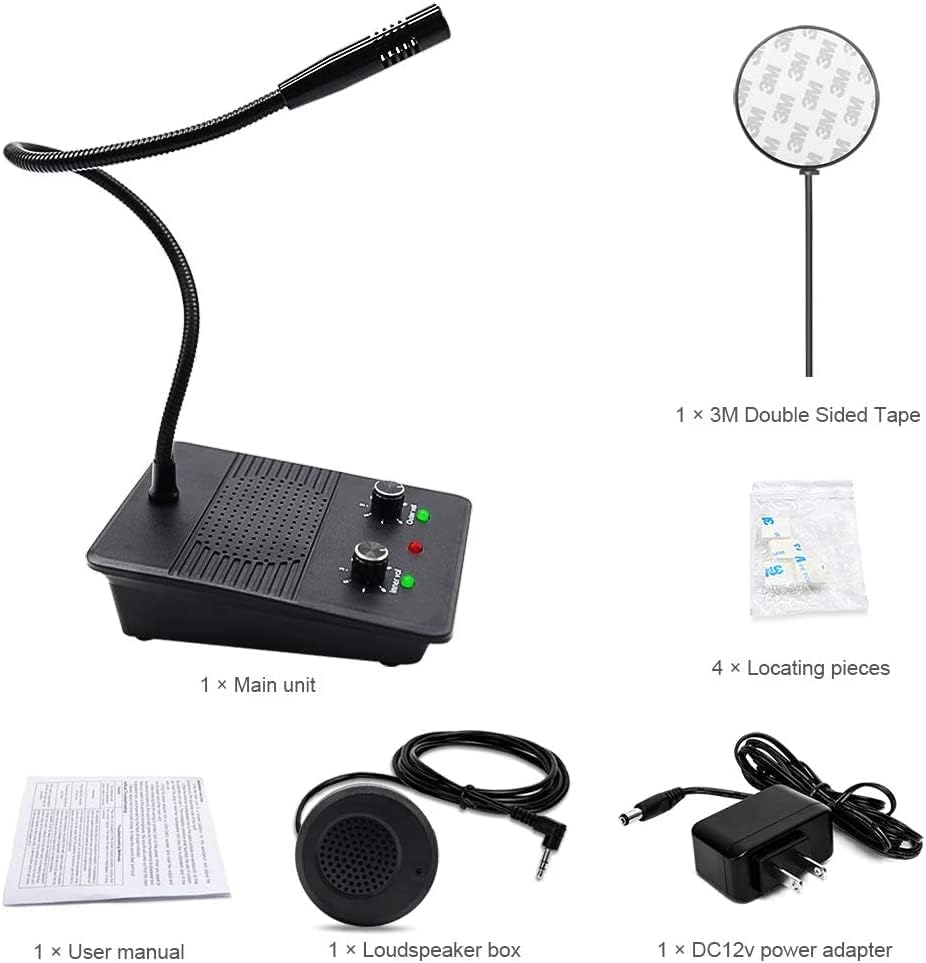
Image 7: Connection diagram and dimensions of the main unit and external speaker.
ຕັ້ງຄ່າວິດີໂອຄູ່ມື
Video 1: This video demonstrates the physical components and basic setup of the ChunHee Window Speaker Intercom System, including the main unit, external speaker, and power adapter. It highlights the various ports and controls for easy identification.
5. ຄໍາແນະນໍາການດໍາເນີນງານ
The ChunHee WI02 system is designed for straightforward operation:
- Automatic Dual-Way Communication: Once powered on, the system automatically enables dual-way communication. You do not need to press any buttons to speak or listen.
- Adjusting Inner Volume: Use the 'Inner Volume' knob on the front panel of the main unit to adjust the listening volume for the operator.
- Adjusting Outer Volume: Use the 'Outer Volume' knob on the front panel of the main unit to adjust the listening volume for the external party.
- ເວົ້າ: Speak clearly into the flexible microphone on the main unit.
- ຟັງ: Listen for responses through the main unit's speaker. The external party will speak into the external speaker, and their voice will be transmitted to the main unit.
The system's advanced microcomputer technology automatically processes speech signals, ensuring clear and natural sound without requiring any action during a call.
6. ບໍາລຸງຮັກສາ
To ensure the longevity and optimal performance of your ChunHee WI02 Window Speaker Intercom System, follow these maintenance guidelines:
- ທໍາຄວາມສະອາດ: Regularly wipe the main unit and external speaker with a soft, dry cloth. Avoid using abrasive cleaners, solvents, or harsh chemicals, as these can damage the surfaces.
- ການກວດສອບສາຍ: Periodically check all cables for any signs of wear, fraying, or damage. Replace damaged cables immediately to prevent malfunction or safety hazards.
- ເງື່ອນໄຂສິ່ງແວດລ້ອມ: Keep the system away from extreme temperatures, direct sunlight, and high humidity. Ensure it is not exposed to water or other liquids.
- ການເກັບຮັກສາ: If storing the system for an extended period, disconnect the power supply and store it in a cool, dry place.
7. ການແກ້ໄຂບັນຫາ
If you encounter issues with your ChunHee WI02 Window Speaker Intercom System, refer to the following troubleshooting steps:
| ບັນຫາ | ສາເຫດທີ່ເປັນໄປໄດ້ | ການແກ້ໄຂ |
|---|---|---|
| No power/System not turning on | Power adapter not connected or faulty; Power switch is off. | Ensure the power adapter is securely connected to the main unit and a working power outlet. Check if the 'ON/OFF' switch is in the 'ON' position. |
| No sound from inner speaker | Inner volume knob is too low; External speaker not connected or faulty. | Increase the 'Inner Volume' knob. Verify the external speaker cable is securely plugged into the 'Outer' port. |
| No sound from outer speaker | Outer volume knob is too low; Main unit microphone not working. | Increase the 'Outer Volume' knob. Ensure the operator is speaking clearly into the main unit's microphone. |
| ສຽງບິດເບືອນຫຼືບໍ່ຊັດເຈນ | Volume levels too high; Interference; Microphone too far from speaker. | Adjust both inner and outer volume knobs to a moderate level. Ensure the microphone is positioned correctly and not obstructed. Check for strong electromagnetic interference nearby. |
| ສຽງສະທ້ອນ | Volume levels too high; Speakers too close to each other. | Reduce the volume levels. Ensure adequate separation between the main unit and the external speaker. |
8. ຂໍ້ມູນຈໍາເພາະ
| ຄຸນສົມບັດ | ຂໍ້ມູນຈໍາເພາະ |
|---|---|
| ໝາຍເລກຕົວແບບ | WI02 |
| ຂະໜາດລາຍການ (L x W x H) | 5.87 x 4.09 x 5.2 ນິ້ວ |
| ນ້ໍາຫນັກລາຍການ | 1.12 ປອນ |
| ແຫຼ່ງພະລັງງານ | DC |
| ວັດສະດຸ | ພາດສະຕິກ |
| ອັດຕາສ່ວນສັນຍານເຖິງສຽງດັງ | 55 dB |
| ຈໍານວນຊ່ອງ | 1 |
| ການຕອບສະໜອງຄວາມຖີ່ | 15 KHz |
| ເຕັກໂນໂລຊີການເຊື່ອມຕໍ່ | ຜູ້ຊ່ວຍ |
| ຄຸນນະສົມບັດພິເສດ | ໄມໂຄຣໂຟນໃນຕົວ |
| ອຸປະກອນທີ່ເຂົ້າກັນໄດ້ | ລໍາໂພງ |
| ຮູບແບບຂົ້ວໂລກ | Unidirectional |
| ຄວາມອ່ອນໄຫວສຽງ | 55 Decibels |
| ຕົວປະກອບແບບຟອມໄມໂຄຣໂຟນ | ເຂດແດນ |
9. ການຮັບປະກັນແລະການສະຫນັບສະຫນູນ
For warranty information and technical support regarding your ChunHee WI02 Window Speaker Intercom System, please refer to the documentation provided with your purchase or contact ChunHee customer service directly. Details on how to reach support are typically found on the manufacturer's official webສະຖານທີ່ຫຼືພາຍໃນການຫຸ້ມຫໍ່ຜະລິດຕະພັນ.