eKids LOL Surprise OMG Remix Toy Microphone
ຄູ່ມືການສອນ
ຂໍ້ມູນຄວາມປອດໄພທີ່ສໍາຄັນ
Please read these instructions carefully before using the eKids LOL Surprise OMG Remix Toy Microphone. Keep this manual for future reference.
- ຜະລິດຕະພັນນີ້ແມ່ນມີຈຸດປະສົງສໍາລັບເດັກນ້ອຍອາຍຸ 36 ເດືອນຫາ 6 ປີ.
- ຫ້າມໃຫ້ອຸປະກອນຖືກອຸນຫະພູມສູງ, ແສງແດດໂດຍກົງ ຫຼື ຄວາມຊຸ່ມ.
- ຢ່າພະຍາຍາມຖອດປະກອບຫຼືດັດແປງຫນ່ວຍງານ. ນີ້ຈະເປັນການຍົກເລີກການຮັບປະກັນ.
- Use only the specified battery type (2 x AAA batteries).
- ຢ່າປະສົມແບັດເກົ່າ ແລະ ໃໝ່. ຢ່າປະສົມແບັດເຕີລີ່ທີ່ເປັນດ່າງ, ມາດຕະຖານ (ຄາບອນ-ສັງກະສີ), ຫຼືສາກໄຟໄດ້ (nickel-cadmium).
- ຖອດແບດເຕີລີ່ອອກຖ້າເຄື່ອງຈະບໍ່ຖືກໃຊ້ເປັນໄລຍະເວລາ.
- ຖິ້ມແບດເຕີລີ່ຢ່າງມີຄວາມຮັບຜິດຊອບຕາມກົດລະບຽບທ້ອງຖິ່ນ.
- ການເບິ່ງແຍງຜູ້ໃຫຍ່ແມ່ນແນະນໍາໃນລະຫວ່າງການໃຊ້.
ເນື້ອໃນຊຸດ
- 1 x LOL Surprise Karaoke Microphone
ຫມາຍເຫດ: ຫມໍ້ໄຟບໍ່ໄດ້ລວມແລະຕ້ອງໄດ້ຮັບການຊື້ແຍກຕ່າງຫາກ.
ສິນຄ້າເກີນview

ຮູບພາບ: ດ້ານໜ້າ view of the eKids LOL Surprise OMG Remix Toy Microphone, highlighting the Microphone Button, Song Button, Speaker, and Flashing Lights area. Dimensions are also shown.
- ປຸ່ມໄມໂຄຣໂຟນ: ກົດເພື່ອ ampເຮັດໃຫ້ສຽງຂອງເຈົ້າດັງຂຶ້ນ.
- ປຸ່ມເພງ: Press to play built-in music.
- ລໍາໂພງ: Located at the bottom of the microphone head.
- ໄຟກະພິບ: Integrated into the microphone head, they flash to the music.
ການຕິດຕັ້ງຫມໍ້ໄຟ
The microphone requires 2 x AAA (R03) batteries (not included).
- Using a Phillips head screwdriver, locate and open the battery compartment door on the back of the microphone.
- Insert 2 x AAA (R03) batteries, ensuring the correct polarity (+/-) as indicated in the compartment.
- Replace the compartment door and tighten the screw with the Phillips screwdriver. Do not overtighten.

ຮູບພາບ: Back of the microphone packaging showing a diagram for battery installation, indicating the battery compartment and correct battery orientation.
ຄໍາແນະນໍາການດໍາເນີນງານ
Once batteries are installed, the microphone is ready for use.
- To Activate Microphone: ກົດ ປຸ່ມໄມໂຄຣໂຟນ (top blue button). Speak or sing into the microphone head to amplify your voice through the built-in speaker.
- To Play Built-in Music: ກົດ ປຸ່ມເພງ (bottom blue button). The microphone will play pre-recorded music.
- ໄຟກະພິບ: The lights on the microphone head will automatically flash in sync with the music or your amplified voice, enhancing the performance.
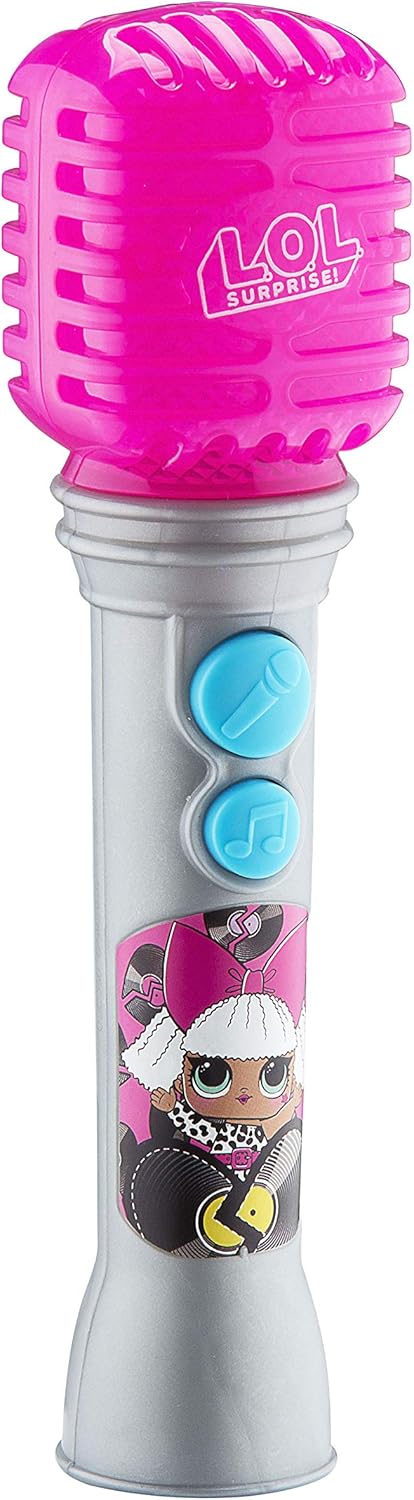
ຮູບພາບ: ເຕັມ view of the eKids LOL Surprise OMG Remix Toy Microphone, showcasing ການອອກແບບ ແລະ ປຸ່ມຕ່າງໆຂອງມັນ.
ການບໍາລຸງຮັກສາແລະການດູແລ
- Wipe the microphone with a soft, dry cloth to clean. Do not use abrasive cleaners or immerse in water.
- Store the microphone in a cool, dry place away from direct sunlight when not in use.
- ຖອດແບດເຕີຣີອອກຖ້າເກັບຮັກສາໄວ້ເປັນເວລາດົນເພື່ອປ້ອງກັນການຮົ່ວໄຫຼ.
ການແກ້ໄຂບັນຫາ
| ບັນຫາ | ສາເຫດທີ່ເປັນໄປໄດ້ | ການແກ້ໄຂ |
|---|---|---|
| No sound from microphone/speaker. | ແບດເຕີລີ່ຕ່ໍາຫຼືຕິດຕັ້ງບໍ່ຖືກຕ້ອງ. | ກວດສອບຂົ້ວຂອງແບັດເຕີຣີ. ປ່ຽນດ້ວຍແບັດເຕີຣີ AAA ໃໝ່. |
| ໄຟບໍ່ກະພິບ. | Microphone is not active or music is not playing. | Ensure the Microphone Button or Song Button is pressed. Check batteries. |
| ສຽງບິດເບືອນ. | ແບັດເຕີຣີຕໍ່າ. | ປ່ຽນແບັດ AAA ໃໝ່. |
ຂໍ້ມູນຈໍາເພາະ
- ໝາຍເລກຕົວແບບ: LL-070v0i
- ພະລັງງານ: ແບັດເຕີຣີ AAA (R03) 2 ກ້ອນ (ບໍ່ລວມ)
- ອາຍຸທີ່ແນະນໍາ: 36 ເດືອນ - 6 ປີ
- ຂະໜາດຜະລິດຕະພັນ: 9.7 x 7.2 x 26.7 ນິ້ວ (ຂະຫນາດບັນຈຸໂດຍປະມານ)
- ນ້ໍາຫນັກລາຍການ: 4.6 ອອນ
- ຜູ້ຜະລິດ: EKIDS
ການຮັບປະກັນແລະການສະຫນັບສະຫນູນ
For warranty information or technical support, please refer to the contact details provided on the product packaging or visit the official eKids webເວັບໄຊ.
eKids Webເວັບໄຊ: www.ekids.com
UPC: 0092298950808


