1. ບົດແນະນຳ
Thank you for choosing the Xtorm 15W Go Power Bank XG1021. This manual provides essential information for the safe and efficient operation, maintenance, and troubleshooting of your device. Please read this manual thoroughly before using the power bank and retain it for future reference.
2. ຜະລິດຕະພັນເກີນview
The Xtorm 15W Go Power Bank XG1021 is a compact and portable external battery designed to charge your mobile devices on the go. Featuring a 10,000 mAh capacity and 15W USB-C output, it offers efficient power delivery.

Figure 2.1: The Xtorm 15W Go Power Bank XG1021 in Space Grey, showcasing ການອອກແບບກະທັດຮັດ, ຫນາແຫນ້ນ.
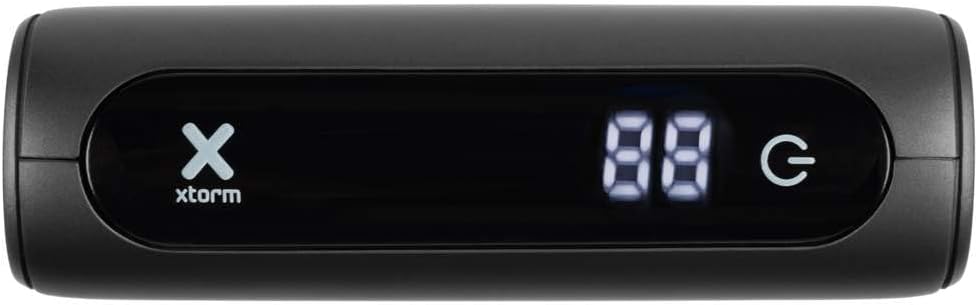
Figure 2.2: Front display of the power bank, indicating battery percentage and power status.
2.1. ຄວາມເຂົ້າກັນໄດ້ທົ່ວໄປ
This power bank is designed for broad compatibility, capable of charging various devices including smartphones, tablets, and portable gaming consoles.

Figure 2.3: Illustration of the power bank's compatibility with different device types.
2.2. ການອອກແບບແບບພົກພາ
The Xtorm Go Power Bank is engineered for portability, making it an ideal travel companion. Its compact dimensions and light weight ensure it can be easily carried.

Figure 2.4: The power bank's compact size, suitable for travel.
3. ຕັ້ງຄ່າ
3.1. ການຫຸ້ມຫໍ່ແລະການກວດກາເບື້ອງຕົ້ນ
Upon opening the package, ensure all components are present and undamaged. The box should contain the Xtorm 15W Go Power Bank, a USB-C cable, and this user manual.

Figure 3.1: Contents included in the Xtorm Power Bank Go package.
3.2. ການສາກໄຟເບື້ອງຕົ້ນຂອງ Power Bank
Before first use, it is recommended to fully charge the Xtorm Go Power Bank. Connect the provided USB-C cable to the power bank's USB-C input port and the other end to a compatible USB wall charger (not included). The digital display will show the charging progress. Once 100% is displayed, the power bank is fully charged and ready for use.
4. ຄໍາແນະນໍາການດໍາເນີນງານ
4.1. ກຳລັງສາກອຸປະກອນພາຍນອກ
- ເຊື່ອມຕໍ່ສາຍສາກໄຟຂອງອຸປະກອນຂອງທ່ານເຂົ້າກັບໜຶ່ງໃນພອດອອກຂອງແບດເຕີລີ່ (USB-A ຫຼື USB-C).
- ເຊື່ອມຕໍ່ສົ້ນສາຍໄຟອື່ນໆໃນອຸປະກອນຂອງທ່ານ.
- ທະນາຄານພະລັງງານຈະເລີ່ມສາກໄຟອຸປະກອນຂອງທ່ານໂດຍອັດຕະໂນມັດ. ຈໍສະແດງຜົນດິຈິຕອລຈະສະແດງແບັດເຕີລີທີ່ຍັງເຫຼືອtage ຂອງທະນາຄານພະລັງງານ.
- ເພື່ອຢຸດການສາກໄຟ, ພຽງແຕ່ຖອດອຸປະກອນຂອງທ່ານອອກ.
The 15W USB-C output allows for faster charging of compatible devices.

Figure 4.1: Fast charging an external device using the power bank.
4.2. ການກວດສອບລະດັບຫມໍ້ໄຟ
The digital display on the front of the power bank indicates the current battery percentage. This display activates automatically when a device is connected or when the power bank is being charged.
5. ບໍາລຸງຮັກສາ
- ທໍາຄວາມສະອາດ: ໃຊ້ຜ້າອ່ອນ, ແຫ້ງເພື່ອເຮັດຄວາມສະອາດ power bank. ຫຼີກເວັ້ນການນໍາໃຊ້ສານເຄມີທີ່ຮຸນແຮງຫຼືວັດສະດຸຂັດ.
- ການເກັບຮັກສາ: ເກັບຮັກສາພາວເວີແບງໄວ້ໃນບ່ອນທີ່ເຢັນ, ແຫ້ງ, ຫຼີກລ່ຽງແສງແດດໂດຍກົງ ແລະ ອຸນຫະພູມສູງເກີນໄປ. ສຳລັບການເກັບຮັກສາໄລຍະຍາວ, ແນະນຳໃຫ້ສາກໄຟພາວເວີແບງໃຫ້ປະມານ 50-70% ທຸກໆສາມເດືອນເພື່ອຮັກສາສຸຂະພາບຂອງແບັດເຕີຣີ.
- ການດູແລຫມໍ້ໄຟ: Do not expose the power bank to water or moisture. Avoid dropping or subjecting the device to strong impacts.
6. ການແກ້ໄຂບັນຫາ
- Power bank ບໍ່ໄດ້ສາກໄຟ: Ensure the USB-C cable is securely connected to both the power bank's input and the wall charger. Try a different cable or wall charger.
- ອຸປະກອນບໍ່ໄດ້ສາກໄຟຈາກ power bank: Ensure the charging cable is securely connected to both the power bank's output and your device. Check if the power bank has sufficient charge. Try a different cable or output port.
- ການສາກໄຟຊ້າ: Ensure you are using a compatible cable and that your device supports fast charging. The power bank's output may be limited by the connected device's input capabilities.
- Power bank ຮູ້ສຶກອົບອຸ່ນໃນເວລາໃຊ້ງານ: ມັນເປັນເລື່ອງປົກກະຕິທີ່ພາວເວີແບນຈະອຸ່ນຂຶ້ນເລັກນ້ອຍໃນລະຫວ່າງການສາກ ຫຼືສາກໄຟ. ຖ້າມັນຮ້ອນຫຼາຍ, ຕັດການເຊື່ອມຕໍ່ທັນທີແລະຕິດຕໍ່ສະຫນັບສະຫນູນ.
7. ຂໍ້ມູນຈໍາເພາະ
Detailed technical specifications for the Xtorm 15W Go Power Bank XG1021:
| ຄຸນສົມບັດ | ຂໍ້ມູນຈໍາເພາະ |
|---|---|
| ຊື່ຕົວແບບ | XG1021 |
| ຍີ່ຫໍ້ | Xtorm |
| ຄວາມອາດສາມາດຫມໍ້ໄຟ | 10,000 mAh (9800mAh / 36.2Wh Li-ion) |
| ປະເພດຕົວເຊື່ອມຕໍ່ | USB ປະເພດ C |
| ການປ້ອນຂໍ້ມູນ (USB-C) | 5V = 3A (15W) |
| ຂາອອກ (USB-C) | 5V = 3A (15W) |
| ຂາອອກ (USB-A) | 5V=3A |
| ຜົນຜະລິດທັງໝົດ | 15W |
| ອົງປະກອບຫມໍ້ໄຟ | ລິດທຽມ-ໄອອອນ |
| ຄຸນນະສົມບັດພິເສດ | ກະທັດຮັດ |
| ການນໍາໃຊ້ທີ່ແນະນໍາ | ໂທລະສັບສະຫຼາດ |
| ແຫຼ່ງພະລັງງານ | ສາຍໄຟຟ້າ |
| ສີ | Space Grey |

Figure 7.1: Back of the power bank displaying printed specifications and regulatory marks.
8. ຂໍ້ມູນຄວາມປອດໄພ
ເພື່ອຮັບປະກັນການໃຊ້ງານທີ່ປອດໄພ ແລະ ປ້ອງກັນຄວາມເສຍຫາຍຕໍ່ອຸປະກອນ ຫຼື ການບາດເຈັບ, ກະລຸນາປະຕິບັດຕາມຄຳແນະນຳດ້ານຄວາມປອດໄພຕໍ່ໄປນີ້:
- Do not expose the power bank to extreme temperatures (above 45°C or below -10°C) or direct sunlight.
- ຢ່າໃຫ້ Power Bank ຖືກນໍ້າ, ຄວາມຊຸ່ມ ຫຼື ຄວາມຊື້ນສູງ.
- Do not disassemble, modify, or attempt to repair the power bank yourself. This will void the warranty and may cause safety hazards.
- ຫຼີກລ້ຽງການຫຼຸດລົງຫຼືການໃສ່ທະນາຄານພະລັງງານທີ່ມີຜົນກະທົບທີ່ເຂັ້ມແຂງ.
- Keep the power bank away from flammable materials and explosive environments.
- ໃຊ້ພຽງແຕ່ສາຍສາກ ແລະອະແດັບເຕີທີ່ໄດ້ຮັບການຢັ້ງຢືນເທົ່ານັ້ນ.
- ຮັກສາໃຫ້ໄກຈາກເດັກນ້ອຍ.

Figure 8.1: Internal safety mechanisms of the Xtorm Power Bank.
9. ການຮັບປະກັນແລະການສະຫນັບສະຫນູນ
Xtorm products are manufactured to high quality standards. For information regarding warranty terms and conditions, please refer to the official Xtorm webເວັບໄຊ ຫຼືບັດຮັບປະກັນລວມຢູ່ໃນການຊື້ຂອງທ່ານ.
For technical support, troubleshooting assistance, or general inquiries, please visit the Xtorm Support Helpdesk online or contact their customer service. You can also find more information and updates on Xtorm's official social media channels.
- Xtorm Support Helpdesk: www.xtorm.eu/support
- ສື່ສັງຄົມ: ຊອກຫາ "Xtorm" on major platforms.


