1. ບົດແນະນຳ
This instruction manual provides essential information for the safe and efficient operation, setup, maintenance, and troubleshooting of your Einhell TE-OS 18/150 Li-Solo Power X-Change Cordless Multi-Sander. Please read this manual thoroughly before using the tool and keep it for future reference. This product is part of the Einhell Power X-Change family, meaning it operates with any 18V Power X-Change battery.

Figure 1: Einhell TE-OS 18/150 Li-Solo Cordless Multi-Sander with included abrasive sheets.
2. ຄໍາແນະນໍາກ່ຽວກັບຄວາມປອດໄພທົ່ວໄປ
ໃຫ້ປະຕິບັດຕາມຂໍ້ຄວນລະວັງດ້ານຄວາມປອດໄພຕໍ່ໄປນີ້ສະເໝີເມື່ອໃຊ້ເຄື່ອງມືໄຟຟ້າເພື່ອປ້ອງກັນໄຟຟ້າຊັອດ, ໄຟໄໝ້, ແລະ ການບາດເຈັບສາຫັດ.
- ຄວາມປອດໄພໃນພື້ນທີ່ເຮັດວຽກ: ຮັກສາພື້ນທີ່ບ່ອນເຮັດວຽກຂອງເຈົ້າໃຫ້ສະອາດ ແລະ ມີແສງສະຫວ່າງດີ. ພື້ນທີ່ວຸ້ນວາຍ ຫຼືບ່ອນມືດພາໃຫ້ເກີດອຸປະຕິເຫດ. ຫ້າມໃຊ້ເຄື່ອງມືໄຟຟ້າໃນບັນຍາກາດທີ່ລະເບີດ, ເຊັ່ນໃນທີ່ປະທັບຂອງຂອງແຫຼວ, ອາຍແກັສ, ຫຼືຝຸ່ນ.
- ຄວາມປອດໄພທາງໄຟຟ້າ: ຫຼີກເວັ້ນການສໍາຜັດກັບຮ່າງກາຍກັບພື້ນດິນຫຼືຫນ້າດິນ. ຫ້າມບໍ່ໃຫ້ເຄື່ອງໃຊ້ໄຟຟ້າຖືກຝົນ ຫຼືສະພາບທີ່ປຽກ.
- ຄວາມປອດໄພສ່ວນຕົວ: Always wear eye protection. Use hearing protection when operating for extended periods. Wear a dust mask in dusty conditions. Dress properly; avoid loose clothing or jewelry. Keep hair, clothing, and gloves away from moving parts.
- ການນໍາໃຊ້ແລະການດູແລເຄື່ອງມື: ຢ່າບັງຄັບເຄື່ອງມືໄຟຟ້າ. ໃຊ້ເຄື່ອງມືໄຟຟ້າທີ່ຖືກຕ້ອງສຳລັບການນຳໃຊ້ຂອງທ່ານ. ຖອດຊຸດແບັດເຕີຣີອອກຈາກເຄື່ອງມືໄຟຟ້າກ່ອນທີ່ຈະເຮັດການປັບແຕ່ງ, ປ່ຽນອຸປະກອນເສີມ, ຫຼື ເກັບຮັກສາເຄື່ອງມືໄຟຟ້າ. ເກັບຮັກສາເຄື່ອງມືໄຟຟ້າທີ່ບໍ່ໄດ້ໃຊ້ງານໃຫ້ໄກຈາກເດັກນ້ອຍ ແລະ ຢ່າອະນຸຍາດໃຫ້ຜູ້ທີ່ບໍ່ຄຸ້ນເຄີຍກັບເຄື່ອງມືໄຟຟ້າ ຫຼື ຄຳແນະນຳເຫຼົ່ານີ້ໃຊ້ເຄື່ອງມືໄຟຟ້າ.
- ການນໍາໃຊ້ແລະການດູແລເຄື່ອງມືຫມໍ້ໄຟ: ເຕີມເງິນດ້ວຍເຄື່ອງສາກທີ່ລະບຸໂດຍຜູ້ຜະລິດເທົ່ານັ້ນ. ໃຊ້ເຄື່ອງມືພະລັງງານກັບຊຸດຫມໍ້ໄຟທີ່ກໍານົດໂດຍສະເພາະ.
3. ອົງປະກອບຂອງຜະລິດຕະພັນ
The Einhell TE-OS 18/150 Li-Solo multi-sander includes the following components:
- Cordless Multi-Sander Unit
- Dust Collection Box (with filter)
- Adapter for External Dust Extraction
- 6 Abrasive Sheets (3x P120, 3x P240)
ໝາຍເຫດ: This product is supplied without a battery or charger. These are sold separately as part of the Power X-Change system.

Figure 2: Key features of the multi-sander, including Softgrip, dust extraction, delta sanding shoe, and large oscillating motion.

Figure 3: The Einhell TE-OS 18/150 Li-Solo is sold without a battery or charger.
4. ຕັ້ງຄ່າ
4.1 ການຕິດຕັ້ງຫມໍ້ໄຟ
- ໃຫ້ແນ່ໃຈວ່າສະວິດໄຟຂອງເຄື່ອງຂັດຢູ່ໃນຕຳແໜ່ງ 'ປິດ'.
- Slide a charged 18V Power X-Change battery pack into the battery receptacle on the rear of the sander until it clicks securely into place.
- ເພື່ອຖອດແບດເຕີລີ່ອອກ, ກົດປຸ່ມປ່ອຍໃສ່ຊຸດຫມໍ້ໄຟແລະເລື່ອນອອກ.
4.2 Attaching Abrasive Paper
The sander features an 'Extreme Fix' hook-and-loop fastening system for quick and secure abrasive paper changes.
- ໃຫ້ແນ່ໃຈວ່າເຄື່ອງຂັດຖືກປິດ ແລະ ແບັດເຕີຣີຖືກຖອດອອກ.
- Align the holes on the abrasive sheet with the holes on the sanding plate.
- Press the abrasive sheet firmly onto the hook-and-loop surface of the sanding plate to secure it.
- To remove, simply peel the abrasive sheet off the sanding plate.

Figure 4: Attaching abrasive paper using the hook-and-loop system.

Figure 5: The sander comes with 6 abrasive sheets (3x P120, 3x P240).
4.3 ການສະກັດຂີ້ຝຸ່ນ
The sander offers two options for dust extraction:
- Integrated Dust Collection Box: Attach the provided dust collection box to the designated port on the sander. This is suitable for most light to medium sanding tasks.
- External Dust Extraction: For prolonged use or when working with fine dust, attach the vacuum adapter to the dust extraction port and connect it to a suitable workshop vacuum cleaner.

Figure 6: Options for dust extraction: integrated dust collector or external vacuum connection.
5. ຄໍາແນະນໍາການດໍາເນີນງານ
5.1 ການເປີດ/ປິດ
- Ensure a charged battery is installed and abrasive paper is securely attached.
- To start the sander, push the ON/OFF switch to the 'I' (ON) position.
- To stop the sander, push the ON/OFF switch to the 'O' (OFF) position.
5.2 ເຕັກນິກການຂັດ
- Hold the sander firmly with one hand using the Softgrip surface.
- Place the sanding plate flat on the workpiece before switching the tool on.
- Apply light, even pressure. Do not press too hard, as this can reduce sanding efficiency and damage the workpiece or tool.
- ຍ້າຍ sander ໃນຈັງຫວະທີ່ລຽບ, ທັບຊ້ອນກັນທົ່ວຫນ້າດິນ.
- The delta-shaped sanding plate is ideal for sanding corners, edges, and smaller, intricate areas.
- Always switch off the sander and allow it to come to a complete stop before lifting it from the workpiece.

Figure 7: Demonstrating the use of the multi-sander for detailed work on a window frame.
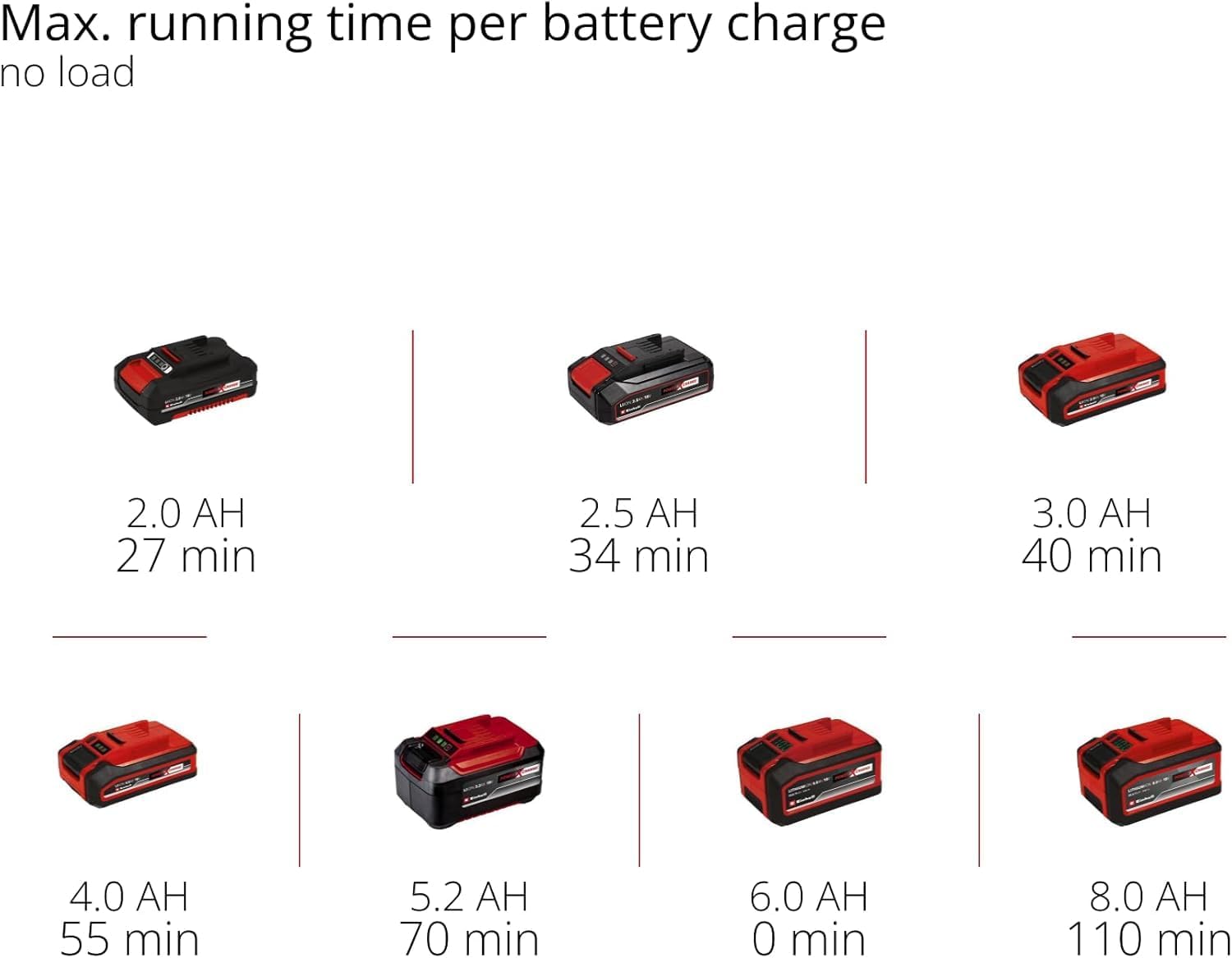
Figure 8: The compact design allows for optimal handling and one-handed control.
5.3 Battery Runtime (No Load)
The approximate maximum running time per battery charge (no load) for various Power X-Change battery capacities is as follows:
- 2.0 AH: 27 minutes
- 2.5 AH: 34 minutes
- 3.0 AH: 40 minutes
- 4.0 AH: 55 minutes
- 5.2 AH: 70 minutes
- 8.0 AH: 110 minutes

Figure 9: Battery runtime chart for various Power X-Change battery capacities.
6. ບໍາລຸງຮັກສາ
6.1 Cleaning the Dust Collection Box
- Regularly empty the dust collection box to maintain optimal dust extraction performance.
- ເອົາກ່ອງຂີ້ຝຸ່ນອອກຈາກ sander.
- Open the dust box and dispose of the collected dust.
- Clean the filter inside the dust box by tapping it or using compressed air.
- Reattach the dust box securely to the sander.
6.2 ການທຳຄວາມສະອາດ ແລະ ການກວດກາທົ່ວໄປ
- Always remove the battery before any cleaning or maintenance.
- ຮັກສາຊ່ອງລະບາຍອາກາດໃຫ້ສະອາດເພື່ອປ້ອງກັນຄວາມຮ້ອນເກີນໄປ. ໃຊ້ແປງອ່ອນໆ ຫຼື ລົມອັດ.
- ເຊັດທີ່ຢູ່ອາໃສຂອງເຄື່ອງມືທີ່ມີຄວາມອ່ອນ, damp ຜ້າ. ຢ່າໃຊ້ສານທໍາຄວາມສະອາດທີ່ຮຸນແຮງຫຼືສານລະລາຍ.
- Regularly inspect the sanding plate for wear or damage. Replace if necessary.
- Check the power switch for proper function.
7. ການແກ້ໄຂບັນຫາ
If you encounter issues with your multi-sander, refer to the following common troubleshooting steps:
| ບັນຫາ | ສາເຫດທີ່ເປັນໄປໄດ້ | ການແກ້ໄຂ |
|---|---|---|
| Sander ບໍ່ໄດ້ເລີ່ມຕົ້ນ | ສຽບແບັດເຕີລີ່ບໍ່ຖືກຕ້ອງ ຫຼືໝົດ. | ກວດໃຫ້ແນ່ໃຈວ່າໃສ່ແບັດເຕີຣີເຕັມແລ້ວ. ສາກແບັດເຕີຣີຖ້າຈຳເປັນ. |
| ການປະຕິບັດດິນຊາຍບໍ່ດີ | Worn or incorrect abrasive paper. Excessive pressure. | Replace abrasive paper. Use appropriate grit. Apply lighter, even pressure. |
| Ineffective dust extraction | Dust box full or filter clogged. Dust port blocked. | Empty dust box and clean filter. Clear any blockages in the dust port. |
| ການສັ່ນສະເທືອນ/ສຽງລົບກວນຫຼາຍເກີນໄປ | Damaged sanding plate or abrasive paper. Loose components. | Inspect sanding plate and abrasive paper for damage. Ensure all components are securely fastened. |
ຖ້າບັນຫາຍັງຄົງຢູ່ຫຼັງຈາກພະຍາຍາມແກ້ໄຂບັນຫາເຫຼົ່ານີ້ແລ້ວ, ກະລຸນາຕິດຕໍ່ຫາຝ່າຍສະໜັບສະໜູນລູກຄ້າຂອງ Einhell.
8. ຂໍ້ມູນຈໍາເພາະ
| ຄຸນສົມບັດ | ຂໍ້ມູນຈໍາເພາະ |
|---|---|
| ຜູ້ຜະລິດ | ອີນເຮລ |
| ໝາຍເລກຕົວແບບ | TE-OS 18/150 Li |
| ແຫຼ່ງພະລັງງານ | Cordless (Power X-Change 18V) |
| ສະບັບtage | 18 ໂວນ |
| ພະລັງງານ | 18 ວັດ |
| ສູງສຸດ. ຄວາມໄວ Oscillation | 24000 oscillations/min |
| Sanding Plate Type | Delta (Hook-and-loop fastening) |
| ລວມມີແຜ່ນຂັດ | 6 sheets (3x P120, 3x P240) |
| ການສະກັດເອົາຝຸ່ນ | Integrated dust collection box and external vacuum adapter |
| ຂະໜາດສິນຄ້າ (L x W x H) | 22.4 x 10.1 x 14.9 cm |
| ນ້ຳໜັກ | 860 ກຣາມ (ບໍ່ມີຫມໍ້ໄຟ) |
| ແບດເຕີລີ່ / ສາກໄຟ | Not included, required (Power X-Change 18V lithium-ion) |
9. ການຮັບປະກັນແລະການສະຫນັບສະຫນູນ
ສຳລັບຂໍ້ມູນການຮັບປະກັນ, ການລົງທະບຽນຜະລິດຕະພັນ, ຫຼື ການຊ່ວຍເຫຼືອດ້ານເຕັກນິກ, ກະລຸນາອ້າງອີງເຖິງ Einhell ຢ່າງເປັນທາງການ website or contact your local Einhell service center. Keep your proof of purchase for any warranty claims.
ບໍ່ພົບວິດີໂອຜະລິດຕະພັນຢ່າງເປັນທາງການຈາກຜູ້ຂາຍສຳລັບການຝັງຢູ່ໃນຄູ່ມືນີ້.


