ແນະນຳ
ຂອບໃຈສໍາລັບການຊື້asing the Berrcom Non-Contact Infrared Forehead Thermometer. This device is designed for safe, accurate, and rapid temperature measurement of the human body, as well as room and object temperatures. Please read this manual thoroughly before use to ensure proper operation and to maintain the device's longevity.

Image: The Berrcom Non-Contact Infrared Forehead Thermometer, a white handheld device with a digital display and blue control buttons.
ຂໍ້ມູນຄວາມປອດໄພ
ກະລຸນາປະຕິບັດການລະມັດລະວັງດ້ານຄວາມປອດໄພດັ່ງຕໍ່ໄປນີ້ເພື່ອປ້ອງກັນການບາດເຈັບຫຼືຄວາມເສຍຫາຍຂອງອຸປະກອນ:
- ຢ່າເອົາເຄື່ອງວັດແທກອຸນຫະພູມຢູ່ໃນນໍ້າ ຫຼືຂອງແຫຼວອື່ນໆ.
- ຮັກສາອຸປະກອນໃຫ້ຫ່າງຈາກແສງແດດໂດຍກົງ, ຂີ້ຝຸ່ນ, ແລະອຸນຫະພູມທີ່ຮຸນແຮງ.
- Do not drop or subject the thermometer to strong impacts.
- This device is intended for household use. Consult a medical professional for any health concerns.
- ຮັກສາໃຫ້ໄກຈາກເດັກນ້ອຍ.
ສິນຄ້າເກີນview
ຄຸນນະສົມບັດທີ່ສໍາຄັນ
- ການວັດແທກທີ່ບໍ່ແມ່ນການຕິດຕໍ່: Safe and hygienic, measure from 3-5cm distance.
- ຫຼາຍໂmodeດ: Measures body, room, and object temperatures.
- ໄວແລະຖືກຕ້ອງ: Instant temperature reading with high precision.
- ອາການໄຂ້: Audible alarm for high temperatures.
- ຈໍ LCD ຂະຫນາດໃຫຍ່: Easy-to-read digital display with backlight.
- ຟັງຊັນຫນ່ວຍຄວາມຈໍາ: Stores up to 32 sets of data for tracking.
- ປິດອັດຕະໂນມັດ: Powers off after 30 seconds of inactivity to save battery.

Image: Visual representation of key features including LCD large screen, mute/beep switching, automatic shutdown, environmental friendliness, one-button operation, and non-contact measurement.
ອົງປະກອບອຸປະກອນ

Image: Diagram showing the various components of the thermometer, including the infrared probe, memory key, mute/beep button, mode display, LCD display, temperature display, voice display, and scan button.
- Infrared Probe: Sensor for temperature detection.
- ຈໍ LCD: Shows temperature readings and settings.
- ປຸ່ມໂໝດ: Switches between Body, Room, and Object modes.
- Mute/Beep Button: ສະຫຼັບສຽງເປີດ/ປິດ.
- ປຸ່ມຄວາມຈໍາ: Accesses stored temperature readings.
- Scan Button (Trigger): ເລີ່ມການວັດແທກອຸນຫະພູມ.
- ຊ່ອງໃສ່ຫມໍ້ໄຟ: Located at the bottom of the handle.
ຕັ້ງຄ່າ
ການຕິດຕັ້ງຫມໍ້ໄຟ
The thermometer requires two (2) AA batteries (not included) for operation.
- ເປີດຝາປິດຊ່ອງໃສ່ແບັດເຕີຣີທີ່ຢູ່ທາງລຸ່ມຂອງມືຈັບ.
- ໃສ່ໝໍ້ໄຟ AA ສອງໜ່ວຍ, ຮັບປະກັນການຂົ້ວທີ່ຖືກຕ້ອງ (+ ແລະ -).
- ປິດຝາປິດຊ່ອງໃສ່ຫມໍ້ໄຟຢ່າງປອດໄພ.

ຮູບພາບ: ດ້ານລຸ່ມ view of the thermometer showing the open battery compartment and two AA batteries.
ຄໍາແນະນໍາການດໍາເນີນງານ
ເປີດ/ປິດ
- To power on, simply press the Scan button (trigger). The device will perform a self-test and display the last measurement.
- The thermometer will automatically shut down after approximately 30 seconds of inactivity to conserve battery life.
ການວັດແທກ (ອຸນຫະພູມຮ່າງກາຍ)
- Ensure the thermometer is in Body mode. If not, press the "MODE" button to switch until "BODY" is displayed.
- Hold the thermometer 3-5 cm (1.2-2 inches) away from the center of the forehead.
- Press the Scan button (trigger) once.
- The temperature reading will be displayed on the LCD screen within one second.
- An audible beep will confirm the measurement (if sound is enabled).

Image: A hand holding the thermometer, demonstrating the 3-5cm measurement distance from a baby's forehead, highlighting the 1-second measurement capability.

Image: A close-up of the thermometer's front, emphasizing its non-contact infrared technology and new generation core chip sensing for accurate readings.
ການປ່ຽນໂໝດການວັດແທກ
The thermometer supports three measurement modes: Body, Room, and Object.
- Press the "MODE" button to cycle through the available modes. The current mode will be displayed on the LCD screen.
- ໂBodyດຮ່າງກາຍ: For measuring human body temperature.
- ຮູບແບບຫ້ອງ: For measuring ambient room temperature.
- ໂObjectດວັດຖຸ: For measuring the surface temperature of objects (e.g., milk, bath water).

Image: A graphic illustrating the three distinct measurement modes: Body (with a baby icon), Room (with a living room icon), and Object (with a cup of milk icon).
Fahrenheit/Celsius ສະຫຼັບ
The temperature unit can be switched between Celsius (°C) and Fahrenheit (°F).
- With the device powered on, press and hold the "MODE" button for a few seconds until the unit changes.
- Release the button when the desired unit is displayed.
Mute/Beep Function
To toggle the audible beep on or off:
- Press the "MUTE/BEEP" button (speaker icon) to switch between sound on and sound off.
- A speaker icon on the LCD will indicate if the sound is enabled.
ຟັງຊັນຄວາມຈໍາ
The thermometer can store up to 32 sets of temperature readings.
- ເຖິງ view past readings, press the "MEM" (Memory) button.
- Each press will cycle through the stored readings from most recent to oldest.

Image: A graph illustrating the storage of 32 data sets, showing temperature changes over time, with the memory button highlighted on the thermometer.
ການດູແລແລະບໍາລຸງຮັກສາ
- ທໍາຄວາມສະອາດ: Wipe the thermometer body with a soft, dry cloth. For the probe, use a cotton swab lightly moistened with alcohol. Do not use abrasive cleaners or immerse in water.
- ການເກັບຮັກສາ: ເກັບຮັກສາອຸປະກອນໄວ້ໃນບ່ອນທີ່ເຢັນ, ແຫ້ງ, ຫ່າງຈາກແສງແດດໂດຍກົງ ແລະອຸນຫະພູມທີ່ຮ້າຍກາດ.
- ການປ່ຽນແບັດເຕີຣີ: ໃຫ້ປ່ຽນແບັດເຕີຣີເມື່ອຕົວຊີ້ບອກແບັດເຕີຣີອ່ອນປະກົດຂຶ້ນຢູ່ໜ້າຈໍ. ໃຫ້ຖອດແບັດເຕີຣີອອກຖ້າບໍ່ໄດ້ໃຊ້ອຸປະກອນເປັນເວລາດົນ.
ການແກ້ໄຂບັນຫາ
| ບັນຫາ | ສາເຫດທີ່ເປັນໄປໄດ້ | ການແກ້ໄຂ |
|---|---|---|
| ບໍ່ມີການສະແດງຜົນ/ອຸປະກອນຈະບໍ່ເປີດ. | ຫມໍ້ໄຟຕ່ໍາຫຼືຕາຍ; ການຕິດຕັ້ງແບັດເຕີລີບໍ່ຖືກຕ້ອງ. | ປ່ຽນແບັດເຕີຣີ; ກວດສອບຂົ້ວແບັດເຕີຣີ. |
| ການອ່ານບໍ່ຖືກຕ້ອງ. | Measurement distance too far/close; Dirty probe; Ambient temperature fluctuations. | Ensure 3-5cm distance; Clean the probe; Allow device to acclimate to room temperature. |
| "Lo" ຫຼື "Hi" ສະແດງ. | ອຸນຫະພູມຢູ່ນອກຂອບເຂດທີ່ວັດແທກໄດ້. | Ensure measurement is within specified operating range. |
ຂໍ້ມູນຈໍາເພາະ
| ຄຸນສົມບັດ | ລາຍລະອຽດ |
|---|---|
| ຂະໜາດສິນຄ້າ | 6.1 x 1.57 x 3.94 ນິ້ວ |
| ນ້ໍາຫນັກລາຍການ | 7.05 ອອນ |
| ໝາຍເລກຕົວແບບ | ເບີຄອມ |
| ຕ້ອງໃຊ້ແບັດເຕີຣີ | 2 ຫມໍ້ໄຟ AA (ບໍ່ລວມ) |
| ໄລຍະຫ່າງການວັດແທກ | 3-5 ຊຕມ |
| ປະເພດການສະແດງ | ຈໍ LCD |
| ເຕັກໂນໂລຊີການເຊື່ອມຕໍ່ | ອິນຟາເຣດ |
| ຄຸນນະສົມບັດພິເສດ | Non-Contact, Fever Alarm, Memory Function |
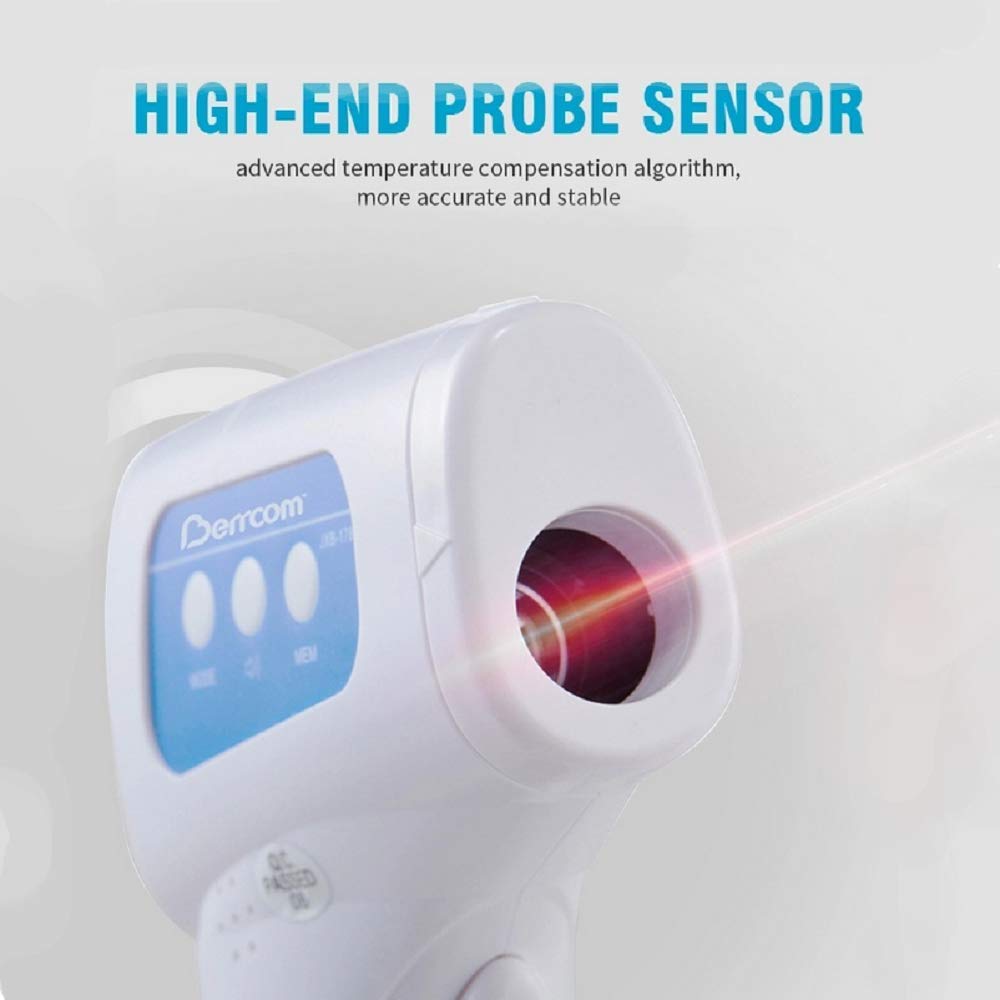
Image: A close-up of the thermometer's infrared probe, emphasizing its high-end sensor and advanced temperature compensation algorithm for accurate and stable readings.
ການຮັບປະກັນແລະການສະຫນັບສະຫນູນ
ສຳລັບຂໍ້ມູນການຮັບປະກັນ ຫຼື ການຊ່ວຍເຫຼືອດ້ານເຕັກນິກ, ກະລຸນາອ້າງອີງໃສ່ການຫຸ້ມຫໍ່ຜະລິດຕະພັນ ຫຼື ຕິດຕໍ່ຜູ້ຜະລິດໂດຍກົງ. ເກັບໃບຮັບເງິນຊື້ຂອງທ່ານໄວ້ເປັນຫຼັກຖານການຊື້.
Manufacturer: Berrcom
ວັນທີ່ມີໃຫ້ຄັ້ງທຳອິດ: ວັນທີ 19 ມິຖຸນາ 2020


