1. ບົດແນະນຳ
The Axxess AXDIS-FD1 Data Interface is designed to integrate an aftermarket radio into select Ford, Lincoln, Mazda, and Mercury vehicles from 2007 and up. This interface provides essential features such as accessory power, retention of Retained Accessory Power (R.A.P.), and outputs for navigation functions (parking brake, reverse, speed sense). It also facilitates the retention of factory steering wheel controls (SWC) and rear seat entertainment systems where applicable.
This manual provides detailed instructions for the proper installation and operation of your AXDIS-FD1 Data Interface. Please read it thoroughly before beginning the installation process.
2. ຜະລິດຕະພັນເກີນview ແລະຄຸນສົມບັດ
The AXDIS-FD1 Data Interface offers the following functionalities:
- Provides a 12-volt 10-amp accessory power output.
- Retains Retained Accessory Power (R.A.P.) functionality.
- Offers navigation outputs: parking brake, reverse, and speed sense.
- Retains factory steering wheel controls (SWC).
- Retains factory rear seat entertainment (RSE) where equipped.
- Compatible with both non-amplified ແລະ amplified factory systems, including Sony/THX systems.
- Supports a wide range of Ford, Lincoln, Mazda, and Mercury vehicles from 2007 and newer.
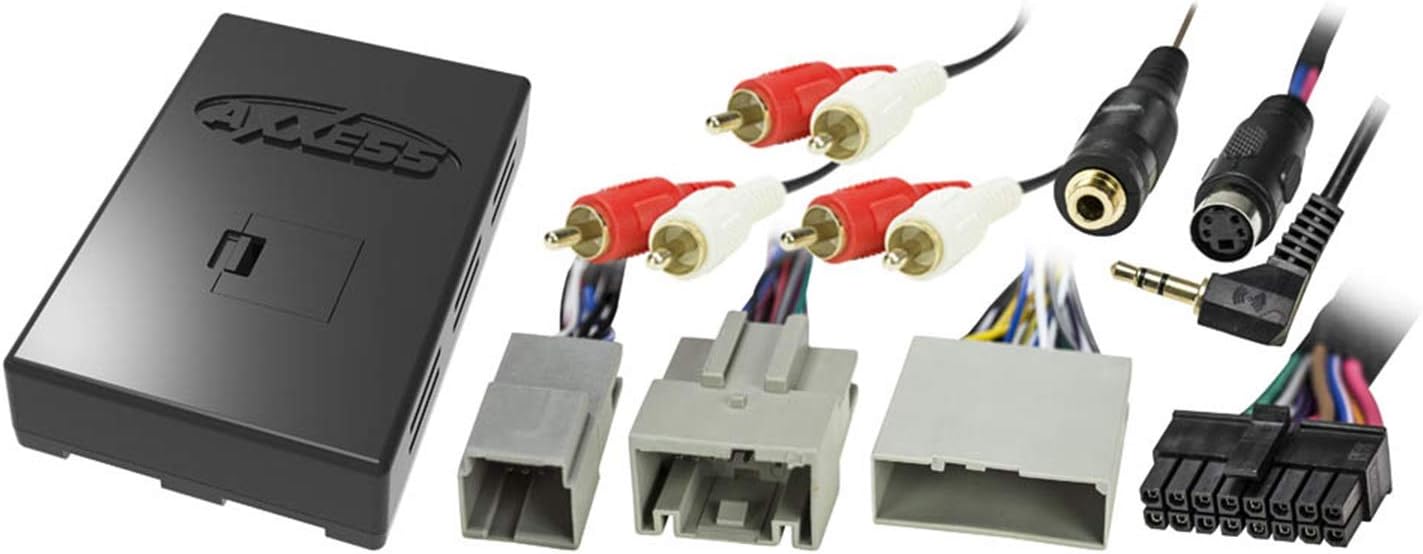
Image 1: The Axxess AXDIS-FD1 Data Interface module shown alongside its accompanying wiring harnesses, including RCA connectors, vehicle-specific connectors, and a 3.5mm jack/mini-DIN connector for steering wheel control integration.
3. ສິ່ງທີ່ຢູ່ໃນກ່ອງ
ເມື່ອເປີດການຫຸ້ມຫໍ່ຜະລິດຕະພັນ, ກວດເບິ່ງວ່າລາຍການຕໍ່ໄປນີ້ປະກອບມີ:
- Axxess AXDIS-FD1 Data Interface Module
- Vehicle-specific wiring harnesses
- ຄູ່ມືແນະ ນຳ (ເອກະສານນີ້)
4. ການຕິດຕັ້ງແລະການຕິດຕັ້ງ
Professional installation is recommended. Before beginning, ensure the vehicle's battery is disconnected to prevent electrical damage. Refer to your aftermarket radio's installation manual for specific wiring instructions.
4.1 ການເຊື່ອມຕໍ່ສາຍໄຟ
Match the wires from the AXDIS-FD1 harness to the corresponding wires on your aftermarket radio's harness. Solder all connections and insulate them with heat shrink tubing or electrical tape for reliability.
- Red (Accessory 12V+): Connect to the aftermarket radio's accessory wire.
- Yellow (Constant 12V+): Connect to the aftermarket radio's constant power wire.
- ສີດໍາ (ດິນ): Connect to the aftermarket radio's ground wire.
- Orange/White (Illumination): Connect to the aftermarket radio's illumination wire (if applicable).
- Speaker Wires (Green, Green/Black, Purple, Purple/Black, White, White/Black, Gray, Gray/Black): Connect to the corresponding speaker wires of the aftermarket radio.
- Blue/White (Amplifier Turn-On): Connect to the aftermarket radio's amplifier turn-on wire (if using an external amplifier or retaining factory amplified system).
- Light Green (Parking Brake): Connect to the aftermarket radio's parking brake input.
- Green/Purple (Reverse): Connect to the aftermarket radio's reverse gear input.
- Pink (Speed Sense): Connect to the aftermarket radio's speed sense input.
- 3.5mm Jack / Mini-DIN Connector: Connect to the aftermarket radio's steering wheel control input. Refer to your radio's manual for specific connection type.
4.2 ການຕັ້ງຄ່າໂມດູນ
The AXDIS-FD1 module typically auto-detects the vehicle and radio type. However, some aftermarket radios may require specific programming steps for steering wheel controls. Consult the Axxess website or the included quick reference guide for any specific dip switch settings or programming procedures for your vehicle and radio model.
4.3 ການທົດສອບ
After all connections are made and the module is configured, reconnect the vehicle's battery. Test all functions of the aftermarket radio, including:
- Accessory power (radio turns on/off with ignition).
- Audio output from all speakers.
- Steering wheel control functionality (volume, track, mode).
- Navigation outputs (parking brake, reverse, speed sense) if connected to a navigation-equipped radio.
- Retained Accessory Power (R.A.P.) functionality.
- Rear seat entertainment (if applicable).
5. ຄໍາແນະນໍາການດໍາເນີນງານ
Once installed, the Axxess AXDIS-FD1 Data Interface operates automatically, providing the necessary data conversions for your aftermarket radio to function seamlessly with your vehicle's factory systems.
- ການຄວບຄຸມພວງມາໄລ (SWC): The interface translates the vehicle's SWC signals into commands understood by your aftermarket radio. Functionality typically includes volume up/down, track up/down, and mode/source selection. Specific button assignments may vary based on the aftermarket radio and vehicle.
- Retained Accessory Power (R.A.P.): This feature allows the radio to remain on for a short period after the ignition is turned off, until a door is opened, mimicking the factory behavior.
- ຜົນໄດ້ຮັບການນໍາທາງ: The parking brake, reverse, and speed sense outputs provide critical data to aftermarket navigation systems, enabling features like destination entry while parked, automatic camera switching, and accurate GPS tracking.
Refer to your aftermarket radio's user manual for detailed instructions on operating its features, as the AXDIS-FD1 primarily acts as an integration bridge.
6. ການແກ້ໄຂບັນຫາ
ຖ້າທ່ານພົບບັນຫາຫຼັງຈາກການຕິດຕັ້ງ, ໃຫ້ແກ້ໄຂໃໝ່view ຂັ້ນຕອນການແກ້ໄຂບັນຫາທົ່ວໄປຕໍ່ໄປນີ້:
- No Power to Radio:
- Check all power and ground connections (Yellow, Red, Black wires).
- ກວດສອບວ່າຟິວຂອງຍານພາຫະນະຍັງຄົບຖ້ວນ.
- Ensure the AXDIS-FD1 module is properly connected to the vehicle's data bus.
- ບໍ່ມີສຽງຈາກລຳໂພງ:
- Confirm all speaker wires are correctly connected and insulated.
- If using a factory amplified system, ensure the Blue/White amplifier turn-on wire is connected.
- Check the aftermarket radio's fader/balance settings.
- Steering Wheel Controls Not Functioning or Malfunctioning:
- Verify the 3.5mm jack or Mini-DIN connector is securely plugged into the aftermarket radio's SWC input.
- Check the aftermarket radio's settings for SWC programming. Some radios require manual programming or a specific setting.
- Ensure the AXDIS-FD1 module's dip switches (if any) are set correctly for your specific radio and vehicle.
- If controls are erratic (e.g., volume button changes station), re-verify the SWC connection and programming. This can sometimes indicate a conflict in how the radio interprets the signals.
- Navigation Outputs (Parking Brake, Reverse, Speed Sense) Not Working:
- Confirm these wires are correctly connected to the aftermarket navigation radio's inputs.
- Check the navigation radio's settings to ensure these inputs are enabled and recognized.
If problems persist, contact Axxess technical support for further assistance.
7. ຂໍ້ມູນຈໍາເພາະ
| ໝາຍເລກຕົວແບບ | AXDIS-FD1 |
| ຂະໜາດສິນຄ້າ | 7.5 x 4 x 2.5 ນິ້ວ |
| ນ້ໍາຫນັກລາຍການ | 12.8 ອອນ |
| ຜົນຜະລິດພະລັງງານອຸປະກອນເສີມ | 12-volt, 10-amp |
| ຄວາມເຂົ້າກັນໄດ້ | Select Ford, Lincoln, Mazda, Mercury vehicles (2007 and up) |
8. ການຮັບປະກັນແລະການສະຫນັບສະຫນູນ
For warranty information and technical support, please refer to the official Axxess webເວັບໄຊ ຫຼືຕິດຕໍ່ພະແນກບໍລິການລູກຄ້າຂອງເຂົາເຈົ້າ. ຮັກສາໃບຮັບເງິນການຊື້ຂອງທ່ານໄວ້ເປັນຫຼັກຖານການຊື້ສໍາລັບການຮຽກຮ້ອງການຮັບປະກັນໃດໆ.
Axxess is a brand of Metra Electronics Corp.


