1. ບົດແນະນຳ
Thank you for choosing the SHARDOR 10-Cup Programmable Drip Coffee Maker. This appliance is designed to provide a convenient and efficient way to brew delicious coffee. Featuring a touch-screen control panel, brew strength selection, and a 24-hour programmable timer, this coffee maker simplifies your daily routine. Please read this manual thoroughly before use to ensure proper operation and maintenance.
2. ການປົກປ້ອງທີ່ສໍາຄັນ
ເມື່ອນຳໃຊ້ເຄື່ອງໃຊ້ໄຟຟ້າ, ຄວນລະມັດລະວັງຄວາມປອດໄພຂັ້ນພື້ນຖານສະເໝີ ເພື່ອຫຼຸດຜ່ອນຄວາມສ່ຽງຕໍ່ການເກີດອັກຄີໄພ, ໄຟຟ້າຊອດ, ແລະ/ຫຼື ການບາດເຈັບຕໍ່ຄົນ, ລວມທັງສິ່ງຕໍ່ໄປນີ້:
- ອ່ານຄໍາແນະນໍາທັງຫມົດ.
- ຢ່າແຕະພື້ນຜິວທີ່ຮ້ອນ. ໃຊ້ດ້າມຈັບ ຫຼື ບິດ.
- ເພື່ອປ້ອງກັນໄຟໄໝ້, ການຊົດເຊີຍໄຟຟ້າ, ແລະບາດເຈັບສ່ວນຕົວ, ຢ່າເອົາສາຍໄຟ, ປລັກສຽບ, ຫຼືເຄື່ອງໃຊ້ໃນນ້ຳ ຫຼືຂອງແຫຼວອື່ນໆ.
- ການເບິ່ງແຍງຢ່າງໃກ້ຊິດແມ່ນມີຄວາມຈໍາເປັນໃນເວລາທີ່ອຸປະກອນໃດໆຖືກນໍາໃຊ້ໂດຍຫຼືຢູ່ໃກ້ກັບເດັກນ້ອຍ.
- ຖອດປລັກອອກຈາກປລັກສຽບໃນເວລາທີ່ບໍ່ໄດ້ໃຊ້ແລະກ່ອນທີ່ຈະເຮັດຄວາມສະອາດ. ປ່ອຍໃຫ້ເຢັນກ່ອນທີ່ຈະໃສ່ຫຼືຖອດຊິ້ນສ່ວນ, ແລະກ່ອນທີ່ຈະເຮັດຄວາມສະອາດເຄື່ອງໃຊ້.
- ຫ້າມນຳໃຊ້ເຄື່ອງໃຊ້ທີ່ມີສາຍໄຟ ຫຼື ປລັກສຽບທີ່ເສຍຫາຍ ຫຼື ຫຼັງຈາກເຄື່ອງໃຊ້ງານຜິດປົກກະຕິ, ຫຼືໄດ້ຮັບຄວາມເສຍຫາຍໃນທຸກຮູບແບບ.
- ການນໍາໃຊ້ອຸປະກອນເສີມທີ່ບໍ່ແນະນໍາໂດຍຜູ້ຜະລິດເຄື່ອງໃຊ້ອາດຈະເຮັດໃຫ້ເກີດໄຟໄຫມ້, ໄຟຟ້າຊອດ, ຫຼືການບາດເຈັບສ່ວນບຸກຄົນ.
- ຢ່າໃຊ້ນອກ.
- ຢ່າປ່ອຍໃຫ້ສາຍໄຟແຂວນໃສ່ຂອບໂຕະ ຫຼືໂຕະ, ຫຼືແຕະພື້ນຜິວທີ່ຮ້ອນ.
- ຢ່າວາງໃສ່ ຫຼືຢູ່ໃກ້ກັບເຕົາແກ໊ສຮ້ອນ ຫຼືເຕົາໄຟຟ້າ, ຫຼືໃນເຕົາອົບທີ່ມີຄວາມຮ້ອນ.
- ສຽບປລັກສຽບໃສ່ເຄື່ອງທຸກຄັ້ງກ່ອນ, ຈາກນັ້ນສຽບສາຍໃສ່ປລັກສຽບໃສ່ຝາ. ເພື່ອຕັດການເຊື່ອມຕໍ່, ເຮັດໃຫ້ການຄວບຄຸມໃດໆ 'ປິດ', ຈາກນັ້ນຖອດປລັກອອກຈາກເຕົ້າສຽບຝາ.
- ຢ່າໃຊ້ເຄື່ອງໃຊ້ອື່ນນອກເໜືອໄປຈາກການໃຊ້ທີ່ຕັ້ງໃຈ.
3. ອົງປະກອບຂອງຜະລິດຕະພັນ
Familiarize yourself with the various parts of your SHARDOR Drip Coffee Maker:

ຮູບພາບ: ລະເບີດ view of the coffee maker, labeling key components such as the removable funnel, water tank lid, smart drip tank, water tank, touch-screen control panel, warming plate, carafe lid, and coffee pot.
- Removable Funnel: ຖືການກັ່ນຕອງກາເຟແລະພື້ນຖານ.
- Water Tank Lid: Covers the water tank.
- Smart Drip Tank: Internal component for water distribution.
- ຖັງນໍ້າ: Reservoir for water, with a visible window for level indication.
- Touch-screen Control Panel: ຈໍສະແດງຜົນດິຈິຕອນ ແລະ ປຸ່ມສຳລັບໃຊ້ງານ.
- ແຜ່ນອຸ່ນ: ເຮັດໃຫ້ກາເຟທີ່ຕົ້ມແລ້ວອົບອຸ່ນ.
- Carafe Lid: Covers the glass coffee pot.
- Coffee Pot (Carafe): Glass carafe with measurement markings for up to 10 cups.
4. ຕັ້ງຄ່າ
- ແກະກ່ອງ: ເອົາວັດສະດຸຫຸ້ມຫໍ່ ແລະ ສ່ວນປະກອບທັງໝົດອອກຈາກກ່ອງຢ່າງລະມັດລະວັງ.
- ທໍາຄວາມສະອາດເບື້ອງຕົ້ນ: Before first use, wash the carafe, carafe lid, and reusable filter in warm, soapy water. Rinse thoroughly and dry. Wipe the exterior of the coffee maker with a soft, damp ຜ້າ.
- ຕຳແໜ່ງ: Place the coffee maker on a flat, stable surface away from the edge of the counter. Ensure it is near an electrical outlet.
- ຮອບທໍາອິດ Brew (ທໍາຄວາມສະອາດ): For the first use, run a brew cycle with only water to clean the internal components. Fill the water tank to the MAX level, place the empty reusable filter in the funnel, and run a full brew cycle without coffee grounds. Discard the water.
5. ຄໍາແນະນໍາການດໍາເນີນງານ
5.1. ການຕັ້ງໂມງ
ເພື່ອກໍານົດເວລາປະຈຸບັນ:
- Plug the coffee maker into a power outlet. The display will show '12:00 AM'.
- Press the 'Hour' button repeatedly to set the hour. The time will cycle through AM and PM.
- Press the 'Min' button repeatedly to set the minutes.
- ໂມງຈະຕັ້ງອັດຕະໂນມັດຫຼັງຈາກບໍ່ເຄື່ອນໄຫວສອງສາມວິນາທີ.

Image: Close-up of the touch-screen control panel with 'Min', 'Prog', 'On/Off', 'Strength', and 'Hour' buttons.
5.2. ດື່ມກາເຟ
- ຕື່ມຖັງນໍ້າ: Open the top lid and pour fresh, cold water into the water tank. Use the water level indicator on the side of the machine to measure the desired number of cups (up to 10 cups).
- ເພີ່ມພື້ນທີ່ກາເຟ: Place the reusable filter into the removable funnel. Add the desired amount of ground coffee into the filter. A general guideline is one tablespoon of coffee grounds per cup of water, but adjust to your preference.
- Select Brew Strength: Press the 'Strength' button on the touch-screen control panel to toggle between 'Regular' and 'Bold' brew strengths.
- ເລີ່ມເບຍ: Place the empty carafe with its lid on the warming plate. Press the 'On/Off' button to start the brewing process immediately. The indicator light will illuminate.
- ຄຸນນະສົມບັດຕ້ານ Drip: The coffee maker features an anti-drip system that temporarily stops the flow of coffee if the carafe is removed during brewing, allowing you to pour a cup before the cycle is complete. Return the carafe within 20 seconds to prevent overflow.
- ຮັກສາຄວາມອົບອຸ່ນ: After brewing, the warming plate will automatically keep the coffee warm for up to 2 hours before automatically shutting off.

ຮູບພາບ: ຂ້າງ view of the coffee maker showing the water level indicator.

Image: A hand adding coffee grounds into the reusable filter basket.

Image: Visual representation of selecting between 'Regular' and 'Bold' flavor options.

Image: A finger pointing to the anti-drip mechanism, showing how it prevents drips when the carafe is removed.

Image: The coffee maker with a cup of coffee, highlighting the 'Keep Warm for 2 Hours' feature and auto shut-off.
5.3. Programmable Brewing (24-Hour Timer)
ເພື່ອຕັ້ງເວລາຕົ້ມທີ່ຊັກຊ້າ:
- Prepare the coffee maker with water and coffee grounds as described in steps 1-2 of 'Brewing Coffee'.
- Press the 'Prog' button. The display will flash.
- Use the 'Hour' and 'Min' buttons to set your desired start time for brewing.
- Press the 'Prog' button again to confirm the setting. The 'Prog' indicator light will illuminate, indicating the timer is set.
- ຜູ້ຜະລິດກາເຟຈະເລີ່ມຜະລິດເບຍໂດຍອັດຕະໂນມັດຕາມເວລາທີ່ຕັ້ງໂຄງການ.
6. ການບໍາລຸງຮັກສາແລະການທໍາຄວາມສະອາດ
ການທໍາຄວາມສະອາດເປັນປົກກະຕິຮັບປະກັນປະສິດທິພາບທີ່ດີທີ່ສຸດແລະຍືດອາຍຸຂອງເຄື່ອງເຮັດກາເຟຂອງທ່ານ.
- ຖອດປລັກ: Always unplug the coffee maker from the electrical outlet before cleaning.
- ເຮັດຄວາມສະອາດການກັ່ນຕອງທີ່ໃຊ້ຄືນໄດ້: After each use, remove the reusable filter from the funnel. Discard used coffee grounds and rinse the filter thoroughly under running water. It is recommended to wash it with warm, soapy water periodically.
- Clean Carafe and Lid: Wash the glass carafe and its lid in warm, soapy water after each use. They are also dishwasher-safe (top rack recommended).
- ພາຍນອກສະອາດ: ເຊັດພື້ນຜິວພາຍນອກຂອງເຄື່ອງເຮັດກາເຟດ້ວຍຄວາມອ່ອນ, ງamp cloth. Do not use abrasive cleaners or scouring pads. Never immerse the coffee maker in water or any other liquid.
- ການຖອກທ້ອງ: Mineral deposits from water can build up over time and affect performance. Decalcify your coffee maker every 2-3 months, or more frequently if you have hard water. Use a commercial descaling solution or a mixture of white vinegar and water (1:2 ratio). Run a brew cycle with the solution, then run 2-3 cycles with fresh water to rinse thoroughly.

Image: A hand rinsing the removable coffee filter under a kitchen faucet.
7. ການແກ້ໄຂບັນຫາ
ຖ້າທ່ານພົບບັນຫາກັບເຄື່ອງຊົງກາເຟຂອງທ່ານ, ໃຫ້ອ້າງອີງເຖິງບັນຫາ ແລະ ວິທີແກ້ໄຂທົ່ວໄປຕໍ່ໄປນີ້:
| ບັນຫາ | ສາເຫດທີ່ເປັນໄປໄດ້ | ການແກ້ໄຂ |
|---|---|---|
| ກາເຟບໍ່ໄດ້ຕົ້ມ. | No water in tank, not plugged in, power outage, or 'On/Off' button not pressed. | Fill water tank, check power connection, press 'On/Off' button. |
| ກາເຟອ່ອນເກີນໄປ. | Not enough coffee grounds, 'Regular' strength selected, or grounds too coarse. | Add more coffee, select 'Bold' strength, or use finer grounds. |
| ກາເຟລົ້ນຈາກການກັ່ນຕອງ. | Too many coffee grounds, filter clogged, or carafe not properly placed. | Reduce coffee amount, clean filter, ensure carafe is centered on warming plate. |
| ກາເຟມີລົດຊາດບໍ່ດີ. | Old coffee grounds, dirty machine, or poor water quality. | Use fresh coffee, clean machine (including decalcifying), use filtered water. |
ຖ້າບັນຫາຍັງຄົງຢູ່ຫຼັງຈາກພະຍາຍາມແກ້ໄຂເຫຼົ່ານີ້, ກະລຸນາຕິດຕໍ່ຝ່າຍຊ່ວຍເຫຼືອລູກຄ້າ.
8. ຂໍ້ມູນຈໍາເພາະ
- ຍີ່ຫໍ້: ShardOR
- ໝາຍເລກຕົວແບບ: CM1429TE-UL666
- ຄວາມອາດສາມາດ: 10 ຈອກ
- ຂະໜາດຜະລິດຕະພັນ: 6.89"D x 10.87"W x 14.88"H
- ນ້ໍາຫນັກລາຍການ: 5.48 ປອນ
- ສໍາເລັດຮູບພາຍນອກ: ສະແຕນເລດ
- ໂໝດການໃຊ້ງານ: ອັດຕະໂນມັດຢ່າງເຕັມສ່ວນ
- ການໂຕ້ຕອບຂອງມະນຸດ: ໜ້າຈໍສຳຜັດ
- ປະເພດການປ້ອນກາເຟ: ກາເຟພື້ນ
- ຄຸນນະສົມບັດພິເສດ: Programmable, Brew Strength Control, 2-Hour Warming Plate, Automatic Shut-Off
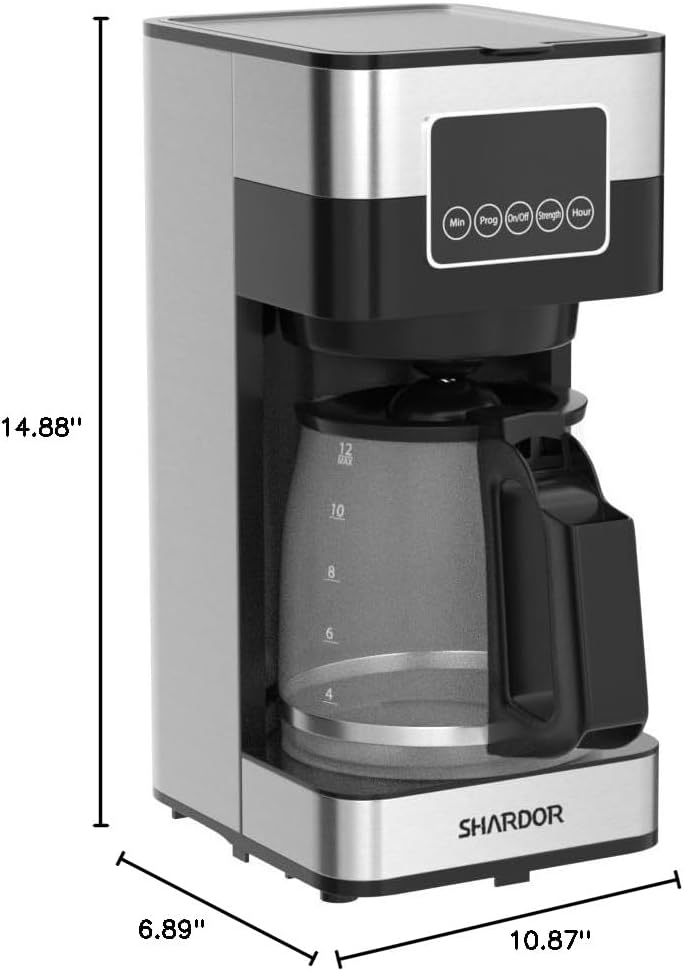
Image: Diagram showing the dimensions of the SHARDOR Drip Coffee Maker: 6.89 inches deep, 10.87 inches wide, and 14.88 inches high.
9. ວິດີໂອຜະລິດຕະພັນຢ່າງເປັນທາງການ
Watch this official video from SHARDOR for a quick overview of the Drip Coffee Maker:
ວິດີໂອ: ວິດີໂອຜະລິດຕະພັນຢ່າງເປັນທາງການasing the SHARDOR Drip Coffee Maker, demonstrating its features and ease of use.
10. ການຮັບປະກັນແລະການສະຫນັບສະຫນູນ
The SHARDOR Drip Coffee Maker comes with a 2-year warranty. To activate your warranty, please register your product within 7 days of receiving it. For warranty claims, technical assistance, or any product-related inquiries, please contact SHARDOR customer support through their official website or the contact information provided with your purchase. Please retain your proof of purchase for warranty validation.


