1. ບົດແນະນຳ
This manual provides detailed instructions for the setup, operation, maintenance, and troubleshooting of your iProda T1045A 10.1 inch Android Tablet. Please read this manual thoroughly before using your device to ensure proper functionality and to maximize your user experience.
The iProda T1045A is a 10.1-inch tablet featuring an HD IPS display with 1280x800 resolution, powered by a 64-bit Quad-core processor running Android 9 Pie. It includes 3GB RAM, 64GB internal storage expandable up to 128GB via TF card, dual-band Wi-Fi, HDMI output, and a 5000mAh battery for extended use.
2. ຜະລິດຕະພັນເກີນview
2.1 ເນື້ອໃນຊຸດ
ເມື່ອເປີດແພັກເກັດ, ກວດເບິ່ງວ່າສິນຄ້າທັງໝົດມີຢູ່:
- iProda T1045A 10.1 inch Android Tablet
- ສາຍ USB
- Power Adapter
- ຄູ່ມືຜູ້ໃຊ້ (ເອກະສານນີ້)

Image: Contents of the iProda T1045A tablet package.
2.2 ຮູບແບບອຸປະກອນ
Familiarize yourself with the physical components and ports of your tablet:
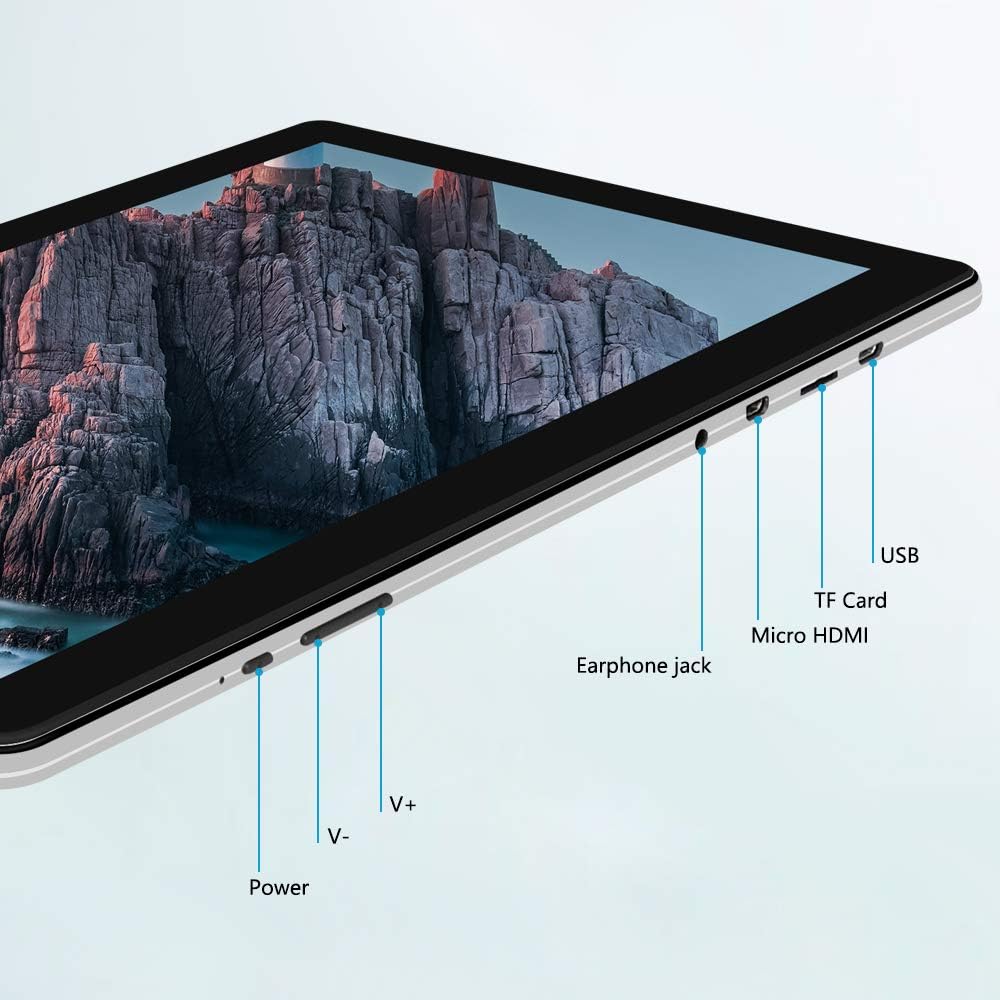
ຮູບພາບ: ຂ້າງ view of the iProda T1045A tablet highlighting port locations.
- ປຸ່ມເປີດປິດ: Press and hold to power on/off or restart the tablet. Short press to turn the screen on/off.
- Volume Buttons (V+, V-): ປັບລະດັບສຽງ.
- ຫູຟັງຫູຟັງ: ເຊື່ອມຕໍ່ຫູຟັງ 3.5 ມມ.
- ສະລັອດຕິງບັດ TF: Insert a microSD card for expandable storage (up to 128GB).
- ພອດ Micro HDMI: Connect to an external display using a Micro HDMI to HDMI cable.
- ພອດ USB: Connect to a computer for data transfer or for charging the device.
3. ຕັ້ງຄ່າ
3.1 ການສາກໄຟເບື້ອງຕົ້ນ
Before first use, fully charge the tablet. Connect the provided USB cable to the tablet's USB port and the power adapter, then plug the adapter into a wall outlet. The charging indicator will typically illuminate. A full charge may take several hours.
3.2 ການເປີດ/ປິດ
- ເພື່ອເປີດເຄື່ອງ: ກົດປຸ່ມເປີດປິດຄ້າງໄວ້ຈົນກ່ວາ ໜ້າ ຈໍຈະແຈ້ງຂຶ້ນ.
- ປິດເຄື່ອງ: Press and hold the Power button until a power menu appears on the screen. Select "Power off" and confirm.
- ເພື່ອເລີ່ມຕົ້ນໃໝ່: ຈາກເມນູພະລັງງານ, ເລືອກ "Restart".
- ເປີດ/ປິດໜ້າຈໍ: Briefly press the Power button to turn the screen off (sleep mode) or wake it up.
3.3 ຕົວຊ່ວຍສ້າງການຕິດຕັ້ງເບື້ອງຕົ້ນ
The first time you power on the tablet, you will be guided through an initial setup process. Follow the on-screen prompts to:
- ເລືອກພາສາທີ່ທ່ານຕ້ອງການ.
- ເຊື່ອມຕໍ່ກັບເຄືອຂ່າຍ Wi-Fi.
- ຕັ້ງຄ່າບັນຊີ Google ຂອງທ່ານ (ທາງເລືອກ, ແຕ່ແນະນໍາໃຫ້ດາວໂຫລດແອັບຯ).
- ຕັ້ງຄ່າການຕັ້ງຄ່າວັນທີ ແລະເວລາ.
3.4 Inserting a TF Card (MicroSD)
ເພື່ອຂະຫຍາຍບ່ອນເກັບຂໍ້ມູນຂອງແທັບເລັດ:
- ຊອກຫາຊ່ອງໃສ່ບັດ TF ຢູ່ດ້ານຂ້າງຂອງແທັບເລັດ.
- Carefully insert a microSD card (up to 128GB) into the slot with the gold contacts facing down until it clicks into place.
- ເພື່ອເອົາອອກ, ຄ່ອຍໆຍູ້ບັດເຂົ້າໄປຂ້າງໃນຈົນກວ່າມັນຈະງໍອອກມາ.
4. ຄໍາແນະນໍາການດໍາເນີນງານ
4.1 ການນໍາທາງພື້ນຖານ
The iProda T1045A uses a touch-sensitive screen for navigation:
- ແຕະ: ເລືອກລາຍການ ຫຼືເປີດແອັບພລິເຄຊັນ.
- ແຕະແລະຖື: ເຂົ້າເຖິງເມນູບໍລິບົດ ຫຼືຍ້າຍໄອຄອນ.
- ປັດ: ເລື່ອນຜ່ານລາຍຊື່ ຫຼື ສະຫຼັບລະຫວ່າງໜ້າຈໍຫຼັກ.
- ເມື່ອເຂົ້າຕາຈົນ: ຊູມເຂົ້າ ຫຼືອອກໃນຮູບພາບ ແລະ web ໜ້າ.
4.2 ການເຊື່ອມຕໍ່ Wi-Fi
ເພື່ອເຊື່ອມຕໍ່ກັບເຄືອຂ່າຍໄຮ້ສາຍ:
- ໄປທີ່ ການຕັ້ງຄ່າ > ເຄືອຂ່າຍ ແລະອິນເຕີເນັດ > Wi-Fi.
- ສະຫຼັບ Wi-Fi On.
- ເລືອກເຄືອຂ່າຍທີ່ທ່ານຕ້ອງການຈາກບັນຊີລາຍຊື່.
- ໃສ່ລະຫັດຜ່ານຖ້າຖືກຖາມ, ຈາກນັ້ນແຕະ ເຊື່ອມຕໍ່.
The tablet supports both 2.4G and 5G dual-band Wi-Fi for faster and more stable connections.
4.3 ການຈັບຄູ່ Bluetooth
To pair with Bluetooth devices (e.g., headphones, speakers):
- ໄປທີ່ ການຕັ້ງຄ່າ > ອຸປະກອນທີ່ເຊື່ອມຕໍ່ > Bluetooth.
- ສະຫຼັບ Bluetooth On.
- ກວດໃຫ້ແນ່ໃຈວ່າອຸປະກອນ Bluetooth ຂອງທ່ານຢູ່ໃນໂໝດຈັບຄູ່.
- Select your device from the list of available devices and follow any on-screen prompts to complete pairing.
4.4 ການນໍາໃຊ້ກ້ອງຖ່າຍຮູບ
The tablet is equipped with a 2MP front camera and a 5MP rear camera.
- ເປີດ ກ້ອງຖ່າຍຮູບ application from the app drawer.
- ແຕະໄອຄອນກ້ອງຖ່າຍຮູບເພື່ອສະຫຼັບລະຫວ່າງກ້ອງໜ້າ ແລະກ້ອງຫຼັງ.
- ແຕະປຸ່ມຊັດເຕີເພື່ອຖ່າຍຮູບ ຫຼື ເລີ່ມ/ຢຸດການບັນທຶກວິດີໂອ.

Image: Tablet in use, showcasing its camera capabilities.
4.5 Connecting to an External Display (HDMI)
To display your tablet's screen on a larger monitor or TV:
- Connect one end of a Micro HDMI cable to the tablet's Micro HDMI port.
- Connect the other end of the cable to an HDMI input on your external display.
- Select the correct HDMI input source on your external display.
- The tablet's screen content should now be mirrored on the external display.
4.6 ການຈັດການແອັບ
The tablet runs Android 9 Pie and supports applications from the Google Play Store.
- ການຕິດຕັ້ງແອັບ: ເປີດ Play Store app, ຊອກຫາຄໍາຮ້ອງສະຫມັກທີ່ທ່ານຕ້ອງການ, ແລະແຕະ ຕິດຕັ້ງ.
- ຖອນການຕິດຕັ້ງແອັບ: Tap and hold an app icon on the home screen or in the app drawer, then drag it to "Uninstall" or select "App info" and choose "Uninstall". Alternatively, go to ການຕັ້ງຄ່າ > ແອັບ & ການແຈ້ງເຕືອນ, ເລືອກແອັບ, ແລະແຕະ ຖອນການຕິດຕັ້ງ.
5. ບໍາລຸງຮັກສາ
5.1 ການທໍາຄວາມສະອາດອຸປະກອນ
ເພື່ອເຮັດຄວາມສະອາດແທັບເລັດຂອງທ່ານ:
- Power off the tablet before cleaning.
- ໃຊ້ຜ້າແພທີ່ອ່ອນໆ, ບໍ່ມີເສັ້ນດ່າງ, dampຫໍ່ດ້ວຍນ້ໍາຫຼືເຄື່ອງເຮັດຄວາມສະອາດຫນ້າຈໍ, ເພື່ອເຊັດຫນ້າຈໍແລະຮ່າງກາຍ.
- ຫຼີກລ່ຽງການໃຊ້ສານເຄມີທີ່ຮຸນແຮງ, ເຄື່ອງເຮັດຄວາມສະອາດຂັດ, ຫຼືຄວາມຊຸ່ມຊື່ນຫຼາຍເກີນໄປ.
5.2 ການປັບປຸງຊອບແວ
Periodically check for software updates to ensure optimal performance and security:
- ໄປທີ່ ການຕັ້ງຄ່າ > ລະບົບ > ຂັ້ນສູງ > ອັບເດດລະບົບ.
- Follow the on-screen instructions to download and install any available updates. Ensure your tablet is sufficiently charged or connected to power during updates.
5.3 ການຄຸ້ມຄອງການເກັບຮັກສາ
To manage internal storage and the TF card:
- ໄປທີ່ ການຕັ້ງຄ່າ > ການເກັບຮັກສາ.
- ທີ່ນີ້ເຈົ້າສາມາດ view storage usage, free up space, and manage files on both internal storage and the inserted TF card.
6. ການແກ້ໄຂບັນຫາ
This section addresses common issues you might encounter with your iProda T1045A tablet.
6.1 ອຸປະກອນບໍ່ເປີດ
- Ensure the tablet is sufficiently charged. Connect it to the power adapter and allow it to charge for at least 30 minutes before attempting to power on again.
- ລອງກົດປຸ່ມເປີດປິດຄ້າງໄວ້ປະມານ 10-15 ວິນາທີເພື່ອບັງຄັບໃຫ້ເປີດຄືນໃໝ່.
6.2 ບັນຫາການເຊື່ອມຕໍ່ Wi-Fi
- Verify that Wi-Fi is enabled in ການຕັ້ງຄ່າ.
- ໃຫ້ແນ່ໃຈວ່າທ່ານກໍາລັງໃສ່ລະຫັດຜ່ານ Wi-Fi ທີ່ຖືກຕ້ອງ.
- ຣີສະຕາດເລົາເຕີ Wi-Fi ແລະແທັບເລັດຂອງທ່ານ.
- Try connecting to a different Wi-Fi network to determine if the issue is with the tablet or the network.
6.3 ການປະຕິບັດຊ້າ
- ປິດແອັບພລິເຄຊັນພື້ນຫຼັງທີ່ບໍ່ຈໍາເປັນ.
- Clear cached data for apps in ການຕັ້ງຄ່າ > ແອັບ & ການແຈ້ງເຕືອນ > [ຊື່ແອັບ] > ການເກັບຮັກສາ & cache > ລຶບລ້າງແຄດ.
- Ensure sufficient free storage space. Uninstall unused apps or move large files to a TF card.
- ຣີສະຕາດແທັບເລັດ.
6.4 ແບັດເຕີຣີໝົດໄວ
- ຫຼຸດຄວາມສະຫວ່າງໜ້າຈໍ.
- ປິດໃຊ້ງານ Wi-Fi, Bluetooth, ແລະ GPS ເມື່ອບໍ່ໄດ້ໃຊ້.
- ປິດແອັບພື້ນຫຼັງທີ່ໃຊ້ພະລັງງານຫຼາຍ.
- ກວດສອບການນໍາໃຊ້ຫມໍ້ໄຟໃນ ການຕັ້ງຄ່າ > ແບັດເຕີຣີ ເພື່ອລະບຸແອັບທີ່ຫິວພະລັງງານ.
- Ensure the tablet is not allowed to run below 15% charge frequently, as this can impact battery longevity.
6.5 ຣີເຊັດເປັນຄ່າໂຮງງານ
ຖ້າບັນຫາຍັງຄົງເກີດຂຶ້ນຢູ່, ການຣີເຊັດເປັນຄ່າໂຮງງານອາດຈະແກ້ໄຂບັນຫາເຫຼົ່ານັ້ນໄດ້. ຄຳເຕືອນ: This will erase all data on your tablet. Back up important data before proceeding.
- ໄປທີ່ ການຕັ້ງຄ່າ > ລະບົບ > ຂັ້ນສູງ > ຣີເຊັດຕົວເລືອກ.
- ເລືອກ ລຶບຂໍ້ມູນທັງໝົດ (ຣີເຊັດເປັນຄ່າໂຮງງານ).
- ຢືນຢັນການຕັດສິນໃຈຂອງທ່ານແລະປະຕິບັດຕາມການເຕືອນໃນຫນ້າຈໍ.
7. ຂໍ້ມູນຈໍາເພາະ
Below are the technical specifications for the iProda T1045A tablet:
| ຊື່ຕົວແບບ | T1045A |
| ລະບົບປະຕິບັດການ | Android 9 Pie |
| ຂະຫນາດຈໍສະແດງຜົນ | 10.1 ນິ້ວ |
| ຄວາມລະອຽດການສະແດງ | 1280 x 800 ພິກເຊລ (HD IPS) |
| ໂຮງງານຜະລິດ | MediaTek Quad-core 1.5Ghz |
| RAM | 3 GB |
| ການເກັບຮັກສາພາຍໃນ | SSD 64 GB |
| ການເກັບຮັກສາທີ່ຂະຫຍາຍໄດ້ | Up to 128 GB via TF Card (MicroSD) |
| Graphics Coprocessor | ARM Mali-T720 MP2 |
| ກ້ອງຫຼັງ | 5 MP |
| ກ້ອງໜ້າ | 2 MP |
| ຄວາມອາດສາມາດຫມໍ້ໄຟ | 5000 mAh Lithium Polymer |
| ອາຍຸຫມໍ້ໄຟສະເລ່ຍ | ສູງສຸດ 8 ຊົ່ວໂມງ |
| ການເຊື່ອມຕໍ່ໄຮ້ສາຍ | Dual-Band Wi-Fi (802.11a/b/g/n), Bluetooth 4.0 |
| ທ່າເຮືອ | 1x USB 2.0, 1x Micro HDMI, 3.5mm Earphone Jack, TF Card Slot |
| ຂະໜາດ | 34.5 x 19.7 x 5.5 cm |
| ນ້ຳໜັກ | 550 g |

Image: Key performance specifications of the tablet.

Image: Tablet portability and battery details.
8. ການຮັບປະກັນແລະການສະຫນັບສະຫນູນ
8.1 ການຮັບປະກັນຜະລິດຕະພັນ
The iProda T1045A tablet comes with a ຮັບປະກັນ 12 ເດືອນ ຈາກວັນທີ່ຊື້. ການຮັບປະກັນນີ້ກວມເອົາຄວາມບົກຜ່ອງດ້ານການຜະລິດແລະການເຮັດວຽກຜິດປົກກະຕິພາຍໃຕ້ການນໍາໃຊ້ປົກກະຕິ. ມັນບໍ່ກວມເອົາຄວາມເສຍຫາຍທີ່ເກີດຈາກການນໍາໃຊ້ທີ່ບໍ່ຖືກຕ້ອງ, ອຸປະຕິເຫດ, ການສ້ອມແປງທີ່ບໍ່ໄດ້ຮັບອະນຸຍາດ, ຫຼືຄວາມເສຍຫາຍປົກກະຕິ.
8.2 ສະຫນັບສະຫນູນລູກຄ້າ
If you encounter any issues not covered in the troubleshooting section or require further assistance, please contact iProda customer support. Refer to your purchase documentation or the iProda official webເວັບໄຊສໍາລັບຂໍ້ມູນຕິດຕໍ່.
When contacting support, please have your tablet's model number (T1045A) and purchase details readily available.