ແນະນຳ
ຂອບໃຈສໍາລັບການຊື້asing the VOKSUN S300 Portable Bluetooth Vinyl Record Player. This device is designed to provide a unique and versatile audio experience, allowing you to enjoy your vinyl collection and digital music with ease. This manual will guide you through the setup, operation, and maintenance of your record player to ensure optimal performance and longevity.
ກະລຸນາອ່ານຄູ່ມືນີ້ຢ່າງລະອຽດກ່ອນທີ່ຈະນໍາໃຊ້ຜະລິດຕະພັນແລະເກັບຮັກສາມັນໄວ້ສໍາລັບການອ້າງອີງໃນອະນາຄົດ.
ຄໍາແນະນໍາຄວາມປອດໄພ
To prevent fire or shock hazards, observe the following precautions:
- ຫ້າມບໍ່ໃຫ້ອຸປະກອນຖືກຝົນ ຫຼື ຄວາມຊຸ່ມຊື່ນ.
- ຢ່າໃຊ້ເຄື່ອງນີ້ຢູ່ໃກ້ກັບນ້ໍາ.
- ເຮັດຄວາມສະອາດດ້ວຍຜ້າແຫ້ງເທົ່ານັ້ນ.
- ຫ້າມປິດຊ່ອງລະບາຍອາກາດໃດໆ. ຕິດຕັ້ງຕາມຄໍາແນະນໍາຂອງຜູ້ຜະລິດ.
- ຫ້າມຕິດຕັ້ງໃກ້ກັບແຫຼ່ງຄວາມຮ້ອນເຊັ່ນລັງສີ, ເຄື່ອງບັນທຶກຄວາມຮ້ອນ, ເຕົາຫຼືອຸປະກອນອື່ນໆ (ລວມທັງ. amplifiers) ທີ່ຜະລິດຄວາມຮ້ອນ.
- ປົກປ້ອງສາຍໄຟບໍ່ໃຫ້ຖືກເປີດ ຫຼື ຈີກ, ໂດຍສະເພາະຢູ່ປລັກສຽບ, ເຄື່ອງຮັບສະດວກ, ແລະຈຸດທີ່ພວກມັນອອກຈາກເຄື່ອງ.
- ໃຊ້ໄຟລ໌ແນບ/ອຸປະກອນເສີມທີ່ຜູ້ຜະລິດລະບຸໄວ້ເທົ່ານັ້ນ.
- ຖອດປລັກໜ່ວຍນີ້ໃນລະຫວ່າງພາຍຸຟ້າຜ່າ ຫຼືເມື່ອບໍ່ໄດ້ໃຊ້ເປັນເວລາດົນນານ.
- ອ້າງອີງການບໍລິການທັງໝົດໃຫ້ກັບພະນັກງານບໍລິການທີ່ມີຄຸນວຸດທິ. ການບໍລິການແມ່ນຕ້ອງການໃນເວລາທີ່ຫນ່ວຍບໍລິການໄດ້ຮັບຄວາມເສຍຫາຍໃນທາງໃດກໍ່ຕາມເຊັ່ນ: ສາຍໄຟຫຼືປລັກສຽບຖືກເສຍຫາຍ, ມີນ້ໍາຮົ່ວຫຼືສິ່ງຂອງຕົກເຂົ້າໄປໃນຫນ່ວຍງານ, ຫນ່ວຍງານຖືກຝົນຫຼືຄວາມຊຸ່ມຊື່ນ, ບໍ່ເຮັດວຽກເປັນປົກກະຕິ. , ຫຼືໄດ້ຖືກຫຼຸດລົງ.
ເນື້ອໃນຊຸດ
ກວດສອບວ່າລາຍການທັງຫມົດແມ່ນລວມຢູ່ໃນຊຸດຂອງທ່ານ:
- VOKSUN S300 Portable Bluetooth Vinyl Record Player
- Power Adapter
- ສາຍ USB
- ສາຍໄຟ AUX 3.5mm
- ຄູ່ມືການສອນ
ສິນຄ້າເກີນview
ການເຊື່ອມຕໍ່ແຜງດ້ານຫລັງ
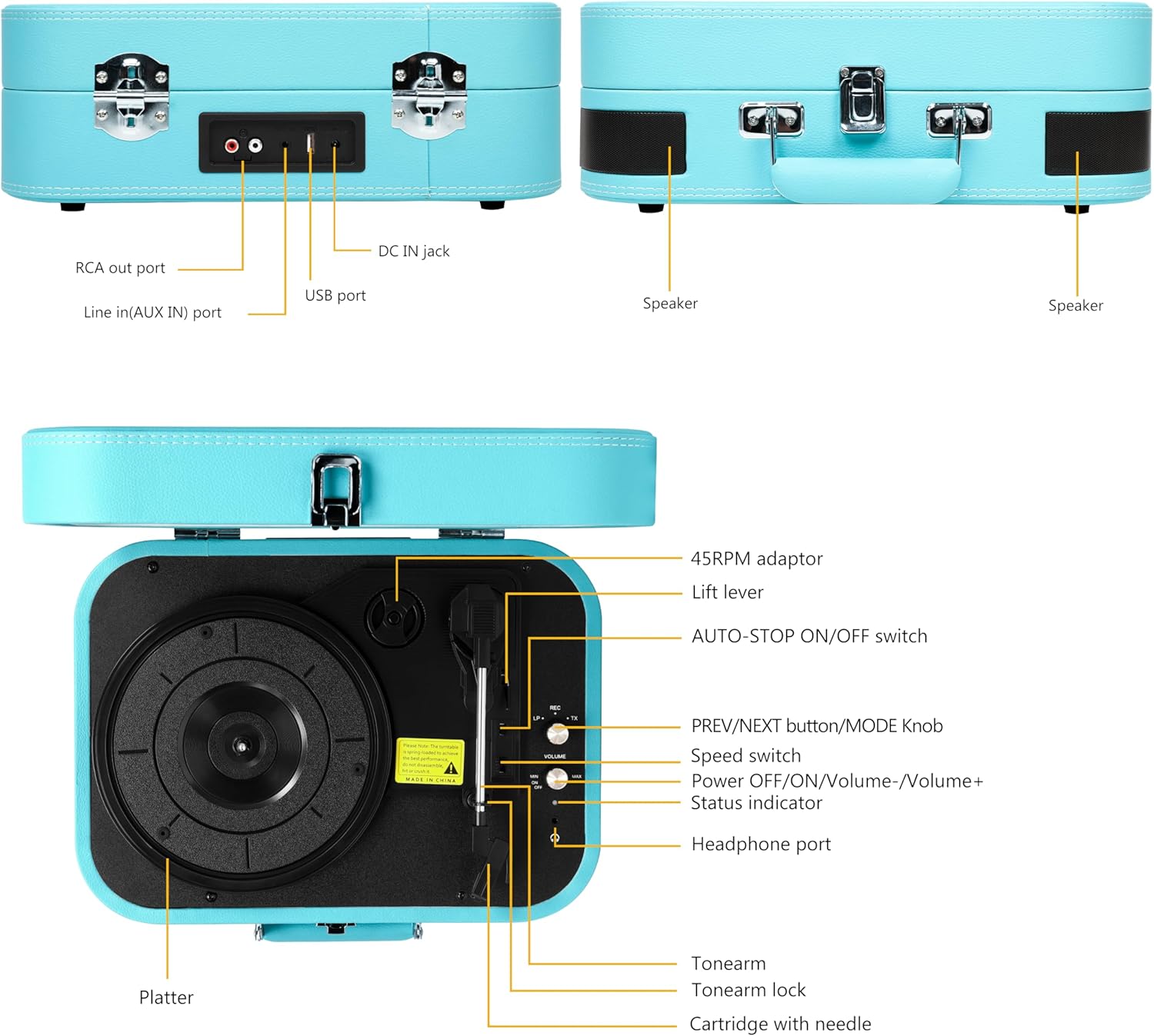
This image displays the rear panel of the record player, highlighting the RCA output for external speakers, the AUX input for connecting external audio devices, the DC IN jack for power, and the USB port for playback and recording.
- RCA Out Port: Connects to external speakers for enhanced audio output.
- Line In (AUX IN) Port: Connects external audio devices (e.g., smartphones, MP3 players) via a 3.5mm cable.
- DC ໃນ Jack: Power input for the record player.
- ພອດ USB: ສໍາລັບການຫຼິ້ນ MP3 files from a USB flash drive or recording vinyl to MP3.
Top Panel Controls and Components

This image illustrates the top view of the record player, detailing the platter, tonearm assembly, speed selector, and various control buttons and ports.
- 45RPM Adaptor: Used for playing 45 RPM records with a large center hole.
- ລີເວີຍົກ: ຍົກສູງບົດບາດແລະຕ່ ຳ ສຽງ.
- AUTO-STOP ON/OFF Switch: Enables or disables the auto-stop function at the end of a record.
- PREV/NEXT Button / MODE Knob: Controls track selection (USB/Bluetooth) and switches between input modes (Vinyl, Bluetooth, AUX, USB).
- ສະຫຼັບຄວາມໄວ: Selects playback speed (33-1/3, 45, 78 RPM).
- Power OFF/ON / Volume-/Volume+ Knob: ເປີດ/ປິດເຄື່ອງ ແລະ ປັບລະດັບສຽງ.
- ຕົວຊີ້ບອກສະຖານະ: LED light indicating current mode or status.
- ພອດຫູຟັງ: ເຊື່ອມຕໍ່ຫູຟັງເພື່ອຟັງເປັນສ່ວນຕົວ.
- ໂຕນ: ຖື cartridge ແລະ stylus.
- Tonearm Lock: Secures the tonearm when not in use or during transport.
- Cartridge with Needle: Reads the grooves of the vinyl record.
- ຈານ: The rotating surface where records are placed.
ຕັ້ງຄ່າ
1. ການຫຸ້ມຫໍ່
Carefully remove the record player from its packaging. Retain the packaging for future transport or storage. Ensure all components listed in the 'Package Contents' section are present.
2. ການເຊື່ອມຕໍ່ພະລັງງານ
- Connect the power adapter to the DC IN jack on the rear of the record player.
- ສຽບປາຍອີກດ້ານໜຶ່ງຂອງອະແດບເຕີໄຟເຂົ້າກັບປລັກສຽບທີ່ເໝາະສົມ.
3. ການຈັດວາງເບື້ອງຕົ້ນ
Place the record player on a stable, level surface away from direct sunlight, heat sources, and excessive dust or vibrations. Ensure adequate ventilation around the unit.
ຄໍາແນະນໍາການດໍາເນີນງານ
1. Basic Vinyl Playback
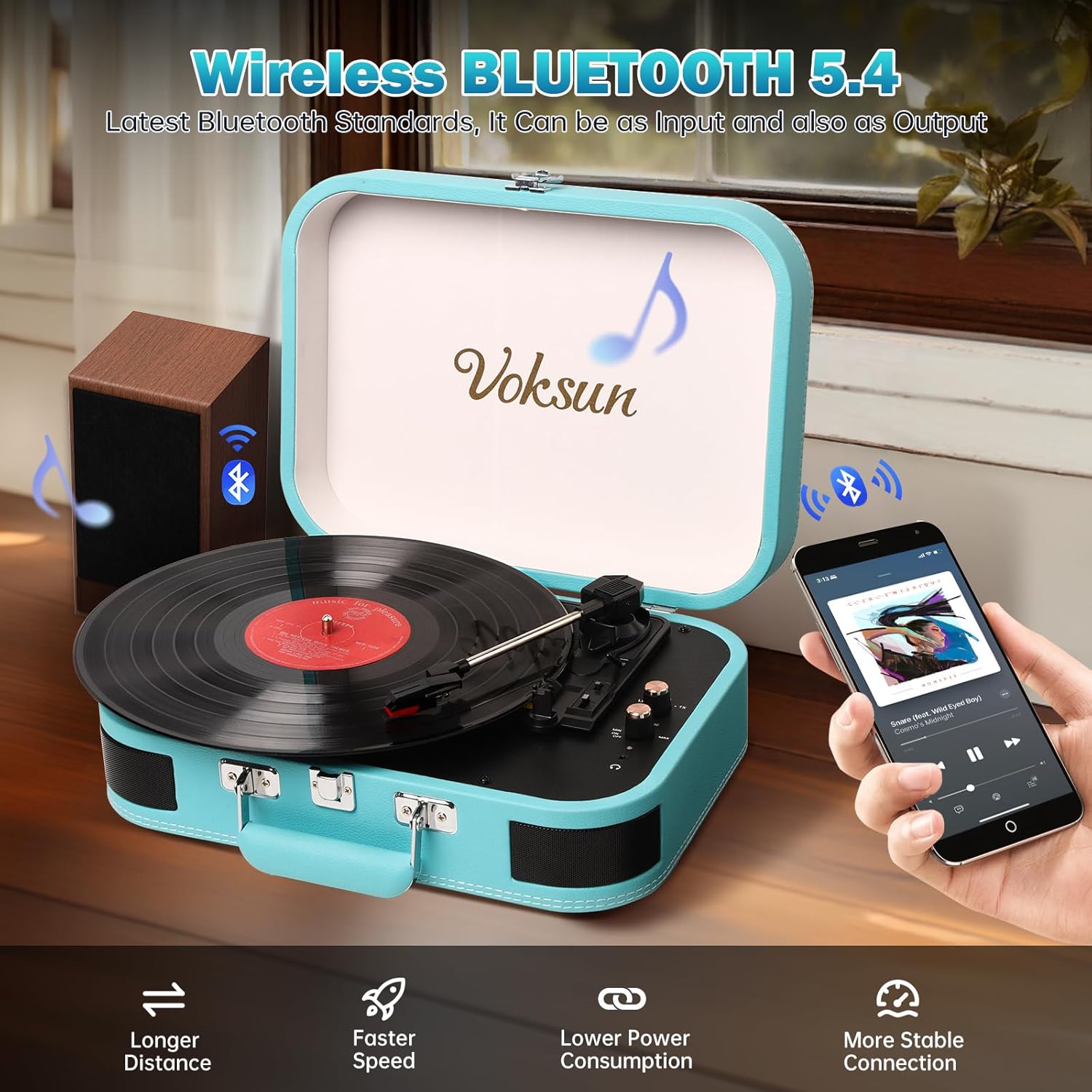
This image shows the record player in an open position with a vinyl record placed on the platter, illustrating its readiness for playing music.
- ເປີດຝາປິດຂອງເຄື່ອງຫຼິ້ນແຜ່ນສຽງ.
- Turn the Power OFF/ON/Volume knob clockwise to power on the unit. The status indicator will light up.
- ວາງບັນທຶກ vinyl ໃສ່ແຜ່ນ.
- Select the appropriate speed (33-1/3, 45, or 78 RPM) using the Speed Switch, matching your record's speed. Use the 45RPM adaptor if necessary for 45 RPM records.
- Release the Tonearm Lock.
- Lift the Tonearm using the Lift Lever.
- Carefully position the stylus over the desired track of the record.
- Gently lower the Tonearm using the Lift Lever. The record will begin to play.
- Adjust the volume using the Power OFF/ON/Volume knob.
- At the end of the record, if the AUTO-STOP switch is ON, the platter will stop rotating automatically. If OFF, it will continue to rotate.
- To stop playback manually, lift the tonearm, return it to its rest, and engage the tonearm lock.
2. ແບບ Bluetooth
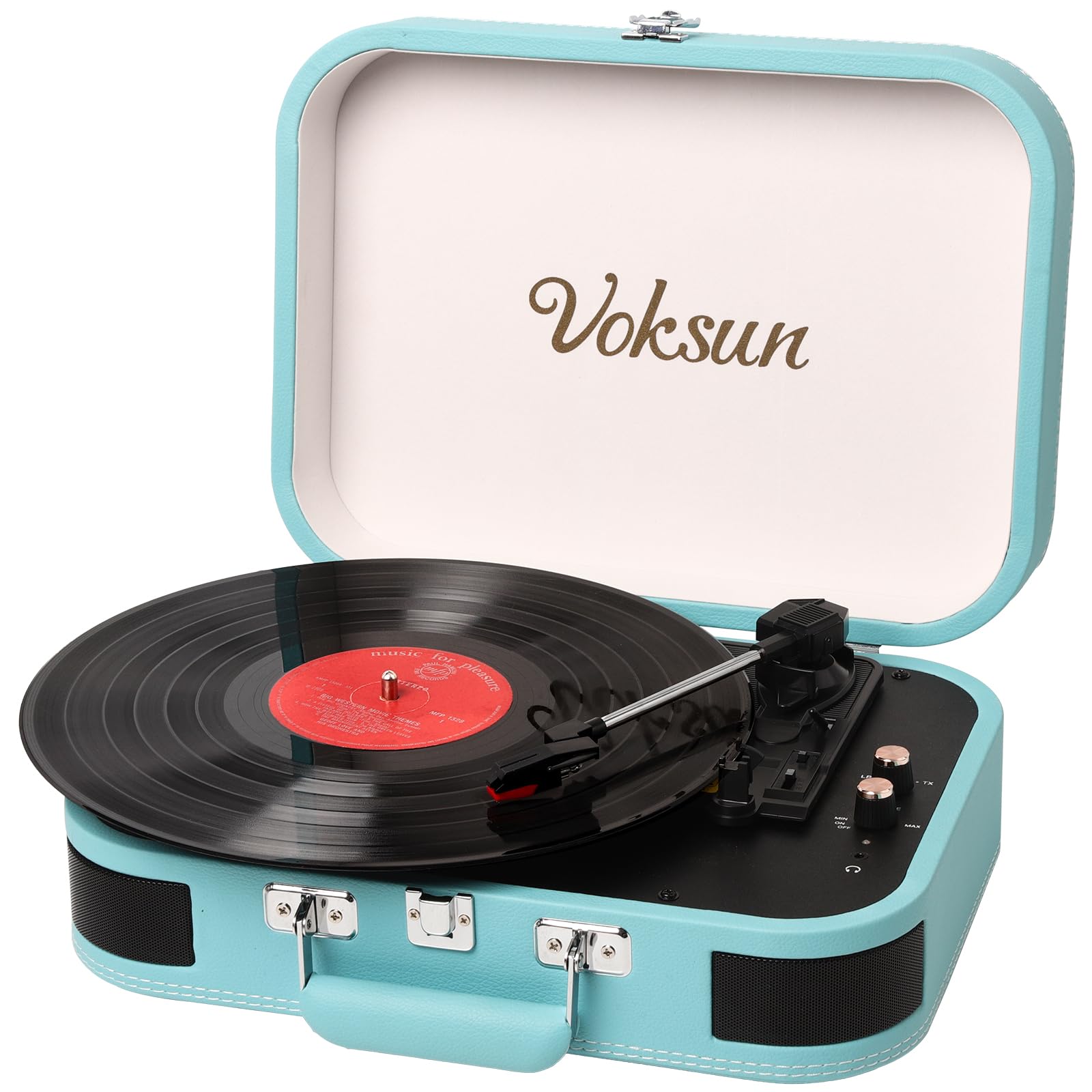
This image demonstrates the record player's Bluetooth connectivity, showing a smartphone wirelessly streaming music to the unit.
- ເປີດເຄື່ອງຫຼິ້ນແຜ່ນສຽງ.
- Rotate the MODE knob to select Bluetooth mode. The status indicator will flash blue, indicating pairing mode.
- ເປີດໃຊ້ Bluetooth ໃນໂທລະສັບສະຫຼາດ ຫຼື ອຸປະກອນອື່ນໆທີ່ເປີດໃຊ້ງານ Bluetooth ຂອງທ່ານ.
- ຊອກຫາ "VOKSUN" in your device's Bluetooth list and select it to pair.
- Once paired, the status indicator will stop flashing and remain solid blue.
- You can now play music from your device through the record player's speakers. Adjust volume on both the record player and your device.
3. ເຄື່ອງປ້ອນຂໍ້ມູນ AUX

This image illustrates the use of the 3.5mm AUX IN and Headphone ports, showing a user enjoying music with headphones and an AUX cable connected.
- ເປີດເຄື່ອງຫຼິ້ນແຜ່ນສຽງ.
- Connect one end of the 3.5mm AUX cable to the AUX IN port on the rear of the record player.
- Connect the other end of the AUX cable to the headphone jack of your external audio device (e.g., smartphone, MP3 player).
- Rotate the MODE knob to select AUX mode.
- Play music from your external device. The audio will be routed through the record player's speakers.
- Adjust volume on both the record player and your external device.
4. ການຫຼິ້ນ USB
- ເປີດເຄື່ອງຫຼິ້ນແຜ່ນສຽງ.
- ໃສ່ USB flash drive ທີ່ບັນຈຸສຽງ MP3 files into the USB port on the rear of the record player.
- Rotate the MODE knob to select USB mode.
- The record player will automatically begin playing the MP3 files ຈາກ USB drive.
- Use the PREV/NEXT buttons to skip tracks.
- Adjust the volume using the Power OFF/ON/Volume knob.
5. Vinyl to MP3 Recording

This diagram visually explains how to transform audio from vinyl records into WAV format files, which are then saved to a USB flash drive.
- ໃຫ້ແນ່ໃຈວ່າໄດຣຟ໌ USB ຖືກສຽບເຂົ້າໄປໃນພອດ USB.
- Start playing a vinyl record as described in 'Basic Vinyl Playback'.
- While the record is playing, press and hold the MODE knob for a few seconds until the status indicator changes, indicating recording has started.
- The record player will convert the vinyl audio into MP3 files and save them to the connected USB drive.
- To stop recording, press the MODE knob again.
6. External Speaker Connection (RCA)

This image provides a clear visual guide for connecting the record player to external speakers via RCA output, as well as other portable audio devices.
- Connect RCA cables (not included) to the RCA Out ports on the rear of the record player.
- Connect the other end of the RCA cables to the corresponding audio input jacks on your external amplifier ຫຼືລໍາໂພງພະລັງງານ.
- Ensure the record player is in the desired playback mode (Vinyl, Bluetooth, AUX, or USB).
- Adjust the volume on both the record player and your external audio system.
7. ການໃຊ້ຫູຟັງ
- Plug your headphones into the Headphone Port on the top panel.
- ສຽງຈະຖືກສົ່ງໄປຫາຫູຟັງຂອງທ່ານໂດຍອັດຕະໂນມັດ, ໂດຍປິດສຽງລຳໂພງໃນຕົວ.
- Adjust the volume using the Power OFF/ON/Volume knob.
ບໍາລຸງຮັກສາ
1. ທໍາຄວາມສະອາດ
- Wipe the record player's exterior with a soft, dry cloth. Do not use abrasive cleaners or solvents.
- ໃຫ້ປິດຝາໃຫ້ແໜ້ນເມື່ອບໍ່ໄດ້ໃຊ້ເພື່ອປ້ອງກັນການສະສົມຂອງຝຸ່ນຢູ່ເທິງແຜ່ນຮອງ ແລະ ແຂນໂທນເນີ.
2. ການດູແລປາກກາປາກກາ

This close-up image focuses on the stylus and cartridge, which are crucial for reading the grooves of a vinyl record.
- ເຂັມ (ເຂັມ) ລະອຽດອ່ອນ. ຈັດການມັນດ້ວຍຄວາມລະມັດລະວັງ.
- ຫຼີກເວັ້ນການສໍາຜັດສະໄຕລັດດ້ວຍນິ້ວມືຂອງທ່ານ.
- ທຳຄວາມສະອາດປາກກາເປັນໄລຍະໆດ້ວຍແປງອ່ອນໆ, ຄ່ອຍໆຖູຈາກຫຼັງຫາໜ້າ.
- A worn stylus can damage records and degrade sound quality. Replace the stylus when necessary.
3. ການເກັບຮັກສາ
When storing the record player, ensure the tonearm is secured with the tonearm lock and the lid is closed. Store in a cool, dry place.
ການແກ້ໄຂບັນຫາ
| ບັນຫາ | ສາເຫດທີ່ເປັນໄປໄດ້ | ການແກ້ໄຂ |
|---|---|---|
| ບໍ່ມີພະລັງງານ | ອະແດັບເຕີໄຟບໍ່ໄດ້ເຊື່ອມຕໍ່ ຫຼື ມີບັນຫາ. | ກວດໃຫ້ແນ່ໃຈວ່າອະແດັບເຕີໄຟເຊື່ອມຕໍ່ຢ່າງປອດໄພກັບໜ່ວຍ ແລະປລັກສຽບໄຟທີ່ເຮັດວຽກ. |
| ບໍ່ມີສຽງຈາກ ລຳ ໂພງ | ລະດັບສຽງຕໍ່າເກີນໄປ; ເລືອກໂໝດບໍ່ຖືກຕ້ອງ; ເຊື່ອມຕໍ່ຫູຟັງແລ້ວ. | Increase volume. Verify correct mode (Vinyl, Bluetooth, AUX, USB). Disconnect headphones if present. |
| ບັນທຶກສຽງຂ້າມ ຫຼື ສຽງບິດເບືອນ | Record is dirty or scratched; stylus is dirty or worn; unit is not level. | Clean record. Clean or replace stylus. Place unit on a stable, level surface. |
| Bluetooth ບໍ່ໄດ້ຈັບຄູ່ | Record player not in Bluetooth mode; device too far; device already paired to another unit. | Ensure record player is in Bluetooth mode (flashing blue light). Move device closer. Disconnect from other Bluetooth devices. |
| Vinyl to MP3 recording not working | USB drive not inserted or full; USB drive not formatted correctly. | Ensure USB drive is inserted and has sufficient space. Format USB drive to FAT32 if necessary. |
ຂໍ້ມູນຈໍາເພາະ
This image highlights the record player's ability to play records at different speeds (33-1/3, 45, 78 RPM) and accommodate various record sizes.
| ຄຸນສົມບັດ | ລາຍລະອຽດ |
|---|---|
| ໝາຍເລກຕົວແບບ | S300 |
| ຍີ່ຫໍ້ | VOKSUN |
| ຄວາມໄວໃນການຫຼິ້ນ | 33-1/3, 45, 78 RPM |
| ການເຊື່ອມຕໍ່ | Bluetooth, AUX In, USB, RCA Out, Headphone Jack |
| ຟັງຊັນການບັນທຶກ | Vinyl to MP3 (via USB) |
| ລຳໂພງໃນຕົວ | Yes, Stereo |
| ແຫຼ່ງພະລັງງານ | ຜູ້ດັດແປງພະລັງງານ DC |
| ປະເພດວັດສະດຸ | Plastic (with PVC leather finish) |
| ຂະໜາດສິນຄ້າ | 35 x 25.5 x 12.5 ຊມ (13.8 x 10 x 4.9 ນິ້ວ) |
| ນ້ໍາຫນັກລາຍການ | 2.97 ກິໂລ (6.55 ປອນ) |
| ສີ | ສີຟ້າ |
ການຮັບປະກັນແລະການສະຫນັບສະຫນູນ
VOKSUN products are designed and manufactured to the highest quality standards. For warranty information, please refer to the warranty card included in your package or contact your local retailer.
For technical support, troubleshooting assistance, or service inquiries, please contact VOKSUN customer service through the contact information provided on the product packaging or the official VOKSUN website. Please have your model number (S300) and purchase date available when contacting support.


