1. ຂໍ້ມູນຄວາມປອດໄພທີ່ສໍາຄັນ
Please read this entire manual carefully before assembling or operating the Tunturi T20 Treadmill. Retain this manual for future reference.
- ປຶກສາແພດສະເໝີ ກ່ອນທີ່ຈະເລີ່ມໂຄງການອອກກຳລັງກາຍ.
- This equipment is intended for home use only.
- ຮັກສາເດັກນ້ອຍ ແລະສັດລ້ຽງຢູ່ຫ່າງຈາກເຄື່ອງແລ່ນ ໃນລະຫວ່າງການປະຕິບັດງານ.
- ໃຫ້ແນ່ໃຈວ່າ treadmill ໄດ້ຖືກວາງຢູ່ເທິງພື້ນຜິວທີ່ຮາບພຽງ, ມີຄວາມຫມັ້ນຄົງດ້ວຍການເກັບກູ້ຢ່າງພຽງພໍ.
- ໃສ່ເຄື່ອງນຸ່ງແລະເກີບກິລາທີ່ເຫມາະສົມ.
- Use the safety key at all times. In an emergency, pulling the safety key will immediately stop the treadmill.
- ຫ້າມແລ່ນເຄື່ອງແລ່ນຖ້າມັນຖືກເສຍຫາຍ ຫຼືເຮັດວຽກຜິດປົກກະຕິ.
- ນ້ຳໜັກຜູ້ໃຊ້ສູງສຸດ: 120 ກິໂລກຣາມ (264 ປອນ).
2. ການຕິດຕັ້ງແລະການປະກອບ
2.1 ການຫຸ້ມຫໍ່
Carefully remove all components from the packaging. Verify that all parts listed in the 'Included Components' section (see Specifications) are present. Keep packaging materials until assembly is complete.
2.2 ສະພາ
The Tunturi T20 treadmill requires some assembly. Follow the detailed instructions provided in the separate assembly guide included with your product. Ensure all bolts and nuts are securely tightened before use.
2.3 ການຈັດວາງແລະການເຊື່ອມຕໍ່ພະລັງງານ
Place the treadmill on a level surface, ensuring at least 2 meters (6.5 feet) of clear space behind it and 0.5 meters (1.6 feet) on each side. Connect the power cord to a grounded electrical outlet. Ensure the power switch is in the OFF position before plugging in.

ຮູບພາບ: Demonstrating the folding mechanism of the Tunturi T20 treadmill. The treadmill can be folded vertically for compact storage, making it suitable for home environments with limited space.
3. ຄໍາແນະນໍາການດໍາເນີນງານ
3.1 ເປີດ/ປິດ
To power on, plug in the treadmill and flip the main power switch located near the front base to the 'ON' position. The console display will illuminate. To power off, flip the switch to 'OFF' and unplug the unit.
3.2 Console Overview

ຮູບພາບ: The Tunturi T20 treadmill console. This display shows key workout metrics such as time, distance, incline level, and current speed. It also features a visual 400-meter track and indicators for Bluetooth and heart rate connectivity.
The console features an LED or LCD display showing time, distance, incline, calories burned, and steps. Control buttons for speed, incline, program selection, start, stop, and mode are located below the display.
ກະແຈຄວາມປອດໄພ 3.3 ອັນ
Attach the safety key clip to your clothing before starting any workout. Insert the magnetic end of the safety key into the designated slot on the console. The treadmill will not operate without the safety key in place. Removing the safety key will immediately stop the treadmill.
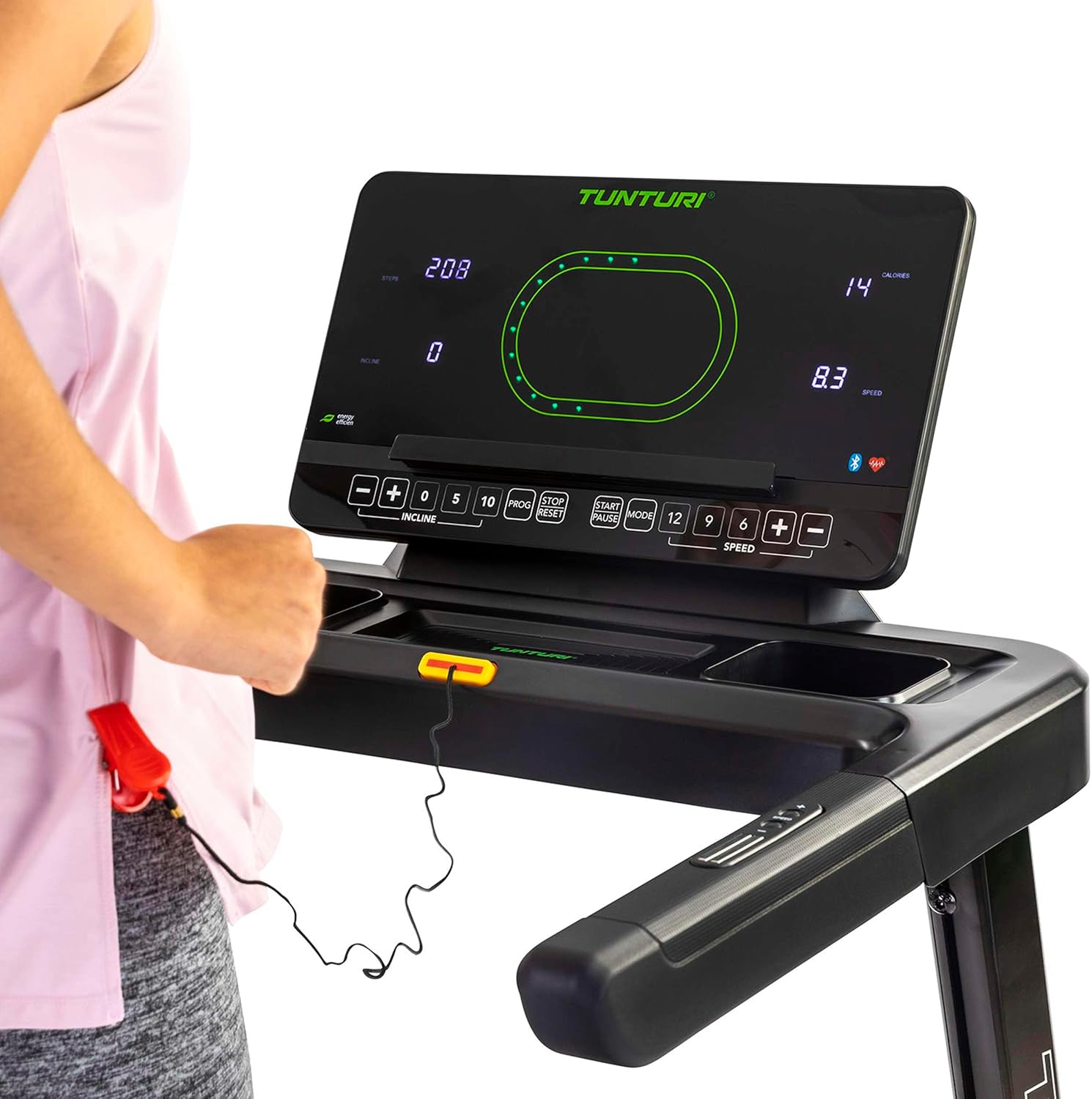
ຮູບພາບ: Close-up of the Tunturi T20 console, showing the red safety key attached. The safety key is a crucial safety feature that must be engaged for the treadmill to operate.
3.4 ເລີ່ມການອອກກໍາລັງກາຍ
- ກວດໃຫ້ແນ່ໃຈວ່າໄດ້ສຽບກະແຈຄວາມປອດໄພໃສ່ ແລະ ປັກໃສ່ເຄື່ອງນຸ່ງຂອງເຈົ້າຢ່າງຖືກຕ້ອງ.
- ກ້າວຂຶ້ນໄປເທິງຮາວຂ້າງຂອງເຄື່ອງແລ່ນ.
- Press the 'START' button. The belt will begin moving at a low speed.
- Carefully step onto the moving belt and adjust your speed using the '+' and '-' buttons or quick speed buttons (e.g., 5, 10 km/h).
3.5 ການປັບຄວາມໄວແລະ Incline
- ຄວາມໄວ: Use the 'SPEED +' and '-' buttons to increase or decrease the belt speed. Quick speed buttons (e.g., 5, 10, 12 km/h) allow for rapid adjustments. The maximum speed is 16 km/h.
- ໃສ່ໃຈ: Use the 'INCLINE +' and '-' buttons to adjust the electronic incline level. The treadmill offers 12 incline options. Quick incline buttons (e.g., 0, 5, 10) are also available.
3.6 ໂຄງການຝຶກອົບຮົມ
The Tunturi T20 offers 47 pre-set training programs. To select a program, press the 'PROG' button repeatedly until your desired program number is displayed. Follow the on-screen prompts to start the program. Each program automatically adjusts speed and incline according to its profile.
3.7 Bluetooth Connectivity and Apps
The treadmill features Bluetooth connectivity, allowing you to connect to various fitness applications for an enhanced training experience.
- Tunturi Routes: Connect to the Tunturi Routes app to experience virtual routes from around the world. The treadmill automatically adjusts incline to match the terrain of the chosen route.
- AnyRun & Kinomap: The treadmill is also compatible with AnyRun and Kinomap applications, offering additional training videos and interactive experiences.

ຮູບພາບ: A tablet displaying the Tunturi Routes application on the treadmill console. This illustrates the integration of smart fitness apps with the Tunturi T20 for interactive workouts.

ຮູບພາບ: A user interacting with the Tunturi Routes app on a tablet mounted on the treadmill console. This demonstrates the ease of controlling and monitoring virtual routes during a workout.
3.8 ການຕິດຕາມອັດຕາການເຕັ້ນຫົວໃຈ
The Tunturi T20 treadmill supports heart rate monitoring, typically via a compatible chest strap (not always included, check product contents). Connect your chest strap via Bluetooth to the treadmill console to display your heart rate during your workout.
3.9 ການຢຸດເຊົາການອອກກໍາລັງກາຍ
To stop the treadmill, press the 'STOP' button. The belt will gradually slow down and come to a complete stop. Alternatively, pull the safety key to immediately stop the treadmill in an emergency.
4. ບໍາລຸງຮັກສາ
Regular maintenance ensures the longevity and safe operation of your Tunturi T20 Treadmill.
- ທໍາຄວາມສະອາດ: ເຊັດເຄື່ອງແລ່ນຫຼັງການໃຊ້ແຕ່ລະຄັ້ງດ້ວຍການໂຄສະນາamp ຜ້າເພື່ອເອົາເຫື່ອແລະຝຸ່ນ. ຢ່າໃຊ້ເຄື່ອງເຮັດຄວາມສະອາດຂັດ.
- ການລະບາຍສີ: The running belt requires periodic lubrication. Refer to the separate lubrication instructions provided with the included lubrication tool. Frequency depends on usage.
- ການປັບສາຍແອວ: Over time, the running belt may become misaligned or loose. Consult the assembly guide for instructions on how to adjust the belt tension and centering.
- ການກວດກາ: ກວດກາສະກູ, ນັອດ ແລະ ຊິ້ນສ່ວນທີ່ເຄື່ອນທີ່ທັງໝົດເປັນປະຈຳເພື່ອເບິ່ງຄວາມແໜ້ນໜາ ແລະ ການສວມໃສ່. ຂັນສະກູທີ່ວ່າງໃຫ້ແໜ້ນ.
5. ການແກ້ໄຂບັນຫາ
If you encounter issues with your Tunturi T20 Treadmill, refer to the following common solutions:
- ເຄື່ອງແລ່ນບໍ່ເລີ່ມຕົ້ນ:
- ກວດໃຫ້ແນ່ໃຈວ່າໄດ້ສຽບສາຍໄຟເຂົ້າກັບປລັກສຽບສາຍໄຟຢ່າງປອດໄພ.
- ກວດສອບວ່າສະວິດໄຟຫຼັກຢູ່ໃນຕຳແໜ່ງ 'ເປີດ'.
- Verify the safety key is correctly inserted into the console.
- ສາຍແອວເລື່ອນ ຫຼື ລັງເລໃຈ:
- ສາຍແອວແລ່ນອາດຈະຕ້ອງການການປັບຄວາມຕຶງ. ໃຫ້ອ້າງອີງເຖິງພາກສ່ວນການບຳລຸງຮັກສາ ຫຼື ຄູ່ມືການປະກອບ.
- The belt may need lubrication. Follow the lubrication instructions.
- ສິ່ງລົບກວນທີ່ຜິດປົກກະຕິ:
- ກວດເບິ່ງອົງປະກອບທີ່ວ່າງແລະເຄັ່ງຄັດຖ້າຈໍາເປັນ.
- ໃຫ້ແນ່ໃຈວ່າເຄື່ອງແລ່ນຢູ່ເທິງໜ້າດິນທີ່ຮາບພຽງ.
- Lubricate the running belt if a squeaking noise is heard from the belt area.
- Console Display Not Working:
- ໃຫ້ແນ່ໃຈວ່າການເຊື່ອມຕໍ່ພະລັງງານທັງຫມົດແມ່ນປອດໄພ.
- ຖ້າບັນຫາຍັງຄົງຢູ່, ໃຫ້ຕິດຕໍ່ຝ່າຍຊ່ວຍເຫຼືອລູກຄ້າ.
For issues not covered here, please contact Tunturi customer support.
6. ຂໍ້ມູນຈໍາເພາະຂອງຜະລິດຕະພັນ
| ຄຸນສົມບັດ | ຂໍ້ມູນຈໍາເພາະ |
|---|---|
| ຕົວແບບ | T20 (22TRN20000) |
| ຍີ່ຫໍ້ | Tunturi |
| ແຮງມ້າຈັກ | 1.5 HP |
| ຊ່ວງຄວາມໄວ | 1 - 16 ກິໂລແມັດຕໍ່ຊົ່ວໂມງ |
| ຕົວເລືອກ Incline | 12 (Electronic Adjustment) |
| ໂຄງການຝຶກອົບຮົມ | 47 |
| ພື້ນຜິວແລ່ນ | 125 x 45 ຊມ |
| ນ້ຳໜັກຜູ້ໃຊ້ສູງສຸດ | 120 ກິໂລ |
| ຂະໜາດປະກອບ (L x W x H) | 155 x 74 x 137 cm |
| ຂະໜາດພັບ (L x W x H) | 87 x 74 x 139 cm |
| ນ້ຳໜັກສິນຄ້າ | 62 ກິໂລ |
| ວັດສະດຸກອບ | ເຫຼັກໂລຫະປະສົມ |
| ປະເພດການສະແດງ | LED ຫຼື LCD |
| ການເຊື່ອມຕໍ່ | Bluetooth (Tunturi Routes, AnyRun, Kinomap compatible) |
| ອົງປະກອບລວມ | Treadmill base, Motor housing, Safety key, Power cord, User manual, Assembly hardware, Lubrication tool, Remote control, Warranty documentation |
7. ການຮັບປະກັນແລະການສະຫນັບສະຫນູນ
Your Tunturi T20 Treadmill comes with a manufacturer's warranty. Please refer to the separate warranty documentation included with your product for details on coverage, terms, and conditions.
For technical support, spare parts, or any questions regarding your treadmill, please contact Tunturi customer service. Contact information can typically be found on the warranty documentation or the official Tunturi webເວັບໄຊ.


