1. ບົດແນະນຳ
Thank you for choosing the Xiaomi Mi 55-inch 4K UHD Smart Android TV. This manual provides essential information for the safe and efficient use of your television. Please read it thoroughly before operating the device and retain it for future reference.

ຮູບພາບ 1.1: ດ້ານຫນ້າ view of the Xiaomi Mi 55-inch 4K UHD Smart Android TV.
2. ຂໍ້ມູນຄວາມປອດໄພ
ເພື່ອຮັບປະກັນການດໍາເນີນງານທີ່ປອດໄພແລະປ້ອງກັນຄວາມເສຍຫາຍ, ໃຫ້ສັງເກດເບິ່ງຄວາມລະມັດລະວັງຕໍ່ໄປນີ້:
- ຢ່າເຮັດໃຫ້ໂທລະທັດຖືກຝົນຫຼືຄວາມຊຸ່ມຊື່ນ.
- ຫ້າມກີດຂວາງການເປີດລະບາຍອາກາດ.
- ຮັບປະກັນການຕໍ່ສາຍດິນທີ່ເໝາະສົມສຳລັບປລັກສຽບໄຟ.
- ຫຼີກເວັ້ນການວາງໂທລະທັດໃສ່ພື້ນຜິວທີ່ບໍ່ຫມັ້ນຄົງ.
- ເກັບຮັກສາໂທລະທັດໃຫ້ຫ່າງຈາກແສງແດດໂດຍກົງ, ແຫຼ່ງຄວາມຮ້ອນ ແລະ ແປວໄຟ.
- ຖອດສາຍໂທລະທັດໃນເວລາມີພາຍຸຟ້າຜ່າ ຫຼືເມື່ອບໍ່ໄດ້ໃຊ້ເປັນເວລາດົນນານ.
- ອ້າງອີງການບໍລິການທັງໝົດໃຫ້ກັບພະນັກງານບໍລິການທີ່ມີຄຸນວຸດທິ.
3. ເນື້ອໃນຊຸດ
ກວດສອບວ່າລາຍການທັງຫມົດແມ່ນມີຢູ່ໃນຊຸດ:
- 1 × Xiaomi Mi 55-inch TV
- 1 × Remote control with voice control
- 1 × Remote control batteries
- 1 × ສາຍໄຟ
- 1 × User manual (this document)
- 1 × Support legs
- 4 × Screws for support legs
4. ຕັ້ງຄ່າ
4.1. ການຕິດຕັ້ງທາງດ້ານຮ່າງກາຍ
Your TV can be installed on a stand or wall-mounted. The TV is VESA mounting standard compatible.
4.1.1. ການຕິດຕັ້ງ Stand
- ເອົາໂທລະທັດຫັນໜ້າລົງໃສ່ພື້ນຜິວທີ່ຮາບພຽງຢ່າງລະມັດລະວັງເພື່ອປ້ອງກັນຄວາມເສຍຫາຍຂອງໜ້າຈໍ.
- Attach the support legs to the designated slots at the bottom of the TV using the provided screws. Ensure they are securely fastened.
- ວາງໂທລະທັດໄວ້ເທິງພື້ນຜິວທີ່ໝັ້ນຄົງ ແລະ ຮາບພຽງ.
4.1.2. ການຕິດຝາ (ທາງເລືອກ)
If you choose to wall-mount your TV, use a VESA-compatible wall mount kit (sold separately) and follow the instructions provided with the wall mount. Ensure the wall can support the weight of the TV.
4.2. ເຊື່ອມຕໍ່ອຸປະກອນເສີມ
ເຊື່ອມຕໍ່ອຸປະກອນພາຍນອກຂອງທ່ານກັບຜອດຂອງໂທລະພາບ:
- HDMI: Connect Blu-ray players, game consoles, or set-top boxes to the HDMI ports (3 available). HDMI ARC is supported for audio return channel functionality.
- USB: ເຊື່ອມຕໍ່ອຸປະກອນການເກັບຮັກສາ USB ສໍາລັບການຫຼິ້ນສື່ມວນຊົນ (2 ມີຢູ່).
- LAN: ສໍາລັບການເຊື່ອມຕໍ່ອິນເຕີເນັດແບບມີສາຍ, ໃຫ້ເຊື່ອມຕໍ່ສາຍອີເທີເນັດກັບຜອດ LAN.
- ສຽງດິຈິຕອລອອກ (ອອບຕິກ): Connect to an external audio system for high-quality digital sound.
4.3. ການເປີດເຄື່ອງເບື້ອງຕົ້ນ
- ເຊື່ອມຕໍ່ສາຍໄຟກັບໂທລະພາບ ແລະຈາກນັ້ນໄປຫາປລັກສຽບໄຟ.
- ກົດປຸ່ມເປີດປິດໃນຣີໂໝດຄວບຄຸມ ຫຼືຢູ່ໃນໂທລະພາບ.
- ປະຕິບັດຕາມຄໍາແນະນໍາໃນຫນ້າຈໍເພື່ອເຮັດສໍາເລັດການຕັ້ງຄ່າເບື້ອງຕົ້ນ, ລວມທັງການເລືອກພາສາ, ການເຊື່ອມຕໍ່ເຄືອຂ່າຍ (Wi-Fi ຫຼື Ethernet), ແລະການເຂົ້າສູ່ລະບົບບັນຊີ Google.
5. ຄໍາແນະນໍາການດໍາເນີນງານ
5.1. ການຄວບຄຸມໄລຍະໄກ
The included remote control allows you to navigate the TV's features. It supports voice control for convenient interaction with Google Assistant.
- ປຸ່ມເປີດປິດ: ເປີດ ຫຼືປິດໂທລະພາບ.
- ແຜ່ນນໍາທາງ (ຂຶ້ນ/ລົງ/ຊ້າຍ/ຂວາ/ຕົກລົງ): ນຳທາງເມນູ ແລະເລືອກຕົວເລືອກ.
- ປຸ່ມລະດັບສຽງ: ປັບລະດັບສຽງ.
- ປຸ່ມຊ່ອງ: ປ່ຽນຊ່ອງໂທລະພາບ.
- ປຸ່ມຜູ້ຊ່ວຍ Google: ເປີດໃຊ້ການຄວບຄຸມສຽງ.
- ປຸ່ມຫນ້າທໍາອິດ: ກັບໄປໜ້າຈໍຫຼັກ Android TV.
- ປຸ່ມກັບຄືນ: ກັບໄປໜ້າຈໍກ່ອນໜ້າ.
- ປຸ່ມແອັບ: Dedicated buttons for popular apps like Netflix and YouTube.
5.2. ຄຸນສົມບັດໂທລະທັດອັດສະລິຍະ (Android TV)
Your TV runs on Android TV (version 9), providing access to a wide range of smart features:
- ຜູ້ຊ່ວຍ Google: ໃຊ້ຄຳສັ່ງສຽງເພື່ອຊອກຫາເນື້ອຫາ, ຄວບຄຸມອຸປະກອນອັດສະລິຍະໃນເຮືອນ, ແລະຮັບຂໍ້ມູນ.
- Google Play Store: Download and install various apps, games, and streaming services.
- Chromecast ໃນຕົວ: ຄາສທເນື້ອຫາຈາກສະມາດໂຟນ, ແທັບເລັດ ຫຼືຄອມພິວເຕີຂອງທ່ານໂດຍກົງໃສ່ໂທລະພາບ.
- ແອັບທີ່ຕິດຕັ້ງໄວ້ລ່ວງໜ້າ: Access Netflix, YouTube, and a web browser ໂດຍກົງ.
- SmartThings App Support: Integrate with other compatible smart home devices.
5.3. ການຕັ້ງຄ່າຮູບພາບ ແລະສຽງ
ປັບການຕັ້ງຄ່າຮູບພາບແລະສຽງເພື່ອປັບແຕ່ງຂອງທ່ານ viewປະສົບການ:
- ໂໝດຮູບ: ເລືອກຈາກຄ່າທີ່ຕັ້ງໄວ້ລ່ວງໜ້າຕ່າງໆ (ເຊັ່ນ: ມາດຕະຖານ, ສົດໃສ, ຮູບເງົາ, ເກມ) ຫຼື ປັບແຕ່ງຄວາມສະຫວ່າງ, ຄວາມຄົມຊັດ, ສີ ແລະ ຄວາມຄົມຊັດ.
- HDR: The TV supports HDR for enhanced contrast and color with compatible content.
- ໂໝດສຽງ: Choose from presets like Standard, Music, Movie, or customize equalizer settings.
- DTS/Dolby Audio: The TV supports DTS and Dolby audio technologies for immersive sound.
6. ບໍາລຸງຮັກສາ
6.1. ທໍາຄວາມສະອາດ
ເພື່ອເຮັດຄວາມສະອາດໂທລະພາບຂອງທ່ານ:
- ຖອດປລັກໂທລະທັດທຸກຄັ້ງກ່ອນທຳຄວາມສະອາດ.
- ໃຊ້ຜ້າອ່ອນ, ແຫ້ງເພື່ອເຊັດຫນ້າຈໍແລະຕູ້.
- ສໍາລັບຮອຍແຂງ, ເບົາບາງ dampໃສ່ຜ້າດ້ວຍນ້ໍາຫຼືເຄື່ອງເຮັດຄວາມສະອາດຫນ້າຈໍພິເສດ. ຢ່າສີດນ້ຳສະອາດໃສ່ໜ້າຈໍໂດຍກົງ.
- ຫຼີກເວັ້ນການນໍາໃຊ້ເຄື່ອງເຮັດຄວາມສະອາດຂັດຫຼືສານລະລາຍ.
6.2. ການປັບປຸງຊອບແວ
Periodically check for software updates to ensure your TV has the latest features and performance improvements. Updates can usually be found in the TV's settings menu under 'About' or 'System Update'.
7. ການແກ້ໄຂບັນຫາ
ຖ້າຫາກທ່ານພົບບັນຫາ, ເບິ່ງບັນຫາທົ່ວໄປດັ່ງຕໍ່ໄປນີ້ແລະການແກ້ໄຂ:
| ບັນຫາ | ການແກ້ໄຂທີ່ເປັນໄປໄດ້ |
|---|---|
| ບໍ່ມີພະລັງງານ | Check if the power cable is securely connected and the power outlet is working. Try a different outlet. |
| ບໍ່ມີຮູບ, ແຕ່ສຽງແມ່ນປະຈຸບັນ | ໃຫ້ແນ່ໃຈວ່າເລືອກແຫຼ່ງປ້ອນທີ່ຖືກຕ້ອງ. ກວດເບິ່ງການເຊື່ອມຕໍ່ສາຍກັບອຸປະກອນພາຍນອກ. |
| ບໍ່ມີສຽງ, ແຕ່ມີຮູບພາບ | ກວດເບິ່ງລະດັບສຽງ ແລະການຕັ້ງຄ່າປິດສຽງ. ຢືນຢັນການເຊື່ອມຕໍ່ສາຍສຽງ. ຖ້າໃຊ້ສຽງພາຍນອກ, ໃຫ້ແນ່ໃຈວ່າມັນເປີດ ແລະຕັ້ງຄ່າຢ່າງຖືກຕ້ອງ. |
| ການຄວບຄຸມໄລຍະໄກບໍ່ເຮັດວຽກ | Replace batteries. Ensure there are no obstructions between the remote and the TV. Re-pair the remote if it's a Bluetooth remote. |
| ບໍ່ສາມາດເຊື່ອມຕໍ່ກັບ Wi-Fi ໄດ້ | Check if the Wi-Fi router is on and working. Re-enter the Wi-Fi password. Try restarting the TV and router. |
| ແອັບຯຊ້າ ຫຼືຂັດຂ້ອງ | Close unused apps. Clear app cache. Restart the TV. Ensure sufficient internet speed. |
ຖ້າບັນຫາຍັງຄົງຢູ່, ໃຫ້ຕິດຕໍ່ຝ່າຍຊ່ວຍເຫຼືອລູກຄ້າ.
8. ຂໍ້ມູນຈໍາເພາະ
| ຄຸນສົມບັດ | ລາຍລະອຽດ |
|---|---|
| ໝາຍເລກຕົວແບບ | L55M5-5ASP |
| ຂະໜາດໜ້າຈໍ | 55 ນິ້ວ |
| ເຕັກໂນໂລຊີການສະແດງ | LED |
| ຄວາມລະອຽດ | 3840 x 2160 (4K UHD) |
| ອັດຕາການໂຫຼດຂໍ້ມູນຄືນໃໝ່ | 60Hz |
| Viewໃນມຸມ | 178 ອົງສາ |
| ຄຸນສົມບັດວິດີໂອ | ຮອງຮັບ HDR |
| ລະບົບປະຕິບັດການ | Android TV (Android 9) |
| RAM | 2GB |
| ຄວາມອາດສາມາດເກັບຮັກສາ | 8GB |
| ສຽງອອກ | ລຳໂພງ 2 x 10W |
| ເທັກໂນໂລຍີສຽງ | DTS/Dolby Audio |
| ຄຸນສົມບັດອັດສະລິຍະ | Google Assistant, Google Play, Web Browser, SmartThings app support, YouTube, Netflix (subscription not included), Chromecast built-in, DVB-T2 + DVB-C tuner |
| ການເຊື່ອມຕໍ່ | 3 x HDMI (with ARC), 2 x USB, 1 x LAN (Ethernet 100Mbps), 1 x Digital Optical Audio Out, Built-in Wi-Fi (2.4G/5G), Bluetooth 4.2 |
| ອັດຕາສ່ວນ | 16:9 |
| ມາດຕະຖານການຕິດຕັ້ງ | VESA ເຂົ້າກັນໄດ້ |
| ຂະ ໜາດ ຜະລິດຕະພັນ (W x D x H) | 124.2 x 24.5 x 78 cm (ມີຂາຕັ້ງ) |
| ນ້ຳໜັກສິນຄ້າ | 13 ກິໂລ |
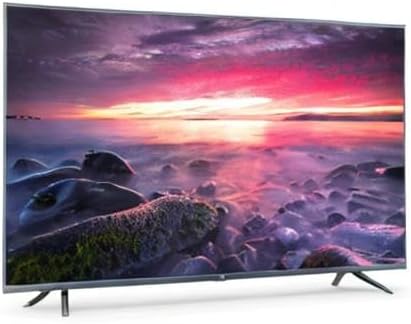
Image 8.1: Energy efficiency label for the Xiaomi Mi 55-inch TV.
9. ການຮັບປະກັນແລະການສະຫນັບສະຫນູນ
ສໍາລັບຂໍ້ມູນການຮັບປະກັນ, ກະລຸນາເບິ່ງໃບຮັບປະກັນທີ່ລວມຢູ່ໃນຜະລິດຕະພັນຂອງທ່ານຫຼືໄປຢ້ຽມຢາມ Xiaomi ຢ່າງເປັນທາງການ webເວັບໄຊສໍາລັບພາກພື້ນຂອງທ່ານ. ຮັກສາໃບຮັບເງິນການຊື້ຂອງທ່ານໄວ້ເປັນຫຼັກຖານການຊື້.
For technical support, troubleshooting assistance beyond this manual, or service inquiries, please contact Xiaomi customer service through their official channels.


