1. ບົດແນະນຳ
Thank you for choosing the TOZO NC9 Hybrid Active Noise Cancelling Wireless Earbuds. These earbuds are designed to provide an immersive audio experience with advanced noise cancellation, clear call quality, and comfortable all-day wear. This manual will guide you through the setup, operation, and maintenance of your new earbuds.
2. ສິ່ງທີ່ຢູ່ໃນກ່ອງ
- ຫູຟັງໄຮ້ສາຍ TOZO Hybrid Active Noise Cancelling
- ກ່ອງສາກ
- ສາຍ USB-C (A ຫາ C) (20 ຊມ)
- Eartips (ຫຼາຍຂະຫນາດ)
- ຄູ່ມືຜູ້ໃຊ້

Figure 2.1: Contents of the TOZO NC9 package.
3. ຜະລິດຕະພັນເກີນview
The TOZO NC9 earbuds feature a compact design with advanced audio technology. Key components include:
- ການຕັດສຽງລົບກວນແບບປະສົມປະສານ: Up to 45dB noise reduction for an immersive listening experience.
- 6-Microphone ENC Clear Call: Enhanced environmental noise cancellation for clear voice transmission during calls.
- ໂໝດຄວາມໂປ່ງໃສ: ອະນຸຍາດໃຫ້ທ່ານໄດ້ຍິນສິ່ງອ້ອມຂ້າງຂອງທ່ານໂດຍບໍ່ຕ້ອງຖອດຫູຟັງຫູຟັງ.
- Stereo Bass Sound: Built-in 10mm drivers with OrigX Acoustic 2.0 technology for rich bass and clear audio.
- ການອອກແບບ Ergonomic: Comfortable fit with six replaceable ear tip sizes.
- TOZO App Integration: Customize sound with 32 EQ options and noise cancellation modes.
- ຂະຫຍາຍເວລາຫຼິ້ນ: Up to 59 hours total playtime with the charging case (ANC off).
- IPX8 ກັນນ້ໍາ: Protection against sweat, rain, and splashes.
- ເທັກໂນໂລຍີ Bluetooth 5.3: Stable connection and low latency.
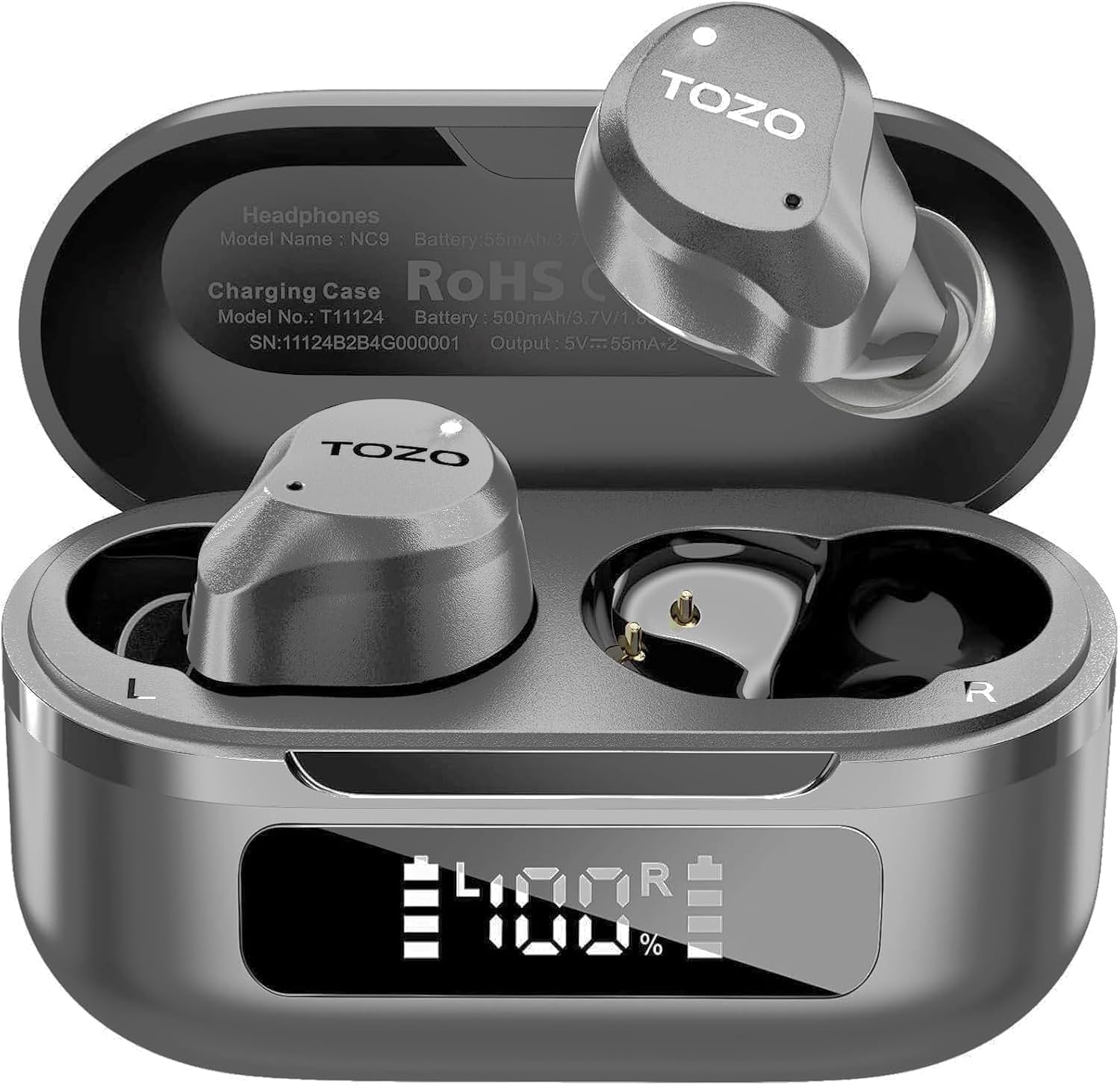
Figure 3.1: TOZO NC9 Earbuds and Charging Case.

Figure 3.2: TOZO OrigX Acoustics Technology for enhanced sound.
4. ຕັ້ງຄ່າ
4.1. ການຈັບຄູ່ເບື້ອງຕົ້ນ
- ເປີດກ່ອງສາກໄຟ. ຫູຟັງເອຍບັດຈະເຂົ້າສູ່ໂໝດຈັບຄູ່ໂດຍອັດຕະໂນມັດ.
- ໃນອຸປະກອນຂອງທ່ານ (ໂທລະສັບສະຫຼາດ, ແທັບເລັດ, ແລະອື່ນໆ), ເປີດໃຊ້ Bluetooth.
- ຊອກຫາ "TOZO NC9" in the list of available Bluetooth devices and select it to connect.
- ເມື່ອເຊື່ອມຕໍ່ແລ້ວ, ທ່ານຈະໄດ້ຍິນສຽງເຕືອນຢືນຢັນການຈັບຄູ່ສຳເລັດແລ້ວ.
4.2. ໃສ່ຫູຟັງ
For optimal sound quality and comfort, ensure a proper fit:
- Choose the ear tips that best fit your ear canal from the provided sizes.
- Insert the earbuds into your ears with the sound hole pointing downwards.
- Gently rotate the earbuds backward to secure them snugly in your ear.

Figure 4.1: Proper wearing of the TOZO NC9 Earbuds.
5. ຄໍາແນະນໍາການດໍາເນີນງານ
5.1. ແຕະການຄວບຄຸມ
The TOZO NC9 earbuds feature intuitive touch controls on each earbud:
- Single Tap (Left/Right): ຫຼິ້ນ/ຢຸດເພງ, ຮັບສາຍ/ວາງສາຍ.
- Double Tap (Left): ເພງທີ່ຜ່ານມາ.
- Double Tap (Right): ຕິດຕາມຕໍ່ໄປ.
- Triple Tap (Left): Activate/Deactivate Noise Cancellation or Transparency Mode.
- Triple Tap (Right): Activate Voice Assistant (Siri, Google Assistant).
- Long Press (Left/Right): ປະຕິເສດການໂທ.
5.2. Active Noise Cancellation (ANC) & ໂໝດຄວາມໂປ່ງໃສ
The earbuds offer three sound modes:
- Active Noise Cancellation (ANC): ຫຼຸດຜ່ອນສິ່ງລົບກວນຈາກພາຍນອກເພື່ອປະສົບການສຽງທີ່ໜ້າປະທັບໃຈ.
- ໂໝດຄວາມໂປ່ງໃສ: ອະນຸຍາດໃຫ້ສຽງອາກາດລ້ອມຮອບຜ່ານ, ເຮັດໃຫ້ທ່ານຮູ້ຈັກສິ່ງແວດລ້ອມຂອງທ່ານ.
- ໂໝດປົກກະຕິ: Standard audio with no active noise processing.
Switch between modes by triple-tapping the left earbud.
Figure 5.1: Active Noise Cancellation in action.
5.3. TOZO App Features
Download the TOZO App to unlock advanced customization options:
- 32 EQ Options: Tailor your audio experience with various preset equalizers or create custom sound profiles.
- ໂໝດການຍົກເລີກສຽງລົບກວນ: Fine-tune ANC and Transparency settings.
- EQ Zone: Share and discover custom EQ settings from other users.

Figure 5.2: TOZO App for sound customization.
6. ການສາກໄຟ ແລະ ອາຍຸການໃຊ້ງານຂອງແບັດເຕີຣີ
6.1. ການສາກໄຟກ່ອງ ແລະ ຫູຟັງ
The charging case can be charged via the included USB-C cable. The earbuds charge automatically when placed inside the case.
- ເວລາສາກໄຟ: ປະມານ 1.5 ຊົ່ວໂມງສຳລັບການສາກເຕັມ.
- ຕົວຊີ້ວັດຫມໍ້ໄຟ: The charging case features an LED display to show the remaining battery percentage.

Figure 6.1: Charging case with LED display.
6.2. ປະສິດທິພາບຫມໍ້ໄຟ
- ເວລາຫຼິ້ນທັງໝົດ (ພ້ອມກ່ອງສາກໄຟ): Up to 59 hours (ANC off), 42 hours (ANC on).
- Single Use Playback: Up to 14 hours (ANC off), 10 hours (ANC on).

Figure 6.2: Extended playtime capabilities.
7. ການບໍາລຸງຮັກສາ & ການດູແລ
7.1. Water Resistance
The TOZO NC9 earbuds are IPX8 water-resistant, meaning they can withstand sweat, rain, and accidental splashes. However, they are not designed for swimming or prolonged submersion. Ensure earbuds are dry before placing them back in the charging case.
7.2. ທໍາຄວາມສະອາດ
Regularly clean your earbuds and charging case to maintain optimal performance:
- ໃຊ້ຜ້າແພທີ່ອ່ອນ, ແຫ້ງ, ບໍ່ມີເສັ້ນດ່າງເພື່ອເຊັດຫູຟັງຫູຟັງ ແລະ ກ່ອງສາກ.
- ຖອດປາຍຫູອອກ ແລະເຮັດຄວາມສະອາດດ້ວຍສະບູອ່ອນໆ ແລະນໍ້າ, ຈາກນັ້ນເຊັດໃຫ້ແຫ້ງກ່ອນຕິດໃໝ່.
- ຫຼີກເວັ້ນການນໍາໃຊ້ວັດສະດຸຂັດຫຼືສານເຄມີທີ່ຮຸນແຮງ.
8. ການແກ້ໄຂບັນຫາ
- ຫູຟັງບໍ່ຈັບຄູ່: ໃຫ້ແນ່ໃຈວ່າຫູຟັງທັງສອງຂ້າງຢູ່ໃນກ່ອງສາກໄຟ, ຈາກນັ້ນເປີດຝາເພື່ອເລີ່ມໂໝດຈັບຄູ່. ກວດສອບການຕັ້ງຄ່າ Bluetooth ຂອງອຸປະກອນຂອງທ່ານ.
- ຫູຟັງຫູຟັງອັນດຽວທີ່ເຮັດວຽກ: Place both earbuds back in the charging case, close the lid, then open it again. Re-pair if necessary.
- ຄຸນະພາບສຽງບໍ່ດີ: Ensure ear tips provide a secure seal. Clean earbuds to remove any debris. Check audio source quality.
- ບັນຫາການສາກໄຟ: Ensure the charging cable is securely connected and the charging case is clean. Check the LED display for battery status.
- ຣີເຊັດຫູຟັງຫູຟັງ: Refer to the full user manual for specific reset instructions if persistent issues occur.
9. ຂໍ້ມູນຈໍາເພາະ
| ຄຸນສົມບັດ | ຂໍ້ມູນຈໍາເພາະ |
|---|---|
| ຊື່ຕົວແບບ | TOZO NC9 |
| ການຄວບຄຸມສິ່ງລົບກວນ | Hybrid Active Noise Cancellation |
| ລຸ້ນ Bluetooth | 5.3 |
| ຊ່ວງ Bluetooth | 10 ແມັດ |
| ອາຍຸແບັດເຕີຣີ (ຫູຟັງ) | 14 ຊົ່ວໂມງ (ANC ປິດ), 10 ຊົ່ວໂມງ (ANC ເປີດ) |
| ເວລາຫຼິ້ນທັງໝົດ (ພ້ອມກໍລະນີ) | 59 ຊົ່ວໂມງ (ANC ປິດ), 42 ຊົ່ວໂມງ (ANC ເປີດ) |
| ເວລາສາກໄຟ | 1.5 ຊົ່ວໂມງ |
| ລະດັບຄວາມຕ້ານທານນ້ໍາ | IPX8 |
| ຂະໜາດໄດເວີສຽງ | 10 ມິນລິແມັດ |
| ປະເພດການຄວບຄຸມ | Touch Control / APP |
| ອົງປະກອບລວມ | Earbuds, Charging Case, USB-C Cable, Eartips, User Manual |
10. ການຮັບປະກັນແລະການສະ ໜັບ ສະ ໜູນ
Your TOZO NC9 earbuds come with an 18-Month Extended Warranty. For warranty activation and support, please visit the official TOZO webເວັບໄຊ ຫຼືຕິດຕໍ່ບໍລິການລູກຄ້າ.
ສໍາລັບການຊ່ວຍເຫຼືອເພີ່ມເຕີມ, ກະລຸນາໄປຢ້ຽມຢາມ ຮ້ານ TOZO ໃນ Amazon.
ວິດີໂອທີ 10.1: ຈົບແລ້ວview of the TOZO NC9 earbuds, including unboxing and features.
ວິດີໂອ 10.2: A review highlighting the sound quality, fit, and value of the TOZO NC9 earbuds.
Video 10.3: A demonstration of the noise cancelling capabilities of the TOZO NC9 earbuds.


