1. ບົດແນະນຳ
ຂອບໃຈສໍາລັບການຊື້asing the Lenco SPR-100BK Splash-Proof Bluetooth Speaker. This portable speaker delivers powerful sound with strong bass and features FM radio, USB, SD card playback, and integrated light effects. Designed for durability, it is splash-proof, making it suitable for various environments. This manual provides essential information for safe and optimal use of your device.
2. ຄໍາແນະນໍາຄວາມປອດໄພທີ່ສໍາຄັນ
- ຢ່າເຮັດໃຫ້ອຸປະກອນຢູ່ໃນອຸນຫະພູມທີ່ຮຸນແຮງ, ແສງແດດໂດຍກົງ, ຫຼືຄວາມຊຸ່ມຊື່ນສູງ.
- Ensure the charging port cover is securely closed when near water to maintain splash-proof integrity.
- ຫ້າມຖອດປະກອບ ຫຼືແກ້ໄຂອຸປະກອນ. ອ້າງອີງການບໍລິການທັງໝົດໃຫ້ກັບບຸກຄະລາກອນທີ່ມີຄຸນວຸດທິ.
- ໃຊ້ພຽງແຕ່ສາຍສາກທີ່ລະບຸ.
- ຮັກສາອຸປະກອນໃຫ້ຫ່າງຈາກສະຫນາມແມ່ເຫຼັກທີ່ເຂັ້ມແຂງ.
- ຫຼີກລ້ຽງການຫຼຸດລົງຫຼືການອຸປະກອນທີ່ມີຜົນກະທົບທີ່ເຂັ້ມແຂງ.
3. ຜະລິດຕະພັນເກີນview
Familiarize yourself with the components of your Lenco SPR-100BK speaker.
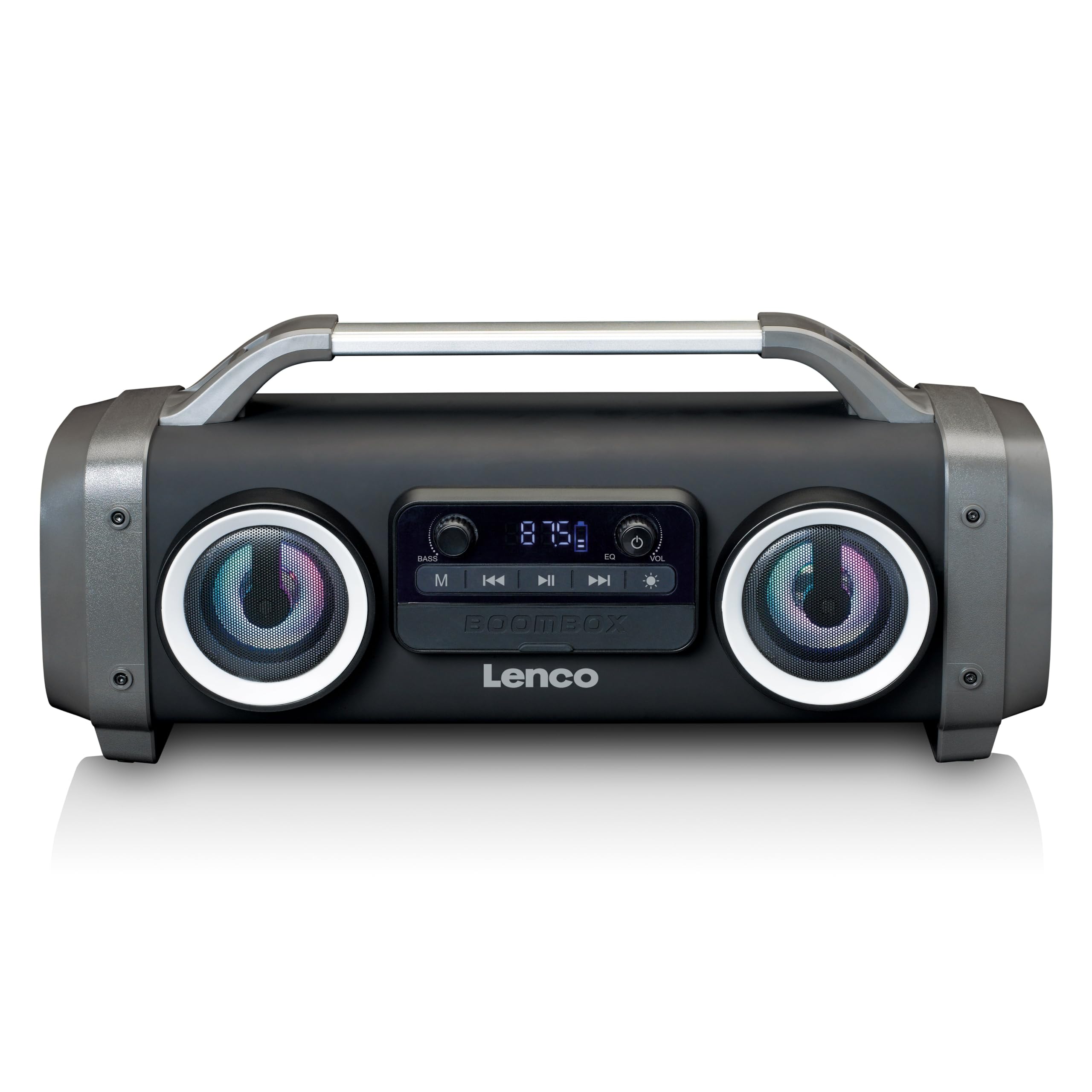
ຮູບ 1: ດ້ານຫນ້າ view of the Lenco SPR-100BK speaker, showing the main speaker grille, control panel, and integrated light effects.
3.1 ການຄວບຄຸມແລະພອດ
- ປຸ່ມເປີດປິດ: ເປີດ ຫຼືປິດລຳໂພງ.
- ປຸ່ມໂໝດ: Switches between Bluetooth, FM Radio, USB, SD, and AUX modes.
- ປຸ່ມຫຼິ້ນ/ຢຸດຊົ່ວຄາວ: ຫຼິ້ນ ຫຼືຢຸດສຽງ.
- ປຸ່ມຄວບຄຸມລະດັບສຽງ: ປັບລະດັບສຽງຫຼັກ.
- Bass Boost Knob: ປັບລະດັບສຽງເບດ.
- Light Effect Button: Cycles through or turns off light effects.
- ພອດ USB: ສໍາລັບການຫຼິ້ນ USB flash drive.
- ຊ່ອງໃສ່ບັດ SD: For SD card playback.
- AUX Input (3.5mm): ສໍາລັບການເຊື່ອມຕໍ່ອຸປະກອນສຽງພາຍນອກ.
- Charging Port (Mini USB): ສໍາລັບການຊາດຫມໍ້ໄຟພາຍໃນ.
4. ຕັ້ງຄ່າ
4.1 ການຫຸ້ມຫໍ່
Carefully remove the speaker and all accessories from the packaging. Ensure the following items are present:
- Lenco SPR-100BK Bluetooth Speaker
- ສາຍສາກ USB
- ສາຍສຽງ 3.5 ມມ (ສາຍ AUX)
- ຄູ່ມືຜູ້ໃຊ້
4.2 ການສາກແບັດເຕີຣີ
- Locate the Mini USB charging port on the speaker.
- ເຊື່ອມຕໍ່ສາຍສາກ USB ທີ່ໃຫ້ມາກັບຊ່ອງສາກໄຟຂອງລຳໂພງ.
- Connect the other end of the USB cable to a compatible USB power adapter (5V/1A, not included) or a computer's USB port.
- ໄຟສັນຍານສາກໄຟຈະສະຫວ່າງຂຶ້ນ, ໂດຍປົກກະຕິແລ້ວແມ່ນສີແດງ, ໃນລະຫວ່າງການສາກໄຟ. ມັນຈະດັບລົງ ຫຼື ປ່ຽນສີ (ຕົວຢ່າງ, ສີຟ້າ) ເມື່ອສາກເຕັມແລ້ວ.
- A full charge takes approximately 4-5 hours and provides up to 15 hours of playback (without light effects).
4.3 ການເປີດເຄື່ອງເບື້ອງຕົ້ນ
ກົດຄ້າງໄວ້ ປຸ່ມເປີດປິດ for a few seconds until the speaker powers on and you hear an audible prompt or see the display light up.
5. ການດໍາເນີນງານ
5.1 ເປີດ/ປິດ
- ເພື່ອເປີດເຄື່ອງ: ກົດຄ້າງໄວ້ ປຸ່ມເປີດປິດ.
- ເພື່ອປິດເຄື່ອງ: ກົດຄ້າງໄວ້ ປຸ່ມເປີດປິດ ອີກເທື່ອຫນຶ່ງ.
5.2 ການເຊື່ອມຕໍ່ Bluetooth
- ເປີດລຳໂພງ. ມັນຈະເຂົ້າສູ່ໂໝດຈັບຄູ່ Bluetooth ໂດຍອັດຕະໂນມັດ, ໂດຍສະແດງດ້ວຍໄຟ LED ກະພິບ.
- ເປີດໃຊ້ Bluetooth ໃນອຸປະກອນມືຖືຂອງທ່ານ (ໂທລະສັບສະຫຼາດ, ແທັບເລັດ, ແລະອື່ນໆ).
- ຊອກຫາ ອຸປະກອນ Bluetooth ທີ່ມີຢູ່ ແລະ ເລືອກ "SPR-100BK" ຈາກບັນຊີລາຍການ.
- ເມື່ອຈັບຄູ່ແລ້ວ, ລຳໂພງຈະສົ່ງສຽງຢືນຢັນ, ແລະໄຟ LED ຈະຢຸດກະພິບ.
- ໂໝດ True Wireless Stereo (TWS): If you have two SPR-100BK speakers, you can pair them for stereo sound.
- ກວດໃຫ້ແນ່ໃຈວ່າທັງສອງລຳໂພງເປີດຢູ່ ແລະຢູ່ໃນໂໝດ Bluetooth.
- On one speaker (the master), press and hold the ປຸ່ມໂໝດ until you hear a TWS pairing prompt.
- The two speakers will automatically connect. Once connected, pair your device to the master speaker as described above.
ວິທະຍຸ 5.3 FM
- ກົດ ປຸ່ມໂໝດ repeatedly until you select FM Radio mode.
- ເພື່ອສະແກນອັດຕະໂນມັດ ແລະບັນທຶກສະຖານີ: ກົດຄ້າງໄວ້ ປຸ່ມຫຼິ້ນ/ຢຸດຊົ່ວຄາວ. The speaker will scan for available FM stations and save them automatically.
- To switch between saved stations: Use the Previous/Next Track Buttons (if available, otherwise it will cycle through automatically).
- ໝາຍເຫດ: For better FM reception, ensure the included 3.5mm audio cable is plugged into the AUX input, as it acts as an external antenna.
5.4 ການຫຼິ້ນບັດ USB/SD
- ໃສ່ແຟລດໄດຣຟ໌ USB ຫຼື ບັດ SD (ພ້ອມດ້ວຍສຽງທີ່ຮອງຮັບ) files) into the respective port/slot.
- The speaker will automatically switch to USB or SD mode and begin playback. If not, press the ປຸ່ມໂໝດ ເພື່ອເລືອກແຫຼ່ງທີ່ຖືກຕ້ອງ.
- ໃຊ້ ປຸ່ມຫຼິ້ນ/ຢຸດຊົ່ວຄາວ ແລະ Previous/Next Track Buttons ເພື່ອຄວບຄຸມການຫຼິ້ນຄືນ.
5.5 AUX Input
- Connect one end of the supplied 3.5mm audio cable to the AUX input on the speaker.
- ເຊື່ອມຕໍ່ສົ້ນອື່ນກັບຊ່ອງສຽບຫູຟັງ ຫຼືສຽງອອກຂອງອຸປະກອນພາຍນອກຂອງທ່ານ.
- ກົດ ປຸ່ມໂໝດ ເພື່ອເລືອກໂໝດ AUX.
- ຄວບຄຸມການຫຼິ້ນ ແລະລະດັບສຽງຈາກອຸປະກອນພາຍນອກຂອງທ່ານ.
5.6 ຜົນກະທົບແສງສະຫວ່າງ
ກົດ ປຸ່ມຜົນກະທົບແສງສະຫວ່າງ to cycle through different light modes or to turn the lights off. The speaker features 12 color light effects.
5.7 ການປັບສຽງ
- ປະລິມານ: ໝຸນ ປຸ່ມຄວບຄຸມປະລິມານ to increase or decrease the overall sound level.
- ເບສ: ໝຸນ Bass Boost Knob to adjust the intensity of the bass.
6. ບໍາລຸງຮັກສາ
6.1 ການທໍາຄວາມສະອາດ
Wipe the speaker with a soft, dry cloth. Do not use abrasive cleaners, waxes, or solvents. For stubborn dirt, a slightly damp cloth can be used, ensuring all port covers are sealed.
6.2 ການດູແລຫມໍ້ໄຟ
- ເພື່ອຍືດອາຍຸການໃຊ້ງານຂອງແບັດເຕີຣີ, ໃຫ້ສາກລຳໂພງໃຫ້ເຕັມກ່ອນການນຳໃຊ້ຄັ້ງທຳອິດ.
- ຫຼີກລ້ຽງການຫມົດຫມໍ້ໄຟເລື້ອຍໆ.
- If storing the speaker for an extended period, charge it to about 50% every few months.
6.3 ການເກັບຮັກສາ
ເກັບຮັກສາລຳໂພງໄວ້ໃນບ່ອນທີ່ເຢັນ, ແຫ້ງ, ຫ່າງຈາກແສງແດດໂດຍກົງ ແລະ ອຸນຫະພູມສູງສຸດ.
7. ການແກ້ໄຂບັນຫາ
| ບັນຫາ | ສາເຫດທີ່ເປັນໄປໄດ້ | ການແກ້ໄຂ |
|---|---|---|
| ລຳໂພງບໍ່ເປີດ. | ແບັດເຕີຣີໝົດ. | ສາກລຳໂພງໂດຍໃຊ້ສາຍ USB ທີ່ໃຫ້ມາ. |
| ບໍ່ມີສຽງ. | ປະລິມານຕ່ໍາເກີນໄປ; ເລືອກໂໝດບໍ່ຖືກຕ້ອງ; ອຸປະກອນບໍ່ໄດ້ເຊື່ອມຕໍ່. | Increase volume; press Mode button to select correct source; ensure Bluetooth device is paired or AUX cable is connected. |
| ການຈັບຄູ່ Bluetooth ລົ້ມເຫລວ. | ລຳໂພງບໍ່ຢູ່ໃນໂໝດຈັບຄູ່; ອຸປະກອນໄກເກີນໄປ; ແຊກແຊງ. | Ensure speaker is in Bluetooth pairing mode (flashing LED); move device closer; turn off other Bluetooth devices. |
| ການຮັບວິທະຍຸ FM ບໍ່ດີ. | No external antenna; weak signal. | Plug in the 3.5mm AUX cable to act as an antenna; try moving the speaker to a different location. |
| USB/SD playback not working. | ບໍ່ຮອງຮັບ file ຟໍແມັດ; ໃສ່ກາດ/ໄດຣຟ໌ບໍ່ຖືກຕ້ອງ; ເສຍຫາຍ files. | ຮັບປະກັນ files are in a supported format (e.g., MP3); reinsert the USB drive/SD card; try a different drive/card. |
8. ຂໍ້ມູນຈໍາເພາະ
| ໝາຍເລກຕົວແບບ | SPR-100BK |
| ຍີ່ຫໍ້ | Lenco |
| ຜົນຜະລິດພະລັງງານ | 25 ວັດ RMS |
| ການເຊື່ອມຕໍ່ | Bluetooth, USB, SD Card, 3.5mm AUX Input |
| ປະເພດຫມໍ້ໄຟ | Lithium-ion (4400 mAh) |
| ເວລາຫຼິ້ນ | Up to 15 hours (reduced with light effects) |
| ການປ້ອນຂໍ້ມູນການສາກໄຟ | 5V/1A (Mini USB) |
| ຄຸນນະສົມບັດພິເສດ | Splash-proof design, Integrated light effects, FM Radio, TWS function |
| ຂະໜາດ (L x W x H) | 60 x 60 x 85 cm |
| ນ້ຳໜັກ | 2 ກິໂລກຣາມ |
ຫມາຍເຫດ: ຂໍ້ມູນຈໍາເພາະແມ່ນມີການປ່ຽນແປງໂດຍບໍ່ມີການແຈ້ງລ່ວງຫນ້າ.
9. ການຮັບປະກັນແລະການສະຫນັບສະຫນູນ
9.1 ຂໍ້ມູນການຮັບປະກັນ
This Lenco product is covered by a warranty for a period of 2 ປີ on parts from the date of purchase. This warranty covers manufacturing defects and workmanship under normal use. It does not cover damage caused by misuse, accidents, unauthorized modifications, or normal wear and tear.
9.2 ການປັບປຸງຊອບແວ
Software updates for this product are guaranteed until ວັນທີ 13 ເມສາ 2030.
9.3 ສະຫນັບສະຫນູນລູກຄ້າ
For technical assistance, warranty claims, or product inquiries, please contact Lenco customer support through their official website or the retailer where the product was purchased. Please have your model number (SPR-100BK) and proof of purchase ready.
Lenco ຢ່າງເປັນທາງການ Webເວັບໄຊ: www.lenco.com


