1. ບົດແນະນຳ
Welcome to your Garmin Approach S62 Premium GPS Golf Watch. This manual provides detailed instructions for setting up, operating, maintaining, and troubleshooting your device. Please read this manual thoroughly to ensure optimal performance and longevity of your watch.
2. ສິ່ງທີ່ຢູ່ໃນກ່ອງ
- Garmin Approach S62 Premium GPS Golf Watch
- ສາກໄຟ/ສາຍຂໍ້ມູນ
- ເອກະສານ
- Wearable4U Power Bank (E-Bank)
- Wearable4U Wall Charger
- Wearable4U Car Charger

Image: Contents of the Wearable4U bundle, including the Garmin Approach S62 watch, power bank, wall charger, and car charger.
3. ອຸປະກອນເກີນview
The Garmin Approach S62 is a premium GPS golf watch designed to provide essential golf course information and smart features directly on your wrist. It features a large, easy-to-read color touchscreen display.

Image: The Garmin Approach S62 watch displaying the time, steps count, and current date.

Image: The Garmin Approach S62 watch displaying detailed golf course information for a specific hole, including distances to the green.
4. ຕັ້ງຄ່າ
4.1. ການສາກອຸປະກອນ
Before first use, fully charge your Approach S62. Connect the charging clip to the watch and plug the USB cable into a power source. A full charge typically takes approximately 2 hours.
4.2. ເປີດ / ປິດພະລັງງານ
- ເພື່ອເປີດເຄື່ອງ: Press and hold the power button (usually the top right button) until the Garmin logo appears.
- ປິດເຄື່ອງ: Press and hold the power button until the power options menu appears, then select 'Power Off'.
4.3. ການຕິດຕັ້ງແລະການຈັບຄູ່ເບື້ອງຕົ້ນ
Upon first power-on, the watch will guide you through initial setup steps, including language selection and personal data input. To unlock full smart features, pair your watch with the Garmin Golf app on your smartphone via Bluetooth. Follow the on-screen instructions on both the watch and the app.
5. ຄໍາແນະນໍາການດໍາເນີນງານ
5.1. Golf Features
The Approach S62 is preloaded with over 41,000 golf courses worldwide. Once you start a round, the watch automatically detects your location and displays course information.
5.1.1. Virtual Caddie
The Virtual Caddie feature suggests a club based on your typical hitting distance for each club, considering wind speed and direction. It also indicates where to aim on the course map.

Image: The Garmin Approach S62 watch showing the Virtual Caddie feature, suggesting a club and aim point for a shot.
5.1.2. Hazard View
Quickly scroll through each hazard on the map to view distances to the front and back of bunkers, water hazards, and other obstacles.
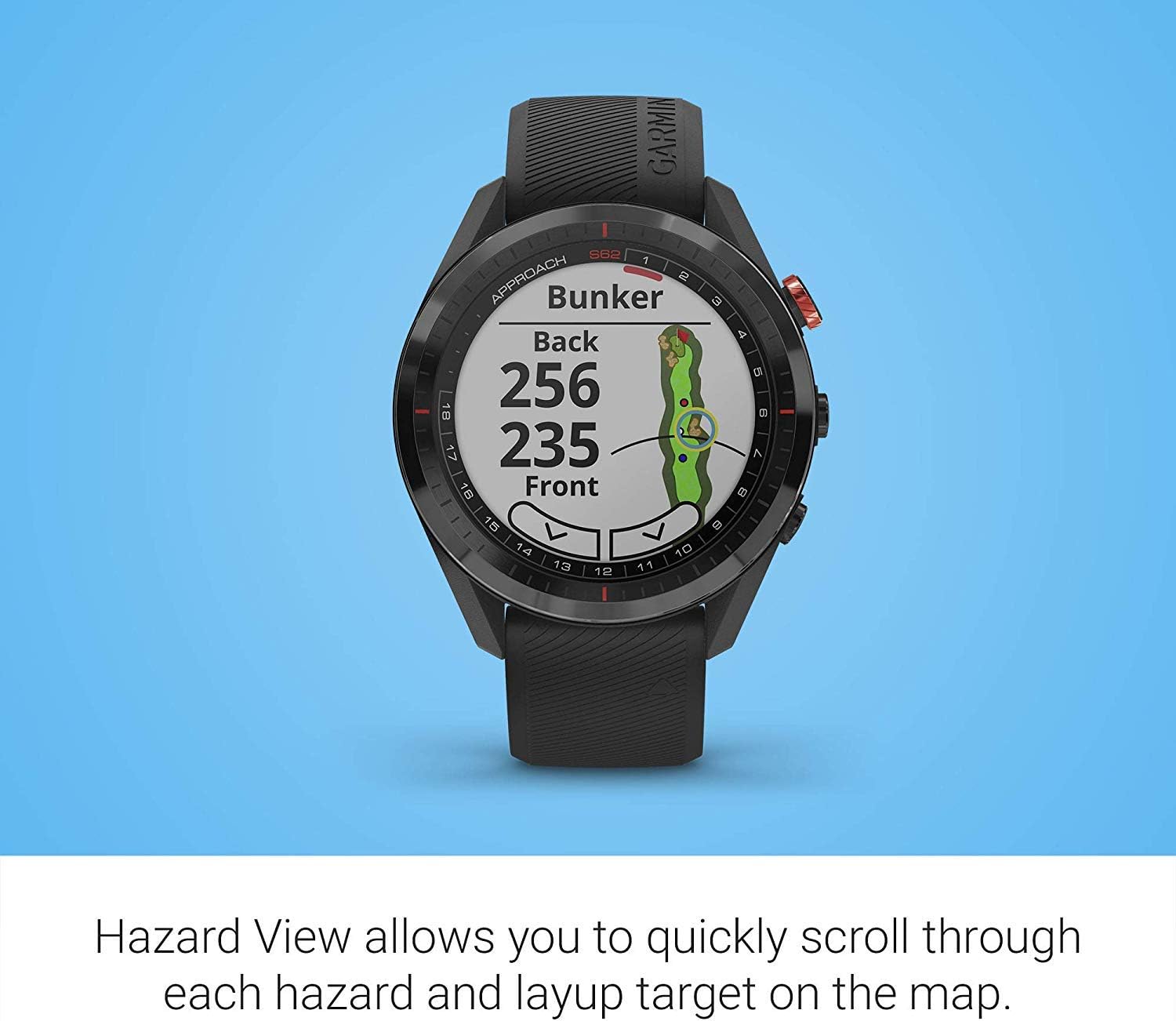
Image: The Garmin Approach S62 watch displaying the Hazard View, showing distances to the front and back of a bunker.
5.1.3. PlaysLike Distance
This feature adjusts yardage measurements to account for uphill and downhill shots, providing a more accurate distance to the target.
5.1.4. ສີຂຽວ View
ສີຂຽວ View feature allows you to manually position the pin for the day, providing precise distances to the front, middle, and back of the green, as well as to hazards and doglegs.

Image: The Garmin Approach S62 watch displaying the Green View, showing the green layout and allowing for manual pin positioning.
5.1.5. Course Selection and Scoring
The watch automatically detects nearby courses. Select your course and begin your round. The watch can track your score, shots, and other statistics, which can be reviewed on the watch or in the Garmin Golf app.
5.2. ຄຸນສົມບັດອັດສະລິຍະ
5.2.1. Garmin Pay
Garmin Pay is a contactless payment solution that allows you to make convenient payments directly from your watch. Set up your cards in the Garmin Connect app.
5.2.2. ການແຈ້ງເຕືອນ
Receive smart notifications for calls, texts, and app alerts directly on your watch when paired with your smartphone.
5.3. ປັບແຕ່ງໂມງຂອງເຈົ້າ
You can customize watch faces, widgets, and settings through the watch menu or the Garmin Connect app to suit your preferences.
6. ບໍາລຸງຮັກສາ
6.1. ທຳ ຄວາມສະອາດອຸປະກອນ
ທຳຄວາມສະອາດໂມງຂອງທ່ານເປັນປະຈຳດ້ວຍຜ້ານຸ້ມໆ, ຜ້າເຊັດໂຕ ແລະamp ຜ້າ. ຫຼີກເວັ້ນການສານເຄມີທີ່ຮຸນແຮງຫຼືວັດສະດຸຂັດ. ກວດໃຫ້ແນ່ໃຈວ່າບ່ອນຕິດຕໍ່ສາກໄຟສະອາດ ແລະແຫ້ງກ່ອນການສາກໄຟ.
6.2. ການດູແລຫມໍ້ໄຟ
To maximize battery life, avoid exposing the watch to extreme temperatures. Charge the device regularly, but avoid leaving it fully discharged for extended periods. The battery life is approximately 20 hours in GPS mode.
6.3. ການປັບປຸງຊອບແວ
Keep your watch's software updated to ensure optimal performance and access to the latest features. Updates can be performed via the Garmin Connect app or Garmin Express on a computer.
7. ການແກ້ໄຂບັນຫາ
7.1. ບັນຫາທົ່ວໄປ
- ໂມງບໍ່ເປີດ: Ensure the watch is fully charged. Try connecting it to a power source.
- GPS ບໍ່ໄດ້ຮັບສັນຍານ: ໃຫ້ແນ່ໃຈວ່າທ່ານຢູ່ໃນພື້ນທີ່ເປີດທີ່ມີຄວາມຊັດເຈນ view of the sky. Allow several minutes for the watch to acquire satellites.
- ບັນຫາການເຊື່ອມຕໍ່ Bluetooth: ກວດໃຫ້ແນ່ໃຈວ່າ Bluetooth ເປີດຢູ່ທັງໂມງ ແລະສະມາດໂຟນຂອງເຈົ້າ. ລອງຣີສະຕາດອຸປະກອນທັງສອງແລ້ວຈັບຄູ່ພວກມັນຄືນໃໝ່ຜ່ານແອັບ Garmin Connect.
- Inaccurate distances: Ensure the course map is up-to-date. Perform a software update if available.
- ໜ້າຈໍສໍາຜັດບໍ່ຕອບສະໜອງ: Try restarting the device. If the issue persists, contact Garmin support.
8. ຂໍ້ມູນຈໍາເພາະ
| ຄຸນສົມບັດ | ລາຍລະອຽດ |
|---|---|
| ນ້ໍາຫນັກລາຍການ | 1.25 ປອນ |
| ຂະໜາດສິນຄ້າ | 1.85 x 0.58 x 1.85 ນິ້ວ |
| ໝາຍເລກຕົວແບບ | wa001 |
| ໝໍ້ໄຟ | 2 ຫມໍ້ໄຟ Lithium Ion ຕ້ອງການ |
| ຂະຫນາດຈໍສະແດງຜົນ | 3 ນິ້ວ |
| ອາຍຸແບັດເຕີຣີ (ໂໝດ GPS) | 20 ຊົ່ວໂມງ |
| ຄຳສັ່ງສຽງ | ໜ້າຈໍສຳຜັດ |
| ເຕັກໂນໂລຊີການເຊື່ອມຕໍ່ | Bluetooth Smart ແລະ ANT+ |
| ປະເພດແຜນທີ່ | ອາເມລິກາເຫນືອ |
| ປະເພດການຕິດຕັ້ງ | Wrist Mount |
| ປະເພດການສະແດງ | ສາມາດເຫັນແສງແດດໄດ້, ມີ ໜ່ວຍ ຄວາມ ຈຳ ເປັນພິກເຊວທີ່ສາມາດຖ່າຍໂອນໄດ້ (MIP) |
9. ການຮັບປະກັນແລະການສະຫນັບສະຫນູນ
ສຳລັບຂໍ້ມູນການຮັບປະກັນ, ກະລຸນາອ້າງອີງເອກະສານທີ່ມາພ້ອມກັບຜະລິດຕະພັນຂອງທ່ານ ຫຼື ເຂົ້າໄປທີ່ Garmin ຢ່າງເປັນທາງການ webເວັບໄຊ. ສໍາລັບການສະຫນັບສະຫນູນດ້ານວິຊາການ, ການລົງທະບຽນຜະລິດຕະພັນ, ແລະຊັບພະຍາກອນເພີ່ມເຕີມ, ກະລຸນາໄປຢ້ຽມຢາມ garmin.com/support.
10. ວິດີໂອຜະລິດຕະພັນຢ່າງເປັນທາງການ
Video: Official product video demonstrating key features and benefits of the Garmin Approach S62 Premium GPS Golf Watch.