1. ຜະລິດຕະພັນເກີນview
The MikroTik Cloud Router Switch CRS328-24P-4S+RM is a versatile 28-port switch designed for network environments requiring high performance and flexible power options. It features 24 Gigabit Ethernet ports with various Power over Ethernet (PoE) output capabilities and 4 10Gbps SFP+ ports for high-speed fiber or Ethernet connections.
This device supports a "Dual boot" feature, allowing users to choose between RouterOS for advanced routing and Layer 3 features, or SwOS for a simplified, switch-specific operating system.
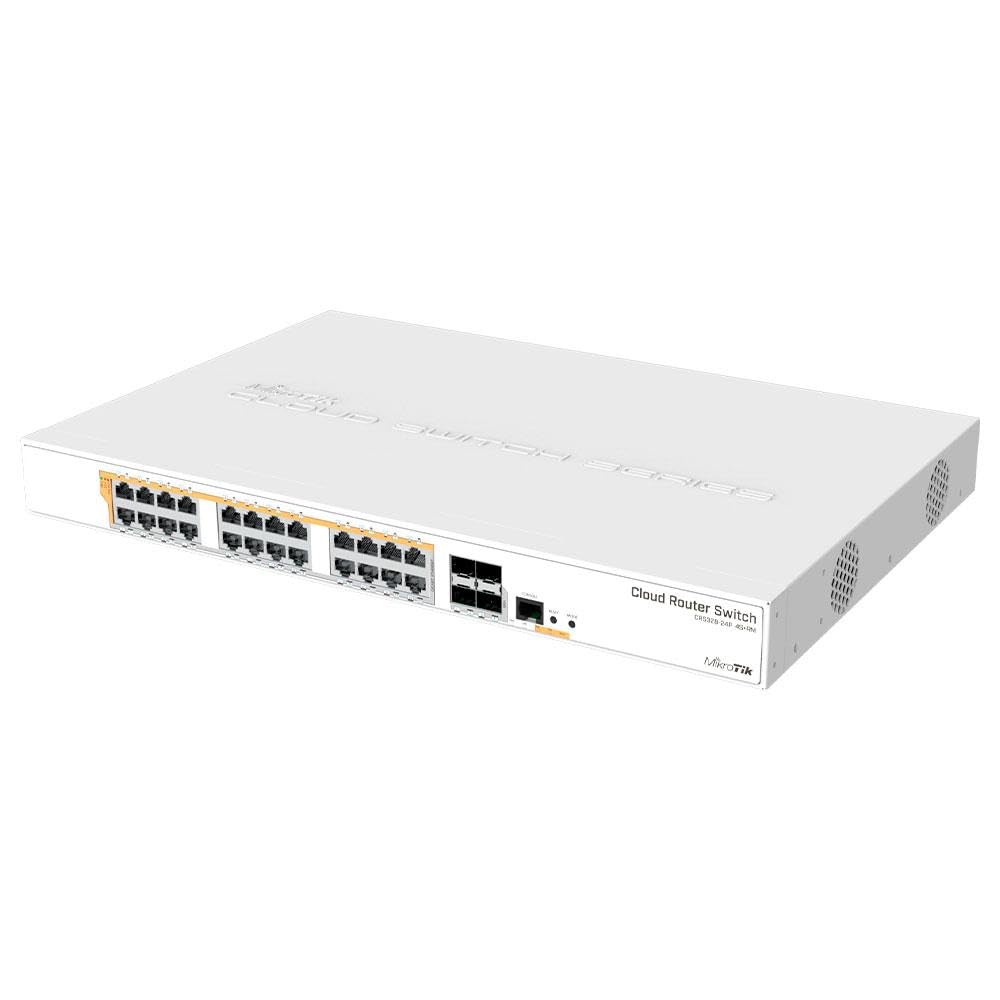
ຮູບທີ 1: Front panel of the MikroTik Cloud Router Switch CRS328-24P-4S+RM. This image displays the 24 Gigabit Ethernet ports, 4 SFP+ ports, console port, and reset button.
2. ເນື້ອໃນຊຸດ
ກວດສອບວ່າອົງປະກອບທັງໝົດມີຢູ່ໃນຊຸດ:
- MikroTik Cloud Router Switch CRS328-24P-4S+RM unit
- Power cable (100-240V AC)
- Rackmount ears (for 1U rack installation)
- ສະກູຕິດ
Note: SFP+ modules and Ethernet cables are not included and must be purchased separately.
3. ການຕິດຕັ້ງແລະການຕິດຕັ້ງ
3.1. ຂໍ້ມູນຄວາມປອດໄພ
- ຮັບປະກັນການລະບາຍອາກາດທີ່ເຫມາະສົມຮອບອຸປະກອນ.
- ເຊື່ອມຕໍ່ອຸປະກອນກັບປລັກສຽບໄຟທີ່ມີດິນ.
- Do not operate the device in environments exceeding 60°C (140°F).
3.2. Rackmount Installation
The CRS328-24P-4S+RM is designed for 1U rackmount installation.
- Attach the provided rackmount ears to the sides of the switch using the included screws.
- Secure the switch into a standard 19-inch rack using appropriate rack screws (not included).
3.3. ການເຊື່ອມຕໍ່ພະລັງງານ
Connect the included power cable to the AC input on the rear of the switch and then to a 100-240V AC power source. The device will power on automatically.
3.4. ການເຂົ້າເຖິງການຕັ້ງຄ່າເບື້ອງຕົ້ນ
To access the device for initial configuration:
- ອີເທີເນັດ: Connect an Ethernet cable from your computer to any of the Gigabit Ethernet ports. The device will typically acquire an IP address via DHCP or use a default fallback IP.
- ຄອນໂຊ: For direct console access, connect a serial console cable to the RJ45 console port on the front panel. Use a terminal emulator (e.g., PuTTY) with settings: 115200 baud, 8 data bits, 1 stop bit, no parity, flow control: none.
4. ການດໍາເນີນງານຂອງ Switch
4.1. Operating System Selection (Dual Boot)
The CRS328-24P-4S+RM supports "Dual boot" with RouterOS and SwOS. You can select the desired operating system during boot-up or via the RouterBOOT loader settings.
- SwOS: Provides a simplified interface with switch-specific features. Ideal for pure Layer 2 switching environments.
- ລະບົບປະຕິບັດການເຣົາເຕີ: Offers advanced routing and Layer 3 features, suitable for complex network configurations.
Refer to the MikroTik documentation for detailed instructions on switching between operating systems.
4.2. Ethernet Port Functionality (PoE)
The 24 Gigabit Ethernet ports offer various Power over Ethernet (PoE) output options:
- Passive PoE
- ລະດັບສຽງຕ່ ຳtage PoE
- 802.3af/at (Type 1 "PoE" / Type 2 "PoE+") with auto-sensing
PoE-Out is passed over mode B pins (4,5+) (7,8-). Each port can provide up to 30 W of power. The device provides a guaranteed 450 W total power for PoE devices (3x150 W per every 8 Ethernet ports).
4.3. SFP+ Port Functionality
The four SFP+ ports provide up to 10 Gbps connectivity options. These ports are compatible with either optical fiber SFP+ modules or Ethernet SFP+ modules (not included).
5. ບໍາລຸງຮັກສາ
5.1. ອັບເດດເຟີມແວ
ກວດສອບ MikroTik ເປັນປະຈຳ website for the latest firmware updates for both RouterOS and SwOS. Keeping the firmware updated ensures optimal performance, security, and access to new features.
Instructions for updating firmware are available in the official MikroTik documentation for RouterOS and SwOS.
5.2. ທໍາຄວາມສະອາດ
To maintain proper airflow and prevent overheating, periodically clean the device. Use a soft, dry cloth to wipe the exterior. For dust accumulation in vents, use compressed air. Ensure the device is powered off before cleaning.
5.3. ປັບປຸ່ມ
The reset button on the front panel can be used for various functions depending on when it is pressed during boot-up. Refer to the MikroTik documentation for specific reset procedures (e.g., resetting to factory defaults, entering RouterBOOT loader).
6. ການແກ້ໄຂບັນຫາ
6.1. ບໍ່ມີພະລັງງານ
- Verify the power cable is securely connected to both the switch and a working power outlet.
- ກວດເບິ່ງແຫຼ່ງພະລັງງານສໍາລັບການເຮັດວຽກ.
6.2. ບໍ່ມີການເຊື່ອມຕໍ່ເຄືອຂ່າຍ
- Ensure Ethernet cables are properly connected to the ports and the link/activity LEDs are illuminated.
- Check the configuration of the switch (VLANs, IP settings) to ensure it matches your network requirements.
- If using SFP+ ports, verify that compatible and functional SFP+ modules are installed and connected correctly.
6.3. PoE Devices Not Powering On
- Confirm that the connected device is PoE-compatible (802.3af/at or passive PoE, depending on configuration).
- Check the PoE settings on the switch for the specific port to ensure PoE output is enabled and configured correctly.
- Verify that the total power consumption of all connected PoE devices does not exceed the switch's maximum PoE budget (450 W).
6.4. Accessing Configuration Interface
- ຖ້າທ່ານບໍ່ສາມາດເຂົ້າເຖິງໄດ້ web interface, try connecting via the console port.
- Ensure your computer's IP address is in the same subnet as the switch's management IP.
- If the password is lost, a factory reset might be necessary (refer to MikroTik documentation).
7. ຂໍ້ມູນຈໍາເພາະ
| ຄຸນສົມບັດ | ລາຍລະອຽດ |
|---|---|
| ຕົວແບບ | CRS328-24P-4S+RM |
| ພອດອີເທີເນັດ | 24 x Gigabit Ethernet (10/100/1000 Mbps) |
| SFP + ທ່າເຮືອ | 4 x 10 Gbps SFP+ |
| ຜົນໄດ້ຮັບ PoE | PoE ແບບ passive, ລະດັບສຽງຕ່ຳtage PoE, 802.3af/at (Type 1 "PoE" / Type 2 "PoE+") |
| Max Power per PoE Port | 30 ວ |
| ງົບປະມານ PoE ທັງໝົດ | 450 W (3x150 W per 8 Ethernet ports) |
| ການສະຫນອງພະລັງງານ | 100-240 V AC, 500 W built-in |
| Max Power Consumption (Device only) | 44 ວ |
| ລະບົບປະຕິບັດການ | Dual boot (RouterOS / SwOS) |
| ຂະໜາດ | 1.1 x 9.7 x 6.5 ນິ້ວ (28 x 246 x 165 ມມ) |
| ນ້ຳໜັກ | 9.53 ປອນ (4.33 ກິໂລ) |
| ອຸນຫະພູມປະຕິບັດການ | -20°C ຫາ +60°C (-4°F ຫາ +140°F) |
| ວັດສະດຸກໍລະນີ | ໂລຫະ |
8. ຂໍ້ມູນການຮັບປະກັນ
MikroTik products typically come with a limited manufacturer's warranty. For specific warranty terms and conditions, please refer to the official MikroTik webເວັບໄຊ ຫຼືເອກະສານທີ່ລວມຢູ່ໃນການຊື້ຂອງທ່ານ. ຮັກສາຫຼັກຖານການຊື້ຂອງທ່ານສໍາລັບການຮ້ອງຂໍການຮັບປະກັນ.
9. ສະຫນັບສະຫນູນດ້ານວິຊາການ
For technical assistance, firmware downloads, and additional documentation, please visit the official MikroTik webເວັບໄຊ:
You can also find community forums and knowledge bases for peer support and common issues.


