1. ບົດແນະນຳ
ຂອບໃຈສໍາລັບການຊື້asing the TWS i17 Dual Earbuds. This manual provides essential information for setting up, operating, and maintaining your new wireless earbuds. Please read this manual thoroughly before use to ensure optimal performance and longevity of your device.
2. ຂໍ້ມູນຄວາມປອດໄພ
To prevent damage to your earbuds or injury to yourself or others, please observe the following precautions:
- ຢ່າເປີດຫູຟັງຫູຟັງ ຫຼືກ່ອງສາກໃສ່ກັບອຸນຫະພູມ, ຄວາມຊຸ່ມຊື່ນ, ຫຼືຂອງແຫຼວທີ່ຮຸນແຮງທີ່ສຸດ.
- ຫຼີກເວັ້ນການຫຼຸດລົງ, ຜົນກະທົບ, ຫຼືການຖອດອຸປະກອນ.
- Do not use abrasive cleaners or solvents. Clean with a soft, dry cloth.
- ຟັງໃນລະດັບສຽງປານກາງເພື່ອປ້ອງກັນຄວາມເສຍຫາຍຂອງການໄດ້ຍິນ.
- ຮັກສາໃຫ້ໄກຈາກເດັກນ້ອຍ.
- This product is not water resistant. Avoid exposure to water or excessive moisture.
3. ເນື້ອໃນຊຸດ
ກວດສອບວ່າລາຍການທັງຫມົດແມ່ນມີຢູ່ໃນຊຸດຂອງທ່ານ:
- TWS i17 Dual Earbuds (Left and Right)
- ກ່ອງສາກ
- ສາຍສາກ USB
- ຄູ່ມືຜູ້ໃຊ້

Image: The TWS i17 Dual Earbuds, with one earbud partially removed from its charging case, showcasing ການອອກແບບສີດໍາ sleek.
4. ຕັ້ງຄ່າ
4.1 ການສາກຫູຟັງ ແລະ ເຄສ
ກ່ອນທີ່ຈະໃຊ້ຄັ້ງທຳອິດ, ໃຫ້ສາກຫູຟັງຫູຟັງ ແລະ ຊ່ອງສາກໃຫ້ເຕັມ.
- ວາງຫູຟັງທັງສອງໃສ່ໃສ່ກ່ອງສາກ. ໃຫ້ແນ່ໃຈວ່າພວກເຂົານັ່ງຢ່າງຖືກຕ້ອງ.
- Connect the USB charging cable to the charging port on the bottom of the case and the other end to a USB power source (e.g., computer, wall adapter).
- The indicator light on the case will show charging status. It will turn off or change color when fully charged.
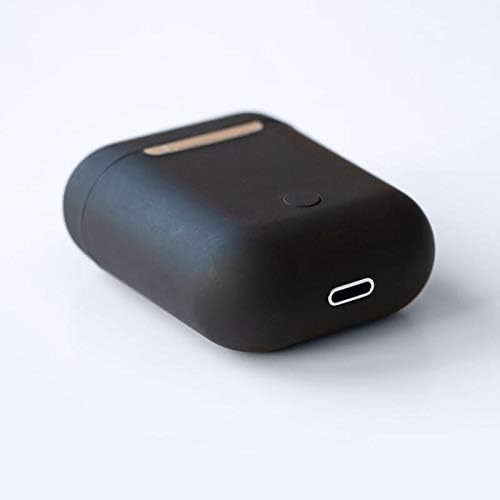
ຮູບພາບ: A close-up view of the bottom of the TWS i17 charging case, highlighting the USB charging port and a small button.
4.2 ການຈັບຄູ່ກັບອຸປະກອນຂອງທ່ານ
The i17 earbuds use Bluetooth for wireless connection.
- ກວດໃຫ້ແນ່ໃຈວ່າໄດ້ສາກຫູຟັງແລ້ວ.
- ເປີດກ່ອງສາກໄຟ. ຫູຟັງເອຍບັດຈະເຂົ້າສູ່ໂໝດຈັບຄູ່ໂດຍອັດຕະໂນມັດ (ໄຟຕົວຊີ້ບອກຈະກະພິບ).
- On your mobile phone or Bluetooth-enabled device, go to Bluetooth settings and turn Bluetooth on.
- ຊອກຫາ available devices. Select "i17" from the list.
- Once connected, the indicator lights on the earbuds will stop flashing. You are now ready to use your earbuds.

Image: The TWS i17 Dual Earbuds resting inside their open charging case, ready for pairing or use.
5. ຄໍາແນະນໍາການດໍາເນີນງານ
5.1 ເປີດ/ປິດ
- ເປີດ: Take the earbuds out of the charging case. They will automatically power on and connect to the last paired device.
- ປິດພະລັງງານ: Place the earbuds back into the charging case. They will automatically power off and begin charging.
5.2 ການຫລີ້ນດົນຕີ
- ຫຼິ້ນ/ຢຸດ: ແຕະໃສ່ຫູຟັງຫູຟັງໜຶ່ງຄັ້ງ.
- ເພງຕໍ່ໄປ: ແຕະສອງເທື່ອໃສ່ຫູຟັງທາງຂວາ.
- ຕິດຕາມກ່ອນ ໜ້າ ນີ້: ແຕະສອງເທື່ອໃສ່ຫູຟັງທາງຊ້າຍ.
5.3 ການຄຸ້ມຄອງການໂທ
- ຮັບ/ສາຍໂທ: ແຕະໃສ່ຫູຟັງຫູຟັງໜຶ່ງຄັ້ງ.
- ປະຕິເສດການໂທ: ກົດຫູຟັງອັນໃດອັນໜຶ່ງຄ້າງໄວ້ 2 ວິນາທີ.
5.4 ຜູ້ຊ່ວຍສຽງ
- ເປີດໃຊ້ຜູ້ຊ່ວຍສຽງ (Siri/Google Assistant): ແຕະສາມເທື່ອໃສ່ຫູຟັງຫູຟັງ.
6. ບໍາລຸງຮັກສາ
Proper maintenance ensures the longevity of your earbuds:
- ທໍາຄວາມສະອາດ: Use a soft, dry, lint-free cloth to clean the earbuds and charging case. Do not use liquids or sprays.
- ການເກັບຮັກສາ: ເມື່ອບໍ່ໄດ້ໃຊ້, ໃຫ້ເກັບຫູຟັງເອຍບັດໃສ່ໃນກະເປົ໋າສາກໄຟເພື່ອປົກປ້ອງພວກມັນ ແລະ ສືບຕໍ່ສາກໄຟ. ເກັບຮັກສາໄວ້ໃນບ່ອນທີ່ເຢັນ, ແຫ້ງ.
- ການດູແລຫມໍ້ໄຟ: To prolong battery life, avoid fully discharging the earbuds frequently. Charge them regularly.

Image: The TWS i17 Dual Earbuds securely stored within their closed charging case, ready for transport or charging.
7. ການແກ້ໄຂບັນຫາ
| ບັນຫາ | ສາເຫດທີ່ເປັນໄປໄດ້ | ການແກ້ໄຂ |
|---|---|---|
| ຫູຟັງບໍ່ຈັບຄູ່ | Low battery; Out of range; Not in pairing mode; Bluetooth off on device. | Charge earbuds; Move closer to device; Ensure case is open for pairing; Turn on Bluetooth on device. |
| ຫູຟັງຫູຟັງອັນດຽວເຮັດວຽກໄດ້ | One earbud not charged; Earbuds not properly synced. | Ensure both earbuds are charged; Place both earbuds back in case, close, then reopen to re-sync. |
| ບໍ່ມີສຽງ | Volume too low; Not connected; Media paused. | Increase volume on device; Reconnect earbuds; Check media playback status. |
| ກ່ອງສາກບໍ່ສາກ | Faulty cable/adapter; Loose connection. | Try a different USB cable or power adapter; Ensure cable is securely plugged in. |
8. ຂໍ້ມູນຈໍາເພາະ
| ຄຸນສົມບັດ | ລາຍລະອຽດ |
|---|---|
| ໝາຍເລກຕົວແບບ | i17 |
| ຍີ່ຫໍ້ | TWS |
| ເຕັກໂນໂລຊີການເຊື່ອມຕໍ່ | ໄຮ້ສາຍ (Bluetooth) |
| ປັດໄຈແບບຟອມຂອງຫູຟັງ | ໃນຫູ |
| ລວມໄມໂຄຣໂຟນ | ແມ່ນແລ້ວ |
| ການຍົກເລີກສິ່ງລົບກວນ | ບໍ່ |
| ເຂົ້າກັນໄດ້ກັບ | ໂທລະສັບມືຖື |
| ສີ | ດຳ |
| ວັດສະດຸ | ພາດສະຕິກ |
| ຄຸນສົມບັດສາຍ | Cable-free |
| ລະດັບຄວາມຕ້ານທານນ້ໍາ | ບໍ່ທົນທານຕໍ່ນ້ໍາ |
| ຂະໜາດການຂົນສົ່ງ | 12.6 x 8.8 x 3.6 cm |
| ນ້ຳໜັກ | 96 ກຣາມ |
| ວັນທີທີ່ມີໃຫ້ທໍາອິດ | ວັນທີ 15 ມັງກອນ 2020 |
9. ການຮັບປະກັນແລະການສະຫນັບສະຫນູນ
For warranty information and customer support, please refer to the contact details provided on the product packaging or the official TWS webເວັບໄຊ. ຮັກສາຫຼັກຖານການຊື້ຂອງທ່ານສໍາລັບການຮ້ອງຂໍການຮັບປະກັນ.
For further assistance, please contact TWS customer service.


