QUMOX Gamepad Bluetooth Wireless 6-axis Turbo Controller User Manual
ຮຸ່ນ: L376U
ແນະນຳ
This manual provides detailed instructions for the QUMOX Bluetooth Wireless Gamepad, Model L376U. This versatile controller is designed for use with multiple platforms, including Nintendo Switch, PlayStation 4 (PS4), iOS 13 and above, Android devices, and PC. It features Bluetooth wireless communication, a 6-axis gyroscope, dual motor vibration, a touch screen, a headphone jack, and integrated speakers, offering an enhanced gaming experience.
Please read this manual thoroughly before using the product to ensure proper operation and to maximize your gaming enjoyment.
ເນື້ອໃນຊຸດ
ກວດສອບວ່າລາຍການທັງຫມົດແມ່ນມີຢູ່ໃນຊຸດ:
- 1x QUMOX Wireless Controller (Model L376U)
- 1x USB Charging Cable (1.8m)
- 1x ຄູ່ມືຜູ້ໃຊ້ພາສາອັງກິດ

Image: The retail packaging for the QUMOX Wireless Controller, showing the product box with branding and key features.
ສິນຄ້າເກີນview
The QUMOX Wireless Gamepad is designed for comfort and precision. Below are images illustrating the controller's various angles and components.

ຮູບພາບ: ທາງຫນ້າ view of the QUMOX Wireless Controller, displaying the dual analog sticks, D-pad, action buttons, and central touchpad.
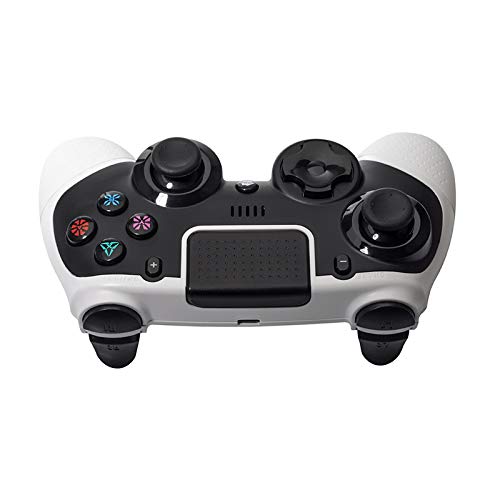
ຮູບພາບ: ເທິງ view of the QUMOX Wireless Controller, showing the shoulder buttons (L1, R1) and trigger buttons (L2, R2).
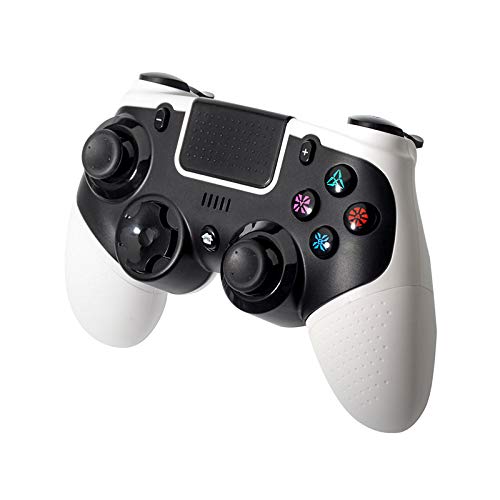
Image: Angled left view of the QUMOX Wireless Controller, highlighting the ergonomic grip and button layout from a side perspective.

Image: Angled right view of the QUMOX Wireless Controller, showing the ergonomic grip and button layout from the opposite side.
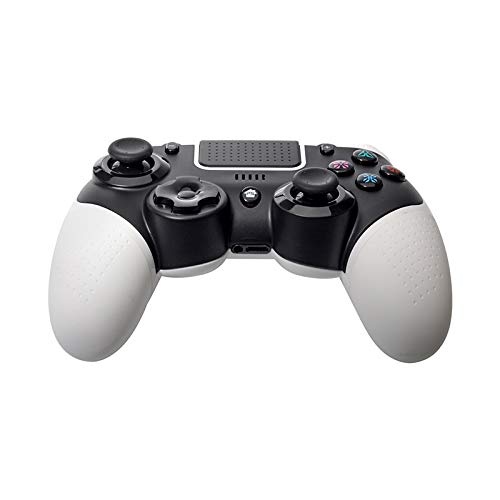
ຮູບພາບ: ລຸ່ມ view of the QUMOX Wireless Controller, revealing the charging port and other underside details.
ຄຸນນະສົມບັດທີ່ສໍາຄັນ:
- ຄວາມເຂົ້າກັນໄດ້ຫຼາຍເວທີ: Works with Nintendo Switch, PlayStation 4, iOS 13+, Android, and PC.
- ການເຊື່ອມຕໍ່ Bluetooth ແບບໄຮ້ສາຍ: Ensures stable connection and strong anti-interference ability.
- 6-Axis Gyroscope Function: ໃຫ້ການຄວບຄຸມການເຄື່ອນໄຫວທີ່ຊັດເຈນສຳລັບເກມທີ່ຮອງຮັບ.
- ການສັ່ນສະເທືອນຂອງມໍເຕີຄູ່: ເສີມຂະຫຍາຍການດຳລົງຊີວິດດ້ວຍການຕອບສະໜອງແບບ haptic.
- ແຜງສຳຜັດປະສົມປະສານ: Offers additional input options for compatible games.
- Headphone Jack & Speakers: For audio output directly from the controller.
- ການອອກແບບ Ergonomic: Comfortable for extended gaming sessions.
ການຕັ້ງຄ່າແລະການຈັບຄູ່
The controller does not require specific driver installation; it can be used after successful pairing with your host device.
ກຳລັງສາກເຄື່ອງຄວບຄຸມ:
Before first use, fully charge the controller. Connect the provided USB charging cable to the controller's charging port and the other end to a USB power source (e.g., console, PC, USB wall adapter). The indicator lights on the controller will show charging status and turn off or change color when fully charged.
ຄຳແນະນຳການຈັບຄູ່:
Specific pairing methods may vary slightly depending on the platform. Generally, ensure the controller is sufficiently charged before attempting to pair.
- ສໍາລັບ Nintendo Switch:
- ຈາກເມນູ HOME, ເລືອກ "ຕົວຄວບຄຸມ" > "ປ່ຽນດ້າມຈັບ/ລຳດັບ".
- On the controller, press and hold the SYNC button (usually a small button on the top or back) for a few seconds until the indicator lights begin to flash.
- Once paired, the player indicator light(s) on the controller will illuminate steadily.
- For PlayStation 4 (PS4):
- Ensure your PS4 is on.
- Connect the controller to the PS4 using the USB cable.
- Press the PS button on the controller. The controller should pair and the light bar will illuminate.
- You can then disconnect the USB cable for wireless play.
- For iOS (13+) / Android Devices:
- Enable Bluetooth on your iOS/Android device.
- Put the controller into pairing mode (often by holding a combination of buttons like SHARE + PS button, or a dedicated pairing button, refer to the controller's specific instructions if different). The indicator lights will flash rapidly.
- On your device, search for new Bluetooth devices and select "QUMOX Gamepad" or similar from the list.
- ເມື່ອເຊື່ອມຕໍ່ແລ້ວ, ໄຟຕົວຊີ້ວັດຈະກາຍເປັນແຂງ.
- ສໍາລັບ PC (Windows):
- For wired connection: Connect the controller to your PC using the USB cable. The PC should automatically detect and install necessary drivers.
- For Bluetooth connection (requires a Bluetooth adapter on PC):
- Go to "Settings" > "Devices" > "Bluetooth & other devices" on your PC.
- Click "Add Bluetooth or other device" > "Bluetooth".
- Put the controller into pairing mode (as described for iOS/Android).
- Select "QUMOX Gamepad" from the list of available devices.
ຄໍາແນະນໍາການດໍາເນີນງານ
This section details the primary functions and features of your QUMOX Wireless Gamepad.
ການຄວບຄຸມພື້ນຖານ:
- ໄມ້ອະນາລັອກ: ໃຊ້ສຳລັບການເຄື່ອນໄຫວ ແລະ ການຄວບຄຸມກ້ອງຖ່າຍຮູບ.
- D-Pad: For directional input, menu navigation.
- Action Buttons (X, O, Triangle, Square / A, B, X, Y): Perform in-game actions.
- Shoulder Buttons (L1, R1) & Trigger Buttons (L2, R2): For various in-game functions like aiming, shooting, or special abilities.
- PS/Home Button: Powers on the controller, accesses system menus.
- SHARE/SELECT Button: Used for sharing content or accessing specific in-game menus.
- OPTIONS/START Button: Pauses games or accesses game options.
ຄຸນນະສົມບັດພິເສດ:
- ຟັງຊັນ Turbo:
The Turbo function allows for rapid, automatic pressing of a button. To activate:
- Press and hold the desired action button (e.g., X, O, Triangle, Square, L1, R1, L2, R2).
- While holding the action button, press the TURBO button (refer to controller diagram for location).
- Release both buttons. The selected button will now rapidly repeat its input when held down.
To deactivate Turbo for a specific button, repeat the process. To clear all Turbo settings, press and hold the TURBO button for 5 seconds.
- 6-Axis Gyroscope:
The built-in 6-axis gyroscope provides motion sensing capabilities, allowing for intuitive control in games that support tilt or motion input. This feature is automatically active when supported by the connected platform and game.
- ການສັ່ນສະເທືອນຂອງມໍເຕີຄູ່:
The controller features dual motors for haptic feedback, providing immersive vibration effects during gameplay. Vibration intensity is typically controlled by the game or console settings.
- ແຜ່ນສໍາຜັດ:
The central touchpad functions as an additional input method, similar to a mouse or trackpad, in games and applications that utilize it. It also acts as a clickable button.
- Headphone Jack & Speakers:
Connect a standard 3.5mm headset to the headphone jack for in-game audio and voice chat. The integrated speaker provides additional audio cues in supported games.
ບໍາລຸງຮັກສາ
- ທໍາຄວາມສະອາດ: ໃຊ້ຜ້າອ່ອນໆແຫ້ງເພື່ອທຳຄວາມສະອາດຕົວຄວບຄຸມ. ສຳລັບຝຸ່ນທີ່ຝັງແໜ້ນ, ໃຫ້ເຊັດອອກເລັກນ້ອຍampen ຜ້າທີ່ມີນ້ໍາ. ຫຼີກເວັ້ນການນໍາໃຊ້ສານເຄມີທີ່ຮຸນແຮງຫຼືວັດສະດຸຂັດ.
- ການເກັບຮັກສາ: ເກັບຮັກສາເຄື່ອງຄວບຄຸມໄວ້ໃນບ່ອນທີ່ເຢັນ, ແຫ້ງ, ຫ່າງຈາກແສງແດດໂດຍກົງແລະອຸນຫະພູມທີ່ສຸດ.
- ການດູແລຫມໍ້ໄຟ: ເພື່ອຍືດອາຍຸແບັດເຕີລີ, ຫຼີກເວັ້ນການປ່ອຍຕົວຄວບຄຸມຢ່າງເຕັມທີ່ເລື້ອຍໆ. ໄລ່ມັນເປັນປົກກະຕິ, ເຖິງແມ່ນວ່າບໍ່ໄດ້ຢູ່ໃນການນໍາໃຊ້ຢ່າງຕໍ່ເນື່ອງ.
- ຫຼີກລ້ຽງການຫຼຸດລົງ: ປົກປ້ອງຕົວຄວບຄຸມຈາກການຫຼຸດລົງແລະຜົນກະທົບ, ເຊິ່ງສາມາດທໍາລາຍອົງປະກອບພາຍໃນ.
ການແກ້ໄຂບັນຫາ
| ບັນຫາ | ການແກ້ໄຂທີ່ເປັນໄປໄດ້ |
|---|---|
| ການຄວບຄຸມບໍ່ໄດ້ເປີດ. | Ensure the controller is fully charged. Connect it to a power source using the USB cable. |
| ບໍ່ສາມາດຈັບຄູ່ກັບອຸປະກອນໄດ້. |
|
| ປຸ່ມບໍ່ຕອບສະໜອງ ຫຼືຊັກຊ້າ. |
|
| ການສັ່ນສະເທືອນບໍ່ເຮັດວຽກ. |
|
ຂໍ້ມູນຈໍາເພາະ
| ຄຸນສົມບັດ | ລາຍລະອຽດ |
|---|---|
| ໝາຍເລກຕົວແບບ | L376U |
| ການເຊື່ອມຕໍ່ | Bluetooth Wireless |
| ຄວາມເຂົ້າກັນໄດ້ | Nintendo Switch, PS4, iOS 13+, Android, PC |
| ຄຸນນະສົມບັດພິເສດ | 6-axis Gyroscope, Dual Motor Vibration, Touchpad, Headphone Jack, Speakers, Turbo Function |
| ຂະໜາດ | 6.3 x 2.95 x 2.95 ນິ້ວ |
| ນ້ຳໜັກ | 12.7 ອອນ |
| ຜູ້ຜະລິດ | QUMOX |
ການຮັບປະກັນແລະການສະຫນັບສະຫນູນ
QUMOX products are manufactured with quality and reliability in mind. For specific warranty information, please refer to the documentation included with your purchase or contact QUMOX customer support directly.
If you encounter any issues not covered in this manual, or require further assistance, please visit the official QUMOX website or contact their customer service department. Please have your model number (L376U) and purchase details ready when seeking support.