1. ບົດແນະນຳ
Thank you for choosing the BEREST A11 Baby Sleep Soother. This soft, cuddly sheep toy is designed to help soothe your baby to sleep with a combination of calming sounds, gentle melodies, and a captivating light projection. It features multiple sound options, adjustable volume, a starry night light projector, and convenient auto-off timers. Please read this manual carefully to ensure proper use and care of your product.

Image: The BEREST A11 Baby Sleep Soother, a grey sheep plush toy with a light projector on its tummy, holding a yellow blanket. Musical notes float around it.
2. ຂໍ້ມູນຄວາມປອດໄພ
- Always ensure the product is placed securely and out of reach of infants to prevent entanglement or choking hazards.
- Do not immerse the electronic sound box in water. Remove it before washing the plush toy.
- Use only the specified battery type (3 AAA batteries). Do not mix old and new batteries or different types of batteries.
- ຮັກສາຫມໍ້ໄຟໃຫ້ໄກຈາກເດັກນ້ອຍ. ຖ້າກືນກິນ, ໃຫ້ຊອກຫາແພດທັນທີ.
- Inspect the product regularly for any damage. Discontinue use if any part is broken or detached.
3. ເນື້ອໃນຊຸດ
- BEREST A11 Sleep Soother Plush Toy (Sheep)
- Sound and Light Module (pre-installed)
- Yellow Comfort Blanket (attached)
- ຄູ່ມືຜູ້ໃຊ້
- 3 AAA Batteries (may be included)
- Small Screwdriver (may be included for battery compartment)
4. ຕັ້ງຄ່າ
4.1 ການຕິດຕັ້ງຫມໍ້ໄຟ
- Locate the battery compartment on the back of the sound and light module, which is inside the plush toy.
- Using a small screwdriver (if provided), open the battery compartment.
- ໃສ່ໝໍ້ໄຟ AAA 3 ອັນ, ຮັບປະກັນການຂົ້ວທີ່ຖືກຕ້ອງ (+/-).
- Close the battery compartment securely with the screw.
4.2 Placement and Attachment
The BEREST A11 Sleep Soother can be placed on a flat surface near the baby or attached to a crib, car seat, or stroller using its secure Velcro fastener.
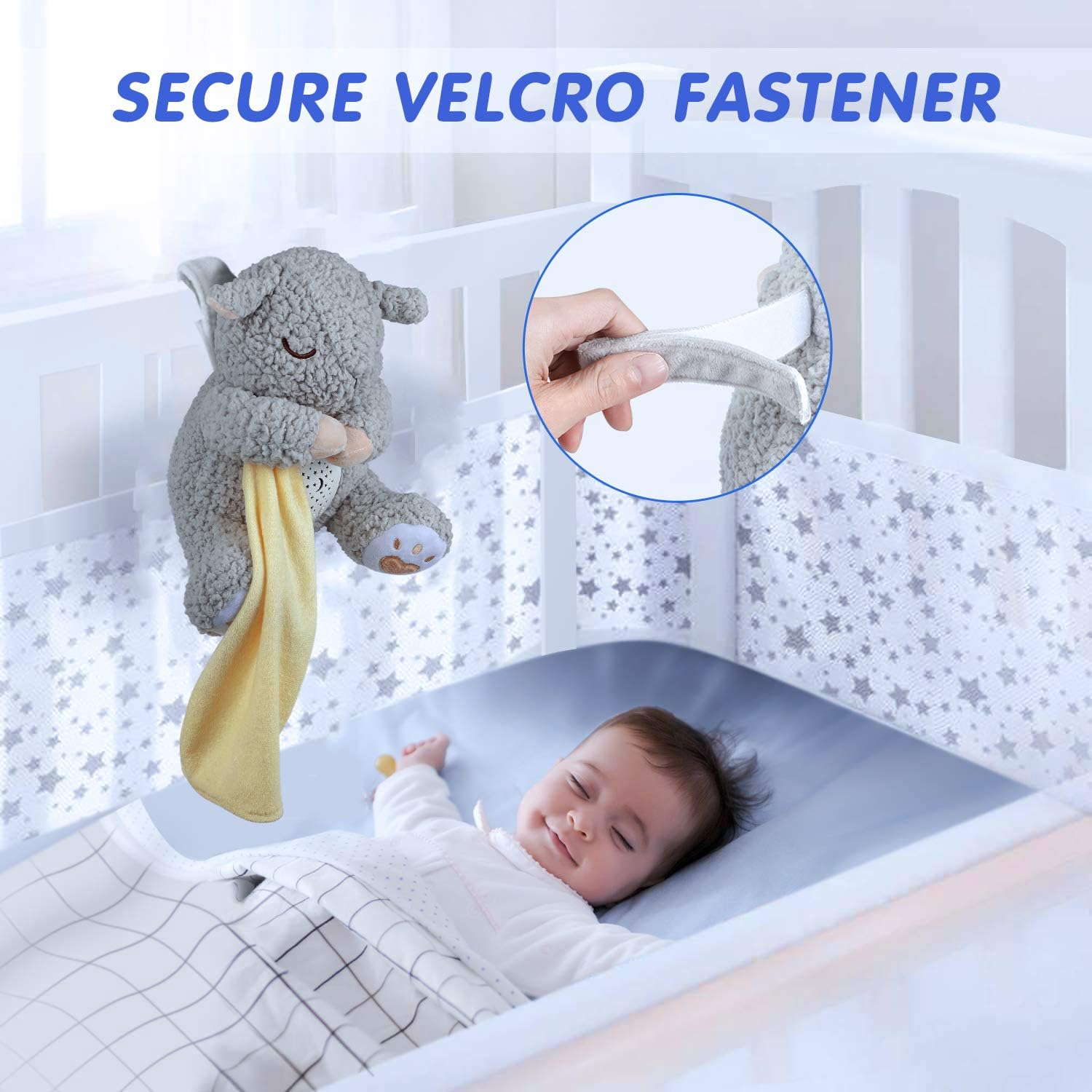
Image: The BEREST A11 Baby Sleep Soother attached to a crib with a Velcro fastener, with a baby sleeping peacefully below. An inset shows a close-up of the Velcro strap.
5. ຄໍາແນະນໍາການດໍາເນີນງານ
The control panel is located on the front of the sound and light module, accessible through the sheep's tummy.
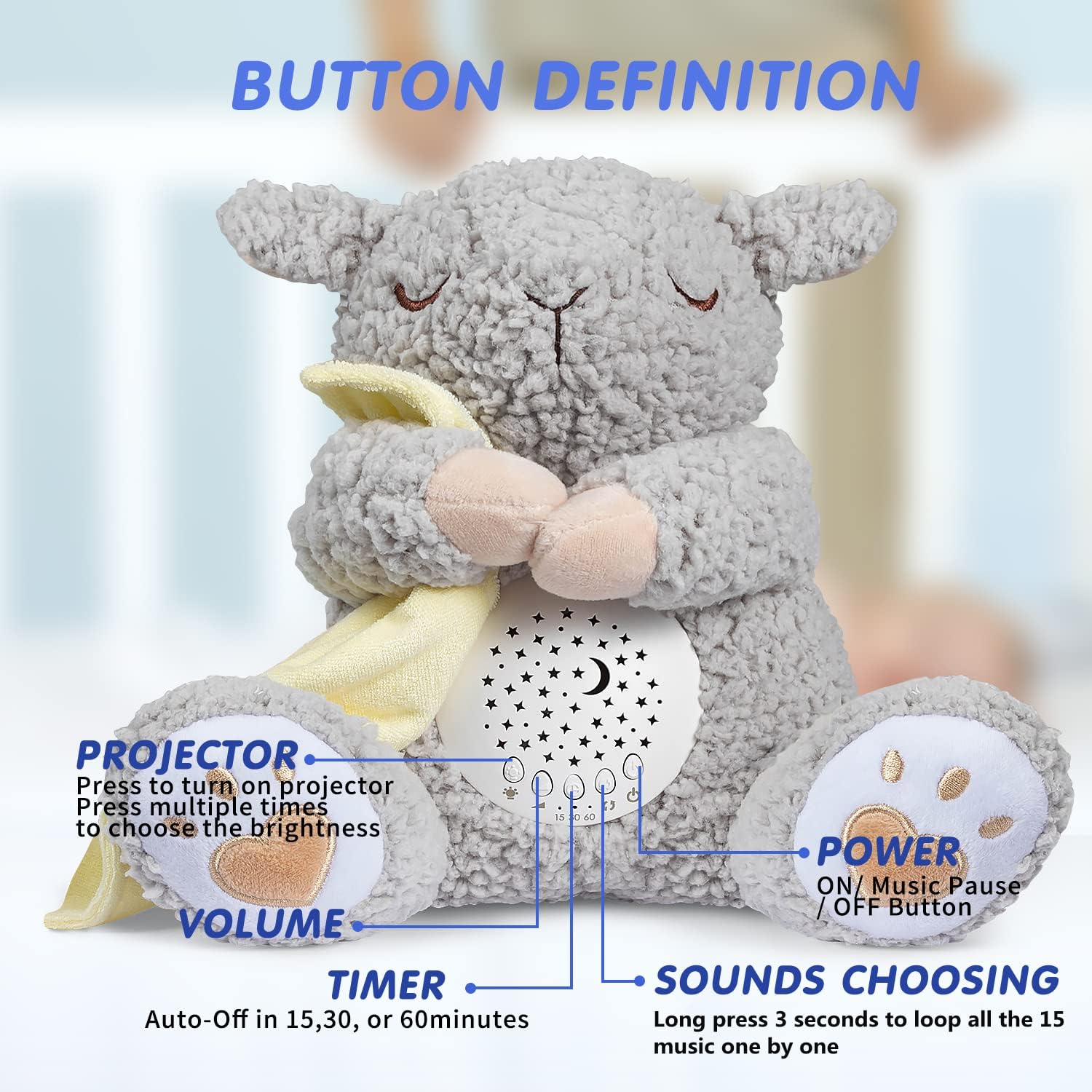
Image: Close-up of the BEREST A11 Baby Sleep Soother's control panel, showing buttons for projector, volume, timer, and sound selection, with labels indicating their functions.
5.1 ເປີດ/ປິດ
- ກົດ ປຸ່ມເປີດປິດ (usually the rightmost button) to turn the device on or off.
- A short press will toggle power.
5.2 Sound Functions
The soother offers 15 high-quality soothing sounds.
- ການເລືອກສຽງ: ກົດຄ້າງໄວ້ Sounds Choosing button (usually the second from the right) for 3 seconds to loop through the 15 available sounds one by one. These include 11 lullabies, 2 white noise sounds, and a mother's heartbeat sound.
- ການຄວບຄຸມລະດັບສຽງ: ໃຊ້ ປຸ່ມລະດັບສຽງ (usually the two leftmost buttons, marked with '+' and '-') to adjust the sound level.

Image: The BEREST A11 Baby Sleep Soother with icons representing different sound options like womb's heartbeat, shushing sound, white noise, lullabies, and natural bird song, next to a sleeping baby.
5.3 Light Projection
The soother features a colorful moon and starry night light display projector.
- ການເປີດໃຊ້ໂປເຈັກເຕີ: ກົດ ປຸ່ມໂປຣເຈັກເຕີ (usually the leftmost button) to turn on the light projection.
- ການຄວບຄຸມຄວາມສະຫວ່າງ: Press the Projector button multiple times to cycle through different brightness settings. The light slowly fades into various colors to capture attention.

Image: The BEREST A11 Baby Sleep Soother projecting stars and a moon onto a wall, with a child sleeping in a bed. Text indicates "STAR PROJECTOR WITH 3 ADJUSTABLE BRIGHTNESS SETTINGS".
5.4 ໂໝດແສງກາງຄືນ
For a softer glow, the comfort blanket can be used to cover the projector.
- ເປີດໃຊ້ແສງກາງຄືນ: ເປີດໂປເຈັກເຕີ.
- Soften Light: Gently cover the projector area on the sheep's tummy with the attached yellow comfort blanket. This diffuses the light, creating a soft night light effect.

Image: The BEREST A11 Baby Sleep Soother with its yellow blanket covering the projector, creating a soft night light, next to a sleeping child. Text indicates "NIGHT LIGHT Cover the blanket over sheep's tummy for a soft night light".
5.5 ເວລາປິດອັດຕະໂນມັດ
The soother includes an auto-off timer to conserve battery life.
- ຕັ້ງຄ່າໂມງຈັບເວລາ: ກົດ ປຸ່ມຈັບເວລາ (usually the third from the right) to select auto-off durations of 15, 30, or 60 minutes.
- ອຸປະກອນຈະປິດອັດຕະໂນມັດຫຼັງຈາກເວລາທີ່ເລືອກ.
Video: This video demonstrates the various sound and light functions of the BEREST A11 Sleep Soother, including sound selection, volume adjustment, and light projection. It also shows the night light feature and the auto-off timer options.
6. ບໍາລຸງຮັກສາ
6.1 ການທໍາຄວາມສະອາດ
The plush toy is hand and machine washable for hygiene.
- Before washing, carefully remove the electronic sound and light module from inside the plush toy.
- The plush toy can be hand washed or machine washed on a gentle cycle with mild detergent.
- Allow the plush toy to air dry completely before reinserting the module.
- Wipe the electronic module with a dry cloth if needed. Do not use liquid cleaners.

Image: The BEREST A11 Baby Sleep Soother plush toy being washed, with the electronic music box removed and shown separately. Text indicates "HAND/ MACHINE WASHABLE Give New & Clean Sheep Toy To Baby Everyday" and "Please take out of the music box before washing."
7. ການແກ້ໄຂບັນຫາ
| ບັນຫາ | ສາເຫດທີ່ເປັນໄປໄດ້ | ການແກ້ໄຂ |
|---|---|---|
| ບໍ່ມີສຽງ ຫຼືແສງສະຫວ່າງ | ຫມໍ້ໄຟແມ່ນຕາຍຫຼືໃສ່ບໍ່ຖືກຕ້ອງ. | ປ່ຽນແບດເຕີຣີດ້ວຍແບດເຕີຣີ້ AAA ໃໝ່, ຮັບປະກັນການຂົ້ວທີ່ຖືກຕ້ອງ. |
| Sound is too low or too loud | ການຕັ້ງຄ່າປະລິມານຕ້ອງການປັບ. | Use the '+' and '-' volume buttons to adjust to the desired level. |
| Light projection is dim or unclear | Brightness setting is low or projector lens is obstructed. | Press the Projector button to increase brightness. Ensure the lens is clean and unobstructed. |
| ອຸປະກອນປິດໂດຍບໍ່ຄາດຄິດ | ເປີດໃຊ້ໂມງຈັບເວລາປິດອັດຕະໂນມັດ. | Check the timer setting. If continuous play is desired, ensure the timer is set to 'off' or the longest duration. |
8. ຂໍ້ມູນຈໍາເພາະ
| ຄຸນສົມບັດ | ລາຍລະອຽດ |
|---|---|
| ຂະໜາດສິນຄ້າ | 3.5 x 5.9 x 9.5 ນິ້ວ |
| ນ້ໍາຫນັກລາຍການ | 0.52 ປອນ (8.32 ອອນສ໌) |
| ໝາຍເລກຕົວແບບ | A11 |
| ອາຍຸທີ່ແນະນໍາ | 0 ເດືອນຂຶ້ນໄປ |
| ແຫຼ່ງພະລັງງານ | ສາກແບັດເຕີລີ່ (ຕ້ອງໃຊ້ແບັດ AAA 3 ອັນ) |
| ວັດສະດຸ | ຜ້າອ່ອນ |
| ຜູ້ຜະລິດ | SZ-AKTE |
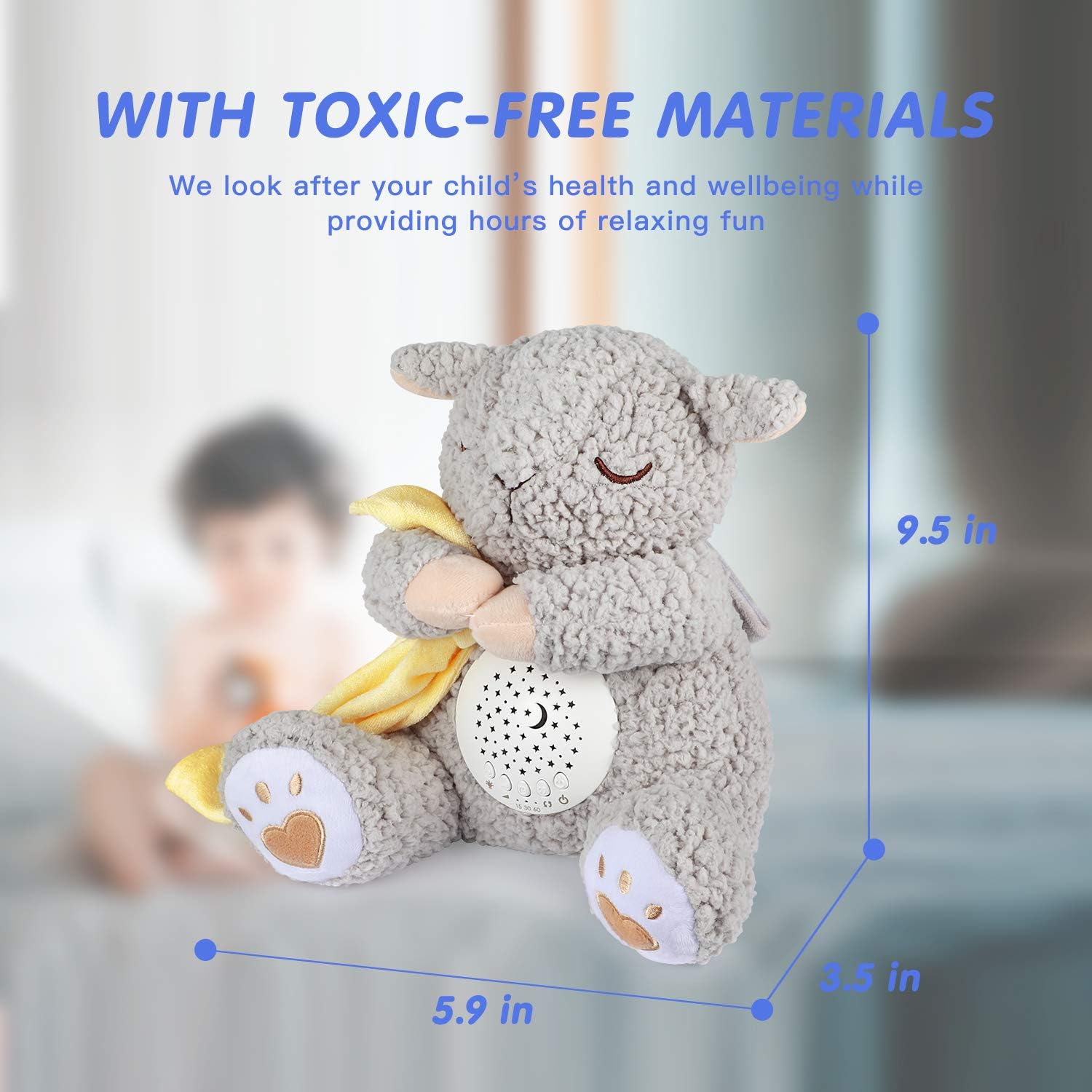
Image: The BEREST A11 Baby Sleep Soother with dimensions labeled: 9.5 inches height, 5.9 inches width, 3.5 inches depth. Text indicates "WITH TOXIC-FREE MATERIALS We look after your child's health and wellbeing while providing hours of relaxing fun".
9. ການຮັບປະກັນແລະການສະຫນັບສະຫນູນ
For warranty information or customer support, please refer to the product packaging or contact BEREST customer service directly. Keep your purchase receipt for any warranty claims.
ວິດີໂອ: ວິດີໂອນີ້ສະຫນອງໃຫ້ຫຼາຍກວ່າview of the BEREST Dreamy Sheep, highlighting its features such as sound options, light projection, and overall design, presented by the seller.


