1. ຜະລິດຕະພັນເກີນview
The XPR3SS 40m Laser Distance Meter is a compact and portable digital measuring device designed for quick and convenient measurement of lengths, surface areas, and volumes. It offers high accuracy and a wide range of applications for both professional and DIY use.
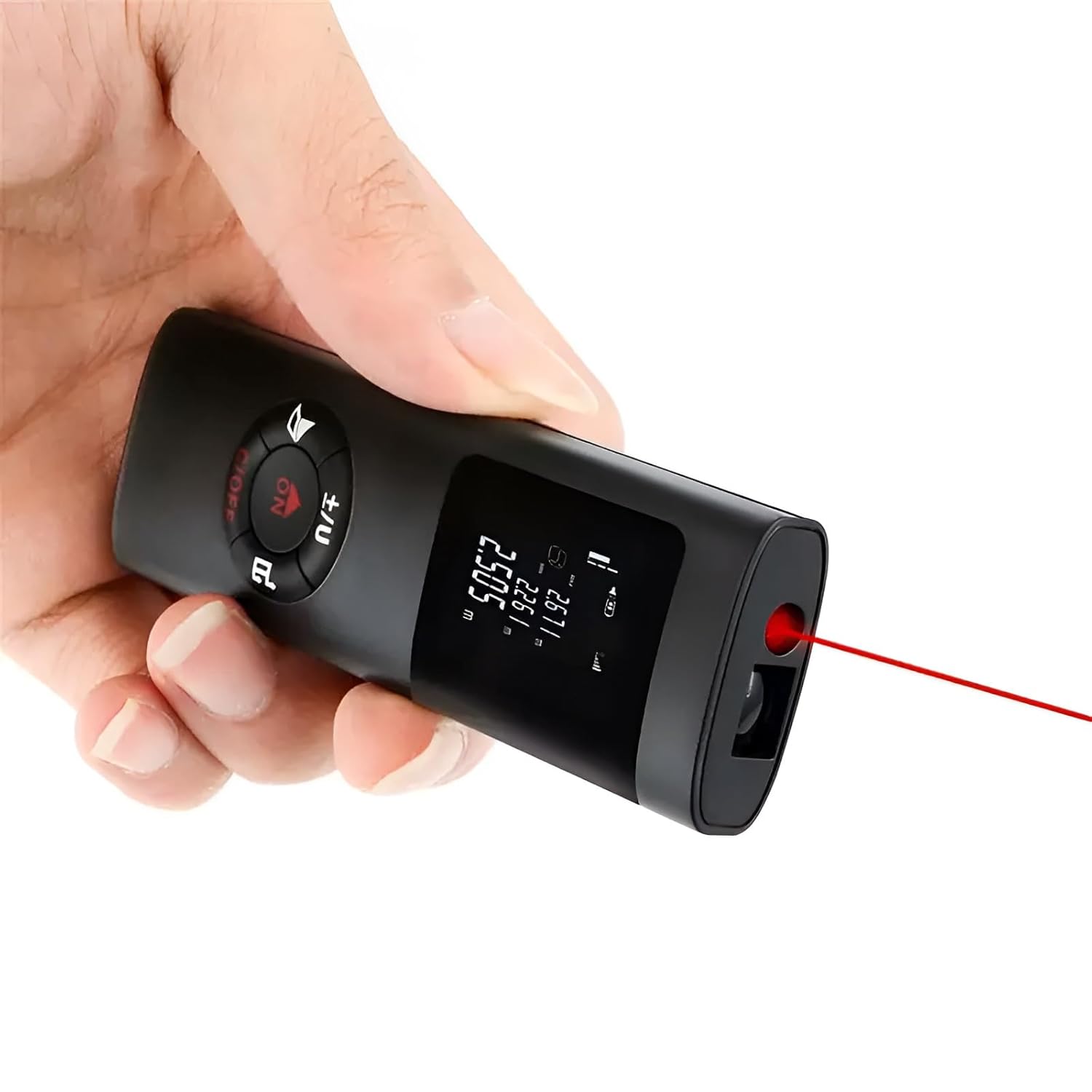
Figure 1: XPR3SS 40m Laser Distance Meter in use.
ຄຸນນະສົມບັດທີ່ສໍາຄັນ:
- Type-C ສາມາດສາກໄຟໄດ້: Equipped with a built-in lithium battery for convenient charging.
- Multifunctional: Capable of measuring distance, area, and volume.
- ຄວາມຖືກຕ້ອງສູງ: Provides measurements with an accuracy of up to ±1mm.
- ກະທັດຮັດ ແລະ ແບບພົກພາ: Ultra-mini design allows for easy carrying in a pocket.
- ການປ່ຽນຫົວ ໜ່ວຍ: Easily switch between meters (m), inches (in), and feet (ft).
- ການອອກແບບທົນທານ: Reinforced shell with IP54 dustproof and waterproof rating.

ຮູບທີ 2: ຂະໜາດຜະລິດຕະພັນ.

Figure 3: Easy to Carry Design.
2. ການເລີ່ມຕົ້ນ
2.1 ສິ່ງທີ່ຢູ່ໃນກ່ອງ
- XPR3SS Laser Distance Meter Device
- ຄູ່ມືຜູ້ໃຊ້ (ເອກະສານນີ້)
- ບັດຮັບປະກັນ
2.2 ການສາກອຸປະກອນ
The device comes with a built-in 200mAh rechargeable lithium battery. Before first use, or when the battery indicator shows low power, connect the device to a Type-C USB charger. A full charge provides power for up to 3500 measurements. The battery is integrated and cannot be replaced by the user.
2.3 ການເປີດ/ປິດ
ເພື່ອເປີດອຸປະກອນ, ໃຫ້ກົດປຸ່ມ ON ປຸ່ມ. ເພື່ອປິດເຄື່ອງ, ໃຫ້ກົດຄ້າງໄວ້ ຄ/ປິດ ປຸ່ມ.
3. ຄໍາແນະນໍາການດໍາເນີນງານ
The XPR3SS Laser Distance Meter features a simple interface with intuitive buttons for various measurement modes.

Figure 4: Device Functions and Controls.
3.1 Basic Straight Line Measurement
For a single length or height measurement:
- ໃຫ້ແນ່ໃຈວ່າອຸປະກອນເປີດຢູ່.
- ຊີ້ເລເຊີໄປທີ່ໜ້າຜິວເປົ້າໝາຍ.
- ກົດ ON button (which also functions as the measure button) to take a measurement. The result will be displayed on the screen.

Figure 5: Straight Line Measurement.
3.2 ການວັດແທກພື້ນທີ່
To calculate the area of a surface:
- Press the appropriate key (refer to Figure 4 for button layout) to select the Area measurement mode. An icon indicating length and width will flash.
- Measure the length of the area.
- Measure the width of the area.
- ອຸປະກອນຈະຄິດໄລ່ອັດຕະໂນມັດແລະສະແດງພື້ນທີ່.
Figure 6: Area Measurement.
3.3 ການວັດແທກປະລິມານ
ເພື່ອຄິດໄລ່ປະລິມານຂອງຊ່ອງ:
- Press the appropriate key (refer to Figure 4) twice to select the Volume measurement mode. An icon indicating length, width, and height will flash.
- Measure the length of the space.
- Measure the width of the space.
- Measure the height of the space.
- ອຸປະກອນຈະຄິດໄລ່ ແລະ ສະແດງລະດັບສຽງໂດຍອັດຕະໂນມັດ.

Figure 7: Volume Measurement.
3.4 ການວັດແທກແບບປີທາໂກຣຽນ
This mode allows for indirect measurement of distances that cannot be directly measured, using the Pythagorean theorem.
- Press the appropriate key (refer to Figure 4) to select the Pythagorean measurement mode (e.g., One Pythagorean or Second Pythagorean).
- Follow the on-screen prompts or diagram to measure the required sides (e.g., hypotenuse and one leg).
- ອຸປະກອນຈະຄິດໄລ່ດ້ານທີ່ບໍ່ຮູ້ຈັກ.
ໝາຍເຫດ: For accurate results, ensure the device is held steady and measurements are taken precisely according to the diagram for the chosen Pythagorean mode.

Figure 8: Pythagorean Measurement Exampເລ.
3.5 ການແປງຫນ່ວຍ
To switch between measurement units (meters, inches, feet), press the ±/U button. The current unit will be displayed on the screen.
4. ບໍາລຸງຮັກສາ
4.1 ການທໍາຄວາມສະອາດ
The device has an IP54 rating, making it dust and splash-proof. To clean the device, wipe it with a soft, damp cloth. Do not use harsh chemicals or abrasive cleaners. Ensure the laser lens and display are kept clean for optimal performance.

Figure 9: Dust and Splash-Proof Design.
4.2 ການເກັບຮັກສາ
Store the device in a cool, dry place away from direct sunlight and extreme temperatures. If storing for an extended period, ensure the battery is partially charged to prolong its lifespan.
5. ການແກ້ໄຂບັນຫາ
If you encounter issues with your XPR3SS Laser Distance Meter, please refer to the following common problems and solutions:
| ບັນຫາ | ສາເຫດ / ການແກ້ໄຂທີ່ເປັນໄປໄດ້ |
|---|---|
| ອຸປະກອນບໍ່ເປີດ. | Battery is depleted. Charge the device using a Type-C USB cable. |
| ການວັດແທກບໍ່ຖືກຕ້ອງ. | Ensure the laser is pointed directly at the target. Clean the laser lens. Perform self-calibration if available (refer to Figure 4 for 'Self-calibration function'). |
| Cannot measure in bright sunlight or outdoors. | The laser visibility and display readability can be significantly reduced in strong daylight. This is a common limitation for laser distance meters in this class. The device is primarily designed for indoor use or shaded outdoor areas. |
| ຈໍສະແດງຜົນແມ່ນມືດມົວ ຫຼືອ່ານຍາກ. | Check battery level. In very bright environments, the display brightness may be insufficient. |
6. ຂໍ້ມູນຈໍາເພາະ
| ຄຸນລັກສະນະ | ລາຍລະອຽດ |
|---|---|
| ຍີ່ຫໍ້ | XPR3SS |
| ໝາຍເລກຕົວແບບ | 0O-LV3Q-MO77 |
| ໄລຍະການວັດແທກ | 40 ແມັດ (131 ຟຸດ) |
| ຄວາມຖືກຕ້ອງ | ±1ມມ |
| ປະເພດຫມໍ້ໄຟ | Rechargeable Lithium Polymer (200mAh) |
| ພອດສາກໄຟ | ປະເພດ -C USB |
| ການຈັດອັນດັບ IP | IP54 (Dustproof and Splashproof) |
| ວັດສະດຸ | Acrylonitrile Butadiene ສະໄຕຣີນ |
| ສີ | ດຳ |
| ນ້ໍາຫນັກລາຍການ | 100 ກຣາມ |
| ຂະໜາດສິນຄ້າ | 10.1L x 3W x 1.8H ຊັງຕີແມັດ |
| ປະເທດຕົ້ນກໍາເນີດ | ຈີນ |
7. ການຮັບປະກັນແລະການສະຫນັບສະຫນູນ
7.1 ຂໍ້ມູນການຮັບປະກັນ
This XPR3SS Laser Distance Meter comes with a ຮັບປະກັນ 6 ເດືອນ ນັບຈາກວັນທີ່ຊື້. ກະລຸນາເກັບໃບຮັບເງິນຊື້ ແລະ ບັດຮັບປະກັນຂອງທ່ານໄວ້ ສຳລັບການຮຽກຮ້ອງການຮັບປະກັນໃດໆ. ການຮັບປະກັນກວມເອົາຂໍ້ບົກພ່ອງຈາກການຜະລິດ ແຕ່ບໍ່ກວມເອົາຄວາມເສຍຫາຍທີ່ເກີດຈາກການໃຊ້ຜິດ, ອຸບັດຕິເຫດ ຫຼື ການສ້ອມແປງທີ່ບໍ່ໄດ້ຮັບອະນຸຍາດ.
7.2 ສະຫນັບສະຫນູນລູກຄ້າ
For any questions, technical assistance, or warranty claims, please contact the seller or refer to the customer support channels provided by your retailer. Ensure you have your product model number and purchase details ready when contacting support.