Midiplus ED 9 Pro MKII

Midiplus ED-9 Pro MKII Electronic Drum Kit

ຄູ່ມືການໃຊ້

1. ບົດແນະນຳ

Thank you for choosing the Midiplus ED-9 Pro MKII Electronic Drum Kit. This advanced electronic drum set is designed to provide a realistic and versatile drumming experience for musicians of all levels. Featuring a new Z12K drum sound module, the ED-9 Pro MKII includes 20 group preset drum kits and allows for 10 user-editable groups, utilizing true multi-sampled drum lossless studio recordings. It also incorporates a built-in metronome, 10 demo songs, and an easy-to-use fast recording function. The kit is expandable with an additional second Crash cymbal (Crash2) and a fourth Tom drum (Tom4). This manual provides essential information for setup, operation, maintenance, and troubleshooting to ensure you get the most out of your ED-9 Pro MKII.

2. ຂໍ້ຄວນລະວັງຄວາມປອດໄພ

Please read and understand all safety instructions before operating the Midiplus ED-9 Pro MKII. Retain this manual for future reference.

3. ເນື້ອໃນຊຸດ

Carefully unpack all items and ensure all components are present before beginning assembly.

Midiplus ED-9 Pro MKII Electronic Drum Kit components laid out

Image: All components of the Midiplus ED-9 Pro MKII Electronic Drum Kit, including the drum module, mesh head pads, rubber cymbals, pedals, and the drum rack frame.

4. ຄູ່ມືການຕິດຕັ້ງ

Follow these steps to assemble your Midiplus ED-9 Pro MKII electronic drum kit. It is recommended to have ample ພື້ນທີ່ສໍາລັບການປະກອບ.

  1. ປະກອບຊັ້ນວາງກອງ:

    Unfold the main rack frame components. Connect the horizontal and vertical bars using the provided clamps and tighten them securely. Ensure the frame is stable and level. Adjust the height and angle of the legs as needed.

  2. Attach Tom Holders and Cymbal Arms:

    Insert the tom holders into the designated clamps on the rack. Position them according to your preferred setup. Similarly, attach the cymbal arms to the rack, ensuring they are securely fastened and can support the weight of the cymbals.

  3. ຕິດຕັ້ງແຜ່ນກອງ:

    Attach the 10" Snare pad to its dedicated holder. Mount the four 8" Tom pads onto their respective holders. Adjust the angle and height of each pad for comfortable playing. Ensure all pads are securely tightened to prevent movement during play.

  4. Mount the Cymbal Pads:

    Place the 12" Hi-Hat, two 12" Crash, and one 12" Ride cymbal pads onto their respective cymbal arms. Secure them with the provided wing nuts or clamps. Adjust the angle and height of each cymbal for optimal playability.

  5. Set Up Pedals:

    Position the Kick Pad in front of the rack. Attach the Kick Pedal to the Kick Pad. Place the Hi-Hat Control Pedal on the floor in a comfortable position relative to the Hi-Hat cymbal.

  6. ເຊື່ອມຕໍ່ໂມດູນ Drum:

    Mount the Z12K Drum Sound Module to the designated module holder on the rack. Ensure it is firmly attached.

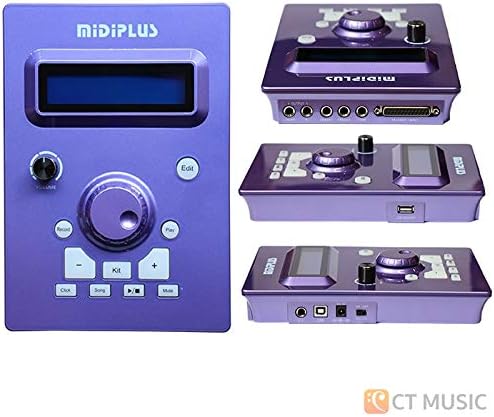
    Midiplus Z12K Drum Sound Module

    Image: The Midiplus Z12K Drum Sound Module, showing its front panel controls and various input/output ports.

  7. ເຊື່ອມຕໍ່ສາຍ:

    Use the multi-cable snake to connect each drum pad and cymbal pad to the corresponding input on the Z12K Drum Sound Module. The inputs are typically labeled (e.g., SN for Snare, T1 for Tom1, HH for Hi-Hat, CR1 for Crash1, RD for Ride, etc.). Connect the Hi-Hat Control Pedal and Kick Pad to their respective inputs. Ensure all connections are secure.

  8. ການເຊື່ອມຕໍ່ພະລັງງານ:

    Connect the power adapter to the DC IN port on the drum module, then plug the adapter into a suitable power outlet. Do not power on the module until all other connections are made.

  9. ສຽງອອກ:

    Connect the AUDIO OUT (L/MONO, R) jacks of the drum module to your amplifier, headphones, or audio interface using appropriate cables (not included).

5. ອົງປະກອບຫຼາຍກວ່າview

5.1 Z12K Drum Sound Module

The heart of your ED-9 Pro MKII, the Z12K module provides all the drum sounds, effects, and control functions.

  • ຈໍສະແດງຜົນ: Shows current kit, song, tempo, and menu options.
  • ປຸ່ມລະດັບສຽງ: ປັບປະລິມານຜົນຜະລິດໂດຍລວມ.
  • ປຸ່ມນຳທາງ: Used to scroll through menus and adjust parameters (e.g., Up/Down, Left/Right).
  • ປຸ່ມ Kit: Selects drum kits.
  • ປຸ່ມເພງ: Selects demo songs.
  • ປຸ່ມ Metronome: Activates/deactivates the metronome.
  • ປຸ່ມບັນທຶກ: ເລີ່ມຕົ້ນ ແລະຢຸດການບັນທຶກ.
  • ປຸ່ມແກ້ໄຂ: Enters kit editing mode.
  • ພອດ USB: ສໍາ​ລັບ​ການ​ເຊື່ອມ​ຕໍ່​ກັບ​ຄອມ​ພິວ​ເຕີ​ສໍາ​ລັບ​ການ​ໂອນ​ຂໍ້​ມູນ MIDI​.
  • ການປ້ອນຂໍ້ມູນ Trigger: Connects to drum and cymbal pads.
  • ສຽງອອກ: Connects to headphones, amplifier, ຫຼືການໂຕ້ຕອບສຽງ.

5.2 ແຜ່ນກອງ ແລະ ແສມບອລ

  • Mesh Head Pads (Snare, Toms): These provide a realistic rebound and feel, similar to acoustic drums. The snare and tom pads are dual-trigger, meaning they can produce different sounds from the head and rim.
  • Rubber Cymbals (Hi-Hat, Crash, Ride): Durable rubber construction for quiet practice and consistent triggering.
    • Hi-Hat: Dual-trigger with choke function. Works in conjunction with the Hi-Hat control pedal for open, closed, and foot splash sounds.
    • ການຂັດຂ້ອງ: Dual-trigger with choke function. Allows for a natural cymbal swell and quick muting.
    • ຂີ່: 3-trigger (bow, bell, edge) with choke function, offering versatile sound options.

6. ການດໍາເນີນງານພື້ນຖານ

6.1 ເປີດ ແລະ ປິດ

  • ເປີດ: Ensure all connections are secure. Press the POWER button on the module. The display will light up.
  • ປິດພະລັງງານ: Press and hold the POWER button until the display turns off.

6.2 ການເລືອກຊຸດກອງ

The ED-9 Pro MKII comes with 20 preset drum kits and allows for 10 user-editable kits.

  1. ກົດ ຊຸດ ປຸ່ມ.
  2. Use the navigation buttons (e.g., Up/Down arrows) to scroll through the available drum kits.
  3. The selected kit will be active immediately.

6.3 ການນໍາໃຊ້ Metronome

The built-in metronome is essential for practicing with accurate timing.

  • ກົດ ເມໂທຣໂນມ ປຸ່ມເພື່ອເປີດ / ປິດມັນ.
  • While the metronome is active, use the navigation buttons to adjust the tempo (BPM).

6.4 ການຫຼິ້ນເພງສາທິດ

The module includes 10 demo songs for practice and enjoyment.

  1. ກົດ ເພງ ປຸ່ມ.
  2. Use the navigation buttons to select a demo song.
  3. ກົດ ຫຼິ້ນ button to start the song. Press again to stop.

6.5 ການບັນທຶກຜົນງານຂອງທ່ານ

The ED-9 Pro MKII allows for easy recording of your drumming.

  1. ກົດ ບັນທຶກ button once to arm recording (the record indicator will flash).
  2. Start playing. Recording will begin automatically when you hit a pad.
  3. ກົດ ບັນທຶກ ປຸ່ມອີກເທື່ອ ໜຶ່ງ ເພື່ອຢຸດການບັນທຶກ.
  4. To play back your recording, press the ຫຼິ້ນ ປຸ່ມ.

6.6 Editing Drum Kits

You can customize and save your own drum kits. Refer to the full Midiplus ED-9 Pro MKII advanced manual for detailed editing instructions.

  1. Select a user kit (1-10) or a preset kit you wish to modify.
  2. ກົດ ແກ້ໄຂ ປຸ່ມ.
  3. Use the navigation buttons to select the parameter you wish to edit (e.g., instrument sound, volume, pitch, reverb for a specific pad).
  4. Adjust the value using the appropriate buttons.
  5. To save your changes, follow the on-screen prompts or refer to the module's specific save procedure (usually involves pressing and holding a button or navigating to a save option).

7. ການບໍາລຸງຮັກສາແລະການດູແລ

Proper care will extend the life and performance of your electronic drum kit.

8. ການແກ້ໄຂບັນຫາ

If you encounter issues with your ED-9 Pro MKII, refer to the following common problems and solutions.

ບັນຫາສາເຫດທີ່ເປັນໄປໄດ້ການແກ້ໄຂ
ບໍ່ມີສຽງຈາກໂມດູນ.
  • ໄຟບໍ່ໄດ້ເຊື່ອມຕໍ່ ຫຼືເປີດ.
  • ປະລິມານຕໍ່າເກີນໄປ.
  • ສາຍ​ອອກ​ໄດ້​ຕັດ​ການ​ເຊື່ອມ​ຕໍ່​ຫຼື​ຜິດ​ພາດ​.
  • Headphones/amplifier not connected or faulty.
  • Ensure power adapter is connected and module is powered on.
  • Increase the module's master volume.
  • Check all audio output cables and connections.
  • Verify headphones/amplifier ເຮັດວຽກຢ່າງຖືກຕ້ອງ.
Specific pad/cymbal not triggering sound.
  • Pad cable loose or disconnected.
  • ສາຍເຄເບີ້ນຂັດຂ້ອງ.
  • Pad sensitivity too low.
  • Incorrect pad connected to input.
  • Check the cable connection from the pad to the module.
  • Try swapping the cable with a known working one.
  • Adjust the pad's sensitivity setting in the module's edit menu.
  • Ensure the correct pad is plugged into the correct input jack on the module.
Hi-Hat pedal not working correctly.
  • Pedal cable loose or disconnected.
  • Pedal calibration issue.
  • Check the cable connection from the pedal to the module.
  • Refer to the module's manual for Hi-Hat pedal calibration instructions.
Unwanted sounds or double triggering.
  • Pad sensitivity too high.
  • Crosstalk between pads.
  • Decrease the sensitivity of the affected pad in the module's settings.
  • Adjust crosstalk settings in the module (if available) or reposition pads slightly.

9. ຂໍ້ກໍານົດດ້ານວິຊາການ

ຄຸນສົມບັດລາຍລະອຽດ
ຊື່ຕົວແບບED 9 Pro MKII
ໂມດູນສຽງກອງZ12K
Snare Pad10" Dual-trigger Mesh Head
ທອມ ແພດ8" Dual-trigger Mesh Head (x4)
Hi-Hat Cymbal12" Rubber Dual-trigger with Choke
ແສ່ງຊົນ12" Rubber Dual-trigger with Choke (x2)
ຂີ່ Cymbal12" Rubber 3-trigger with Choke
Preset Drum Kits20 ກຸ່ມ
User Drum Kits10 Groups (editable)
ເມໂທຣໂນມໃນຕົວ
ເພງສາທິດ10 ເພງ
ຟັງຊັນການບັນທຶກEasy listening learning fast recording
ການເຊື່ອມຕໍ່USB (for MIDI), Audio Out (L/MONO, R), Headphone Out, Aux In
ການຂະຫຍາຍScalable for second Crash cymbal (Crash2) and fourth Tom drum (Tom4)
ນ້ໍາຫນັກລາຍການ71.8 ປອນ (ປະມານ 32.5 ກິ​ໂລ​)
ຂະໜາດແພັກເກັດ37 x 28 x 15 ນິ້ວ (ປະມານ 94 x 71 x 38 ຊມ)
ປະເພດວັດສະດຸRubber (for cymbals and some pad components)
ສີBlack, White, Silver (frame and module accents)

10. ການຮັບປະກັນແລະການສະຫນັບສະຫນູນ

Midiplus products are manufactured to high quality standards. For specific warranty information, please refer to the warranty card included with your product or visit the official Midiplus webເວັບໄຊ.

If you require technical assistance or have questions not covered in this manual, please contact Midiplus customer support through their official channels. Keep your purchase receipt as proof of purchase for warranty claims.

ຊັບພະຍາກອນອອນໄລນ໌: For the latest drivers, firmware updates, and additional support documentation, please visit the Midiplus official webເວັບໄຊ.
ເອກະສານທີ່ກ່ຽວຂ້ອງ - ED 9 Pro MKII

ກ່ອນview MIDIPLUS Routist RS: ຄູ່ມືເລີ່ມຕົ້ນດ່ວນສໍາລັບການໂຕ້ຕອບສຽງ USB
ເລີ່ມຕົ້ນຢ່າງວ່ອງໄວດ້ວຍ MIDIPLUS Routist RS, ການໂຕ້ຕອບສຽງ USB 2-in/2-out. ຮຽນຮູ້ກ່ຽວກັບຄຸນສົມບັດ, ຮາດແວ, ການເຊື່ອມຕໍ່ ແລະຂໍ້ມູນສະເພາະຂອງມັນ.
ກ່ອນview BAND ຄູ່​ມື​ການ​ນໍາ​ໃຊ້ Keytar Multi-function | ກາງ
ຄູ່​ມື​ການ​ນໍາ​ໃຊ້​ທີ່​ສົມ​ບູນ​ແບບ​ສໍາ​ລັບ​ການ keytar multi-function midiplus BAND​, ກວມ​ເອົາ​ການ​ຕັ້ງ​ຄ່າ​, ຄຸນ​ນະ​ສົມ​ບັດ​, ການ​ດໍາ​ເນີນ​ງານ​, ລາຍ​ລະ​ອຽດ​ແຜງ​, ແລະ​ການ​ເຊື່ອມ​ຕໍ່ Bluetooth MIDI​. ຮຽນຮູ້ວິທີໃຊ້ແປ້ນພິມ 25 ປຸ່ມ, ແຖບສໍາຜັດ chord, ແຜ່ນ strumming, ແລະແຜ່ນ drum.
ກ່ອນview ຄູ່ມືຜູ້ໃຊ້ Midiplus Folding Piano 49 Series
ຄູ່​ມື​ການ​ນໍາ​ໃຊ້​ສໍາ​ລັບ Midiplus Folding Piano 49 ແລະ 49 Air series, ລາຍ​ລະ​ອຽດ​ລັກ​ສະ​ນະ​ຂອງ​ຕົນ​, ການ​ຕັ້ງ​ຄ່າ​, ການ​ດໍາ​ເນີນ​ງານ​, ແລະ​ສະ​ເພາະ​ຂອງ​ຕົນ​.
ກ່ອນview ຄູ່ມືຜູ້ໃຊ້ເປຍໂນພັບ MIDIPLUS 49
ຄູ່ມືຜູ້ໃຊ້ທີ່ຄົບຖ້ວນສຳລັບເປຍໂນພັບ MIDIPLUS 49 ແລະ 49 Air, ເຊິ່ງລະບຸລາຍລະອຽດກ່ຽວກັບການຕັ້ງຄ່າ, ການໃຊ້ງານ, ຄຸນສົມບັດຕ່າງໆ, ສະເປັກ ແລະ ຂໍ້ມູນການຮັບປະກັນ.
ກ່ອນview MIDIPLUS BK492 ຄູ່ມືເຈົ້າຂອງ MIDI Controller
ຄູ່ມືເຈົ້າຂອງທີ່ສົມບູນແບບສໍາລັບ MIDIPLUS BK492 MIDI Controller, ລາຍລະອຽດລັກສະນະ, ການຕິດຕັ້ງ, ການດໍາເນີນງານ, ແລະຂໍ້ກໍາຫນົດສໍາລັບນັກດົນຕີແລະຜູ້ຜະລິດ.
ກ່ອນview ກາງ AMP·73 ຄູ່ມືເລີ່ມຕົ້ນດ່ວນ ແລະ ລາຍລະອຽດດ້ານເຕັກນິກ
ຄູ່ມືເລີ່ມຕົ້ນດ່ວນ ແລະ ລາຍລະອຽດດ້ານເຕັກນິກສຳລັບ MIDIPLUS AMP· 73 ໄມໂຄຣໂຟນມືອາຊີບກ່ອນamp, ລາຍລະອຽດຄຸນສົມບັດ, ຮາດແວ, ການເຊື່ອມຕໍ່ ແລະ ການແກ້ໄຂບັນຫາ.