ແນະນຳ
Thank you for choosing the Tracer Roadster 4 in 1 Steering Wheel. This manual provides detailed instructions for setting up, operating, maintaining, and troubleshooting your new racing wheel. Please read this manual thoroughly before use to ensure optimal performance and longevity of your device.
The Tracer Roadster 4 in 1 Steering Wheel is designed for an immersive gaming experience, compatible with various platforms including PlayStation 4 and Windows PC. It features a responsive steering wheel, integrated shifter, and a pedal set for realistic control.
ເນື້ອໃນຊຸດ
- Tracer Roadster 4 in 1 Steering Wheel
- ຊຸດ Pedal
- ຄູ່ມືຜູ້ໃຊ້ (ເອກະສານນີ້)
ຄູ່ມືການຕິດຕັ້ງ
ການເຊື່ອມຕໍ່ກັບ PlayStation 4 (PS4)
- Connect the steering wheel's USB cable to an available USB port on your PS4 console.
- Power on your PS4 console. The red LED on the steering wheel will illuminate, indicating power.
- Connect the steering wheel to your PS4 controller using a microUSB cable (not included). This step is crucial for authentication.
- ກົດ ຫນ້າທໍາອິດ button on the steering wheel. The green LED will illuminate, indicating successful connection and readiness for use.
ການເຊື່ອມຕໍ່ກັບ PC (Windows)
- Connect the steering wheel's USB cable to an available USB port on your Windows PC.
- The system should automatically detect and install the necessary drivers. If not, please refer to the manufacturer's webເວັບໄຊທ໌ສໍາລັບການດາວໂຫຼດໄດເວີ.
- Once drivers are installed, the steering wheel will be ready for use with compatible PC racing games.

Figure 1: The Tracer Roadster 4 in 1 Steering Wheel, including the main wheel unit, integrated shifter, and separate pedal set. This image shows the complete setup ready for connection.
ຄໍາແນະນໍາການດໍາເນີນງານ
ການຄວບຄຸມລໍ້ການຊີ້ນໍາ
The steering wheel features a full range of motion for precise control in racing games. It includes various buttons and a D-pad for in-game navigation and actions, mimicking a standard game controller layout.
- Directional Pad (D-Pad): For menu navigation and specific in-game controls.
- Action Buttons (X, Circle, Square, Triangle / A, B, X, Y): ປຸ່ມປະຕິບັດການເກມມາດຕະຖານ.
- L1/R1, L2/R2 Buttons: Shoulder buttons, often used for shifting gears or other actions.
- ປຸ່ມຫນ້າທໍາອິດ: PS4 system menu access.
- ປຸ່ມໂປຣແກມ: For programming specific functions (refer to game-specific instructions).
- ແຜ່ນສໍາຜັດ: Integrated touchpad for additional control options, especially on PS4.
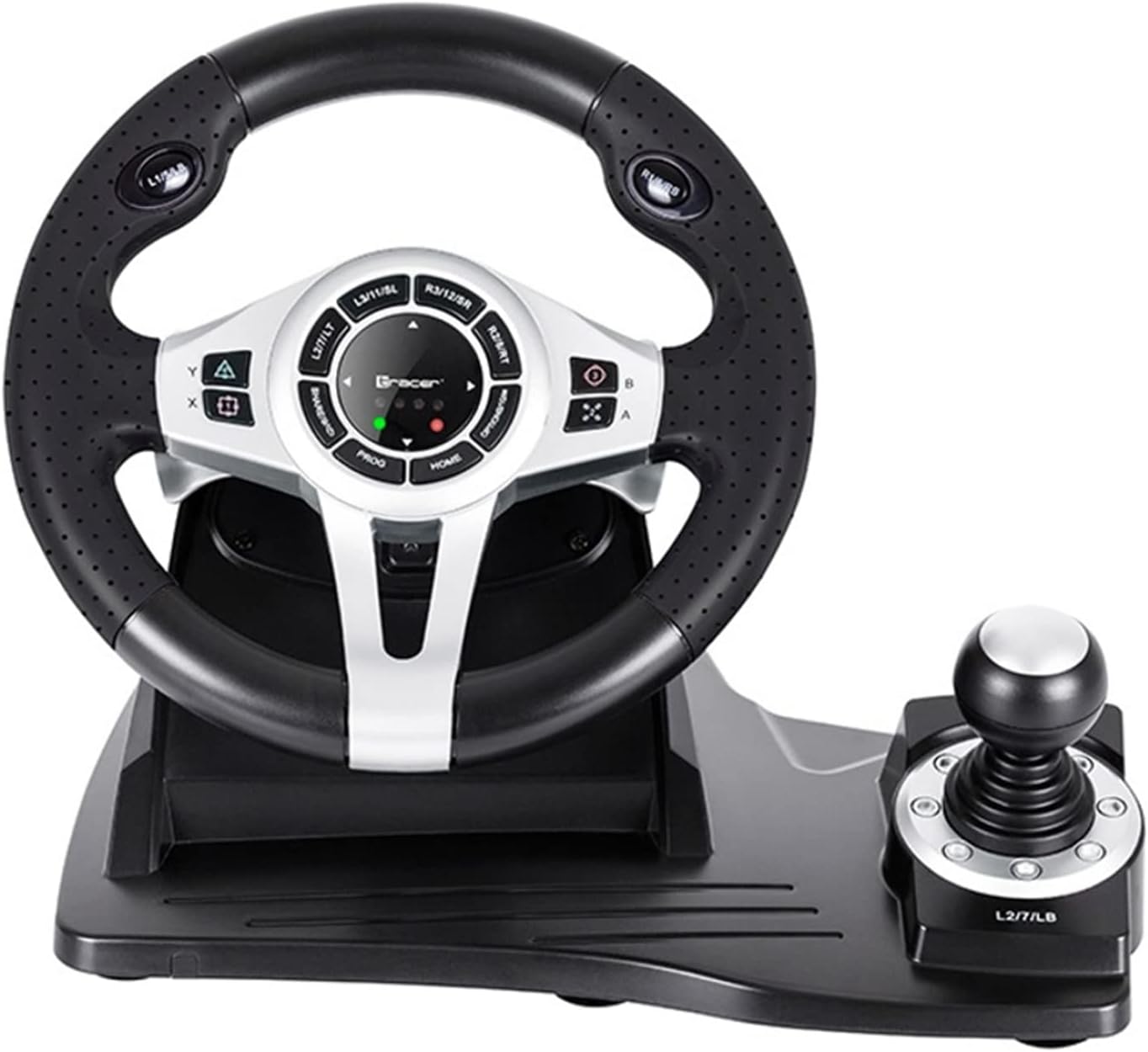
ຮູບທີ 2: A ລາຍລະອຽດ view of the central control panel on the steering wheel, showing the various buttons, D-pad, and indicator lights. The integrated shifter is visible to the right.
ຊຸດ Pedal
The separate pedal set includes an accelerator and brake pedal for realistic driving simulation. Ensure the pedal set is placed on a stable surface to prevent slipping during intense gameplay.

Figure 3: The standalone pedal unit, featuring both accelerator and brake pedals. The textured base provides grip to prevent movement during use.
ການບໍາລຸງຮັກສາແລະການດູແລ
- ທໍາຄວາມສະອາດ: Use a soft, dry cloth to clean the surface of the steering wheel and pedals. For stubborn dirt, a slightly damp ຜ້າສາມາດນໍາໃຊ້ໄດ້, ແຕ່ໃຫ້ແນ່ໃຈວ່າບໍ່ມີຄວາມຊຸ່ມຊື່ນເຂົ້າໄປໃນອົງປະກອບພາຍໃນ.
- ການເກັບຮັກສາ: ເມື່ອບໍ່ໄດ້ໃຊ້, ໃຫ້ເກັບຮັກສາອຸປະກອນໄວ້ໃນບ່ອນທີ່ເຢັນ, ແຫ້ງ, ຫ່າງຈາກແສງແດດໂດຍກົງ ແລະອຸນຫະພູມທີ່ຮຸນແຮງ.
- ຫຼີກລ້ຽງການຂອງແຫຼວ: ຢ່າປ່ອຍໃຫ້ອຸປະກອນຖືກນ້ຳ ຫຼືຂອງແຫຼວອື່ນໆ.
- ຈັດການດ້ວຍຄວາມລະມັດລະວັງ: ຫຼີກລ້ຽງການຫຼຸດລົງຫຼືການອຸປະກອນທີ່ມີຜົນກະທົບທີ່ເຂັ້ມແຂງ.
ການແກ້ໄຂບັນຫາ
| ບັນຫາ | ສາເຫດທີ່ເປັນໄປໄດ້ | ການແກ້ໄຂ |
|---|---|---|
| Steering wheel not recognized by PS4. | Incorrect connection or authentication issue. | Ensure the steering wheel's USB cable is securely connected to the PS4. Verify the microUSB cable connection between the steering wheel and the PS4 controller. Press the ຫນ້າທໍາອິດ ປຸ່ມຢູ່ໃນພວງມາໄລ. |
| No response from steering wheel on PC. | Drivers not installed or USB port issue. | Try a different USB port. Check Device Manager for driver status. Reinstall drivers if necessary from the manufacturer's webເວັບໄຊ. |
| ຕົວຊີ້ວັດ LED ບໍ່ສະຫວ່າງ. | No power or connection issue. | Ensure the USB cable is firmly connected to the console/PC. Check if the console/PC is powered on. |
| ກະເບື້ອງຍ່າງບໍ່ຕອບສະໜອງ. | Loose connection to the steering wheel. | Verify that the pedal unit's cable is securely plugged into the steering wheel base. |
ຂໍ້ມູນຈໍາເພາະ
| ຄຸນສົມບັດ | ລາຍລະອຽດ |
|---|---|
| ຍີ່ຫໍ້ | Tracer |
| ຊື່ຕົວແບບ | Roadster 4 in 1 |
| ໝາຍເລກຕົວແບບ | TRAJOY46524 |
| ເຕັກໂນໂລຊີການເຊື່ອມຕໍ່ | USB |
| ອຸປະກອນທີ່ເຂົ້າກັນໄດ້ | PlayStation 4, Windows PC |
| ປະເພດການຄວບຄຸມ | ພວງມາໄລ |
| ສີ | ດຳ |
| ຄຸນນະສົມບັດພິເສດ | ແຜ່ນສໍາຜັດ |
| ຈໍານວນປຸ່ມ | 8 (excluding D-pad and shifter controls) |
| ນ້ໍາຫນັກລາຍການ | 2 ກິໂລກຣາມ |
| ຂະໜາດສິນຄ້າ (L x W x H) | 2.8 x 24.6 x 16.5 cm |
ການຮັບປະກັນແລະການສະຫນັບສະຫນູນ
ສຳລັບຂໍ້ມູນການຮັບປະກັນ ແລະ ການຊ່ວຍເຫຼືອດ້ານເຕັກນິກ, ກະລຸນາອ້າງອີງເຖິງ Tracer ຢ່າງເປັນທາງການ webເວັບໄຊ ຫຼືຕິດຕໍ່ຮ້ານຂາຍຍ່ອຍຂອງທ່ານ. ຮັກສາຫຼັກຖານການຊື້ຂອງທ່ານສໍາລັບການຮຽກຮ້ອງການຮັບປະກັນໃດໆ.
ສໍາລັບການຊ່ວຍເຫຼືອເພີ່ມເຕີມ, ທ່ານສາມາດໄປຢ້ຽມຢາມໄດ້ ໜ້າຜະລິດຕະພັນໃນ Amazon.com.be.


