1. ບົດແນະນຳ
This manual provides detailed instructions for the installation, operation, and maintenance of the Carel PZGXS0J111 Refrigeration Cooler Control Temperature Controller. This device is designed for precise temperature management in refrigeration systems, display cabinets, and showcases. Please read this manual thoroughly before installation and operation to ensure safe and efficient use.

ຮູບ 1: ດ້ານຫນ້າ view of the Carel PZGXS0J111 controller, showing the digital display and control buttons.
2. ຂໍ້ມູນຄວາມປອດໄພ
Adherence to safety standards is crucial for the proper functioning and longevity of the device, as well as for user safety. This controller complies with relevant European standards.
- ສາຍເຊື່ອມຕໍ່: Ensure connection cables guarantee insulation up to 90°C.
- 12 Vac Versions: For 12 Vac versions, use Class II transformers. To comply with immunity standards, the transformer must be a specified CAREL model. Double insulation cannot be guaranteed between power supply and relay outputs for 12 Vac/dc versions; use only safety low voltage loads (up to 42 V effective rated value).
- ການເກັບກູ້ການຕິດຕັ້ງ: Maintain a space of at least 10 mm between the case and nearby conductive parts.
- Digital and Analog Input Connections: For connections less than 30 m away, adopt suitable measures for separating cables to ensure compliance with immunity standards.
- Output Cable Security: Secure the connection cables of the outputs to avoid contact with very low voltage ພາກສ່ວນ.

Figure 2: Excerpt from the safety standards document, detailing insulation, transformer, and installation clearance requirements.
3. ຂໍ້ກໍານົດດ້ານວິຊາການ
The Carel PZGXS0J111 is a robust electronic microprocessor controller designed for various refrigeration applications. Below are its key technical specifications:
| ຄຸນສົມບັດ | ຂໍ້ມູນຈໍາເພາະ |
|---|---|
| ການສະຫນອງພະລັງງານ | 115 Vac +10/-15% 50/60 Hz |
| ລະດັບພະລັງງານ | 3 VA |
| ວັດສະດຸປ້ອນ | NTC or PTC probes (1 or 3 inputs), Digital input as alternative to third probe |
| ຜົນໄດ້ຮັບ Relay | 2 HP relay: UL 12 A Res. 12 FLA 72 LRA - 240 Vac; 16 A relay: UL 8 A Res. 10 FLA 60 LRA - 240 Vac |
| ປະເພດຂອງ Probe | Std CAREL NTC 10 kΩ at 25°C, Std CAREL PTC 990 Ω at 25°C |
| ການເຊື່ອມຕໍ່ | Screw terminals for cables with cross-sect. from 0.5 mm² to 1.5 mm². Plug-in terminals for screw blocks or with crimped contact (cable cross-sect. up to 2.5 mm²). Rated maximum current per terminal 12 A. |
| ສະພາແຫ່ງ | Terminal: using screws from the front panel or with rear brackets. Interface: with mounting, 4 screws, spacing 101x151 mm. |
| ຈໍສະແດງຜົນ | 3 digit LED display with sign (-999 to 999) and decimal point, six status LEDs |
| ເງື່ອນໄຂການດໍາເນີນງານ | -10T50 °C - humidity <90% RH non-condensing |
| ເງື່ອນໄຂການເກັບຮັກສາ | -20T70 °C - humidity <90% RH non-condensing |
| ໄລຍະການວັດແທກ | -50T90 °C (-58T194 °F) - resolution 0.1 °C/°F |
| Front Panel Index of Protection | Panel installation with IP65 type 1 gasket |
| ກໍລະນີ | Plastic terminal, H76xL36xW65 mm |
| ການຢັ້ງຢືນ | NSF, cURus, EAC CE |
| ສະບັບtage | 115 ໂວນ |
| ສີ | ດຳ |
| UPC | 661020725184 |
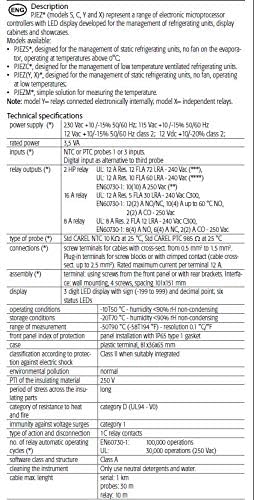
Figure 3: Detailed technical specifications, including power supply, inputs, outputs, and environmental conditions.
4. ການຕິດຕັ້ງ ແລະ ສາຍໄຟ
Proper installation is critical for the controller's performance and safety. Refer to the wiring diagrams and ensure all connections are secure and comply with local electrical codes.
4.1 ແຜນວາດສາຍ
The controller features screw terminals for secure wiring. Ensure to use copper conductors only, as indicated on the device label.

ຮູບ 4: ດ້ານຫລັງ view of the controller displaying the terminal block layout and electrical specifications. Note the "Use copper conductors only" instruction.

Figure 5: Close-up of the wiring terminals, indicating connections for power (115V~), probes (NTC, AMB.T, DEF.T), and digital inputs (DI/NTC).
4.2 ການເຊື່ອມຕໍ່ Terminal
- Terminals 1-3: AUX and L (Line) connections.
- Terminals 4-5: L (Line) and N (Neutral) for 115V~ power supply.
- Terminals 6-7: AMB.T (Ambient Temperature) probe.
- Terminals 8-9: NTC (Negative Temperature Coefficient) probes.
- Terminals 10-11: DEF.T (Defrost Temperature) probe and DI/NTC (Digital Input/NTC) connections.
Ensure proper polarity and secure connections for all wires. The terminal blocks are designed for easy and reliable wiring.

ຮູບທີ 6: ລາຍລະອຽດ view of the green screw terminal blocks, highlighting the robust connection points.
4.3 ການຕິດຕັ້ງ
The controller is designed for panel installation. It uses 4 screws for mounting with a spacing of 101x151 mm. Ensure the panel opening is correctly sized for a snug fit and IP65 protection.

Figure 7: Yellow push clips, likely used for securing the controller during panel mounting or for cable management.
5. ການດໍາເນີນງານ
The Carel PZGXS0J111 features an intuitive interface with a 3-digit LED display and several buttons for control and configuration.
5.1 Display and Functions
The display shows the value of the probe set using parameter P1. An ambient probe, defrost probe, and third probe are available. LEDs indicate the activation of control functions.
| ໄອຄອນ LED | ຟັງຊັນ | ການດໍາເນີນງານປົກກະຕິ | ກະພິບ | ເລີ່ມຂຶ້ນ |
|---|---|---|---|---|
| ❄️ | ຄອມ | on | ຮ້ອງຂໍ | ON |
| 💨 | ພັດລົມ | on | ຮ້ອງຂໍ | ON |
| 💧 | ໜາວ | on | ຮ້ອງຂໍ | ON |
| AUX | ເປີດ | ຜົນຜະລິດປິດ | - | ON |
| 🔔 | ປຸກ | ບໍ່ມີສັນຍານເຕືອນ | - | ON |
| 🕒 | ໂມງ | RTC fitted or disabled, at least 1 time band set | RTC not fitted or disabled, not even 1 time band set | ON ຖ້າ RTC ເຫມາະ |
5.2 Button Functions (Models S, X, Y, C)
| ປຸ່ມ | ການດໍາເນີນງານປົກກະຕິ | ເລີ່ມຂຶ້ນ |
|---|---|---|
| SET | Pressing the button alone: display set point. More than 3 s: display parameter setting menu. | Pressed together: Set point display. |
| ຂຶ້ນ (▲) | ເພີ່ມມູນຄ່າ. | - |
| ລົງ (▼) | ຫຼຸດຄ່າລົງ. | - |
| ON/OFF (⏻) | More than 3 s: start/stop ON/OFF. | - |
| DEFROST (❄️💧) | More than 3 s: start defrost. | - |
| MUTE (🔔) | Mute alarm. | - |
5.3 Setting the Set Point (Desired Temperature)
- ກົດ SET for 1 s; the set value will start flashing after a few moments.
- Increase or decrease the value using UP (▲) ຫຼື ລົງ (▼).
- ກົດ SET ເພື່ອຢືນຢັນມູນຄ່າໃຫມ່.
5.4 Switching the Device ON/OFF
ກົດ ON/OFF (⏻) for more than 3 s. The control and defrost algorithms are now disabled and the instrument displays the message "OFF" alternating with the temperature read by the set probe.
5.5 Manual Defrost (Models S, X, Y and C only)
ກົດ DEFROST (❄️💧) for more than 3 s (the defrost starts only if the temperature conditions are valid).

Figure 8: Tables detailing LED indicators, button functions, and basic operation procedures.
6. ບໍາລຸງຮັກສາ
Regular maintenance ensures the optimal performance and longevity of your Carel PZGXS0J111 controller.
6.1 ການທໍາຄວາມສະອາດ
To clean the instrument, use only neutral detergents and water. Avoid abrasive cleaners or solvents that could damage the casing ຫຼືສະແດງ.
6.2 Probe and Cable Inspection
Periodically inspect probes and cables for any signs of wear, damage, or loose connections. Ensure probes are correctly positioned for accurate temperature readings. The maximum cable length for probes is 10 meters.
7. ການແກ້ໄຂບັນຫາ
This section provides guidance for common issues you might encounter with the Carel PZGXS0J111 controller. For complex problems, consult a qualified technician.
- Display shows "OFF": This indicates the device is switched off. Press and hold the ON/OFF button for more than 3 seconds to turn it back on.
- ການອ່ານອຸນຫະພູມທີ່ບໍ່ຖືກຕ້ອງ: Check probe connections and ensure probes are not damaged or improperly installed. Verify the probe type setting in the controller's parameters.
- ຜູ້ຄວບຄຸມບໍ່ຕອບສະໜອງ: Check the power supply (115V AC). Ensure all wiring connections are secure. If the issue persists, a reset might be necessary (refer to advanced settings in the full manual, if available).
- Alarm Indicator On: Check the alarm conditions. Press the MUTE button to silence the alarm. Address the underlying cause of the alarm (e.g., temperature out of range).
8. ຂໍ້ມູນການຮັບປະກັນ
For warranty details, please refer to the official Carel product warranty statement provided with your purchase or visit the Carel official website. Typically, warranty covers manufacturing defects under normal operating conditions.
- ແຜນການປົກປ້ອງ: Additional protection plans may be available for purchase, offering extended coverage beyond the standard manufacturer's warranty. Examples ລວມມີແຜນການປົກປ້ອງ 3 ປີ ແລະ 4 ປີ.
9. ການຊ່ວຍເຫຼືອລູກຄ້າ
For technical assistance, spare parts, or further inquiries regarding your Carel PZGXS0J111 controller, please contact Carel customer support or your authorized distributor.
ຜູ້ຜະລິດ: Carel
Webເວັບໄຊ: www.carel.com (Please note: This is a generic link. Refer to your product packaging or official documentation for specific support contacts.)


