1. ບົດແນະນຳ
This manual provides essential information for the safe and effective operation of your Behringer C210 Powered Column Loudspeaker. The C210 is a modular column loudspeaker designed for portable PA applications and high-quality music playback. It features an 8-inch subwoofer, four high-frequency drivers, 200 watts of multi-channel Class-D power, Bluetooth audio streaming, an integrated MP3 player, LED lighting, and remote control capabilities.
ກະລຸນາອ່ານຄູ່ມືນີ້ຢ່າງລະອຽດກ່ອນທີ່ຈະປະຕິບັດອຸປະກອນແລະເກັບຮັກສາມັນສໍາລັບການອ້າງອີງໃນອະນາຄົດ.
2. ຄໍາແນະນໍາຄວາມປອດໄພ
- ແຫຼ່ງພະລັງງານ: ເຊື່ອມຕໍ່ຫນ່ວຍບໍລິການພຽງແຕ່ກັບປສຽບໄຟ AC ຂອງ vol ທີ່ລະບຸtage. ຮັບປະກັນວ່າສາຍໄຟບໍ່ເສຍຫາຍ ຫຼື ຖືກປັກ.
- ການລະບາຍອາກາດ: ຫ້າມປິດຊ່ອງລະບາຍອາກາດໃດໆ. ຕິດຕັ້ງຕາມຄໍາແນະນໍາຂອງຜູ້ຜະລິດ.
- ນ້ໍາແລະຄວາມຊຸ່ມ: ຢ່າເຮັດໃຫ້ເຄື່ອງນີ້ຖືກຝົນ ຫຼືຄວາມຊຸ່ມຊື່ນ. ຫ້າມວາງສິ່ງຂອງທີ່ເຕັມໄປດ້ວຍນ້ຳໃສ່ອຸປະກອນ.
- ຄວາມຮ້ອນ: ຫ້າມຕິດຕັ້ງໃກ້ກັບແຫຼ່ງຄວາມຮ້ອນເຊັ່ນລັງສີ, ເຄື່ອງບັນທຶກຄວາມຮ້ອນ, ເຕົາຫຼືອຸປະກອນອື່ນໆ (ລວມທັງ. amplifiers) ທີ່ຜະລິດຄວາມຮ້ອນ.
- ທໍາຄວາມສະອາດ: ເຮັດຄວາມສະອາດດ້ວຍຜ້າແຫ້ງເທົ່ານັ້ນ.
- ການບໍລິການ: ຢ່າພະຍາຍາມໃຫ້ບໍລິການຜະລິດຕະພັນນີ້ດ້ວຍຕົວທ່ານເອງ. ອ້າງອີງການບໍລິການທັງໝົດໃຫ້ກັບພະນັກງານບໍລິການທີ່ມີຄຸນວຸດທິ. ການບໍລິການແມ່ນຕ້ອງການເມື່ອອຸປະກອນໄດ້ຮັບຄວາມເສຍຫາຍໃນທາງໃດກໍ່ຕາມເຊັ່ນ: ສາຍໄຟຫຼືປລັກສຽບຖືກເສຍຫາຍ, ແຫຼວຮົ່ວໄຫຼຫຼືສິ່ງຂອງຕົກເຂົ້າໄປໃນອຸປະກອນ, ອຸປະກອນຖືກຝົນຫຼືຄວາມຊຸ່ມຊື່ນ, ບໍ່ເຮັດວຽກຕາມປົກກະຕິ, ຫຼືຫຼຸດລົງ.
- ການຈັດວາງ: Ensure the loudspeaker is placed on a stable, level surface to prevent tipping.
- ການປ້ອງກັນການໄດ້ຍິນ: Prolonged exposure to high sound pressure levels can cause permanent hearing loss. Use caution when setting volume levels.
3. ເນື້ອໃນຊຸດ
ພາຍຫຼັງການຫຸ້ມຫໍ່, ກະລຸນາກວດສອບວ່າອົງປະກອບທັງໝົດມີຢູ່ ແລະຢູ່ໃນສະພາບດີ:
- Behringer C210 Powered Column Loudspeaker Unit (Subwoofer base and column array)
- ສາຍໄຟ
- ການຄວບຄຸມໄລຍະໄກ
- ຄູ່ມືຜູ້ໃຊ້ (ເອກະສານນີ້)
ຖ້າລາຍການໃດຂາດຫາຍໄປຫຼືເສຍຫາຍ, ກະລຸນາຕິດຕໍ່ຮ້ານຂາຍຍ່ອຍຂອງເຈົ້າທັນທີ.
4. ຜະລິດຕະພັນເກີນview
The Behringer C210 is a compact yet powerful column loudspeaker system designed for ease of transport and quick setup. It consists of a subwoofer base unit and a column array that houses the high-frequency drivers.
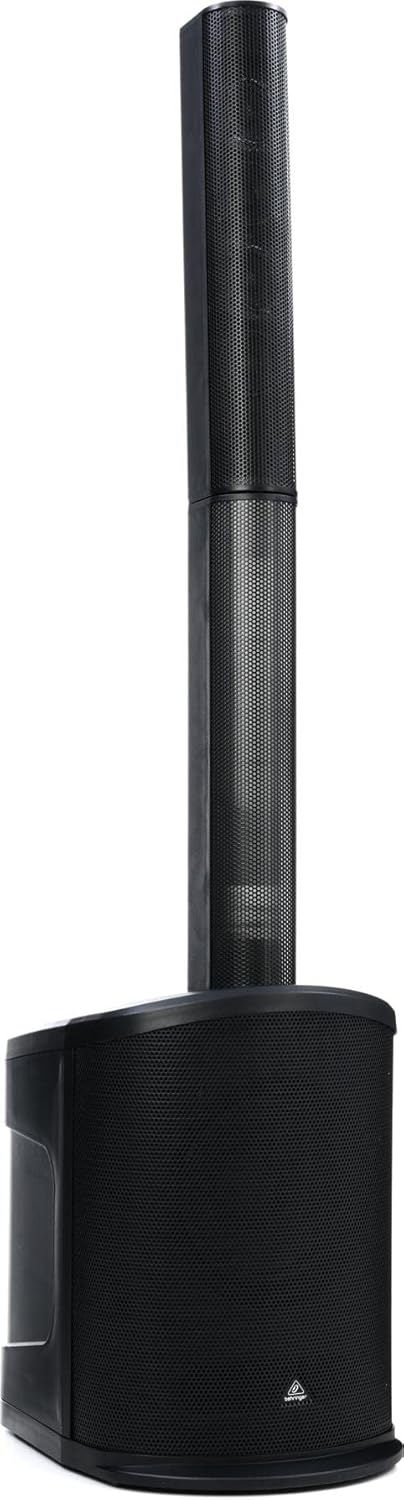
ຮູບ 4.1: ດ້ານຫນ້າ view of the C210 loudspeaker, illustrating its modular design with the subwoofer base and the column array.
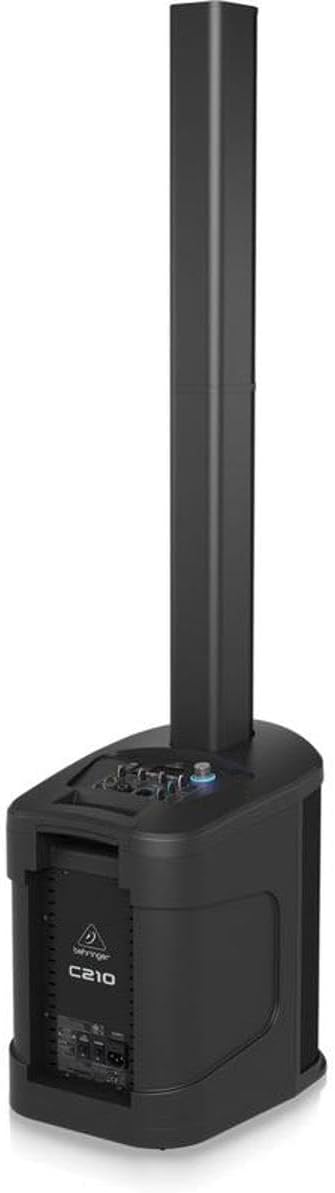
Figure 4.2: Rear/side view of the C210, highlighting the integrated control panel and input/output connections on the subwoofer unit.
ອົງປະກອບທີ່ສໍາຄັນ:
- Subwoofer Base: Houses the 8-inch subwoofer, Class-D amplifier, control panel, and input/output connections.
- Column Array: Contains four high-frequency drivers for wide sound dispersion. It connects directly to the subwoofer base.
- ກະດານຄວບຄຸມ: Located on the top of the subwoofer base, providing access to volume, input selection, MP3 player controls, and LED lighting settings.
- ການຄວບຄຸມໄລຍະໄກ: Allows for convenient adjustment of volume, track selection, and LED lighting from a distance.
5. ຕັ້ງຄ່າ
Follow these steps to set up your C210 loudspeaker:
- ແກະກ່ອງ: ເອົາສ່ວນປະກອບທັງຫມົດອອກຈາກການຫຸ້ມຫໍ່ຢ່າງລະມັດລະວັງ.
- ການຈັດວາງ: Choose a stable, level surface for the subwoofer base. Ensure there is adequate space around the unit for ventilation. Avoid placing it directly against walls or in corners if possible, to optimize sound dispersion.
- Assemble Column Array: Align the bottom of the column array with the connector on the top of the subwoofer base. Gently push down until it is securely seated. The connection is designed to be firm and stable.
- ການເຊື່ອມຕໍ່ພະລັງງານ: Connect the supplied power cable to the AC inlet on the rear of the subwoofer base. Plug the other end into a suitable grounded electrical outlet.
- ການເປີດເຄື່ອງເບື້ອງຕົ້ນ: Before turning on the unit, ensure all volume controls are set to their minimum level. Power on the unit using the main power switch.
6. ການເຮັດວຽກ
6.1. ການດໍາເນີນງານພື້ນຖານ
- ເປີດ/ປິດ: Use the power switch located on the rear of the subwoofer base to turn the unit on or off.
- ປະລິມານໂທ: Adjust the main volume knob on the control panel to control the overall output level of the loudspeaker.
- ການຄັດເລືອກການປ້ອນຂໍ້ມູນ: Use the input selector buttons or knob on the control panel to switch between different audio sources (e.g., Bluetooth, MP3, Line In).
6.2. Bluetooth Audio Streaming
The C210 supports high-quality Bluetooth audio streaming from compatible devices.
- ເປີດໃຊ້ Bluetooth: Select the Bluetooth input mode on the C210's control panel. The unit will enter pairing mode, indicated by a flashing Bluetooth indicator.
- ຈັບຄູ່ອຸປະກອນ: On your smartphone, tablet, or other Bluetooth-enabled device, open the Bluetooth settings and search for available devices. Select "Behringer C210" from the list.
- ເຊື່ອມຕໍ່: Once paired, the Bluetooth indicator on the C210 will become solid, and you can begin streaming audio from your device.
6.3. ການດໍາເນີນງານເຄື່ອງຫຼິ້ນ MP3
ເຄື່ອງຫຼິ້ນ MP3 ທີ່ປະສົມປະສານຊ່ວຍໃຫ້ສາມາດຫຼິ້ນສຽງໄດ້ files from USB sticks and SD/MMC cards.
- ແຊກສື່: Insert a USB stick into the USB port or an SD/MMC card into the card slot on the control panel.
- Select MP3 Input: Switch the input mode to MP3. The unit will automatically detect and begin playing compatible audio files.
- ການຄວບຄຸມ: Use the dedicated MP3 player controls (Play/Pause, Next Track, Previous Track) on the control panel or remote control to manage playback.
6.4. ໄຟ LED
The C210 features integrated LED lighting. Use the dedicated controls on the unit or the remote control to activate and select various lighting modes and effects.
6.5. ການຄວບຄຸມໄລຍະໄກ
ຣີໂໝດຄວບຄຸມທີ່ມາພ້ອມກັບເຄື່ອງນີ້ໃຫ້ການເຂົ້າເຖິງໜ້າທີ່ສຳຄັນໄດ້ຢ່າງສະດວກສະບາຍ:
- ເປີດ/ປິດ
- Master Volume Up/Down
- ການເລືອກແຫຼ່ງປ້ອນຂໍ້ມູນ
- MP3 Player Controls (Play/Pause, Skip)
- LED Lighting Mode Selection
7. ບໍາລຸງຮັກສາ
Proper maintenance ensures the longevity and optimal performance of your C210 loudspeaker.
- ທໍາຄວາມສະອາດ: Disconnect the power before cleaning. Use a soft, dry cloth to wipe down the exterior surfaces. Do not use abrasive cleaners, waxes, or solvents.
- ການເກັບຮັກສາ: If storing the unit for an extended period, disconnect it from power and store it in a dry, dust-free environment. It is recommended to use the original packaging for protection during storage or transport.
- ການລະບາຍອາກາດ: Regularly check that the ventilation openings are clear of dust and debris to prevent overheating.
8. ການແກ້ໄຂບັນຫາ
If you encounter issues with your C210, refer to the following common problems and solutions:
| ບັນຫາ | ສາເຫດທີ່ເປັນໄປໄດ້ | ການແກ້ໄຂ |
|---|---|---|
| ບໍ່ມີພະລັງງານ | Power cable disconnected; Power outlet faulty; Unit power switch off | ກວດສອບການເຊື່ອມຕໍ່ສາຍໄຟ; ລອງໃຊ້ປລັກສຽບອື່ນ; ໃຫ້ແນ່ໃຈວ່າສະວິດໄຟເປີດຢູ່ |
| ບໍ່ມີສຽງອອກ | Volume too low; Incorrect input selected; Audio source issue; Column array not connected properly | Increase master volume; Select correct input; Check audio source device; Re-seat column array |
| Bluetooth ບໍ່ໄດ້ຈັບຄູ່ | C210 not in pairing mode; Device already paired; Interference | Ensure C210 is in Bluetooth input and flashing; Disconnect from other devices; Move closer to C210 |
| ບັນຫາການຫຼິ້ນ MP3 | ບໍ່ຮອງຮັບ file format; Corrupt media; Incorrect input selected | ຮັບປະກັນ files are MP3; Try different USB/SD card; Select MP3 input |
| ການຄວບຄຸມໄລຍະໄກບໍ່ເຮັດວຽກ | ແບັດເຕີຣີໝົດ; ມີສິ່ງກີດຂວາງ; ຢູ່ນອກຂອບເຂດສັນຍານ | Replace batteries; Remove obstructions; Move closer to unit |
ຖ້າບັນຫາຍັງຄົງຢູ່ຫຼັງຈາກພະຍາຍາມແກ້ໄຂເຫຼົ່ານີ້, ກະລຸນາຕິດຕໍ່ຝ່າຍຊ່ວຍເຫຼືອລູກຄ້າ.
9. ຂໍ້ມູນຈໍາເພາະ
Technical specifications for the Behringer C210 Powered Column Loudspeaker:
| ຄຸນສົມບັດ | ຂໍ້ມູນຈໍາເພາະ |
|---|---|
| ຊື່ຕົວແບບ | C210 |
| ປະເພດລຳໂພງ | Subwoofer (with Column Array) |
| ປະເພດການຕິດຕັ້ງ | ອິດສະລະ |
| ລໍາໂພງ Ampປະເພດການຢັ້ງຢືນ | ເຄື່ອນໄຫວ |
| ລຳໂພງກຳລັງຜົນຜະລິດສູງສຸດ | 200 ວັດ |
| Woofer ເສັ້ນຜ່າສູນກາງ | 8 ນິ້ວ |
| Tweeter ເສັ້ນຜ່າສູນກາງ | 2.75 ນິ້ວ (x4) |
| ການຕອບສະໜອງຄວາມຖີ່ | 20 Hz - 20 kHz (approximate, based on 2E+4 Hz) |
| ເຕັກໂນໂລຊີການເຊື່ອມຕໍ່ | Bluetooth |
| ເຕັກໂນໂລຊີການສື່ສານໄຮ້ສາຍ | Bluetooth |
| ວິທີການຄວບຄຸມ | ໄລຍະໄກ |
| ລວມເອົາເຄື່ອງຫຼິ້ນ MP3 ບໍ? | ແມ່ນແລ້ວ |
| ແຫຼ່ງພະລັງງານ | ໄຟຟ້າສາຍ |
| ນ້ໍາຫນັກລາຍການ | 30.6 ປອນ (13.88 ກິໂລ) |
| ຂະໜາດສິນຄ້າ (L x W x H) | 17.32 x 12.99 x 54.53 ນິ້ວ (44 x 33 x 138.5 cm) |
| ແມ່ນກັນນ້ໍາ | ຜິດ |
| ຜູ້ຜະລິດ | ຊົນເຜົ່າດົນຕີ |
| UPC | 653341353139 |
10. ການຮັບປະກັນແລະການສະຫນັບສະຫນູນ
Your Behringer C210 Powered Column Loudspeaker comes with a limited warranty provided by the manufacturer, Music Tribe. The specific terms and duration of the warranty may vary by region and retailer.
For detailed warranty information, product registration, technical support, or service inquiries, please visit the official Behringer website or contact your authorized Behringer dealer.
ທ່ານສາມາດຊອກຫາຂໍ້ມູນເພີ່ມເຕີມແລະຊັບພະຍາກອນສະຫນັບສະຫນູນໄດ້ທີ່ ຮ້ານ Behringer ໃນ Amazon or the official Music Tribe webເວັບໄຊ.


