ແນະນຳ
This manual provides essential information for the safe and effective use of your VTech Peppa Pig Learning Watch. Designed for children aged 3-6 years, this interactive watch combines time-telling with engaging educational games featuring Peppa Pig.
ເນື້ອໃນຊຸດ
- VTech Peppa Pig Learning Watch
- ຄູ່ມືສຳລັບພໍ່ແມ່ (ເອກະສານສະບັບນີ້)
ສິນຄ້າເກີນview
The VTech Peppa Pig Learning Watch features a durable design with a protective flip-top cover. It includes various buttons for navigation and interaction with its functions.

Image: The VTech Peppa Pig Learning Watch in purple, with Peppa Pig's face on the closed protective cover.

Image: The VTech Peppa Pig Learning Watch open on a child's wrist, displaying the digital time and an animated Peppa Pig character. The watch face is decorated with stars and a kite.
ຕັ້ງຄ່າ
1. ການຕິດຕັ້ງຫມໍ້ໄຟ
The watch requires one CR2450 lithium battery. A battery is included for demonstration purposes. For regular use, it is recommended to replace it with a new battery.
- ຊອກຫາຊ່ອງໃສ່ຫມໍ້ໄຟຢູ່ດ້ານຫຼັງຂອງໂມງ.
- ໃຊ້ໄຂຄວງຂະໜາດນ້ອຍ, ເປີດຝາປິດຊ່ອງໃສ່ແບັດເຕີຣີ.
- Insert a new CR2450 lithium battery, ensuring correct polarity (+/-).
- ປ່ຽນຝາປິດ ແລະຮັດສະກູໃຫ້ແໜ້ນ.
2. ການຕັ້ງຄ່າເບື້ອງຕົ້ນ (ເວລາ ແລະ ວັນທີ)
Upon first use or after battery replacement, you may need to set the time and date.
- ກົດ OK button to activate the watch.
- ທ່ອງໄປຫາ ການຕັ້ງຄ່າ menu using the left/right arrow buttons (if available, otherwise consult on-screen prompts).
- ເລືອກ ເວລາ or ວັນທີ and follow the on-screen instructions to adjust the values using the arrow buttons and confirm with OK.
ຄໍາແນະນໍາການດໍາເນີນງານ
1. Time Display and Clock Faces
Open the protective lid to view the current time. The watch offers eight different Peppa Pig-themed clock faces for personalization.
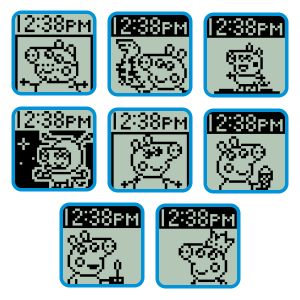
Image: A collage showing eight distinct digital clock faces, each featuring a different Peppa Pig character or scene, as they appear on the watch screen.
2. ເກມການຮຽນຮູ້
The watch includes four leveled-learning games designed to teach counting, number comparison, sorting, and matching skills.
- Counting Game: ຝຶກການນັບວັດຖຸ.
- Comparison Game: Identify the smaller or greater number.
- Sorting Game: Sort items into categories.
- Matching Game: Match objects or shadows.
Video: An official VTech video demonstrating the features and learning games of the Peppa Pig Learning Watch, including interactions with the characters and various educational activities.
3. ໂມງປຸກ, ໂມງຈັບເວລາ ແລະ ໂມງຈັບເວລາ
The watch features practical time management tools:
- ໂມງປຸກ: Set a cuckoo alarm to help establish routines.
- ໂມງຈັບເວລາ: Use the countdown timer for various activities.
- ໂມງຢຸດ: Measure elapsed time for games or tasks.
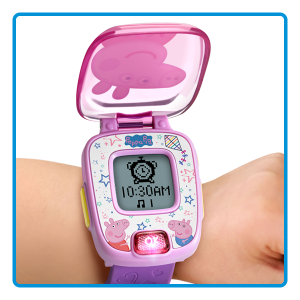
Image: The VTech Peppa Pig Learning Watch screen showing an alarm clock icon set for 10:30 AM, illustrating its alarm function.
ບໍາລຸງຮັກສາ
- ທໍາຄວາມສະອາດ: ເຊັດໂມງດ້ວຍ d ເລັກນ້ອຍamp ຜ້າ. ຢ່າ immerse ໃນນ້ໍາ.
- ການດູແລຫມໍ້ໄຟ: Replace the battery when the display dims or functions become erratic. Remove batteries if the watch will not be used for an extended period.
- ການເກັບຮັກສາ: ເກັບຮັກສາໄວ້ໃນບ່ອນທີ່ເຢັນ, ແຫ້ງ, ຫ່າງຈາກແສງແດດໂດຍກົງ.
ການແກ້ໄຂບັນຫາ
| ບັນຫາ | ການແກ້ໄຂ |
|---|---|
| Watch does not turn on or display is dim. | Replace the CR2450 lithium battery with a new one. Ensure correct polarity. |
| ປຸ່ມບໍ່ຕອບສະໜອງ. | Remove and reinsert the battery to reset the device. If the issue persists, replace the battery. |
| ເວລາ/ວັນທີບໍ່ຖືກຕ້ອງ. | Follow the "Initial Setup" instructions to reset the time and date. |
ຂໍ້ມູນຈໍາເພາະ
- ໝາຍເລກຕົວແບບ: 80-526000
- ຂະໜາດຜະລິດຕະພັນ: 8.24 x 1.13 x 1.95 ນິ້ວ
- ນ້ໍາຫນັກລາຍການ: 2.4 ອອນ
- ແບັດເຕີຣີ: 1 x CR2450 Lithium Metal battery (included for demo)
- ອາຍຸທີ່ແນະນໍາ: 36 ເດືອນ - 6 ປີ
- ຜູ້ຜະລິດ: VTech
ການຮັບປະກັນແລະການສະຫນັບສະຫນູນ
ສໍາລັບຂໍ້ມູນການຮັບປະກັນຫຼືການສະຫນັບສະຫນູນດ້ານວິຊາການ, ກະລຸນາໄປຢ້ຽມຢາມ VTech ຢ່າງເປັນທາງການ webເວັບໄຊ ຫຼືຕິດຕໍ່ພະແນກບໍລິການລູກຄ້າຂອງເຂົາເຈົ້າ. ຮັກສາໃບຮັບເງິນການຊື້ຂອງທ່ານໄວ້ເປັນຫຼັກຖານການຊື້.
VTech Webເວັບໄຊ: www.vtechkids.com