1. ບົດແນະນຳ
ຂອບໃຈສໍາລັບການຊື້asing the ELECTROPRIME Digital Voice Recorder. This device is designed for high-quality audio recording and playback, functioning as both a dictaphone and an MP3 music player. Please read this manual carefully to ensure proper use and optimal performance.
ເນື້ອໃນຊຸດ:
- ELECTROPRIME Digital Voice Recorder (Model: ASHA20BEBUBEB16153)
- ສາຍ USB
- ຄູ່ມືຜູ້ໃຊ້
2. ຜະລິດຕະພັນເກີນview
ເຮັດຄວາມຄຸ້ນເຄີຍກັບອົງປະກອບ ແລະການຄວບຄຸມຂອງອຸປະກອນ.
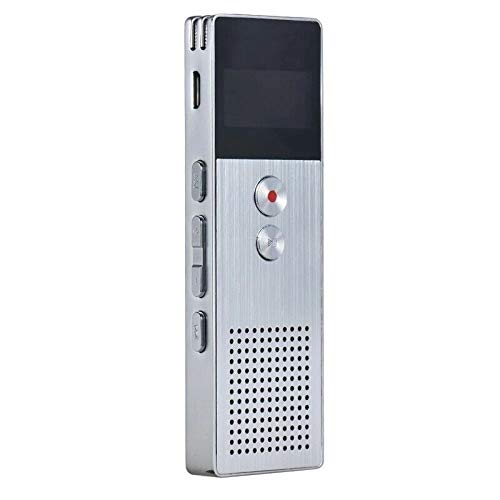
ຮູບພາບ 2.1: ດ້ານໜ້າ view of the ELECTROPRIME Digital Voice Recorder. This image displays the device's screen, the prominent red record button, and other control buttons on the front panel, along with the speaker grille at the bottom.
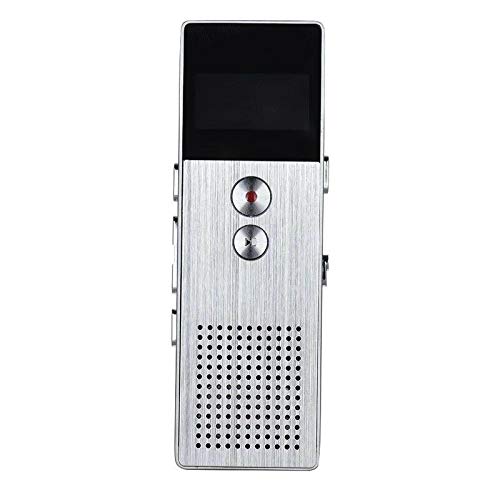
ຮູບພາບ 2.2: ຂ້າງ view of the ELECTROPRIME Digital Voice Recorder. This image highlights the side controls, including the power switch, volume buttons, and the USB charging/data transfer port. The device's compact design is visible.
ອົງປະກອບຂອງອຸປະກອນ:
- ຈໍສະແດງຜົນ: Shows recording status, time, battery level, and menu options.
- ປຸ່ມບັນທຶກ: Initiates and stops audio recording.
- ປຸ່ມຫຼິ້ນ/ຢຸດຊົ່ວຄາວ: Starts and pauses playback of audio files.
- ປຸ່ມລະດັບສຽງ (+/-): ປັບລະດັບສຽງການຫຼິ້ນ.
- ປຸ່ມເມນູ/ໂໝດ: Navigates through menus and switches operating modes.
- ພອດ USB: For charging and data transfer to a computer.
- ໄມໂຄຣໂຟນ: Built-in stereo microphone for audio input.
- ລໍາໂພງ: ສຳລັບການຫຼິ້ນສຽງໂດຍກົງ.
- ຫູຟັງ Jack: ສໍາລັບການຟັງສ່ວນຕົວ.
- ສັບປ່ຽນພະລັງງານ: ເປີດ ຫຼື ປິດອຸປະກອນ.
3. ຕັ້ງຄ່າ
3.1 ການສາກອຸປະກອນ
Before first use, fully charge the device. Connect the recorder to a computer's USB port or a USB wall adapter (not included) using the provided USB cable. The battery indicator on the screen will show charging status. A full charge typically takes 2-3 hours.
3.2 ເປີດ/ປິດ
- ເພື່ອເປີດເຄື່ອງ, ເລື່ອນປຸ່ມ ສະວິດໄຟ ກັບຕໍາແຫນ່ງ ON.
- ເພື່ອປິດເຄື່ອງ, ເລື່ອນປຸ່ມ ສະວິດໄຟ ກັບຕໍາແຫນ່ງ OFF.
3.3 ການຕັ້ງຄ່າເບື້ອງຕົ້ນ
Upon first power-on or after a reset, you may need to set the date, time, and language. Use the navigation buttons to select options and confirm with the Play/Pause button.
4. ຄໍາແນະນໍາການດໍາເນີນງານ
4.1 ການບັນທຶກສຽງ
The device supports high-quality stereo recording in .WAV format, offering up to 23 hours of continuous recording with its 8GB internal memory.
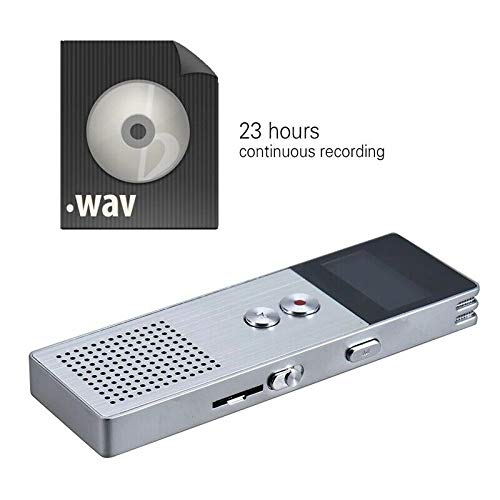
ຮູບພາບ 4.1: The recorder's capability to record in .WAV format and its impressive 23-hour continuous recording capacity are highlighted in this image, alongside the device itself.
- ໃຫ້ແນ່ໃຈວ່າອຸປະກອນເປີດຢູ່.
- ກົດ ປຸ່ມບັນທຶກ (red circle) to start recording. The screen will display a recording indicator and elapsed time.
- ເພື່ອຢຸດການບັນທຶກ, ກົດປຸ່ມ ປຸ່ມຫຼິ້ນ/ຢຸດຊົ່ວຄາວ. ກົດມັນອີກຄັ້ງເພື່ອສືບຕໍ່.
- ເພື່ອຢຸດການບັນທຶກ ແລະ ບັນທຶກ file, ກົດ ປຸ່ມບັນທຶກ ອີກເທື່ອຫນຶ່ງ. ໄດ້ file ຈະຖືກບັນທຶກໄວ້ໂດຍອັດຕະໂນມັດ.
ເຄັດລັບ: For best recording quality, ensure the microphone is not obstructed and the device is placed on a stable surface.
4.2 ການຫຼິ້ນຄືນ
- In the main menu, navigate to the "Recordings" or "Music" folder using the navigation buttons.
- ເລືອກທີ່ຕ້ອງການ file ແລະກົດ ປຸ່ມຫຼິ້ນ/ຢຸດຊົ່ວຄາວ ເພື່ອເລີ່ມຕົ້ນການຫຼິ້ນ.
- ໃນລະຫວ່າງການຫຼິ້ນ, ໃຫ້ໃຊ້ Volume Buttons (+/-) ເພື່ອປັບລະດັບສຽງ.
- ກົດ ປຸ່ມຫຼິ້ນ/ຢຸດຊົ່ວຄາວ to pause playback, and again to resume.
- ເພື່ອຢຸດການຫຼີ້ນ, ກົດປຸ່ມ ປຸ່ມຢຸດ (if available, otherwise navigate out of playback mode).
4.3 MP3 Music Player Functionality
The device can also function as an MP3 player. Transfer MP3 files to the device via USB connection to your computer.
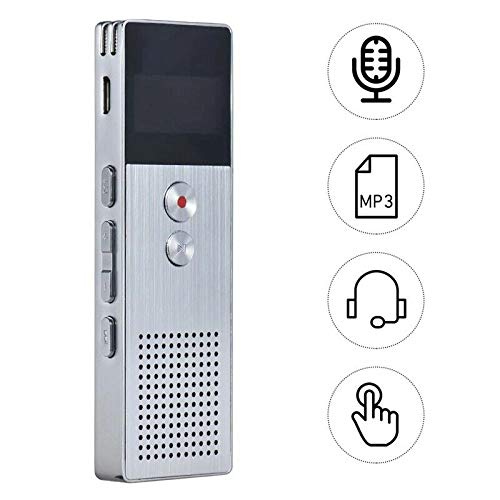
ຮູບພາບ 4.2: This image illustrates the multi-functional capabilities of the device, including its use as a voice recorder (microphone icon), an MP3 player (MP3 icon), and its compatibility with headphones (headphone icon). The touch icon suggests ease of interaction.
- ເຊື່ອມຕໍ່ອຸປະກອນກັບຄອມພິວເຕີຂອງທ່ານໂດຍໃຊ້ສາຍ USB.
- The device will appear as a removable disk. Copy your MP3 files into the "Music" folder on the device.
- ເອົາອຸປະກອນອອກຈາກຄອມພິວເຕີຂອງທ່ານຢ່າງປອດໄພ.
- On the recorder, navigate to the "Music" menu and select your desired MP3 file ສໍາລັບການຫຼິ້ນ.
4.4 File Management (Connecting to PC)
To transfer, delete, or organize files, connect the recorder to your computer using the USB cable. The device will be recognized as a mass storage device. You can then drag and drop files as you would with any USB drive.
5. ບໍາລຸງຮັກສາ
- ຮັກສາອຸປະກອນໃຫ້ແຫ້ງ. ຄວາມຊຸ່ມສາມາດທຳລາຍວົງຈອນພາຍໃນໄດ້.
- ຫຼີກເວັ້ນອຸນຫະພູມທີ່ຮຸນແຮງ.
- ຫ້າມຖິ້ມ ຫຼືເຮັດໃຫ້ອຸປະກອນຖືກກະທົບຢ່າງແຮງ.
- ເຊັດອຸປະກອນດ້ວຍຜ້າອ່ອນໆແລະແຫ້ງ. ຢ່າໃຊ້ສານເຄມີຫຼືຜົງຊັກຟອກທີ່ຮຸນແຮງ.
- Regularly back up important recordings to your computer.
6. ການແກ້ໄຂບັນຫາ
ອຸປະກອນບໍ່ເປີດ:
- ໃຫ້ແນ່ໃຈວ່າໄດ້ສາກໄຟແລ້ວ. ເຊື່ອມຕໍ່ຫາແຫຼ່ງພະລັງງານແລ້ວລອງໃໝ່ອີກຄັ້ງ.
- ກວດເບິ່ງວ່າສະວິດໄຟຢູ່ໃນຕໍາແຫນ່ງເປີດ.
ບໍ່ສາມາດບັນທຶກ:
- Check available memory. If full, transfer files to a computer and delete them from the device.
- ກວດໃຫ້ແນ່ໃຈວ່າໄມໂຄຣໂຟນບໍ່ຖືກປົກຄຸມ.
- Verify the device is in recording mode.
ບໍ່ມີສຽງໃນລະຫວ່າງການຫຼິ້ນ:
- Adjust the volume using the Volume Buttons.
- Ensure headphones are properly connected if using them.
- ກວດເບິ່ງວ່າສຽງ file ເສຍຫາຍ.
ອຸປະກອນບໍ່ຮັບຮູ້ໂດຍຄອມພິວເຕີ:
- ລອງໃຊ້ພອດ USB ຫຼື ສາຍ USB ອື່ນ.
- ໃຫ້ແນ່ໃຈວ່າອຸປະກອນເປີດຢູ່ເມື່ອເຊື່ອມຕໍ່.
- ປິດເປີດຄອມພິວເຕີຂອງທ່ານຄືນໃໝ່.
7. ຂໍ້ມູນຈໍາເພາະ
| ຍີ່ຫໍ້ | ໄຟຟ້າ |
| ໝາຍເລກຕົວແບບ | ASHA20BEBUBEB16153 |
| ການເກັບຮັກສາຄວາມຈໍາ | 8 GB |
| ຮູບແບບການບັນທຶກ | WAV |
| ຮູບແບບການຫຼິ້ນ | MP3, WAV |
| ໄມໂຄຣໂຟນ | ສະເຕຣິໂອ |
| ການບັນທຶກຢ່າງຕໍ່ເນື່ອງ | ສູງສຸດ 23 ຊົ່ວໂມງ |
| ການເຊື່ອມຕໍ່ | USB |
8. ການຮັບປະກັນແລະການສະຫນັບສະຫນູນ
For warranty information or technical support, please refer to the product packaging or contact ELECTROPRIME customer service through their official website or the retailer where the product was purchased. Please have your model number (ASHA20BEBUBEB16153) and purchase details ready.