1. ບົດແນະນຳ
This manual provides essential information for the safe and efficient operation of your Eurom DryBest 30 WiFi dehumidifier. Please read these instructions carefully before use and retain them for future reference. This appliance is designed to reduce humidity levels in indoor environments, improving air quality and preventing issues related to excessive moisture.
2. ຄໍາແນະນໍາຄວາມປອດໄພ
ປະຕິບັດຕາມຄວາມລະມັດລະວັງດ້ານຄວາມປອດໄພຕໍ່ໄປນີ້ສະເໝີເພື່ອຫຼຸດຜ່ອນຄວາມສ່ຽງຕໍ່ການເກີດອັກຄີໄພ, ໄຟໄໝ້ ຫຼື ການບາດເຈັບ.
- ຮັບປະກັນການສະຫນອງພະລັງງານ voltage ກົງກັບປ້າຍການຈັດອັນດັບເທິງຫນ່ວຍ.
- ຫ້າມໃຊ້ເຄື່ອງດູດຝຸ່ນດ້ວຍສາຍໄຟ ຫຼືປລັກສຽບທີ່ເສຍຫາຍ.
- ເກັບຮັກສາອຸປະກອນໃຫ້ຫ່າງຈາກແຫຼ່ງຄວາມຮ້ອນ, ແສງແດດໂດຍກົງ ແລະ ວັດສະດຸໄວໄຟ.
- ຫ້າມປິດຊ່ອງສຽບອາກາດ ຫຼືທາງອອກ. ຮັກສາຊ່ອງຫວ່າງຢ່າງຫນ້ອຍ 20 ຊຕມຮອບຫນ່ວຍ.
- ຢ່າເອົາສິ່ງຂອງເຂົ້າໄປໃນຊ່ອງລະບາຍອາກາດ.
- ຖອດປລັກເຄື່ອງອອກກ່ອນທຳຄວາມສະອາດ, ບຳລຸງຮັກສາ ຫຼື ເມື່ອບໍ່ໄດ້ໃຊ້ງານ.
- Do not use the appliance in bathrooms or other excessively wet environments where it could come into contact with water.
- ເຄື່ອງໃຊ້ນີ້ບໍ່ໄດ້ມີຈຸດປະສົງເພື່ອໃຊ້ໂດຍບຸກຄົນ (ລວມທັງເດັກນ້ອຍ) ທີ່ມີຄວາມສາມາດທາງຮ່າງກາຍ, ຄວາມຮູ້ສຶກ ຫຼືຈິດໃຈທີ່ຫຼຸດລົງ, ຫຼືຂາດປະສົບການ ແລະຄວາມຮູ້, ເວັ້ນເສຍແຕ່ວ່າພວກເຂົາໄດ້ຮັບການຊີ້ນໍາ ຫຼືຄໍາແນະນໍາກ່ຽວກັບການນໍາໃຊ້ເຄື່ອງໃຊ້ໂດຍບຸກຄົນທີ່ຮັບຜິດຊອບຄວາມປອດໄພຂອງເຂົາເຈົ້າ.
- ເດັກນ້ອຍຄວນໄດ້ຮັບການເບິ່ງແຍງເພື່ອຮັບປະກັນວ່າພວກເຂົາບໍ່ໄດ້ຫຼີ້ນກັບເຄື່ອງໃຊ້.
- ຖ້າສາຍການສະຫນອງເສຍຫາຍ, ມັນຕ້ອງໄດ້ຮັບການທົດແທນໂດຍຜູ້ຜະລິດ, ຕົວແທນໃຫ້ບໍລິການ, ຫຼືຜູ້ທີ່ມີຄຸນສົມບັດທີ່ຄ້າຍຄືກັນເພື່ອຫຼີກເວັ້ນອັນຕະລາຍ.
3. ຜະລິດຕະພັນເກີນview
The Eurom DryBest 30 WiFi is a powerful and efficient dehumidifier designed for domestic use. It features a quiet operation and can be controlled via WiFi for convenience.
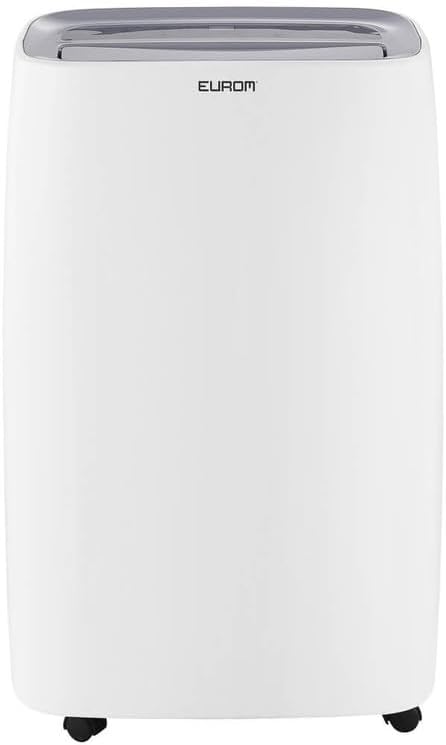
ຮູບທີ 3.1: ດ້ານໜ້າ view of the Eurom DryBest 30 WiFi dehumidifier. This image displays the unit's overall appearance, highlighting its modern white casing and integrated handles for portability.
3.1 ອົງປະກອບຫຼັກ
- ກະດານຄວບຄຸມ: Located on the top of the unit for easy access to settings and indicators.
- ຊ່ອງສຽບອາກາດ: Top-mounted grille for expelling dry air.
- Air Inlet / Filter: Rear-mounted for drawing in humid air, equipped with a removable air filter.
- ຖັງນໍ້າ: ຖັງທີ່ສາມາດຖອດອອກໄດ້ສຳລັບເກັບນ້ຳທີ່ກັ່ນແລ້ວ.
- ທໍ່ລະບາຍນ້ຳຢ່າງຕໍ່ເນື່ອງ: ຮູສຳລັບເຊື່ອມຕໍ່ທໍ່ເພື່ອການລະບາຍນ້ຳຢ່າງຕໍ່ເນື່ອງ.
- ນັກສະແດງ: Wheels at the base for easy movement.
4. ຕັ້ງຄ່າ
4.1 ການຫຸ້ມຫໍ່
- ເອົາເຄື່ອງດູດຄວາມຊຸ່ມອອກຈາກບັນຈຸພັນຂອງມັນຢ່າງລະມັດລະວັງ.
- ເອົາວັດສະດຸຫຸ້ມຫໍ່ທັງໝົດອອກ, ລວມທັງເທບ ຫຼື ໜັງປ້ອງກັນ.
- Inspect the unit for any signs of damage. If damaged, do not operate and contact your retailer.
4.2 ການຈັດວາງ
- Place the dehumidifier on a firm, level surface to prevent vibration and water leakage.
- ໃຫ້ແນ່ໃຈວ່າມີຊ່ອງຫວ່າງຢ່າງໜ້ອຍ 20 ຊຕມ (8 ນິ້ວ) ອ້ອມຕົວເຄື່ອງເພື່ອການໄຫຼວຽນຂອງອາກາດທີ່ເໝາະສົມ. ຫ້າມວາງໃສ່ຝາ ຫຼື ເຟີນິເຈີທີ່ສາມາດກີດຂວາງຊ່ອງອາກາດ ຫຼື ຊ່ອງສຽບໄດ້.
- ເພື່ອໃຫ້ໄດ້ປະສິດທິພາບສູງສຸດ, ໃຫ້ວາງເຄື່ອງໄວ້ກາງຫ້ອງ ຫຼື ບໍລິເວນທີ່ຕ້ອງການດູດຄວາມຊຸ່ມຊື່ນ.
- ຫຼີກລ່ຽງການວາງເຄື່ອງໃກ້ກັບອຸປະກອນທີ່ຜະລິດຄວາມຮ້ອນ ຫຼື ບ່ອນທີ່ມີແສງແດດໂດຍກົງ.
4.3 ການເຊື່ອມຕໍ່ພະລັງງານ
- ສຽບສາຍໄຟໃສ່ບ່ອນສຽບໄຟຟ້າທີ່ມີດິນ.
- Ensure the outlet meets the electrical requirements of the unit (230V, 50Hz).
4.4 ທາງເລືອກການລະບາຍນ້ໍາ
The dehumidifier offers two drainage methods: manual tank emptying or continuous drainage.
4.4.1 ການລະບາຍນໍ້າດ້ວຍມື (ຖັງນໍ້າ)
- When the water tank is full, the "FULL" indicator light will illuminate, and the unit will automatically stop operating.
- ດຶງຖັງນ້ໍາອອກຈາກດ້ານຫນ້າຂອງຫນ່ວຍງານຢ່າງລະມັດລະວັງ.
- ຖອກນ້ຳທີ່ເກັບໄວ້ອອກ.
- ເລື່ອນຖັງນໍ້າທີ່ຫວ່າງເປົ່າກັບຄືນສູ່ຕໍາແໜ່ງຈົນກວ່າມັນຈະຄລິກຢ່າງແໜ້ນໜາ. ເຄື່ອງຈະກັບມາເຮັດວຽກຕໍ່.
4.4.2 ການລະບາຍນ້ໍາຢ່າງຕໍ່ເນື່ອງ
- For continuous operation without emptying the tank, connect a suitable drain hose (not included) to the continuous drain outlet at the back of the unit.
- Ensure the hose is sloped downwards to allow gravity to drain the water into a floor drain or larger container.
- ກວດສອບວ່າຈຸດເຊື່ອມຕໍ່ທໍ່ນັ້ນແໜ້ນໜາເພື່ອປ້ອງກັນການຮົ່ວໄຫຼ.
4.5 WiFi Setup
The DryBest 30 WiFi can be controlled remotely via a smartphone app.
- Download the "Eurom Smart" app (or similar specified app) from your device's app store.
- Follow the in-app instructions to register an account and add your dehumidifier.
- Ensure your dehumidifier is powered on and the WiFi indicator light is blinking, indicating pairing mode.
- Once connected, the WiFi indicator light will become solid.
5. ຄໍາແນະນໍາການດໍາເນີນງານ

ຮູບທີ 5.1: Control Panel of the Eurom DryBest 30 WiFi. This image details the various buttons and indicators for operating the dehumidifier.
5.1 ກະດານຄວບຄຸມຫຼາຍກວ່າview
- ປຸ່ມພະລັງງານ: ເປີດ ຫຼືປິດເຄື່ອງ.
- ປຸ່ມ MODE: ໝຸນວຽນຜ່ານໂໝດການເຮັດວຽກ (ຕົວຢ່າງ, ອັດຕະໂນມັດ, ຕໍ່ເນື່ອງ, ຊັກເຄື່ອງ).
- ປຸ່ມຂຶ້ນ/ລົງ: Adjust desired humidity level or timer settings.
- ປຸ່ມຄວາມໄວ: Selects fan speed (High, Low).
- ປຸ່ມໂມງຈັບເວລາ: ຕັ້ງໂມງຈັບເວລາເປີດ ຫຼືປິດອັດຕະໂນມັດ.
- ປຸ່ມ SWING: Activates or deactivates the oscillating air outlet.
- ປຸ່ມ PUMP: Activates the internal pump for continuous drainage (if applicable and hose connected).
- ປຸ່ມລັອກ: ຟັງຊັນລັອກເດັກເພື່ອປ້ອງກັນການປ່ຽນແປງໂດຍບັງເອີນ.
- ຕົວຊີ້ວັດ WIFI: ສະແດງສະຖານະການເຊື່ອມຕໍ່ WiFi.
- FULL Indicator: Illuminates when the water tank is full.
- LAUNDRY Indicator: Illuminates when Laundry mode is active.
- FAN Indicator: Illuminates when fan is operating.
5.2 ການດໍາເນີນງານພື້ນຖານ
- ເປີດ: ກົດ ພະລັງງານ button. The unit will start in its default or last-used mode.
- ຕັ້ງຄວາມຊຸ່ມຊື່ນທີ່ຕ້ອງການ: ໃຊ້ UP ແລະ ລົງ buttons to set the target humidity level (e.g., 40% - 60% relative humidity is generally recommended). The unit will operate until this level is reached, then cycle on and off to maintain it.
- ເລືອກໂໝດ: ກົດ ໂໝດ button to choose between different operating modes.
- ແບບອັດຕະໂນມັດ: The unit automatically adjusts operation based on the ambient humidity.
- ໂModeດຕໍ່ເນື່ອງ: The unit runs continuously regardless of humidity level. Ideal for very damp conditions or for use with continuous drainage.
- ໂໝດຊັກລີດ: Designed to quickly dry clothes indoors. The unit operates at high fan speed and continuous dehumidification.
- ປັບຄວາມໄວພັດລົມ: ກົດ ຄວາມໄວ button to toggle between High and Low fan speeds.
- ຕັ້ງເວລາ: ກົດ ເວລາ ປຸ່ມ, ຈາກນັ້ນໃຊ້ UP ແລະ ລົງ to set the desired operating duration (e.g., 2 hours, 4 hours).
- ຟັງຊັນ Swing: ກົດ ແກວ່ງ button to activate the oscillating louvers, distributing dry air more evenly.
- ລັອກເດັກ: ກົດຄ້າງໄວ້ ລັອກ button for a few seconds to activate/deactivate the child lock.
- ປິດພະລັງງານ: ກົດ ພະລັງງານ ກົດປຸ່ມອີກເທື່ອຫນຶ່ງເພື່ອປິດເຄື່ອງ.

ຮູບທີ 5.2: Dehumidifier in use, illustrating its application for drying laundry. The image shows the unit positioned near a clothes rack, indicating its effectiveness in reducing drying times indoors.
6. ບໍາລຸງຮັກສາ
ການບໍາລຸງຮັກສາເປັນປົກກະຕິຮັບປະກັນປະສິດທິພາບທີ່ດີທີ່ສຸດແລະຍືດອາຍຸຊີວິດຂອງເຄື່ອງ dehumidifier ຂອງທ່ານ.
6.1 ການທໍາຄວາມສະອາດເຄື່ອງກອງອາກາດ
ການກັ່ນຕອງອາກາດຄວນເຮັດຄວາມສະອາດທຸກໆສອງອາທິດຫຼືເລື້ອຍໆຂື້ນກັບການນໍາໃຊ້ແລະຄຸນນະພາບຂອງອາກາດ.
- ຖອດເຄື່ອງປັບຄວາມຊຸ່ມຊື່ນອອກຈາກປລັກສຽບໄຟ.
- ເອົາການກັ່ນຕອງອາກາດອອກຈາກດ້ານຫລັງຂອງຫນ່ວຍງານ.
- Gently vacuum any dust or debris from the filter. For heavy dirt, wash the filter with lukewarm water and a mild detergent.
- Rinse thoroughly and allow the filter to air dry completely before reinstalling. Do not expose to direct sunlight or high heat.
- ຕື່ມການກັ່ນຕອງແຫ້ງເຂົ້າໄປໃນຫນ່ວຍບໍລິການ.
6.2 ການທໍາຄວາມສະອາດຖັງນໍ້າ
ທຳຄວາມສະອາດຖັງນ້ຳເປັນປະຈຳເພື່ອປ້ອງກັນການເຕີບໃຫຍ່ຂອງເຊື້ອລາ ແລະ ເຊື້ອລາ.
- ຖອດປລັກໜ່ວຍ.
- ເອົາອອກແລະປ່ອຍຖັງນ້ໍາ.
- Wash the tank with warm water and a mild detergent. Rinse thoroughly.
- Dry the tank completely before placing it back into the unit.
6.3 ການເກັບຮັກສາ
ຖ້າເຄື່ອງດູດຄວາມຊຸ່ມຈະບໍ່ຖືກໃຊ້ເປັນໄລຍະເວລາຂະຫຍາຍ:
- ຖອດປລັກເຄື່ອງ ແລະ ຖອກນໍ້າອອກໃຫ້ໝົດ.
- ທຳຄວາມສະອາດຕົວກອງອາກາດ ແລະ ພາຍນອກຂອງຕົວເຄື່ອງ.
- Allow the unit to dry for at least 24 hours in a well-ventilated area to prevent mold growth inside.
- Store the dehumidifier upright in a cool, dry place, away from direct sunlight and extreme temperatures.
7. ການແກ້ໄຂບັນຫາ
ກ່ອນທີ່ຈະຕິດຕໍ່ກັບຝ່າຍຊ່ວຍເຫຼືອລູກຄ້າ, ກະລຸນາເບິ່ງຄູ່ມືການແກ້ໄຂບັນຫາຕໍ່ໄປນີ້ສໍາລັບບັນຫາທົ່ວໄປ.
| ບັນຫາ | ສາເຫດທີ່ເປັນໄປໄດ້ | ການແກ້ໄຂ |
|---|---|---|
| ຫນ່ວຍບໍລິການບໍ່ເປີດ. | No power, power cord loose, water tank full. | ກວດສອບການເຊື່ອມຕໍ່ໄຟຟ້າ, ໃຫ້ແນ່ໃຈວ່າຖັງຫວ່າງເປົ່າ ແລະ ໃສ່ຢ່າງຖືກຕ້ອງ. |
| ບໍ່ມີນ້ຳເກັບ / ການດູດຄວາມຊຸ່ມຊື່ນຕໍ່າ. | Humidity level too low, air filter clogged, room temperature too low, unit size too small for area. | Increase desired humidity setting, clean air filter, ensure room temperature is above 5°C (41°F), close doors/windows. |
| ໜ່ວຍມີສຽງດັງ. | ໜ່ວຍບໍ່ໄດ້ຢູ່ເທິງໜ້າດິນທີ່ຮາບພຽງ, ຕົວກອງອາກາດອຸດຕັນ. | Place on a flat, stable surface. Clean air filter. |
| ນ້ໍາຮົ່ວອອກຈາກຫນ່ວຍ. | Water tank not inserted correctly, continuous drain hose loose or blocked. | Reinsert water tank properly. Check continuous drain hose for secure connection and obstructions. |
| ບັນຫາການເຊື່ອມຕໍ່ WiFi. | Incorrect app, poor WiFi signal, incorrect pairing procedure. | Ensure correct app is used, check router and signal strength, repeat WiFi setup steps. |
8. ຂໍ້ມູນຈໍາເພາະ
| ຄຸນສົມບັດ | ຂໍ້ມູນຈໍາເພາະ |
|---|---|
| ຊື່ຕົວແບບ | DryBest 30 WiFi |
| ໝາຍເລກອ້າງອີງ | 1052 |
| ຍີ່ຫໍ້ | ເອີໂຣ |
| ຄວາມອາດສາມາດ Dehumidification | 30 ລິດ / 24 ຊົ່ວໂມງ |
| ການບໍລິໂພກພະລັງງານ | 580 ວ |
| ຄວາມອາດສາມາດຂອງກະແສລົມ | 350 m³/ຊົ່ວໂມງ |
| ລະດັບສຽງ | <47 dBA |
| ຂະໜາດ (L x W x H) | 64.2 x 43.1 x 30.1 cm |
| ນ້ຳໜັກ | 15.5 ກິໂລ |
| ປະລິມານຖັງນໍ້າ | 6 Liters / 10 Liters (depending on mode/configuration) |
| ຄຸນນະສົມບັດພິເສດ | Silent operation, Adjustable humidity control, WiFi connectivity |
| ການນໍາໃຊ້ທີ່ແນະນໍາ | ພາຍໃນປະເທດ |
| ສີ | ສີຂາວ |
9. ການຮັບປະກັນແລະການສະຫນັບສະຫນູນ
For warranty information, please refer to the terms and conditions provided at the time of purchase or contact your retailer. If you encounter any issues not covered in the troubleshooting section, or require further assistance, please contact Eurom customer support or your authorized dealer.
ຮັກສາໃບຮັບເງິນການຊື້ຂອງທ່ານໄວ້ເປັນຫຼັກຖານການຊື້ສໍາລັບການຮຽກຮ້ອງການຮັບປະກັນໃດໆ.


