1. ບົດແນະນຳ
The eKids Frozen 2 Bluetooth Karaoke Machine with Light Show is designed to provide an interactive music experience. This portable device allows users to stream audio wirelessly via Bluetooth, sing along with the included wired microphone, and expand content through a USB port. It features a multi-colored LED light show and built-in memory for storing music.
2. ສິ່ງທີ່ຢູ່ໃນກ່ອງ
- Bluetooth MP3 Karaoke Machine
- ໄມໂຄຣໂຟນທີ່ມີສາຍ
- ສາຍສາກ USB
3. ຄຸນລັກສະນະຂອງຜະລິດຕະພັນ
- ການເຊື່ອມຕໍ່ Bluetooth: Connect to any compatible Bluetooth device to stream audio wirelessly.
- ໄມໂຄຣໂຟນມີສາຍ: Includes one real working wired microphone for singing along. An additional mic jack is available for a second microphone (sold separately).
- ເຄື່ອງຫຼິ້ນສຽງ USB: Features a USB port to play MP3 files from a USB flash drive (not included).
- ຟັງຊັນການບັນທຶກ: Record performances while singing along to streaming music. Requires a USB flash drive (not included).
- Multi-colored LED Light Show: Integrated light show to enhance the performance experience.
- ໜ່ວຍ ຄວາມ ຈຳ ໃນຕົວ: Store hours of music directly on the device.
- ແບັດເຕີຣີທີ່ສາມາດສາກໄດ້: Portable design with a built-in rechargeable battery for on-the-go use.

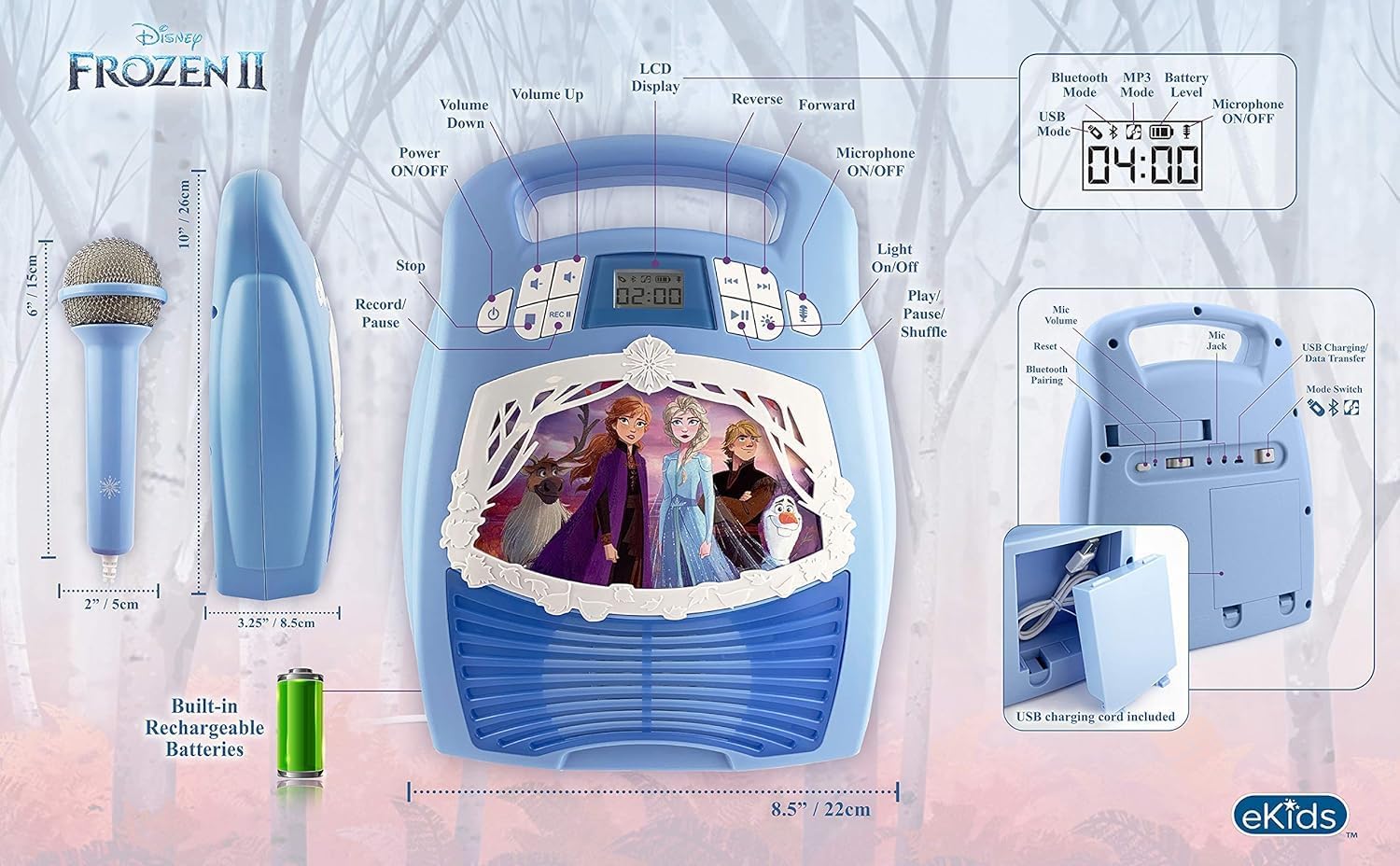
ຮູບ 1: ເກີນview of the Karaoke Machine's Controls and Features.

Figure 2: Bluetooth Compatibility with various devices.
4. ຕັ້ງຄ່າ
4.1 ການສ້າງພະລັງງານຫນ່ວຍງານ
The karaoke machine operates on a built-in rechargeable battery. Ensure the unit is fully charged before first use for optimal performance.
- Connect the supplied USB charging cable to the USB charging port on the back of the unit.
- ເຊື່ອມຕໍ່ປາຍອີກດ້ານໜຶ່ງຂອງສາຍ USB ເຂົ້າກັບອະແດບເຕີໄຟ USB ມາດຕະຖານ (ບໍ່ລວມຢູ່) ຫຼື ພອດ USB ທີ່ມີພະລັງງານ.
- The charging indicator will illuminate. Allow sufficient time for a full charge.
4.2 ການເຊື່ອມຕໍ່ໄມໂຄຣໂຟນ
The wired microphone connects to the microphone jack on the unit.
- Locate the microphone jack on the side or back of the karaoke machine.
- Insert the microphone plug firmly into the jack.

Figure 3: Karaoke Machine with Microphone Connected.
5. ຄໍາແນະນໍາການດໍາເນີນງານ
5.1 ເປີດ/ປິດ
ກົດຄ້າງໄວ້ ພະລັງງານ button located on the control panel to turn the unit on or off.
5.2 ການຈັບຄູ່ Bluetooth
- Turn on the karaoke machine. The Bluetooth indicator on the display will flash, indicating it is in pairing mode.
- ໃນອຸປະກອນທີ່ເປີດໃຊ້ Bluetooth ຂອງທ່ານ (ໂທລະສັບສະຫຼາດ, ແທັບເລັດ, ແລະອື່ນໆ), ໄປທີ່ການຕັ້ງຄ່າ Bluetooth ແລະເປີດໃຊ້ Bluetooth.
- Select "eKids Frozen 2 Karaoke" (or similar name) from the list of available devices.
- ເມື່ອຈັບຄູ່ແລ້ວ, ໄຟສັນຍານ Bluetooth ຈະຢຸດກະພິບ ແລະ ຍັງຄົງສະຫວ່າງຢູ່. ດຽວນີ້ທ່ານສາມາດຖ່າຍທອດສຽງຈາກອຸປະກອນຂອງທ່ານໄດ້ແລ້ວ.
5.3 Playing Music via USB
- ໃສ່ USB flash drive ທີ່ບັນຈຸ MP3 files ເຂົ້າໄປໃນພອດ USB ໃນຫນ່ວຍ.
- The unit should automatically switch to USB mode and begin playing music. If not, press the ໂໝດ ປຸ່ມເພື່ອເລືອກໂຫມດ USB.
- ໃຊ້ ຫຼິ້ນ/ຢຸດຊົ່ວຄາວ, ຕິດຕາມຕໍ່ໄປ, ແລະ ເພງກ່ອນໜ້າ ປຸ່ມເພື່ອຄວບຄຸມການຫຼິ້ນ.
5.4 ການນຳໃຊ້ໄມໂຄຣໂຟນ
- Ensure the microphone is securely plugged into the mic jack.
- ກົດ ເປີດ / ປິດໄມໂຄຣໂຟນ button to activate the microphone.
- Adjust the microphone volume using the dedicated volume controls if available, or the main volume controls.
5.5 ການສະແດງແສງສະຫວ່າງ
ກົດ ເປີດ/ປິດໄຟ button to activate or deactivate the multi-colored LED light show.
5.6 Recording Performances
To record your singing, a USB flash drive (not included) must be inserted into the USB port.
- Ensure a USB flash drive is inserted.
- Start playing your desired music (via Bluetooth or USB).
- ກົດ REC ປຸ່ມເພື່ອເລີ່ມຕົ້ນການບັນທຶກ.
- Sing into the microphone.
- ກົດ REC button again to stop recording. Your performance will be saved to the USB flash drive.
6. ບໍາລຸງຮັກສາ
- ເຮັດຄວາມສະອາດເຄື່ອງດ້ວຍຜ້າອ່ອນ, ແຫ້ງ. ຢ່າໃຊ້ເຄື່ອງເຮັດຄວາມສະອາດຂັດຫຼືສານລະລາຍ.
- ເກັບຮັກສາອຸປະກອນໃຫ້ຫ່າງຈາກແສງແດດໂດຍກົງ, ແຫຼ່ງຄວາມຮ້ອນ ແລະ ຄວາມຊຸ່ມ.
- Store the microphone in its designated compartment on the back of the unit when not in use to prevent loss or damage.
ຮູບ 4: ດ້ານຫລັງ view with microphone storage compartment.
7. ການແກ້ໄຂບັນຫາ
- ບໍ່ມີພະລັງງານ: Ensure the unit is charged. Connect the USB charging cable and allow it to charge.
- ບໍ່ມີສຽງ: Check the volume levels on both the karaoke machine and your connected Bluetooth device. Ensure the microphone is turned on if using it.
- Bluetooth ບໍ່ເຊື່ອມຕໍ່: Make sure Bluetooth is enabled on your device and the karaoke machine is in pairing mode. Try restarting both devices. Ensure no other devices are currently connected to the karaoke machine.
- ໄມໂຄຣໂຟນບໍ່ເຮັດວຽກ: Verify the microphone is securely plugged into the correct jack and the microphone ON/OFF button is activated.
- ບັນຫາການບັນທຶກ: Ensure a compatible USB flash drive is inserted and has sufficient free space.
8. ຂໍ້ມູນຈໍາເພາະ
| ຄຸນສົມບັດ | ລາຍລະອຽດ |
|---|---|
| ຂະໜາດສິນຄ້າ | 8 x 3 x 10 ນິ້ວ |
| ນ້ໍາຫນັກລາຍການ | 2.64 ປອນ |
| ໝາຍເລກຕົວແບບ | FR-553v9M |
| ອາຍຸທີ່ແນະນໍາ | 3 - 35 ເດືອນ |
| ໝໍ້ໄຟ | 3 AA batteries required (included) - Note: Product description also mentions built-in rechargeable battery. Please refer to packaging for exact battery type. |
| ຄຸນນະສົມບັດພິເສດ | Portable, Rechargeable |
| ສີ | Older Version |
| ຜູ້ຜະລິດ | ການອອກແບບເດັກນ້ອຍ |
9. ຂໍ້ມູນຄວາມປອດໄພ
Please read and follow all safety instructions provided with the product packaging. This product is intended for use by children aged 3 and up, under adult supervision.
10. ການຮັບປະກັນແລະການສະຫນັບສະຫນູນ
ຜະລິດຕະພັນນີ້ມາພ້ອມກັບ a ການຮັບປະກັນຫນຶ່ງປີຈໍາກັດ. For warranty claims or technical support, please refer to the contact information provided in your product packaging or visit the eKids official webເວັບໄຊ.
11. ວິດີໂອຜະລິດຕະພັນ
Video 1: An official product video from KIDdesigns, Inc. showcasing the eKids Frozen 2 Bluetooth Karaoke Machine with Light Show, highlighting its features and design.


