ແນະນຳ
This manual provides detailed instructions for the safe and efficient operation, maintenance, and troubleshooting of your Roborock S6 Pure Robot Vacuum and Mop. Please read this manual thoroughly before using the product and retain it for future reference.
ຂໍ້ມູນຄວາມປອດໄພທີ່ສໍາຄັນ
ປະຕິບັດຕາມຄວາມລະມັດລະວັງດ້ານຄວາມປອດໄພຂັ້ນພື້ນຖານສະເໝີເມື່ອໃຊ້ເຄື່ອງໃຊ້ໄຟຟ້າເພື່ອຫຼຸດຜ່ອນຄວາມສ່ຽງຕໍ່ການເກີດອັກຄີໄພ, ໄຟຟ້າຊອດ ແລະ ການບາດເຈັບ.
- Do not use the robot vacuum outdoors or on wet surfaces.
- ບໍ່ອະນຸຍາດໃຫ້ເດັກນ້ອຍດໍາເນີນການສູນຍາກາດຫຸ່ນຍົນ.
- ໃຫ້ແນ່ໃຈວ່າບ່ອນສາກໄຟຖືກວາງຢູ່ເທິງພື້ນລະດັບກັບຝາ.
- Remove any loose cables, small objects, or fragile items from the floor before operation.
- Do not use the robot vacuum to pick up large debris, sharp objects, or liquids.
- Only use the original charging dock and power adapter provided by Roborock.
ສ່ວນປະກອບຂອງຜະລິດຕະພັນ
Familiarize yourself with the main components of your Roborock S6 Pure.

ຮູບພາບ: ເທິງ view of the Roborock S6 Pure Robot Vacuum, showing the LiDAR sensor tower, power button, and spot cleaning button.
- LiDAR Navigation System: ສຳລັບການສ້າງແຜນທີ່ ແລະ ການນຳທາງທີ່ຊັດເຈນ.
- ແປງຫຼັກ: ສໍາລັບການທໍາຄວາມສະອາດຜ້າພົມເລິກແລະຊັ້ນແຂງ.
- ແປງດ້ານຂ້າງ: ກວາດສິ່ງເສດເຫຼືອຈາກແຄມ ແລະມຸມ.
- Dustbin: ລວບລວມຝຸ່ນແລະສິ່ງເສດເຫຼືອ.
- Water Tank & Mop Cloth: ສຳລັບໜ້າທີ່ຖູພື້ນ.
- ບ່ອນສາກໄຟ: For automatic recharging.
- ປຸ່ມເປີດປິດ: To turn on/off and start/pause cleaning.
- Spot Cleaning Button: For targeted cleaning of small areas.
ຄູ່ມືການຕິດຕັ້ງ
1. ການຫຸ້ມຫໍ່ແລະການຈັດວາງ
- ເອົາເຄື່ອງດູດຝຸ່ນຫຸ່ນຍົນ ແລະ ອຸປະກອນເສີມທັງໝົດອອກຈາກການຫຸ້ມຫໍ່ຢ່າງລະມັດລະວັງ.
- Choose a suitable location for the charging dock. It should be placed against a wall, on a hard, level surface, with at least 0.5 meters (1.6 feet) clear space on both sides and 1.5 meters (4.9 feet) in front.
- ເຊື່ອມຕໍ່ອະແດບເຕີໄຟຟ້າເຂົ້າກັບແທ໊ກສາກໄຟ ແລະ ສຽບມັນເຂົ້າກັບປລັກສຽບຝາ. ໃຫ້ແນ່ໃຈວ່າສາຍໄຟຖືກເກັບໄວ້ຢ່າງເປັນລະບຽບເພື່ອປ້ອງກັນການພັນກັນ.
2. ການສາກໄຟເບື້ອງຕົ້ນ
Place the robot vacuum onto the charging dock. Ensure the charging contacts on the robot align with those on the dock. The power indicator light on the robot will illuminate, indicating it is charging. Fully charge the robot before first use (approximately 3-5 hours).
3. ການຕິດຕັ້ງແອັບຯ ແລະການເຊື່ອມຕໍ່
For full functionality, download the Roborock app on your smartphone.
- Scan the QR code in the quick start guide or search for "Roborock" in your app store.
- ເປີດ app ແລະສ້າງບັນຊີ.
- Follow the in-app instructions to add your S6 Pure robot vacuum. This typically involves connecting to the robot's Wi-Fi hotspot and then connecting the robot to your home Wi-Fi network.

Image: The Roborock S6 Pure robot vacuum next to a smartphone displaying the Roborock app interface, demonstrating advanced app control capabilities.
ຄໍາແນະນໍາການດໍາເນີນງານ
1. ເລີ່ມທໍາຄວາມສະອາດ
- ຜ່ານປຸ່ມຫຸ່ນຍົນ: Press the Power button once to start a full clean. Press it again to pause. Press and hold to turn off.
- ຜ່ານ Roborock App: Open the app, select your S6 Pure, and tap "Clean" to start. You can also select specific rooms or zones to clean.

Image: The Roborock S6 Pure robot vacuum cleaning a specific area, illustrating its selective room cleaning feature based on a mapped layout.
2. ໜ້າທີ່ຖູພື້ນ
The S6 Pure can vacuum and mop simultaneously. To use the mopping function:
- ຕື່ມໃສ່ຖັງນ້ໍາດ້ວຍນ້ໍາສະອາດ.
- ຕິດຜ້າ mop ໃສ່ຖັງນ້ໍາ.
- Slide the water tank assembly into the back of the robot until it clicks into place.
- Start a cleaning cycle. The robot will automatically switch to mopping mode on hard floors.
3. Mapping and Navigation
The S6 Pure uses Precision LiDAR Navigation to create an accurate map of your home. This map is used for efficient cleaning paths, multi-floor mapping, and setting no-go zones.

Image: A visual representation of the Roborock S6 Pure utilizing LiDAR navigation to map a room, showing distance measurements and effective home-mapping.

Image: An illustration depicting a multi-story house with the Roborock S6 Pure, showing how it can map and store layouts for different floors.
4. ການຄວບຄຸມສຽງ (Alexa)
The Roborock S6 Pure is compatible with Amazon Alexa. To enable voice control:
- Ensure your Roborock S6 Pure is connected to the Roborock app and your home Wi-Fi.
- ເປີດແອັບ Amazon Alexa.
- Go to "Skills & Games" and search for "Roborock".
- Enable the Roborock skill and link your Roborock account.
- You can now use commands like: "Alexa, ask Roborock to start cleaning." or "Alexa, ask Roborock to go home."
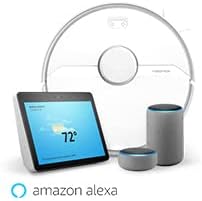
Image: The Roborock S6 Pure robot vacuum shown alongside Amazon Echo devices, illustrating its compatibility with Amazon Alexa for voice control.
ບໍາລຸງຮັກສາ
ການບໍາລຸງຮັກສາເປັນປົກກະຕິຮັບປະກັນການປະຕິບັດທີ່ດີທີ່ສຸດແລະຍືດອາຍຸຂອງເຄື່ອງດູດຝຸ່ນຫຸ່ນຍົນຂອງທ່ານ.
1. ຖັງຂີ້ເຫຍື້ອ ແລະເຄື່ອງກອງ
- ຖັງຂີ້ເຫຍື້ອຫວ່າງເປົ່າ: ຫຼັງຈາກແຕ່ລະຮອບການທໍາຄວາມສະອາດ, ເປີດຝາດ້ານເທິງ, ເອົາຖັງຂີ້ຝຸ່ນອອກ, ແລະລ້າງເນື້ອໃນຂອງມັນ.
- ການກັ່ນຕອງສະອາດ: Tap the filter to remove dust. The filter can also be rinsed with water; ensure it is completely dry before reinserting. Clean at least once a week, or more frequently if used often.
2. ແປງຫຼັກ ແລະ ແປງຂ້າງ
- ແປງຫຼັກ: Remove the main brush cover and the brush itself. Use the cleaning tool provided to cut and remove any tangled hair or debris. Clean weekly.
- ແປງດ້ານຂ້າງ: Check for tangled hair or debris. If necessary, remove the screw holding the side brush and clean it. Replace if damaged. Clean monthly.
3. Wheels and Sensors
- ລໍ້: Wipe the drive wheels and omnidirectional wheel with a dry cloth to remove dust and hair. Clean monthly.
- ເຊັນເຊີ: Gently wipe all sensors (cliff sensors, wall sensor, charging contacts) with a soft, dry cloth. Clean monthly.
4. Mop Cloth and Water Tank
- ຜ້າປູ: Remove the mop cloth after each use and wash it thoroughly. It can be hand-washed or machine-washed.
- ຖັງນໍ້າ: Empty any remaining water from the tank after each use. Rinse the tank if necessary.
ການແກ້ໄຂບັນຫາ
ອ້າງອີງໃສ່ພາກນີ້ສໍາລັບບັນຫາທົ່ວໄປແລະການແກ້ໄຂຂອງພວກເຂົາ.
| ບັນຫາ | ສາເຫດທີ່ເປັນໄປໄດ້ | ການແກ້ໄຂ |
|---|---|---|
| ຫຸ່ນຍົນບໍ່ເປີດ. | ແບັດເຕີຣີຕໍ່າ ຫຼືບໍ່ໄດ້ສາກ. | ວາງຫຸ່ນຍົນໄວ້ເທິງແທ່ນສາກໄຟ ແລະ ຮັບປະກັນວ່າມັນສາກໄຟເຕັມແລ້ວ. |
| Robot cannot return to charging dock. | Charging dock is blocked or out of range. | Ensure the charging dock has clear space around it. Move the dock to a more central location if needed. |
| ປະສິດທິພາບທໍາຄວາມສະອາດບໍ່ດີ. | Dustbin full, brushes tangled, or filter clogged. | Empty the dustbin, clean the main brush and side brush, and clean or replace the filter. |
| ຫຸ່ນຍົນຕິດຢູ່ເລື້ອຍໆ. | ອຸປະສັກ, ສາຍວ່າງ, ຫຼືດ້ານສີດໍາ. | Clear the cleaning area of obstacles. Use no-go zones in the app for problematic areas. |
| ບັນຫາການເຊື່ອມຕໍ່ແອັບຯ. | Incorrect Wi-Fi password, router issues, or robot offline. | Ensure correct Wi-Fi password. Restart your router and the robot. Re-pair the robot with the app if necessary. |
ຂໍ້ມູນຈໍາເພາະ
| ຄຸນສົມບັດ | ລາຍລະອຽດ |
|---|---|
| ຊື່ຕົວແບບ | S6Pure |
| ຍີ່ຫໍ້ | ໂຣໂບຣັອກ |
| ຂະໜາດສິນຄ້າ | 14"L x 14"W x 4"H |
| ນ້ໍາຫນັກລາຍການ | 15.17 ປອນ |
| ຊີວິດຫມໍ້ໄຟ | ເຖິງ 180 ນາທີ |
| ປະເພດການກັ່ນຕອງ | ຜ້າ |
| ວິທີການຄວບຄຸມ | ສຽງ, ແອັບ |
| ອຸປະກອນທີ່ເຂົ້າກັນໄດ້ | Amazon Echo |
| ແຫຼ່ງພະລັງງານ | ພະລັງງານຫມໍ້ໄຟ |
| ສະບັບtage | 220 ໂວນ |
| UPC | 606015769620 |
ການຮັບປະກັນແລະການສະຫນັບສະຫນູນ
ສຳລັບຂໍ້ມູນການຮັບປະກັນ ແລະ ການຊ່ວຍເຫຼືອດ້ານເຕັກນິກ, ກະລຸນາອ້າງອີງເຖິງ Roborock ຢ່າງເປັນທາງການ webເວັບໄຊ ຫຼືຕິດຕໍ່ບໍລິການລູກຄ້າຂອງເຂົາເຈົ້າໂດຍກົງ. ຮັກສາໃບຮັບເງິນການຊື້ຂອງທ່ານໄວ້ເປັນຫຼັກຖານການຊື້ສໍາລັບການຮ້ອງຂໍການຮັບປະກັນ.
ຊັບພະຍາກອນອອນໄລນ໌: www.roborock.com
ຄູ່ມືການນໍາໃຊ້ (PDF): ດາວໂຫລດຄູ່ມື PDF


