1. ຜະລິດຕະພັນເກີນview
The eKids Wired Headphones are designed for children, offering a safe and comfortable audio experience. These headphones feature a 3.5mm jack for universal compatibility and include parental volume control to protect young ears. The adjustable headband and soft ear cushions ensure a comfortable fit for extended use.

ຮູບພາບ 1.1: ເກີນview of the eKids Wired Headphones. This image displays the full product, highlighting its black and green design, the padded earcups, adjustable headband, and the attached 3.5mm audio cable.
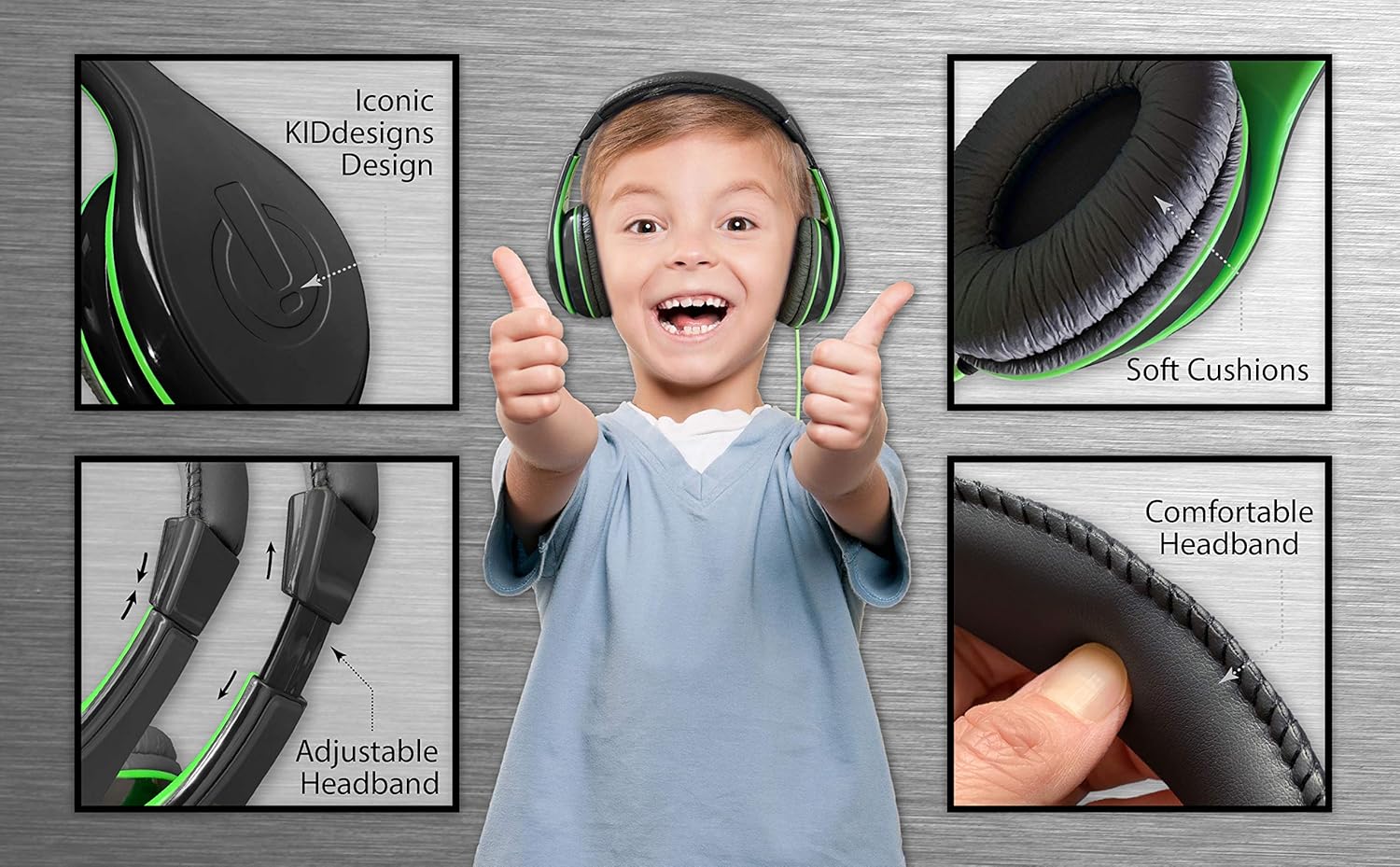
ຮູບພາບ 1.2: Key Features of the eKids Headphones. This image highlights the soft ear cushions, comfortable headband, and adjustable headband mechanism, demonstrating the design elements for user comfort.
ຄຸນນະສົມບັດທີ່ສໍາຄັນ:
- ຄວາມເຂົ້າກັນໄດ້ທົ່ວໂລກ: Connects to smartphones, tablets, and computers via a standard 3.5mm audio jack.
- ການຄວບຄຸມປະລິມານຂອງພໍ່ແມ່: Built-in switch to limit sound levels for safe listening.
- ພໍດີແບບກຳນົດເອງ: Adjustable headband and soft ear cushions to provide a personalized and comfortable fit.
- ການອອກແບບທົນທານ: Features a tangle-free cord and robust construction suitable for children's use.
2. ຕັ້ງຄ່າ
Setting up your eKids Wired Headphones is straightforward. Follow these steps to begin using your headphones:
- ແກະຫູຟັງອອກ: ເອົາຫູຟັງອອກຈາກການຫຸ້ມຫໍ່ຢ່າງລະມັດລະວັງ.
- ກໍານົດສຽງ Jack: ຊອກຫາຊ່ອງສຽບສຽງ 3.5 ມມ ຢູ່ປາຍສາຍຫູຟັງ.
- ເຊື່ອມຕໍ່ຫາອຸປະກອນ: Plug the 3.5mm audio jack into the corresponding audio port on your smartphone, tablet, computer, or other compatible audio device.
- ປັບສາຍແອວ: Gently extend or retract the headband to fit comfortably over the user's head. The ear cushions should rest fully over the ears.

ຮູບພາບ 2.1: Child connecting and using the eKids headphones with a laptop. This image illustrates the headphones in use, connected to a device, and highlights the comfortable fit for a child.
3. ຄໍາແນະນໍາການດໍາເນີນງານ
Once connected, the headphones are ready for use. Audio will play through the headphones when your device outputs sound.
- ການຫຼິ້ນສຽງ: Start playing audio (music, videos, audiobooks) on your connected device.
- Device Volume Control: Adjust the primary volume level using the controls on your connected device.
- ການປັບຫູຟັງ: Ensure the ear cushions fully cover the ears for optimal sound quality and comfort.
4. Parental Volume Control
The eKids Wired Headphones include a built-in volume limiting switch to help protect children's hearing. This feature allows you to set a maximum volume level suitable for different listening environments.
Adjusting the Volume Limiter:
- Locate the volume limiting switch on the side of one of the earcups.
- The switch typically has three settings: H (ສູງ), M (ປານກາງ), ແລະ L (ຕໍ່າ).
- Slide the switch to the desired volume level. It is recommended to use the 'L' (Low) setting for quiet environments and 'M' (Medium) for general use. The 'H' (High) setting should be used with caution and under adult supervision in noisy environments.
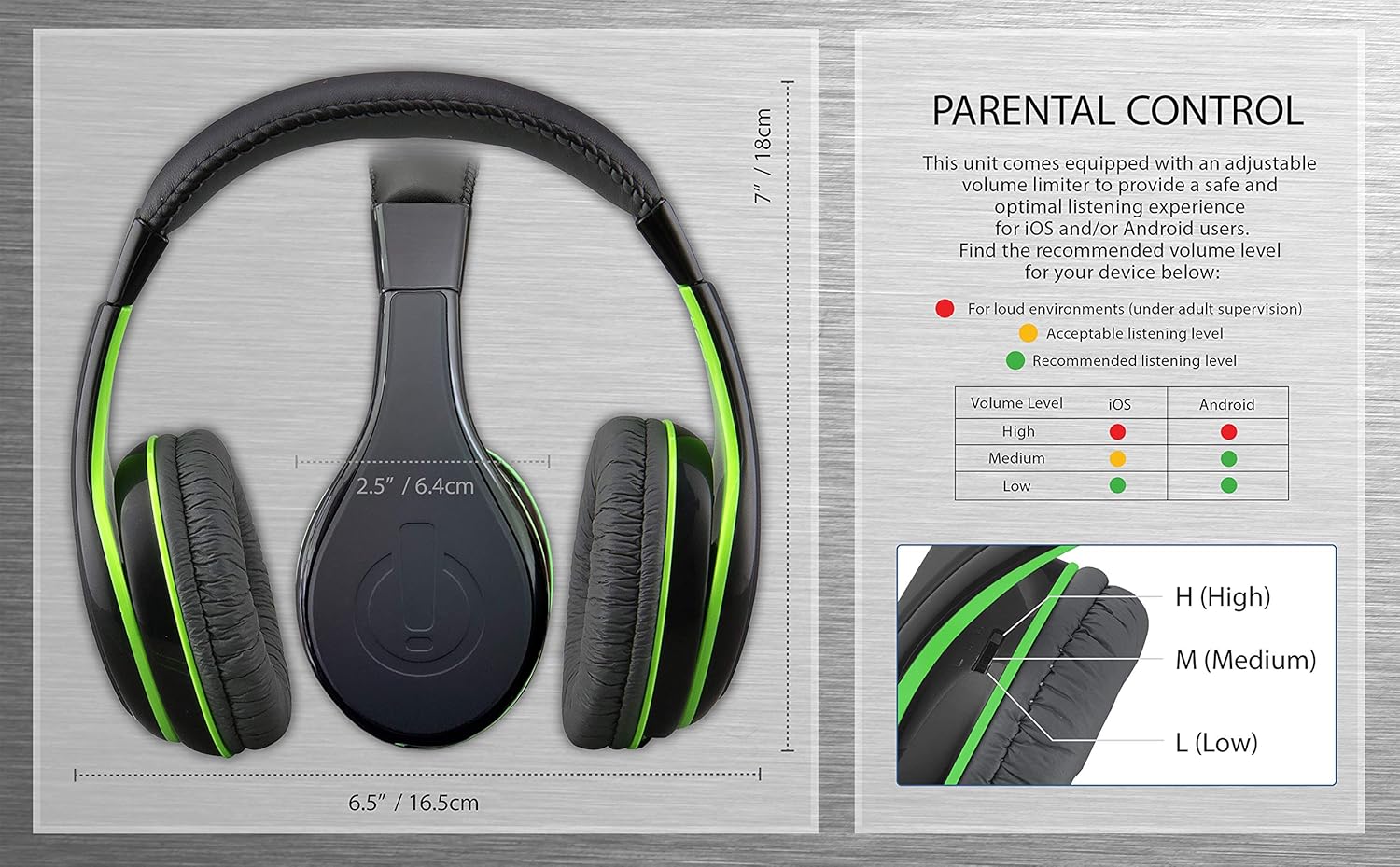
ຮູບພາບ 4.1: Parental Control Diagram. This image provides a visual guide to the headphone dimensions and details the parental volume control switch with recommended listening levels for iOS and Android devices (High, Medium, Low).
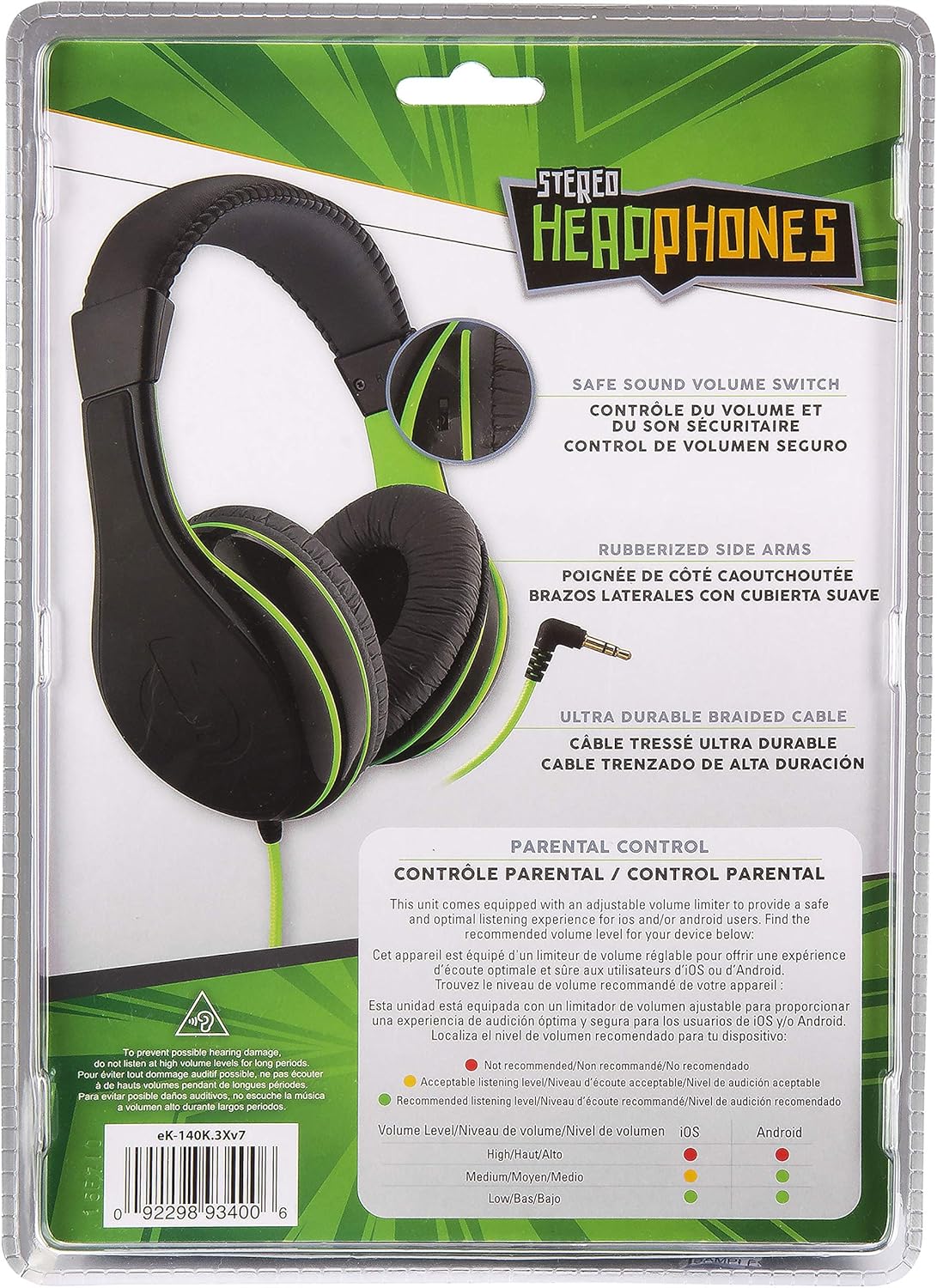
ຮູບພາບ 4.2: Volume Limiting Switch Location. This image shows the back of the product packaging, clearly indicating the location of the adjustable safe sound volume switch on the headphone earcup.
ສຳຄັນ: Always supervise children when they are using headphones, especially when adjusting volume levels. Prolonged exposure to loud sounds can cause hearing damage.
5. ບໍາລຸງຮັກສາ
Proper care and maintenance will extend the life of your eKids Wired Headphones.
- ທໍາຄວາມສະອາດ: Use a soft, dry cloth to wipe the headphones. Do not use liquid cleaners or abrasive materials.
- ການເກັບຮັກສາ: Store the headphones in a clean, dry place when not in use. Avoid extreme temperatures.
- ການດູແລສາຍໄຟ: Do not pull on the cable to disconnect from a device. Always grasp the plug. Avoid sharp bends or kinks in the cable.
- ການເປີດເຜີຍນ້ໍາ: ຫູຟັງເຫຼົ່ານີ້ບໍ່ທົນທານຕໍ່ນ້ໍາ. ຫຼີກເວັ້ນການສໍາຜັດກັບນ້ໍາຫຼືຄວາມຊຸ່ມຊື່ນຫຼາຍເກີນໄປ.
6. ການແກ້ໄຂບັນຫາ
If you encounter issues with your eKids Wired Headphones, refer to the following common solutions:
| ບັນຫາ | ການແກ້ໄຂທີ່ເປັນໄປໄດ້ |
|---|---|
| ບໍ່ມີສຽງ |
|
| ສຽງບິດເບືອນຫຼືບໍ່ຈະແຈ້ງ |
|
| ຫູຟັງບໍ່ສະບາຍ |
|
7. ຂໍ້ມູນຈໍາເພາະ
| ຄຸນສົມບັດ | ລາຍລະອຽດ |
|---|---|
| ຊື່ຕົວແບບ | eKids Wired Headphones Black |
| ໝາຍເລກຕົວແບບ | eK-140B.3Xv7 |
| ຍີ່ຫໍ້ | eKids |
| ເຕັກໂນໂລຊີການເຊື່ອມຕໍ່ | ມີສາຍ (ແຈັກ 3.5 ມມ) |
| ການຈັດວາງຫູ | ເກີນຫູ |
| ປະເພດການຄວບຄຸມ | Volume Control (Parental Limiter) |
| ຄຸນສົມບັດສາຍ | Tangle ຟຣີ |
| ຊ່ວງຄວາມຖີ່ | 20 Hz - 20,000 Hz |
| impedance | 32 ໂອມ |
| ວັດສະດຸ | ພາດສະຕິກ |
| ນ້ໍາຫນັກລາຍການ | 8.8 ອອນ |
| UPC | 092298934006 |
| ອົງປະກອບລວມ | ຫູຟັງແບບມີສາຍ |
8. ການຮັບປະກັນແລະການສະຫນັບສະຫນູນ
For warranty information or technical support, please refer to the contact details provided with your product packaging or visit the official eKids webເວັບໄຊ. ຮັກສາໃບຮັບເງິນການຊື້ຂອງທ່ານສໍາລັບການຮ້ອງຂໍການຮັບປະກັນ.
ຜູ້ຜະລິດ: ການອອກແບບເດັກນ້ອຍ


