1. ບົດແນະນຳ
The Kami Nio Wireless Bluetooth Speaker is designed to provide high-quality audio from your mobile device. This manual provides essential information for setting up, operating, and maintaining your speaker, ensuring optimal performance and longevity.
ຄຸນນະສົມບັດທີ່ສໍາຄັນ:
- Wireless Bluetooth connectivity with a 32 ft. signal range.
- ເວລາຫຼິ້ນດົນເຖິງ 6 ຊົ່ວໂມງດ້ວຍການສາກຄັ້ງດຽວ.
- Stereo sound with dual drivers for enhanced audio experience.
- Integrated passive subwoofer bass amplifier for rich low-end frequencies.
- Convenient volume and music control directly on the device.
2. ເນື້ອໃນຊຸດ
ກະລຸນາກວດເບິ່ງຊຸດສຳລັບລາຍການຕໍ່ໄປນີ້:
- Kami Nio Wireless Bluetooth Speaker (1 unit)
- USB Charging Cable (quantity not specified, typically one)
- ຄູ່ມືຜູ້ໃຊ້ (ເອກະສານນີ້)
3. ຂໍ້ມູນຄວາມປອດໄພ
ເພື່ອຮັບປະກັນການປະຕິບັດງານທີ່ປອດໄພແລະປ້ອງກັນຄວາມເສຍຫາຍ, ກະລຸນາປະຕິບັດຕາມຄວາມລະມັດລະວັງຕໍ່ໄປນີ້:
- ຢ່າເຮັດໃຫ້ລໍາໂພງຖືກນໍ້າ, ຄວາມຊຸ່ມຊື່ນ, ຫຼືອຸນຫະພູມທີ່ຮຸນແຮງ.
- ຫຼີກລ່ຽງການລຸດລົງ ຫຼື ວາງລຳໂພງຕໍ່ກັບຜົນກະທົບທີ່ຮຸນແຮງ.
- ຢ່າພະຍາຍາມຖອດປະກອບ ຫຼື ສ້ອມແປງລຳໂພງດ້ວຍຕົນເອງ. ຕິດຕໍ່ພະນັກງານບໍລິການທີ່ມີຄຸນວຸດທິ.
- ເກັບຮັກສາລຳໂພງໃຫ້ຫ່າງຈາກແຫຼ່ງຄວາມຮ້ອນເຊັ່ນ: ໝໍ້ນ້ຳຄວາມຮ້ອນ, ເຕົາໄຟ ຫຼື ເຄື່ອງໃຊ້ໄຟຟ້າທີ່ຜະລິດຄວາມຮ້ອນອື່ນໆ.
- ໃຊ້ສະເພາະສາຍສາກໄຟ ແລະ ແຫຼ່ງພະລັງງານທີ່ລະບຸໄວ້ເທົ່ານັ້ນ.
4. ຜະລິດຕະພັນເກີນview
Familiarize yourself with the physical components and controls of your Kami Nio speaker.

ຮູບທີ 4.1: ດ້ານໜ້າ view of the Kami Nio Wireless Bluetooth Speaker, showcasing its gray fabric grille and rounded rectangular shape.
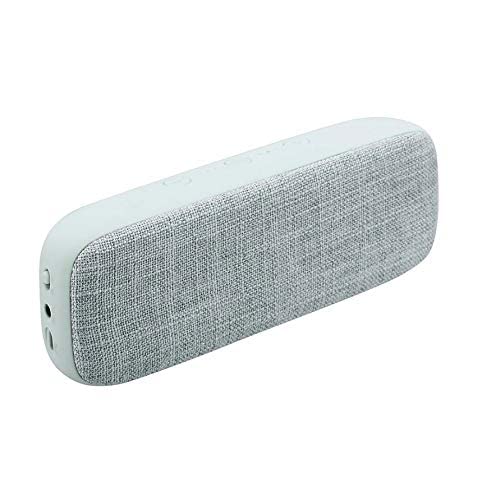
ຮູບທີ 4.2: ມຸມ view of the Kami Nio Wireless Bluetooth Speaker, highlighting the textured gray fabric covering the speaker grille and the smooth gray casing.
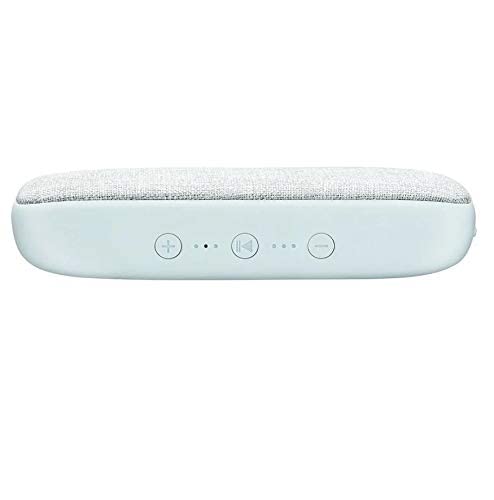
ຮູບທີ 4.3: ເທິງ view of the Kami Nio Wireless Bluetooth Speaker, displaying the control panel with buttons for volume up (+), previous track (|<), play/pause/next track (>||), and volume down (-), along with LED indicators.
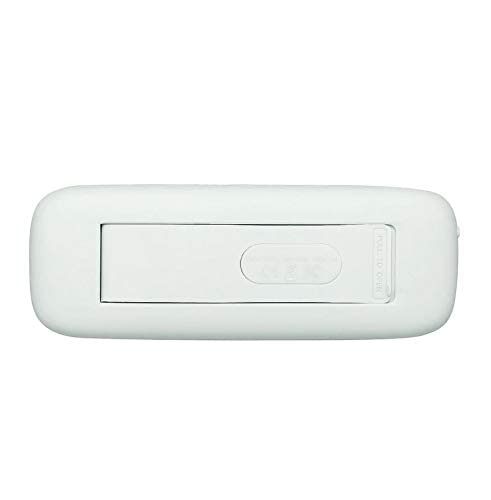
ຮູບທີ 4.4: ລຸ່ມ view of the Kami Nio Wireless Bluetooth Speaker, revealing a compartment with a 'PULL TO OPEN' tab, likely for battery access or a port cover.
5. ຕັ້ງຄ່າ
5.1. ການສາກໄຟ ລຳ ໂພງ
- Locate the charging port on the speaker (refer to Figure 4.4 for potential port location).
- ເຊື່ອມຕໍ່ສາຍສາກ USB ທີ່ໃຫ້ມາກັບຊ່ອງສາກໄຟຂອງລຳໂພງ.
- ເຊື່ອມຕໍ່ອີກສົ້ນຂອງສາຍ USB ກັບອະແດັບເຕີໄຟ USB ທີ່ເຂົ້າກັນໄດ້ (ບໍ່ລວມ) ຫຼືພອດ USB ຂອງຄອມພິວເຕີ.
- The LED indicator (refer to Figure 4.3) will illuminate to show charging status. It typically turns off or changes color when fully charged.
- ລໍຖ້າປະມານ 2-3 ຊົ່ວໂມງເພື່ອໃຫ້ສາກໄຟເຕັມ.
5.2. ການຈັບຄູ່ Bluetooth
- ເປີດ: Press and hold the power button (location not explicitly shown, typically integrated with play/pause or a separate button) until the speaker powers on and the Bluetooth indicator LED starts flashing, indicating pairing mode.
- ເປີດໃຊ້ Bluetooth: On your mobile device (smartphone, tablet, laptop), go to the Bluetooth settings and ensure Bluetooth is enabled.
- ເລືອກລຳໂພງ: In the list of available devices, select "Kami Nio" (or similar name).
- ຢືນຢັນການເຊື່ອມຕໍ່: Once paired, the Bluetooth indicator LED on the speaker will stop flashing and remain solid, and you may hear an audible confirmation tone.
- Your Kami Nio speaker is now ready to play audio.
6. ປະຕິບັດການລໍາໂພງ
Once paired, you can control your music directly from the speaker or your connected device.
6.1. Basic Controls (Refer to Figure 4.3):
- ເປີດ/ປິດ: Press and hold the power button (often combined with Play/Pause) for a few seconds.
- ຫຼິ້ນ/ຢຸດ: Press the Play/Pause button (▶‖) once to play or pause audio.
- ເພງຕໍ່ໄປ: Press and hold the Play/Pause button (▶‖) for 2 seconds to skip to the next track.
- ຕິດຕາມກ່ອນ ໜ້າ ນີ້: Press the Previous Track button (|<) once to go to the beginning of the current track or the previous track.
- ປະລິມານຂຶ້ນ: Press the Volume Up button (+) to increase the volume.
- ປະລິມານລົງ: Press the Volume Down button (-) to decrease the volume.
7. ບໍາລຸງຮັກສາ
Proper care will extend the life of your Kami Nio speaker.
- ທໍາຄວາມສະອາດ: ໃຊ້ຜ້າອ່ອນໆແຫ້ງເຊັດດ້ານນອກຂອງລຳໂພງ. ຢ່າໃຊ້ນໍ້າຢາເຮັດຄວາມສະອາດທີ່ມີສານຂັດ, ຕົວລະລາຍ ຫຼື ສານເຄມີຮຸນແຮງ.
- ການເກັບຮັກສາ: ເມື່ອບໍ່ໄດ້ໃຊ້ເປັນເວລາດົນ, ໃຫ້ເກັບຮັກສາລຳໂພງໄວ້ໃນບ່ອນເຢັນ, ແຫ້ງ, ຫ່າງຈາກແສງແດດໂດຍກົງ ແລະ ອຸນຫະພູມທີ່ຮ້າຍກາດ.
- ການດູແລຫມໍ້ໄຟ: To maintain battery health, avoid fully discharging the battery frequently. Charge the speaker regularly, even if not in use.
8. ການແກ້ໄຂບັນຫາ
ຖ້າທ່ານພົບບັນຫາກັບລຳໂພງຂອງທ່ານ, ລອງໃຊ້ວິທີແກ້ໄຂຕໍ່ໄປນີ້:
- ບໍ່ມີພະລັງງານ: Ensure the speaker is charged. Connect it to a power source and allow it to charge for at least 30 minutes before attempting to power on.
- ບໍ່ສາມາດຈັບຄູ່ໄດ້:
- Ensure the speaker is in pairing mode (Bluetooth LED flashing).
- ໃຫ້ແນ່ໃຈວ່າ Bluetooth ຖືກເປີດໃຊ້ຢູ່ໃນອຸປະກອນຂອງທ່ານ.
- Move the speaker closer to your device (within 32 ft.).
- ປິດ ແລະເປີດທັງລຳໂພງ ແລະ Bluetooth ຂອງອຸປະກອນຂອງທ່ານ.
- Forget/remove the speaker from your device's Bluetooth list and try pairing again.
- ບໍ່ມີສຽງ:
- ກວດເບິ່ງລະດັບສຽງໃນທັງລຳໂພງ ແລະອຸປະກອນທີ່ເຊື່ອມຕໍ່ຂອງທ່ານ.
- ໃຫ້ແນ່ໃຈວ່າລຳໂພງໄດ້ຖືກຈັບຄູ່ ແລະ ເຊື່ອມຕໍ່ກັບອຸປະກອນຂອງທ່ານສຳເລັດແລ້ວ.
- ລອງຫຼິ້ນສຽງຈາກແອັບພລິເຄຊັນ ຫຼືແຫຼ່ງອື່ນໃນອຸປະກອນຂອງທ່ານ.
- ຄຸນນະພາບສຽງບໍ່ດີ/ການເຊື່ອມຕໍ່ບໍ່ສະໝໍ່າສະເໝີ:
- ຍ້າຍລຳໂພງເຂົ້າໃກ້ອຸປະກອນຂອງທ່ານ.
- Avoid obstacles between the speaker and your device (e.g., walls, large metal objects).
- Minimize interference from other wireless devices (Wi-Fi routers, microwaves).
- ກວດໃຫ້ແນ່ໃຈວ່າລຳໂພງຖືກສາກເຕັມແລ້ວ.
9. ຂໍ້ມູນຈໍາເພາະ
| ຄຸນສົມບັດ | ຂໍ້ມູນຈໍາເພາະ |
|---|---|
| ຊື່ຕົວແບບ | ນີໂອ |
| ໝາຍເລກຕົວແບບ | KNBTSGY |
| ຍີ່ຫໍ້ | ຄາມິ |
| ປະເພດລຳໂພງ | Subwoofer |
| ຄຸນນະສົມບັດພິເສດ | Bluetooth, Wireless |
| ເຕັກໂນໂລຊີການສື່ສານໄຮ້ສາຍ | Bluetooth |
| ເຕັກໂນໂລຊີການເຊື່ອມຕໍ່ | Bluetooth |
| ອຸປະກອນທີ່ເຂົ້າກັນໄດ້ | ສາກົນ |
| ແຫຼ່ງພະລັງງານ | ພະລັງງານຫມໍ້ໄຟ |
| ຮູບແບບການອອກສຽງ | ສະເຕຣິໂອ |
| ການຕັ້ງຄ່າຊ່ອງສຽງອ້ອມຮອບ | 1 |
| ປະເພດການຕິດຕັ້ງ | ພູຕັ້ງໂຕະ |
| ຂະໜາດສິນຄ້າ (LxWxH) | 12.3 x 3.7 x 8.5 cm |
| ນ້ໍາຫນັກລາຍການ | 562 g (0.56 ກິໂລກຣາມ) |
| ຜູ້ຜະລິດ | Teqtronix International General Trading Llc |
| ປະເທດຕົ້ນກໍາເນີດ | ສະຫະລັດ |
10. ການຮັບປະກັນແລະການສະຫນັບສະຫນູນ
ສຳລັບຂໍ້ມູນການຮັບປະກັນ ແລະ ການສະໜັບສະໜູນລູກຄ້າ, ກະລຸນາອ້າງອີງເອກະສານທີ່ມາພ້ອມກັບການຊື້ຂອງທ່ານ ຫຼື ຕິດຕໍ່ຮ້ານຄ້າປີກ. ເກັບຫຼັກຖານການຊື້ຂອງທ່ານໄວ້ສຳລັບການຮຽກຮ້ອງການຮັບປະກັນໃດໆ.
For further assistance, you may also visit the official Kami webເວັບໄຊ ຫຼືຕິດຕໍ່ພະແນກບໍລິການລູກຄ້າຂອງເຂົາເຈົ້າ.


