ແນະນຳ
Welcome to the user manual for your Picun Elite P80S Wireless Headset. This guide provides detailed instructions for setup, operation, maintenance, and troubleshooting to ensure you get the most out of your device. Please read this manual thoroughly before using the headset.
ເນື້ອໃນຊຸດ
- Picun Elite P80S Headset
- Detachable AUX Microphone
- ສາຍສາກ USB
- AUX Cable for Wired Transmission

Image: Picun Elite P80S Wireless Headset with detachable microphone, showcasing its design and included microphone.
ສິນຄ້າເກີນview
ອົງປະກອບ ແລະ ການຄວບຄຸມຂອງຫູຟັງ
The Picun Elite P80S headset features an ergonomic design with easy-to-access media buttons for various functions. These include controls for music playback, call management, vibration mode, LED light display, and volume adjustments.

Image: The Picun Elite P80S Wireless Headset shown in its folded configuration, highlighting its portable design.

Image: The Picun Elite P80S Wireless Headset displayed on a stand, providing a clear view of its over-ear design, earcups, and adjustable headband.
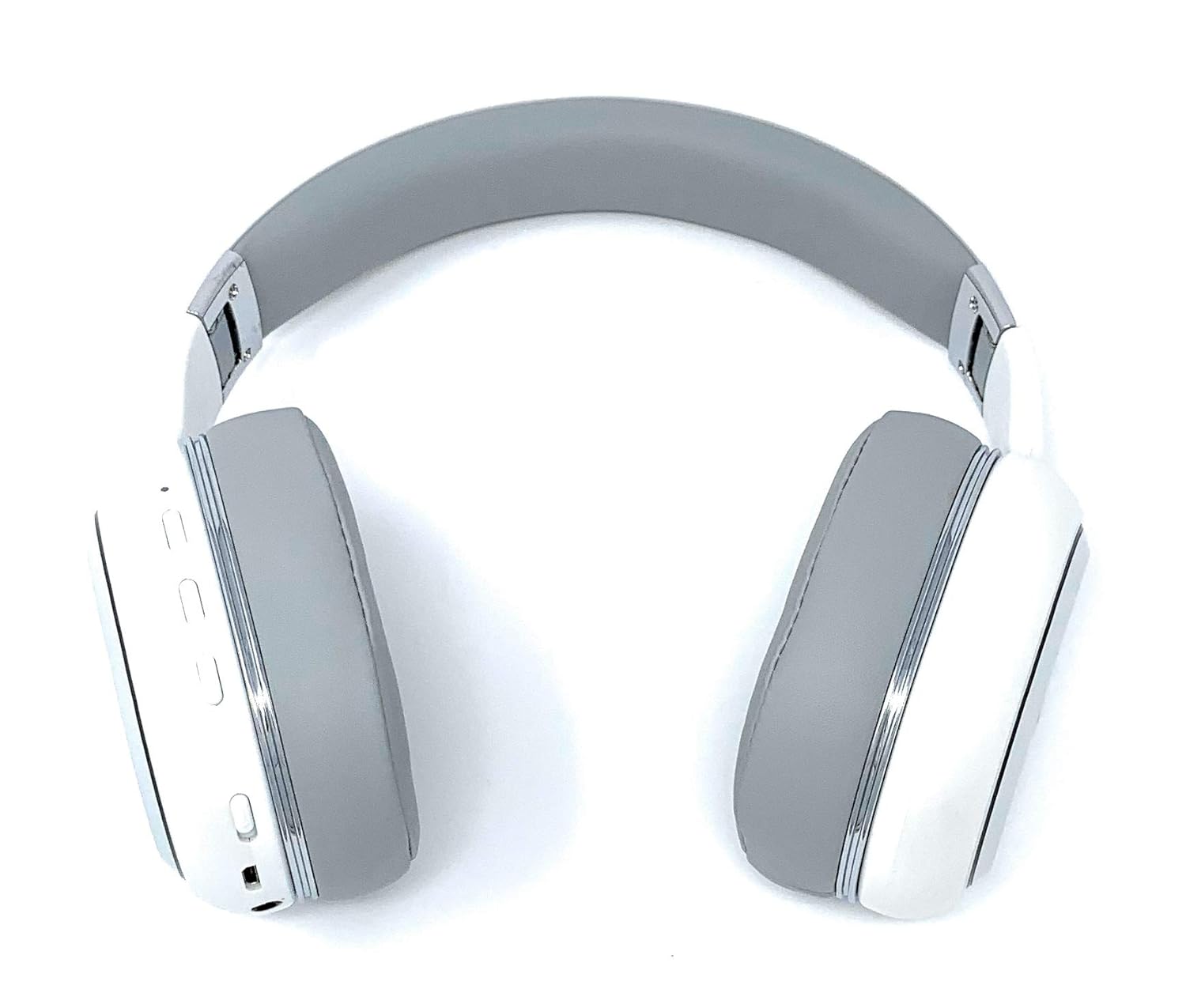
Image: A rear perspective of the Picun Elite P80S Wireless Headset, illustrating the placement of control buttons on the earcup.

Image: A detailed close-up of the right earcup hinge and the 'R' indicator on the Picun Elite P80S Wireless Headset, showing construction details.
ຕັ້ງຄ່າ
ກຳລັງສາກຫູຟັງ
Before initial use, fully charge the headset. Use the provided USB charging cable with any compatible USB adapter or device.
- Connect the USB charging cable to the headset's charging port.
- ເຊື່ອມຕໍ່ອີກສົ້ນຂອງສາຍ USB ກັບແຫຼ່ງພະລັງງານ.
- A full charge provides approximately 40 hours of game time or 60 hours of music/media playback in wireless mode.
ການຈັບຄູ່ Bluetooth
To connect your headset wirelessly:
- ຮັບປະກັນຫູຟັງຖືກປິດໃຊ້ງານ.
- ກົດປຸ່ມເປີດປິດຄ້າງໄວ້ຈົນກວ່າຕົວຊີ້ LED ຈະກະພິບ, ສະແດງເຖິງໂໝດການຈັບຄູ່.
- ໃນອຸປະກອນຂອງທ່ານ (ໂທລະສັບສະຫຼາດ, ແທັບເລັດ, ຄອມພິວເຕີ), ເປີດ Bluetooth ແລະຊອກຫາອຸປະກອນທີ່ມີຢູ່.
- Select "Picun P80S" from the list of found devices.
- ເມື່ອເຊື່ອມຕໍ່ແລ້ວ, ໄຟ LED ຈະສະແດງໄຟທີ່ຄົງທີ່ ຫຼື ກະພິບຊ້າໆ.
ການເຊື່ອມຕໍ່ສາຍໄຟ
For a wired connection, use the provided AUX cable:
- Connect one end of the AUX cable to the headset's AUX port.
- Connect the other end to your audio device's 3.5mm audio jack.
- The headset can be used indefinitely in wired mode, regardless of battery charge.
ການຕິດໄມໂຄຣໂຟນ
The headset includes a detachable microphone for clear communication:
- Locate the microphone port on the headset.
- Gently insert the detachable microphone into the port until it clicks into place.
- The microphone is designed to reduce ambient noise for high-definition vocals.
ຄໍາແນະນໍາການດໍາເນີນງານ
ເປີດ/ປິດ
- ເປີດ: ກົດປຸ່ມເປີດປິດຄ້າງໄວ້ສອງສາມວິນາທີຈົນກວ່າຕົວຊີ້ LED ຈະສະຫວ່າງຂຶ້ນ.
- ປິດພະລັງງານ: Press and hold the power button for a few seconds until the LED indicator turns off.
ເພັງ Playback
- ຫຼິ້ນ/ຢຸດ: ກົດປຸ່ມຫຼິ້ນ/ຢຸດຊົ່ວຄາວໜຶ່ງຄັ້ງ.
- ເພງຕໍ່ໄປ: Press and hold the 'Volume Up' button.
- ຕິດຕາມກ່ອນ ໜ້າ ນີ້: Press and hold the 'Volume Down' button.
ການຄຸ້ມຄອງການໂທ
- ຮັບ/ສາຍໂທ: ກົດປຸ່ມ Multi-function ຄັ້ງດຽວ.
- ປະຕິເສດການໂທ: ກົດປຸ່ມຫຼາຍຟັງຊັນຄ້າງໄວ້ 2 ວິນາທີ.
Dual Shock/Vibration Mode
This mode enhances audio with deep bass and vibrations, ideal for music, movies, and gaming.
- ເປີດໃຊ້/ປິດໃຊ້ງານ: Use the dedicated 'Vibration/Dual Shock Mode On-Off toggle switch' on the headset.
ຈໍສະແດງຜົນ LED
The headset features an LED light display.
- ເປີດ/ປິດ: Use the dedicated 'LED Light Display On-Off button' on the headset.
ການຄວບຄຸມປະລິມານ
- ເພີ່ມປະລິມານ: ກົດປຸ່ມ 'ເພີ່ມລະດັບສຽງ'.
- ຫຼຸດລະດັບສຽງລົງ: ກົດປຸ່ມ 'ຫຼຸດສຽງລົງ'.
ບໍາລຸງຮັກສາ
ທໍາຄວາມສະອາດ
- ເຊັດຫູຟັງດ້ວຍຜ້າອ່ອນ, ແຫ້ງ.
- ຢ່າໃຊ້ເຄື່ອງເຮັດຄວາມສະອາດຂັດຫຼືສານລະລາຍ.
- Keep the charging port and audio jacks free of dust and debris.
ການເກັບຮັກສາ
- ເກັບຮັກສາຊຸດຫູຟັງໄວ້ໃນບ່ອນທີ່ເຢັນ, ແຫ້ງ, ຫ່າງຈາກແສງແດດໂດຍກົງ ແລະອຸນຫະພູມທີ່ຮຸນແຮງ.
- When not in use for extended periods, ensure the headset is fully charged before storing.
ການແກ້ໄຂບັນຫາ
ບໍ່ມີພະລັງງານ
- ກວດໃຫ້ແນ່ໃຈວ່າຊຸດຫູຟັງຖືກສາກເຕັມແລ້ວ.
- Verify the charging cable and power source are functioning correctly.
ບໍ່ມີສຽງ
- ກວດເບິ່ງລະດັບສຽງໃນທັງຊຸດຫູຟັງ ແລະອຸປະກອນທີ່ເຊື່ອມຕໍ່ຂອງທ່ານ.
- If using Bluetooth, ensure the headset is properly paired and connected.
- If using a wired connection, ensure the AUX cable is securely plugged into both the headset and the audio source.
- ທົດສອບດ້ວຍແຫຼ່ງສຽງ ຫຼືອຸປະກອນອື່ນ.
ບັນຫາການຈັບຄູ່ Bluetooth
- Ensure the headset is in pairing mode (LED flashing).
- ປິດ ແລະເປີດ Bluetooth ໃນອຸປະກອນຂອງທ່ານ.
- ລຶບລ້າງການເຊື່ອມຕໍ່ Bluetooth ທີ່ຜ່ານມາຢູ່ໃນອຸປະກອນຂອງທ່ານ ແລະລອງຈັບຄູ່ອີກຄັ້ງ.
- Ensure the headset is within the effective range of your Bluetooth device.
ຂໍ້ມູນຈໍາເພາະ
| ຄຸນສົມບັດ | ລາຍລະອຽດ |
|---|---|
| ຊື່ຕົວແບບ | Elite P80S |
| ເຕັກໂນໂລຊີການເຊື່ອມຕໍ່ | Bluetooth |
| ເຕັກໂນໂລຊີການສື່ສານໄຮ້ສາຍ | Bluetooth |
| ອົງປະກອບລວມ | Headset, Detachable AUX Microphone, USB Charging Cable, AUX Cable for Wired Transmission |
| ຊ່ວງອາຍຸ (ລາຍລະອຽດ) | ຜູ້ໃຫຍ່ |
| ວັດສະດຸ | ໜັງ Faux |
| ປະເພດການຄວບຄຸມ | ການຄວບຄຸມລະດັບສຽງ, ຣີໂໝດ |
| ຄຸນສົມບັດສາຍ | ຖອດອອກໄດ້ |
| ນ້ໍາຫນັກລາຍການ | 820 g (0.82 ກິໂລກຣາມ) |
| ຈໍານວນລາຍການ | 1 |
| ຄຸນນະສົມບັດພິເສດ | ການຍົກເລີກສິ່ງລົບກວນ |
| ຜູ້ຜະລິດ | Picun |
| ເວທີຮາດແວ | ຄອນໂຊນເກມ |
| ຮູບແບບໄມໂຄຣໂຟນ | Built-In, Detachable AUX Microphone |
| ຕ້ອງໃຊ້ແບັດເຕີຣີ | ບໍ່ (ແບັດເຕີຣີ້ທີ່ສາມາດສາກໄຟໄດ້ພາຍໃນ) |
| ປັດໄຈແບບຟອມ | ເກີນຫູ |
| ສີ | ສີຂາວ |
| ການຄວບຄຸມສິ່ງລົບກວນ | Active Noise Cancellation |
| Jack ຫູຟັງ | Jack ຂະ ໜາດ 3.5 ມມ |
ຂໍ້ມູນການຮັບປະກັນ
The Picun Elite P80S Wireless Headset is covered by a manufacturer's warranty. For specific details regarding warranty terms, duration, and claims process, please refer to the warranty policy provided at the time of purchase or contact Picun customer support.
ການຊ່ວຍເຫຼືອລູກຄ້າ
If you encounter any issues not covered in this manual or require further assistance, please contact Picun customer support through their official website or the contact information provided with your product packaging. Please have your product model (P80S) and purchase details ready when contacting support.


