1. ບົດແນະນຳ
This manual provides essential information for the safe and efficient operation of your RAGGIE RGS 1500W 12V Solar Power Inverter. This device is designed to convert 12V DC electricity from batteries or solar panels into 220V AC electricity, allowing you to power standard household appliances from a DC power source. Please read this manual thoroughly before installation and use.
2. ຂໍ້ມູນຄວາມປອດໄພ
ຄຳເຕືອນ: ການບໍ່ປະຕິບັດຕາມຄຳແນະນຳດ້ານຄວາມປອດໄພເຫຼົ່ານີ້ອາດຈະເຮັດໃຫ້ເກີດໄຟຟ້າຊັອດ, ໄຟໄໝ້, ການບາດເຈັບສາຫັດ, ຫຼື ການເສຍຊີວິດໄດ້.
- ໃຫ້ແນ່ໃຈວ່າອິນເວີເຕີຖືກຕິດຕັ້ງຢູ່ໃນສະພາບແວດລ້ອມທີ່ມີລະບາຍອາກາດດີ, ແຫ້ງ ແລະ ເຢັນ, ຫ່າງຈາກແສງແດດໂດຍກົງ, ແຫຼ່ງຄວາມຮ້ອນ ແລະ ວັດສະດຸໄວໄຟ.
- Do not expose the inverter to rain, moisture, or liquids.
- Connect the inverter only to a 12V DC power source. Connecting to a different voltage ອາດຈະທໍາລາຍຫນ່ວຍງານ.
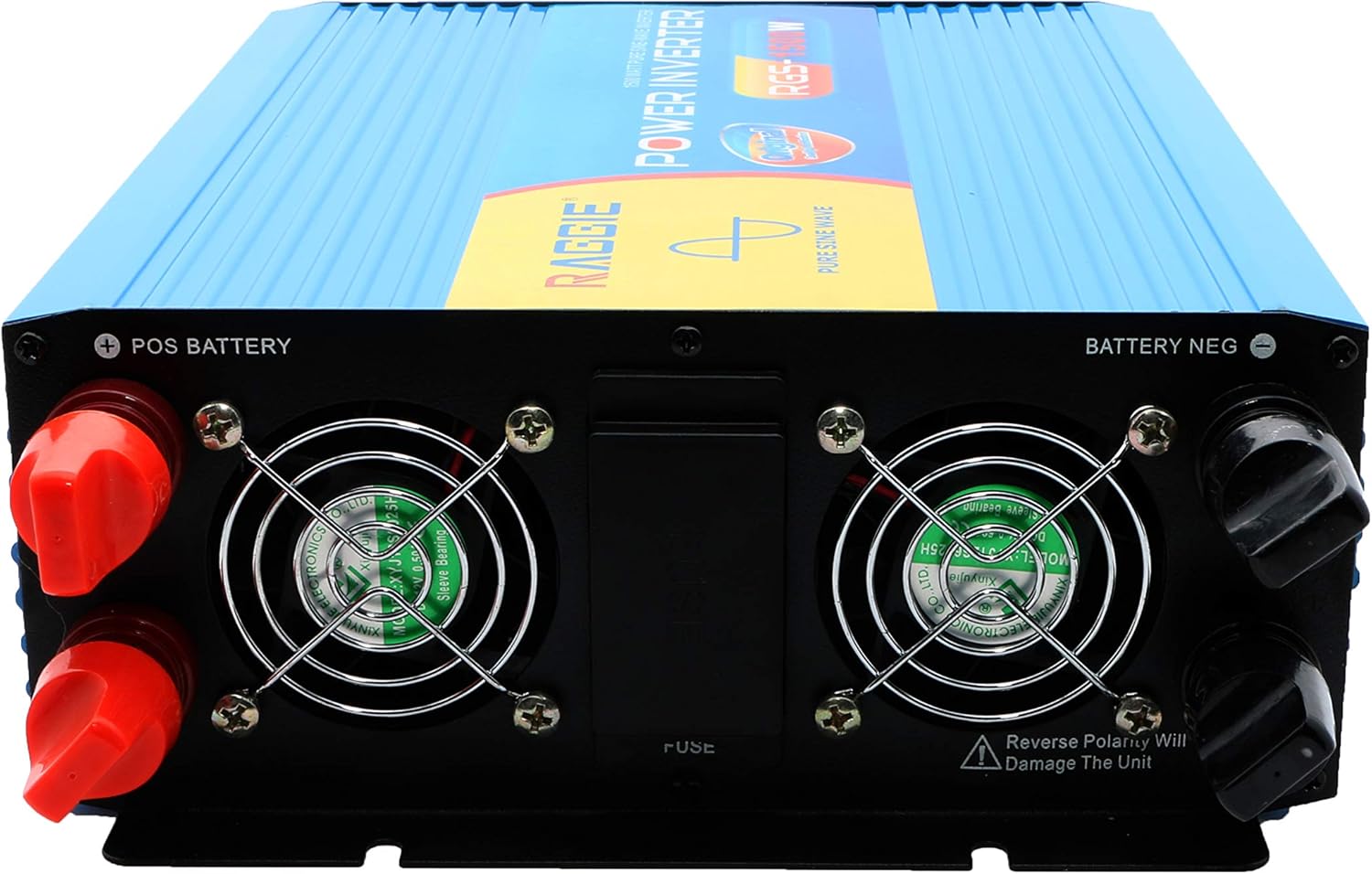
- Always connect the battery terminals with correct polarity: positive (+) to positive, and negative (-) to negative. Reverse polarity will damage the unit.
- ຮັບປະກັນວ່າການເຊື່ອມຕໍ່ທັງໝົດມີຄວາມແໜ້ນໜາ ແລະ ປອດໄພເພື່ອປ້ອງກັນການເກີດຄວາມຮ້ອນເກີນ ແລະ ການເຊື່ອມ.
- ຫ້າມເປີດ inverter ຄasing. ບໍ່ມີສ່ວນທີ່ຜູ້ໃຊ້ບໍລິການພາຍໃນ. ອ້າງອີງການບໍລິການທັງໝົດໃຫ້ກັບບຸກຄະລາກອນທີ່ມີຄຸນວຸດທິ.
- ໃຫ້ເດັກນ້ອຍຢູ່ຫ່າງຈາກ inverter ແລະການເຊື່ອມຕໍ່ຂອງມັນ.
- Always disconnect the DC power source before performing any maintenance or troubleshooting.
- ໃຫ້ແນ່ໃຈວ່າ inverter ຖືກຮາກຖານຢ່າງຖືກຕ້ອງ.
3. ຜະລິດຕະພັນເກີນview
The RAGGIE RGS 1500W inverter features robust construction and essential ports for reliable power conversion.
3.1 ອົງປະກອບຂອງແຜງດ້ານຫລັງ
The rear panel includes the DC input terminals for connecting to your 12V battery or solar array, along with cooling fans and a fuse compartment.
3.2 ອົງປະກອບຂອງກະດານຫນ້າ
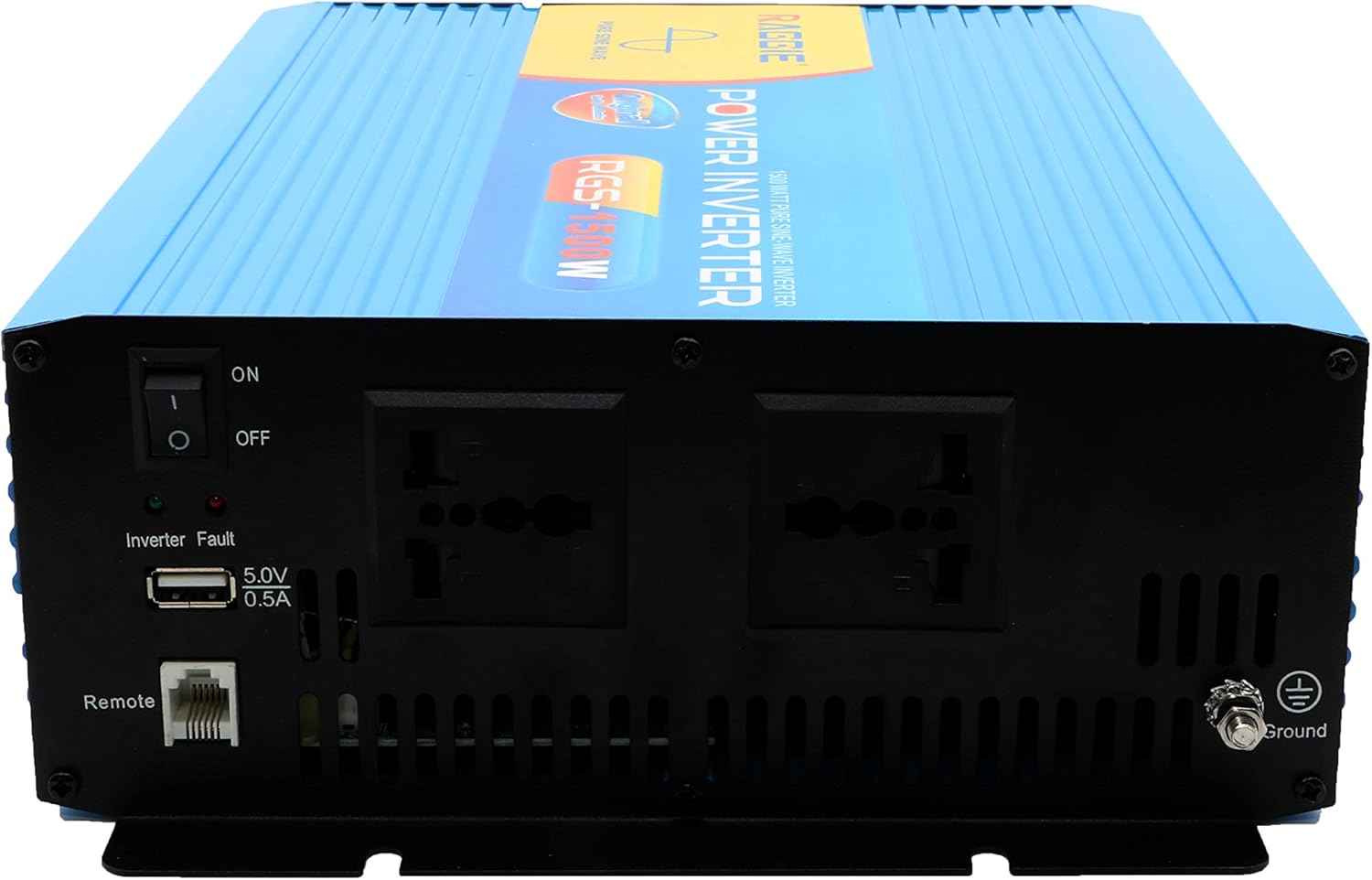
The front panel provides the AC output sockets for connecting your appliances, the main power switch, a USB charging port, and a remote control port.
4. ການຕິດຕັ້ງແລະການຕິດຕັ້ງ
Follow these steps for proper installation of your inverter.
4.1 ການຫຸ້ມຫໍ່ແລະການກວດກາ
- Carefully remove the inverter from its packaging.
- Inspect the unit for any signs of damage during transit. If damage is found, do not proceed with installation and contact your supplier.
- ຮັບປະກັນວ່າອຸປະກອນເສີມທັງໝົດມີຢູ່.
4.2 ການຈັດວາງ
- Choose a location that is dry, cool, and well-ventilated.
- Avoid areas with direct sunlight, high temperatures, or excessive dust.
- Mount the inverter securely on a stable surface.
- Ensure there is adequate clearance around the cooling fans for proper airflow.
4.3 DC Input Connection (Battery/Solar)
IMPORTANT: Ensure the inverter's power switch is in the OFF position before making any connections.
- Use appropriate gauge cables for your 12V DC input. Refer to the specifications for recommended cable sizes.
- ເຊື່ອມຕໍ່ ສີແດງ (+) cable to the positive terminal of your 12V battery/solar array.
- ເຊື່ອມຕໍ່ປາຍອື່ນໆຂອງ ສີແດງ (+) cable to the positive terminal (POS BATTERY) on the inverter's rear panel.
- ເຊື່ອມຕໍ່ ສີດໍາ (-) cable to the negative terminal of your 12V battery/solar array.
- ເຊື່ອມຕໍ່ປາຍອື່ນໆຂອງ ສີດໍາ (-) cable to the negative terminal (BATTERY NEG) on the inverter's rear panel.
- ໃຫ້ແນ່ໃຈວ່າການເຊື່ອມຕໍ່ທັງຫມົດແຫນ້ນແຫນ້ນແລະປອດໄພ.
4.4 ການຖົມດິນ
For safety, the inverter must be properly grounded.
- Connect a grounding wire from the ground terminal on the inverter's front panel to a suitable earth ground point (e.g., vehicle chassis, ground rod).
4.5 AC Output Connection (Appliances)
- Plug your AC appliances directly into the AC output sockets on the inverter's front panel.
- ໃຫ້ແນ່ໃຈວ່າວັດທັງຫມົດtage of all connected appliances does not exceed the inverter's continuous output power (1500W).
5. ຄໍາແນະນໍາການດໍາເນີນງານ
5.1 Turning On the Inverter
- Ensure all DC and AC connections are correctly made and secure.
- Switch the main power switch on the inverter's front panel to the ON ຕໍາແຫນ່ງ.
- The inverter will typically emit a short beep and an indicator light will illuminate, indicating it is operational.
5.2 Turning Off the Inverter
- Disconnect all AC appliances from the inverter.
- Switch the main power switch on the inverter's front panel to the ປິດ ຕໍາແຫນ່ງ.
5.3 ພອດສາກໄຟ USB
- The inverter includes a 5.0V 0.5A USB port for charging small electronic devices.
- Plug your USB device into this port for charging.
6. ບໍາລຸງຮັກສາ
ການບໍາລຸງຮັກສາເປັນປົກກະຕິຮັບປະກັນການປະຕິບັດທີ່ດີທີ່ສຸດແລະອາຍຸຍືນຂອງ inverter ຂອງທ່ານ.
- ທໍາຄວາມສະອາດ: Periodically clean the exterior of the inverter with a dry, soft cloth. Ensure cooling vents are free from dust and debris. Do not use liquid cleaners.
- ກວດສອບການເຊື່ອມຕໍ່: Regularly inspect all DC and AC connections to ensure they remain tight and free from corrosion. Loose connections can cause overheating and power loss.
- ການທົດແທນຟິວ: The inverter is equipped with internal fuses. If the inverter stops working and troubleshooting does not resolve the issue, the fuse may need replacement. This should only be performed by qualified personnel.
7. ການແກ້ໄຂບັນຫາ
ພາກນີ້ແກ້ໄຂບັນຫາທົ່ວໄປທີ່ທ່ານອາດຈະພົບກັບອິນເວີເຕີຂອງທ່ານ.
| ບັນຫາ | ສາເຫດທີ່ເປັນໄປໄດ້ | ການແກ້ໄຂ |
|---|---|---|
| ບໍ່ມີພະລັງງານອອກ / ອິນເວີເຕີບໍ່ເປີດ | ການເຊື່ອມຕໍ່ DC ວ່າງ ຫມໍ້ໄຟຕ່ໍາ voltage ຟິວເປົ່າ ປິດສະຫຼັບ Inverter | ກວດສອບ ແລະ ຮັດສາຍໄຟ DC ໃຫ້ແໜ້ນ ເພີ່ມມູນຄ່າໂທຫຼືທົດແທນແບັດເຕີຣີ Check and replace fuse (by qualified personnel) ເປີດສະວິດອິນເວີເຕີ |
| Overload warning / Inverter shuts down | ກຳລັງໂຫຼດທີ່ເຊື່ອມຕໍ່ເກີນ 1500W Surge power too high | ຫຼຸດຄ່າວັດແທກທັງຫມົດtage of connected appliances Ensure appliance starting current is within inverter's peak capacity |
| Overheating warning / Inverter shuts down | ລະບາຍອາກາດບໍ່ດີ ອຸນຫະພູມອາກາດລ້ອມຮອບຫຼາຍເກີນໄປ Blocked cooling fans | Ensure adequate airflow around the inverter Move inverter to a cooler location Clean cooling fans and vents |
| ຫມໍ້ໄຟຕ່ໍາ voltage ເຕືອນ | ການສາກແບັດເຕີຣີຍັງຕ່ ຳ | ສາກແບັດເຕີຣີຄືນໃໝ່ |
8. ຂໍ້ມູນຈໍາເພາະ
| ຄຸນສົມບັດ | ຂໍ້ມູນຈໍາເພາະ |
|---|---|
| ຍີ່ຫໍ້ | RAGGIE |
| ໝາຍເລກຕົວແບບ | RGS 1500W |
| ພະລັງງານອອກຕໍ່ເນື່ອງ | 1500 ວັດ |
| ການປ້ອນຂໍ້ມູນ Voltage | 12 volts DC |
| ຜົນໄດ້ຮັບ Voltage | AC (Standard for region, typically 220V) |
| ແຫຼ່ງພະລັງງານ | External (Battery/Solar) |
| ການນໍາໃຊ້ທີ່ແນະນໍາ | Provide AC power from a DC source, operate AC devices using DC power. |
| ພະລັງງານຜົນຜະລິດສູງສຸດ | 18000 Watts (Momentary Surge) |
| ການຢັ້ງຢືນ | UL, ETL, CE |
| ວັນທີທໍາອິດທີ່ມີ | ວັນທີ 9 ກໍລະກົດ 2019 |
9. ການຮັບປະກັນແລະການສະຫນັບສະຫນູນ
ສຳລັບຂໍ້ມູນການຮັບປະກັນ ຫຼື ການຊ່ວຍເຫຼືອດ້ານເຕັກນິກ, ກະລຸນາອ້າງອີງເອກະສານທີ່ມາພ້ອມກັບການຊື້ຂອງທ່ານ ຫຼື ຕິດຕໍ່ຜູ້ຜະລິດໂດຍກົງ. ເກັບໃບຮັບເງິນການຊື້ຂອງທ່ານໄວ້ເປັນຫຼັກຖານການຊື້.


