ແນະນຳ
This user manual provides detailed instructions for the proper use and maintenance of your AUTOPHIX OM123 OBD2 Scanner. The OM123 is a universal automotive diagnostic scan tool designed to read and clear engine fault codes, view live data, and retrieve vehicle information for OBDII/EOBD+CAN compliant vehicles. Please read this manual thoroughly before operating the device.
ສິນຄ້າເກີນview
The AUTOPHIX OM123 OBD2 Scanner is a compact and user-friendly diagnostic tool. It features a large LCD display with backlight for clear readability and intuitive navigation buttons.
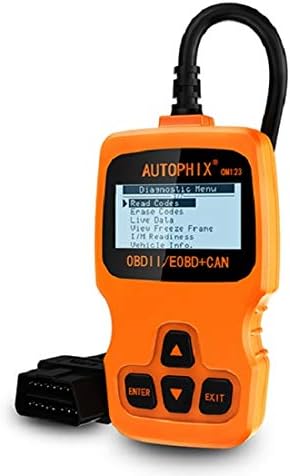
ຮູບທີ 1: ດ້ານໜ້າ view of the AUTOPHIX OM123 OBD2 Scanner, showing the display and control buttons.
ຄຸນນະສົມບັດທີ່ສໍາຄັນ:
- ຟັງຊັນວິນິດໄສ: Reads and clears Diagnostic Trouble Codes (DTCs), turns off the Malfunction Indicator Lamp (MIL), views live data streams, and displays freeze frame data.
- ຄວາມພ້ອມ I/M: Checks the status of emission-related monitors to ensure vehicle readiness for emissions testing.
- ການດຶງຂໍ້ມູນພາຫະນະ: Accesses Vehicle Identification Number (VIN), Calibration ID (CIN), and Calibration Verification Number (CVN).
- ຄວາມເຂົ້າກັນໄດ້ຢ່າງກວ້າງຂວາງ: Supports all OBDII protocols, including CAN, J1850 PWM, J1850 VPW, ISO9141, and KWP2000. Compatible with most vehicles manufactured from 1996 onwards.
- ການໂຕ້ຕອບຜູ້ເປັນມິດ: Features a large 128 x 64 pixel LCD display with white backlight and contrast adjustment. Built-in OBD2 fault code definitions eliminate the need for external lookup.
- ບໍ່ຈໍາເປັນຕ້ອງມີຫມໍ້ໄຟ: Powered directly via the detachable OBDII cable from the vehicle's OBDII port.
- ສະຫນັບສະຫນູນຫຼາຍພາສາ: Available in English, French, German, Spanish, Dutch, Finnish, Portuguese, and Russian.

ຮູບທີ 2: The OM123 scanner's display showing the main diagnostic menu options: Read Codes, Erase Codes, Live Data, View Freeze Frame, I/M Readiness, and Vehicle Info.
ຂະໜາດອຸປະກອນ:

ຮູບທີ 3: Dimensions of the AUTOPHIX OM123 scanner: approximately 125mm (height), 70mm (width), and 22mm (thickness).
ຕັ້ງຄ່າ
- ຊອກຫາພອດ OBDII: ໂດຍປົກກະຕິແລ້ວ ພອດ OBDII ຈະຕັ້ງຢູ່ໃຕ້ແຜງໜ້າປັດດ້ານຂ້າງຂອງຄົນຂັບຂອງລົດ. ໃຫ້ອ້າງອີງໃສ່ຄູ່ມືເຈົ້າຂອງລົດຂອງທ່ານສຳລັບຕຳແໜ່ງທີ່ແນ່ນອນ.
- ເຊື່ອມຕໍ່ເຄື່ອງສະແກນ: With the vehicle's ignition off, firmly plug the OM123 scanner's OBDII connector into the vehicle's OBDII port.
- ເປີດ: Turn the vehicle's ignition to the "ON" position (do not start the engine). The scanner will automatically power on and display the main menu.
- Language Selection (if needed): If the device is not in your preferred language, navigate to the "Settings" or "System Setup" menu (if available) to select the desired language.
ຄໍາແນະນໍາການດໍາເນີນງານ
Once the scanner is connected and powered on, use the UP ແລະ ລົງ arrow buttons to navigate through the menu options, the ປ້ອນ button to confirm a selection, and the ອອກ ປຸ່ມເພື່ອກັບຄືນໄປຫາໜ້າຈໍກ່ອນໜ້າ.
1. ອ່ານລະຫັດ
This function retrieves Diagnostic Trouble Codes (DTCs) from the vehicle's computer. These codes indicate specific issues detected by the vehicle's onboard diagnostic system.
- ຈາກເມນູຫລັກ, ເລືອກ "ອ່ານລະຫັດ" ແລະກົດ ປ້ອນ.
- The scanner will communicate with the vehicle and display any stored DTCs.
- ໃຊ້ UP ແລະ ລົງ buttons to scroll through multiple codes if present. The built-in DTC library provides definitions for common codes.
2. ລຶບລະຫັດ
This function clears all Diagnostic Trouble Codes (DTCs) from the vehicle's computer and turns off the Malfunction Indicator Lamp (MIL), also known as the "Check Engine" light. Ensure any underlying issues are resolved before clearing codes, as they may reappear if the problem persists.
- ຈາກເມນູຫລັກ, ເລືອກ "ລຶບລະຫັດ" ແລະກົດ ປ້ອນ.
- ຢືນຢັນການເລືອກຂອງທ່ານເມື່ອຖືກເຕືອນ.
- The scanner will clear the codes and the MIL should turn off.
3. ຂໍ້ມູນສົດ
This function displays real-time operational parameters from the vehicle's sensors and modules. This data can be useful for diagnosing intermittent problems or verifying repairs.
- ຈາກເມນູຫລັກ, ເລືອກ "ຂໍ້ມູນສົດ" ແລະກົດ ປ້ອນ.
- The scanner will display a list of available data parameters.
- ໃຊ້ UP ແລະ ລົງ buttons to scroll through the data.
4. View Freeze Frame
When an emission-related fault occurs, the vehicle's computer stores a "freeze frame" of data, capturing the engine conditions at the moment the fault was detected. This snapshot can help in diagnosing the cause of the problem.
- ຈາກເມນູຫລັກ, ເລືອກ "View Freeze Frame" ແລະກົດ ປ້ອນ.
- The scanner will display the stored freeze frame data.
5. ຄວາມພ້ອມຂອງ I/M
I/M Readiness (Inspection/Maintenance Readiness) indicates whether the various emission-related systems on the vehicle are functioning correctly and have completed their self-tests. This is crucial for emissions testing.
- ຈາກເມນູຫລັກ, ເລືອກ "ຄວາມພ້ອມຂອງ I/M" ແລະກົດ ປ້ອນ.
- The scanner will display the status of various monitors (e.g., Catalyst Monitor, O2 Sensor Monitor). "OK" or "Complete" indicates the test has passed; "INC" or "Not Complete" indicates the test has not yet run or failed.
6. ຂໍ້ມູນຍານພາຫະນະ
This function allows you to retrieve important vehicle identification information.
- ຈາກເມນູຫລັກ, ເລືອກ "Vehicle Info." ແລະກົດ ປ້ອນ.
- The scanner will display information such as VIN (Vehicle Identification Number), CIN (Calibration Identification Number), and CVN (Calibration Verification Number).
ບໍາລຸງຮັກສາ
- ທໍາຄວາມສະອາດ: ໃຊ້ຜ້າອ່ອນແລະແຫ້ງເພື່ອທຳຄວາມສະອາດເຄື່ອງສະແກນ.asing ແລະ ໜ້າຈໍ. ຫຼີກລ່ຽງການໃຊ້ນໍ້າຢາທໍາຄວາມສະອາດທີ່ມີສີຂັດ ຫຼື ຕົວລະລາຍ.
- ການເກັບຮັກສາ: Store the device in a clean, dry environment, away from extreme temperatures and direct sunlight.
- ການດູແລສາຍໄຟ: Ensure the OBDII cable is not kinked or damaged. Always grasp the connector when plugging or unplugging, not the cable itself.
- ອັບເດດຊອບແວ: ກວດເບິ່ງຜູ້ຜະລິດ website periodically for any available software updates to ensure optimal performance and compatibility.
ການແກ້ໄຂບັນຫາ
| ບັນຫາ | ສາເຫດທີ່ເປັນໄປໄດ້ | ການແກ້ໄຂ |
|---|---|---|
| Scanner does not power on or screen is blank. |
|
|
| ການສື່ສານຜິດພາດກັບຍານພາຫະນະ. |
|
|
| Codes cannot be cleared. |
|
|
ຂໍ້ມູນຈໍາເພາະ
| ຄຸນສົມບັດ | ລາຍລະອຽດ |
|---|---|
| ໝາຍເລກຕົວແບບ | OM123 |
| ຈໍສະແດງຜົນ | 128 x 64 pixel LCD with white backlight and contrast adjustment |
| ການດໍາເນີນງານ Voltage | 9-16V (via OBDII port) |
| ອະນຸສັນຍາທີ່ຮອງຮັບ | CAN, J1850 PWM, J1850 VPW, ISO9141, KWP2000 |
| ອຸນຫະພູມປະຕິບັດການ | 0°C ຫາ 60°C (32°F ຫາ 140°F) |
| ອຸນຫະພູມການເກັບຮັກສາ | -20°C ຫາ 70°C (-4°F ຫາ 158°F) |
| ຂະໜາດ | ປະມານ. 125mm x 70mm x 22mm |
| ນ້ຳໜັກ | ປະມານ 10.4 ອອນສ໌ (295 ກຣາມ) |
| ການຢັ້ງຢືນ | FCC, CE, RoHS |
ການຮັບປະກັນແລະການສະຫນັບສະຫນູນ
The AUTOPHIX OM123 OBD2 Scanner comes with a one-year warranty from the date of purchase, covering manufacturing defects. For technical support, warranty claims, or further assistance, please contact AUTOPHIX customer service through their official webເວັບໄຊທ໌ຫຼືຮ້ານຂາຍຍ່ອຍບ່ອນທີ່ຜະລິດຕະພັນໄດ້ຖືກຊື້.
ສໍາລັບຂໍ້ມູນເພີ່ມເຕີມ, ໄປຢ້ຽມຢາມຢ່າງເປັນທາງການ AUTOPHIX Store.


