1. ບົດແນະນຳ
The Fluid Audio FX80 is an 8-inch single point source coaxial reference monitor designed for accurate audio reproduction in studio environments. This bi-amplified monitor delivers 110 watts of power across a frequency response of 35Hz-22kHz (+/-3dB), making it suitable for critical listening and mixing tasks. This manual provides essential information for setting up, operating, maintaining, and troubleshooting your FX80 monitors.
2. ຕັ້ງຄ່າ
2.1 ການຫຸ້ມຫໍ່
Carefully remove the FX80 monitors from their packaging. Retain the original packaging for future transport or storage.
2.2 ການຈັດວາງ
Optimal placement of your FX80 monitors is crucial for accurate sound reproduction. Position the monitors to form an equilateral triangle with your listening position. The coaxial design provides a wide sweet spot, but proper angling towards the listener is still recommended.
The front-loaded slot port design allows for more flexible placement options, including closer proximity to walls, compared to rear-ported designs. However, consider using the Acoustic Space tuning controls on the rear panel to compensate for boundary effects if placing monitors near walls or in corners.
2.3 ການເຊື່ອມຕໍ່
The FX80 offers versatile input options for connecting to your audio interface, mixer, or other audio sources.
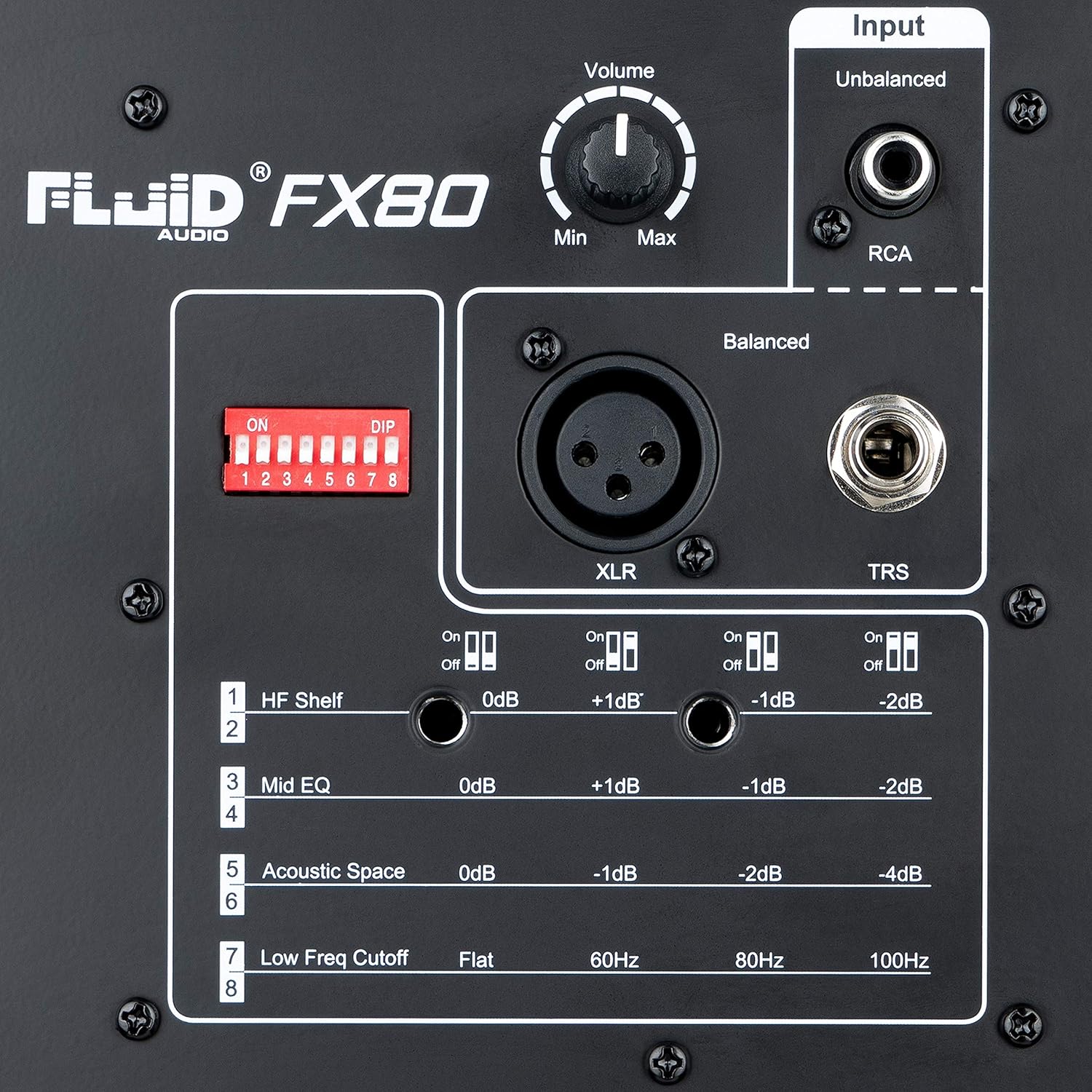
- ການປ້ອນຂໍ້ມູນ XLR: ສໍາລັບການເຊື່ອມຕໍ່ທີ່ສົມດູນຈາກອຸປະກອນສຽງມືອາຊີບ.
- ການປ້ອນຂໍ້ມູນ TRS: For balanced or unbalanced 1/4-inch connections.
- ການປ້ອນຂໍ້ມູນ RCA: For unbalanced connections from consumer-grade audio devices.
Ensure the input switch (located near the input jacks) is set to the correct input type (+4 dBu for balanced XLR/TRS, -10 dBV for unbalanced RCA) to match your source device's output level.
3. ການເຮັດວຽກ
3.1 ເປີດ/ປິດ
Locate the power switch on the rear panel of the monitor. Flip the switch to the 'On' position to power on the unit. The front-panel LED will illuminate to indicate power status.
3.2 ການຄວບຄຸມປະລິມານ
The volume knob on the rear panel allows you to adjust the output level of the monitor. Start with the volume set to minimum and gradually increase it to a comfortable listening level.
3.3 ການຄວບຄຸມການປັບສຽງສຽງ
The FX80 features a set of DIP switches on the rear panel for acoustic tuning, allowing you to optimize the monitor's response to your listening environment.

- HF Shelf: Adjusts the high-frequency response. Options typically include 0dB, +1dB, -1dB, -2dB.
- EQ ກາງ: Adjusts the mid-range frequency response. Options typically include 0dB, +1dB, -1dB, -2dB.
- Acoustic Space: Compensates for bass response when monitors are placed near boundaries. Options typically include 0dB (free space), -1dB (near wall), -2dB (near corner), -4dB (corner).
- Low Freq Cutoff: Sets a high-pass filter to remove frequencies below a certain point, useful when using a subwoofer. Options typically include Flat, 60Hz, 80Hz, 100Hz.
Refer to the diagrams on the rear panel for specific switch configurations and their corresponding frequency curves.
4. ຄຸນສົມບັດ
The Fluid Audio FX80 monitor incorporates advanced design elements for superior audio performance:
- 8" Coaxial Studio Monitor
- Frequency response: 35Hz-22kHz (+/- 3dB)
- ຄວາມຖີ່ຂອງ Crossover: 2.4kHz
- Class D and DSP powered
- Signal-to-noise: 100dB (typical A-weighted)
4.1 Coaxial Design
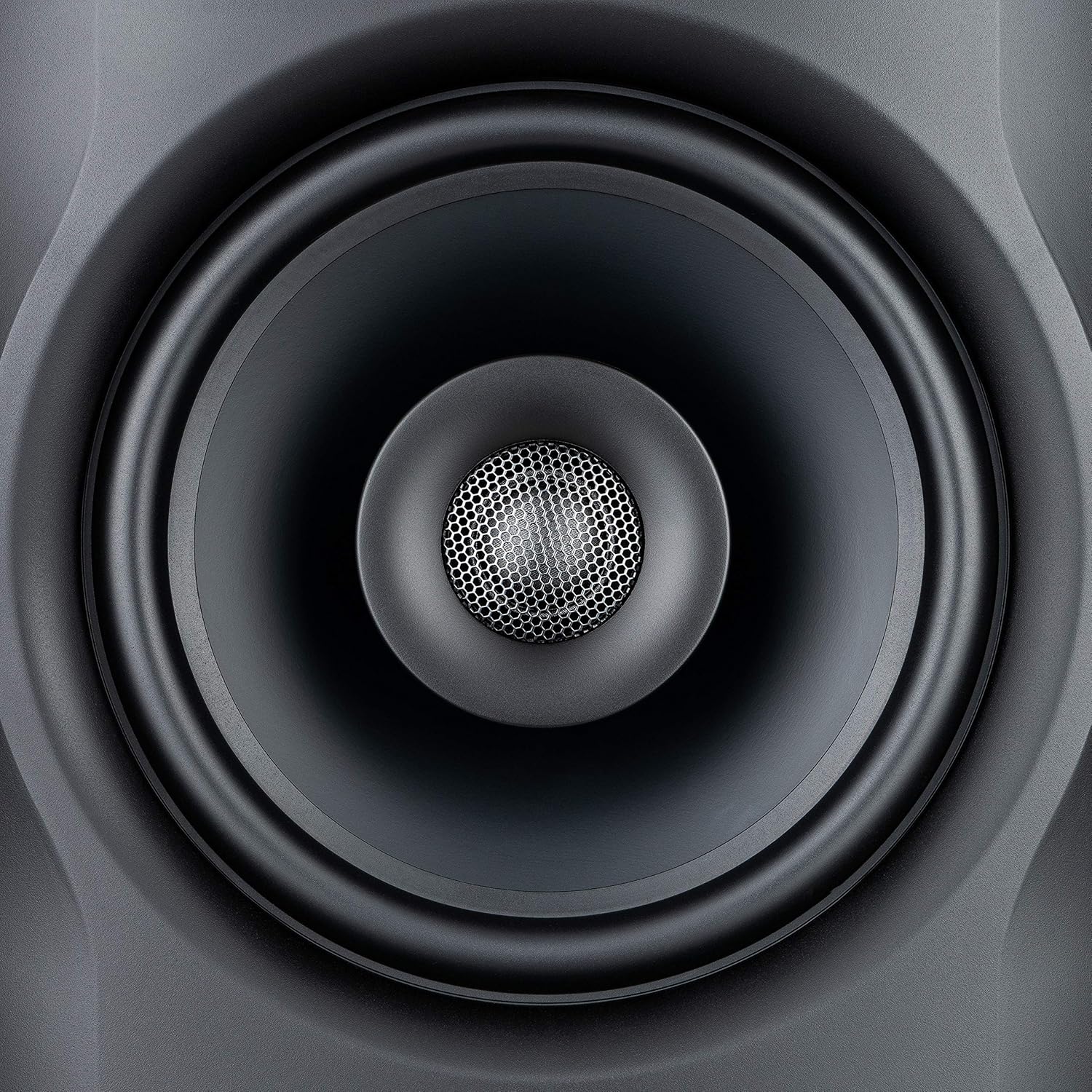
The coaxial driver design positions the tweeter in the acoustic center of the woofer. This creates a single point source for all frequencies, resulting in superior phase coherence, accurate stereo imaging, and a consistent soundstage across a wider listening area. This design minimizes phase anomalies that can occur with traditional two-way speaker designs where drivers are separated.
4.2 Front-Loaded Slot Port

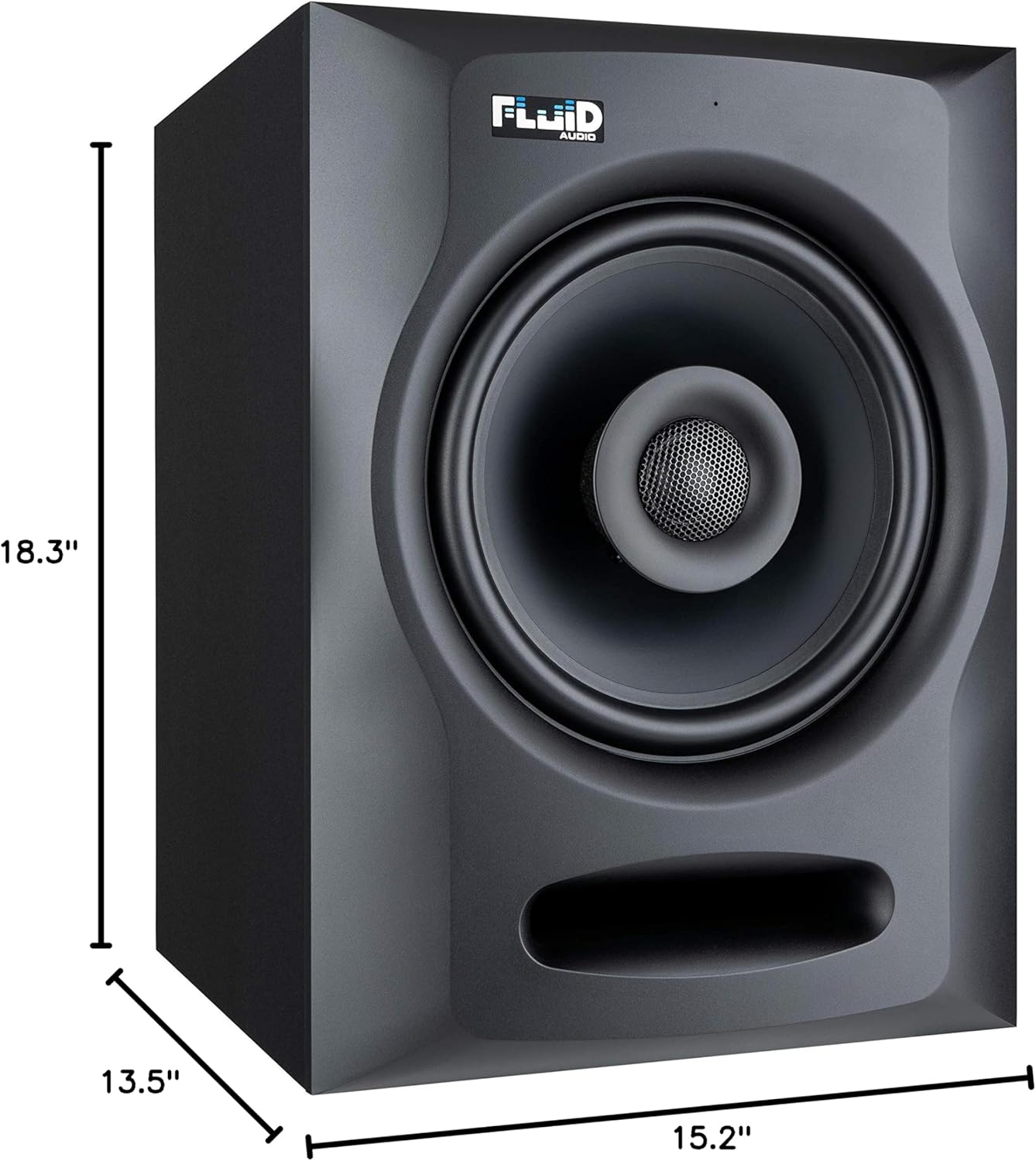
The bass-reflex slot port is strategically placed on the front panel. This design tunes the cabinet to maximize bass output efficiency and directly radiates bass energy towards the listener. It also offers greater flexibility in monitor placement within your studio, as it reduces issues associated with rear-firing ports interacting with walls.
5. ຂໍ້ມູນຈໍາເພາະ
Detailed technical specifications for the Fluid Audio FX80 monitor:
| ຄຸນສົມບັດ | ມູນຄ່າ |
|---|---|
| ຊື່ຕົວແບບ | FX80 |
| ປະເພດລຳໂພງ | ຕິດຕາມກວດກາ |
| ຄຸນນະສົມບັດພິເສດ | Coaxial |
| ຂະຫນາດລໍາໂພງ | 8 ນິ້ວ |
| Woofer ເສັ້ນຜ່າສູນກາງ | 8 ນິ້ວ |
| Tweeter ເສັ້ນຜ່າສູນກາງ | 30 ມິນລິແມັດ |
| ລຳໂພງກຳລັງຜົນຜະລິດສູງສຸດ | 110 ວັດ |
| ການຕອບສະໜອງຄວາມຖີ່ | 35Hz-22kHz (+/- 3dB) |
| Crossover ຄວາມຖີ່ | 2.4kHz |
| ອັດຕາສ່ວນສັນຍານເຖິງສຽງດັງ | 100 dB |
| ແຫຼ່ງພະລັງງານ | ໄຟຟ້າສາຍ |
| ເຕັກໂນໂລຊີການເຊື່ອມຕໍ່ | Coaxial |
| ຮູບແບບການອອກສຽງ | ສະເຕຣິໂອ |
| ຂະໜາດສິນຄ້າ | 11.61 x 10 x 13.39 ນິ້ວ |
| ນ້ໍາຫນັກລາຍການ | 8.15 ປອນ (3697 ກຣາມ) |
| ວັດສະດຸ | Plastic, Silk, Paper/Polypropylene |
| ສີ | ດຳ |
6. ບໍາລຸງຮັກສາ
6.1 ການທໍາຄວາມສະອາດ
To clean your FX80 monitors, use a soft, dry cloth. Avoid using abrasive cleaners, solvents, or waxes, as these can damage the cabinet finish or driver cones. Do not spray cleaning liquids directly onto the monitor.
6.2 ການພິຈາລະນາດ້ານສິ່ງແວດລ້ອມ
Keep the monitors away from direct sunlight, heat sources, and excessive moisture. Ensure adequate ventilation around the units to prevent overheating.
7. ການແກ້ໄຂບັນຫາ
If you encounter issues with your FX80 monitors, try the following steps:
- ບໍ່ມີສຽງ:
- Check if the power switch is on and the front LED is illuminated.
- Verify all audio cables are securely connected to both the monitor and the audio source.
- Ensure the volume knob on the monitor and your audio source is turned up.
- Confirm the correct input type is selected via the rear panel switch.
- ສຽງບິດເບືອນ:
- Reduce the volume level on both the monitor and the audio source.
- Check for damaged audio cables.
- Ensure the input switch matches the signal level of your source (+4 dBu for balanced, -10 dBV for unbalanced).
- Hum ຫຼື Noise:
- ໃຫ້ແນ່ໃຈວ່າສາຍສຽງທັງໝົດມີການປ້ອງກັນ ແລະ ເຊື່ອມຕໍ່ຢ່າງຖືກຕ້ອງ.
- Try using balanced XLR or TRS cables if possible, as they are less susceptible to noise.
- Move audio cables away from power cables.
- ກວດສອບການສໍາລັບການ loops ດິນ.
8. ວິດີໂອຜະລິດຕະພັນຢ່າງເປັນທາງການ
Watch the official Fluid Audio FX80 information video for a visual overview ລັກສະນະ ແລະການອອກແບບຂອງຜະລິດຕະພັນ.
9. ການຮັບປະກັນແລະການສະ ໜັບ ສະ ໜູນ
The Fluid Audio FX80 monitors come with a limited warranty. For specific warranty terms and conditions, please refer to the documentation included with your product or visit the official Fluid Audio webເວັບໄຊ.
For technical support, troubleshooting beyond this manual, or warranty claims, please contact Fluid Audio customer service directly.


