1. ບົດແນະນຳ
ຂອບໃຈສໍາລັບການຊື້asing the VIVIBRIGHT GP100UP LED Projector. This manual provides essential information for the safe and efficient operation of your device. Please read it thoroughly before use and retain it for future reference.
The VIVIBRIGHT GP100UP is an Android 6.0-based LED projector featuring built-in Wi-Fi and Bluetooth, designed for home theater and office presentations. It supports Full HD content and offers a bright projection experience.
2. ຂໍ້ມູນຄວາມປອດໄພ
- ການສະຫນອງພະລັງງານ: ໃຊ້ພຽງແຕ່ອະແດັບເຕີພະລັງງານທີ່ລະບຸໄວ້. ຮັບປະກັນ voltage ກົງກັບການສະຫນອງພະລັງງານໃນທ້ອງຖິ່ນຂອງທ່ານ.
- ການລະບາຍອາກາດ: ຫ້າມປິດຊ່ອງລະບາຍອາກາດ. ຮັບປະກັນການໄຫຼວຽນຂອງອາກາດທີ່ພຽງພໍຢູ່ຮອບໂປເຈັກເຕີເພື່ອປ້ອງກັນຄວາມຮ້ອນເກີນ.
- ການເປີດເຜີຍຂອງແຫຼວ: Keep the projector away from water or other liquids. Do not operate in damp ສະພາບແວດລ້ອມ.
- ທໍາຄວາມສະອາດ: ຕັດການເຊື່ອມຕໍ່ໄຟກ່ອນທຳຄວາມສະອາດ. ໃຊ້ຜ້າອ່ອນແລະແຫ້ງ. ຫຼີກລ່ຽງນໍ້າຢາທຳຄວາມສະອາດທີ່ເປັນຂອງແຫຼວ ຫຼື ນໍ້າຢາສີດ.
- ການແຊກວັດຖຸ: Never insert objects of any kind into the projector openings as they may touch dangerous voltage ຈຸດຫຼືສ່ວນສັ້ນອອກ.
- ການບໍລິການ: ຢ່າພະຍາຍາມບໍລິການຜະລິດຕະພັນນີ້ດ້ວຍຕົນເອງ. ອ້າງເຖິງການບໍລິການທັງtoົດໃຫ້ກັບພະນັກງານບໍລິການທີ່ມີຄຸນວຸດທິ.
- ການປົກປ້ອງຕາ: ຢ່າເບິ່ງໂດຍກົງໃນເລນໂປເຈັກເຕີເມື່ອ lamp ແມ່ນຢູ່. ແສງສະຫວ່າງທີ່ສະຫວ່າງສາມາດເຮັດໃຫ້ເກີດຄວາມເສຍຫາຍຕໍ່ຕາ.
3. ເນື້ອໃນຊຸດ
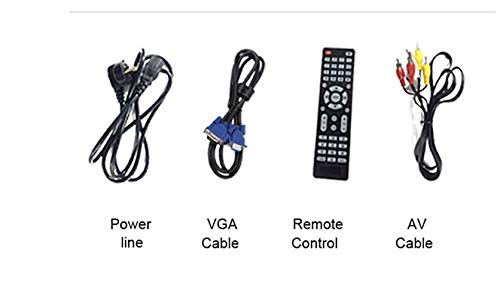
ກວດສອບວ່າລາຍການທັງຫມົດທີ່ລະບຸໄວ້ຂ້າງລຸ່ມນີ້ແມ່ນລວມຢູ່ໃນຊຸດຂອງທ່ານ:
- VIVIBRIGHT GP100UP Projector
- ສາຍໄຟ
- ສາຍ VGA
- ສາຍ AV
- ການຄວບຄຸມໄລຍະໄກ
- ຄູ່ມືຜູ້ໃຊ້ (ເອກະສານນີ້)
ຮູບທີ 3.1: Included accessories with the VIVIBRIGHT GP100UP projector, including power cable, VGA cable, remote control, and AV cable.
4. ຜະລິດຕະພັນເກີນview
4.1. Projector Dimensions
ຮູບທີ 4.1: ດ້ານ ໜ້າ ແລະດ້ານເທິງ view of the VIVIBRIGHT GP100UP projector with approximate dimensions: 11 inches (length), 8.85 inches (width), and 4 inches (height).
4.2. Input/Output Ports
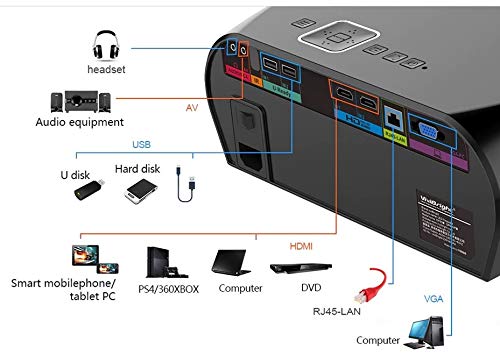
ໂປເຈັກເຕີມີພອດຕ່າງໆສຳລັບເຊື່ອມຕໍ່ອຸປະກອນພາຍນອກ:
ຮູບທີ 4.2: Detailed diagram of the projector's rear panel, illustrating connectivity options including headset, audio equipment (AV), USB ports for U disk and hard disk, HDMI ports, RJ45-LAN, and VGA port.
- HDMI: Connect to Blu-ray players, gaming consoles, laptops, or other HDMI-enabled devices.
- USB: For connecting USB drives (U disk) or external hard drives.
- ຂອງ: ສໍາລັບການເຊື່ອມຕໍ່ອຸປະກອນເກົ່າໂດຍໃຊ້ວິດີໂອປະກອບແລະສຽງສະເຕີລິໂອ.
- VGA: For connecting to computers or laptops with a VGA output.
- RJ45-LAN: ສໍາລັບການເຊື່ອມຕໍ່ເຄືອຂ່າຍມີສາຍ.
- ຫູຟັງ Jack: ສໍາລັບການເຊື່ອມຕໍ່ຫູຟັງພາຍນອກຫຼືລໍາໂພງ.
4.3. ການຄວບຄຸມໄລຍະໄກ
The included remote control allows for convenient operation of the projector.
ຮູບທີ 4.3: Remote control layout with key functions: ON/OFF, Volume Up/Down, OK, Menu, Home, Speed, Mute, Back, Mouse Mode, and the USB receiver.
- ເປີດ/ປິດ: Power on or off the projector.
- ປະລິມານ +/-: ປັບລະດັບສຽງ.
- ຕົກລົງ: ຢືນຢັນການເລືອກ.
- ເມນູ: Access projector settings.
- ຫນ້າທໍາອິດ: Return to the main Android interface.
- ກັບຄືນໄປບ່ອນ: ກັບໄປທີ່ ໜ້າ ຈໍກ່ອນ ໜ້າ ນີ້.
- ໂໝດເມົາສ໌: Activate/deactivate air mouse function (if applicable).
- ປິດສຽງ: ປິດສຽງ ຫຼືປິດສຽງ.
5. ຕັ້ງຄ່າ
5.1. ບັນຈຸເຂົ້າຮຽນ
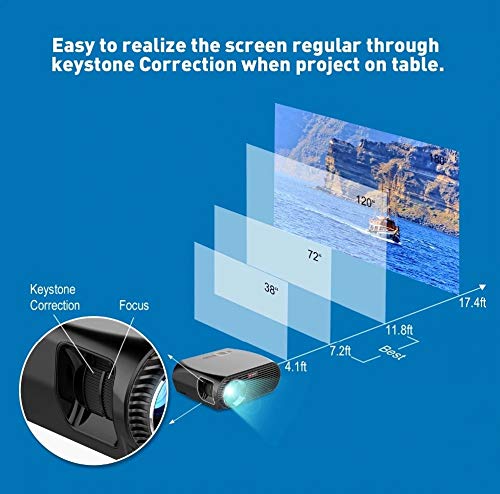
Place the projector on a stable, flat surface or mount it to the ceiling. Ensure there are no obstructions to the lens or ventilation ports. The optimal projection distance for a clear image is between 1 to 5 meters.
ຮູບທີ 5.1: Illustration of projection distances and corresponding screen sizes, along with the location of the keystone correction and focus rings on the projector.
- For a 72-inch screen, the recommended distance is approximately 7.2 feet (2.2 meters).
- For a 120-inch screen, the recommended distance is approximately 11.8 feet (3.6 meters).
5.2. ການເຊື່ອມຕໍ່ພະລັງງານ
- ເຊື່ອມຕໍ່ສາຍໄຟກັບອິນພຸດໄຟຂອງໂປເຈັກເຕີ.
- ສຽບປາຍອື່ນໆຂອງສາຍໄຟເຂົ້າໄປໃນປ່ຽງໄຟຟ້າທີ່ເຫມາະສົມ.
- ດອກໄຟຊີ້ບອກພະລັງງານຢູ່ໃນໂປເຈັກເຕີຄວນສະຫວ່າງ.
5.3. ຈຸດສຸມແລະການແກ້ໄຂ Keystone
After powering on, adjust the image for clarity and proper geometry.
- ຈຸດສຸມ: Rotate the focus ring near the lens until the projected image is sharp and clear.
- ການແກ້ໄຂ Keystone: If the projected image appears trapezoidal (wider at the top or bottom), use the keystone correction ring or lever (usually located near the focus ring) to adjust the image until it is rectangular. The GP100UP supports +/- 15 degrees vertical keystone correction.
6. ຄໍາແນະນໍາການດໍາເນີນງານ
6.1. Initial Power On and Android Interface
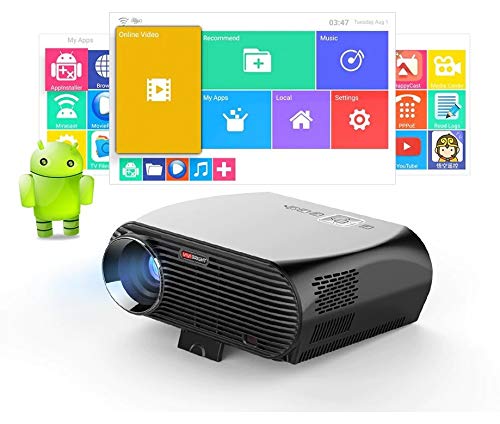
Press the power button on the projector or remote control to turn on the device. The projector will boot into its Android 6.0 operating system interface.
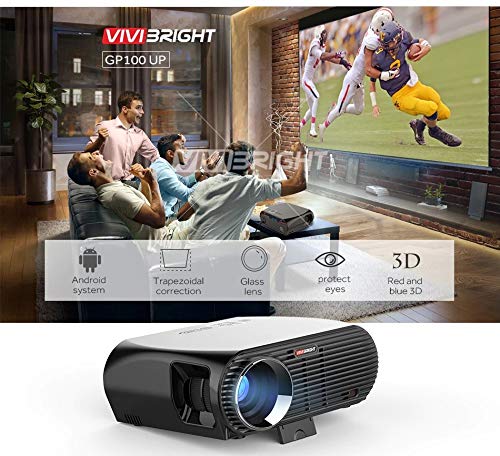
ຮູບທີ 6.1: The VIVIBRIGHT GP100UP projector in operation, highlighting its Android system capabilities and other features.
Navigate the Android interface using the remote control. You can access pre-installed applications, settings, and media files.
6.2. ການເຊື່ອມຕໍ່ອຸປະກອນພາຍນອກ
To project content from external sources:
- Connect your device (e.g., laptop, gaming console, USB drive) to the appropriate port on the projector (HDMI, USB, AV, VGA).
- On the projector's Android interface, navigate to the "Input Source" or "Source" option.
- Select the corresponding input source (e.g., HDMI1, USB, AV, VGA) to display content from your connected device.
6.3. Wireless Connectivity (Wi-Fi, Bluetooth, Screen Mirroring)
The GP100UP supports various wireless functions:
- Wi-Fi:
- Go to "Settings" on the Android interface.
- ເລືອກ "Wi-Fi" ແລະເປີດໃຊ້ມັນ.
- Choose your desired network and enter the password to connect.
- Bluetooth:
- Go to "Settings" on the Android interface.
- Select "Bluetooth" and turn it on.
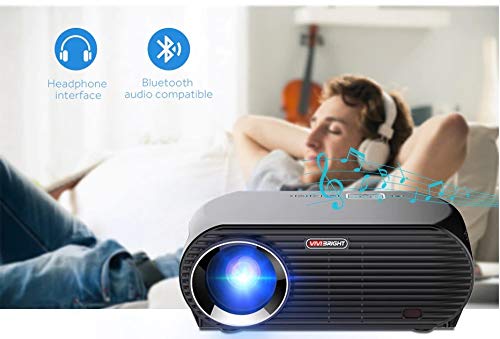
- Pair with Bluetooth audio devices like headphones or speakers.
ຮູບທີ 6.2: The projector's Bluetooth audio compatibility, allowing connection to wireless headphones or speakers.
- Screen Mirroring (Miracast/Airplay/DLNA):
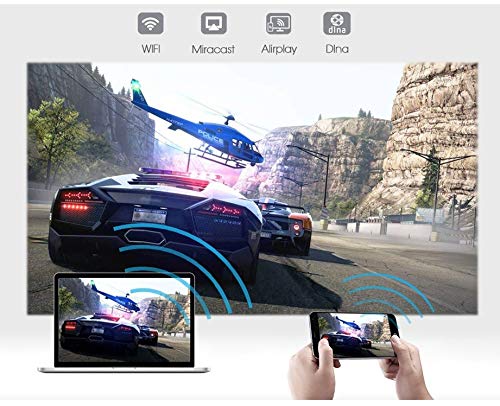
The projector supports mirroring content from compatible smartphones, tablets, and laptops via Wi-Fi, Miracast, Airplay, and DLNA.
- ໃຫ້ແນ່ໃຈວ່າທັງອຸປະກອນຂອງທ່ານ ແລະ ໂປຣເຈັກເຕີໄດ້ເຊື່ອມຕໍ່ກັບເຄືອຂ່າຍ Wi-Fi ດຽວກັນ.
- On the projector's Android interface, open the relevant screen mirroring application (e.g., Miracast, Airplay, DLNA).
- On your smartphone/tablet/laptop, activate its screen mirroring function (e.g., "Screen Mirroring," "Smart View," "Cast," "AirPlay").
- Select the projector from the list of available devices to begin mirroring.

ຮູບທີ 6.3: Wireless screen mirroring capabilities, enabling content from mobile devices and laptops to be displayed on the projector.
7. ບໍາລຸງຮັກສາ
7.1. ການເຮັດຄວາມສະອາດເລນ
Use a soft, lint-free cloth specifically designed for optical lenses. Gently wipe the lens to remove dust or smudges. Avoid using abrasive materials or harsh chemicals.
7.2. Cleaning the Projector Casing
ເຊັດດ້ານນອກຂອງໂປເຈັກເຕີດ້ວຍຜ້າອ່ອນ, ແຫ້ງ. ສໍາລັບຮອຍແຂງ, ເລັກນ້ອຍ damp ຜ້າສາມາດນໍາໃຊ້ໄດ້, ປະຕິບັດຕາມດ້ວຍຜ້າແຫ້ງ. ໃຫ້ແນ່ໃຈວ່າບໍ່ມີຂອງແຫຼວເຂົ້າໄປໃນຊ່ອງລະບາຍອາກາດ.
7.3. Air Filter (if applicable)
While LED projectors typically have sealed optical engines, regularly check ventilation openings for dust accumulation. Use a soft brush or compressed air to clear any blockages.
8. ການແກ້ໄຂບັນຫາ
| ບັນຫາ | ສາເຫດທີ່ເປັນໄປໄດ້ | ການແກ້ໄຂ |
|---|---|---|
| ບໍ່ມີຮູບພາບສະແດງ |
|
|
| ຮູບພາບມົວ |
|
|
| ຮູບພາບແມ່ນ trapezoidal |
|
|
| ບໍ່ມີສຽງ |
|
|
| Wi-Fi/Bluetooth connection issues |
|
|
9. ຂໍ້ມູນຈໍາເພາະ
| ຄຸນສົມບັດ | ລາຍລະອຽດ |
|---|---|
| ໝາຍເລກຕົວແບບ | GP100UP |
| ເຕັກໂນໂລຊີການສະແດງ | ຈໍ LCD |
| ຄວາມລະອຽດເດີມ | 1280x800dpi (WXGA) |
| ຄວາມສະຫວ່າງ | 3500 Lumens |
| ອັດຕາສ່ວນກົງກັນຂ້າມ | 1000:1-2000:1 |
| ແຫຼ່ງແສງ | LED |
| ຊີວິດແຫຼ່ງແສງສະຫວ່າງ | Not specified (typically 20,000+ hours for LED) |
| ໄລຍະການຄາດຄະເນ | 1-5ມ |
| ຂະໜາດທີ່ຄາດໄວ້ | 40-300 inches (Best image size: 72-120 inches) |
| ຂະ ໜາດ ໜ້າ ຈໍ | 4:3/16:9 |
| ການແກ້ໄຂ Keystone | Manual Correction, +/- 15 degrees (vertical) |
| ລະບົບ | Android 6.0.1, CPU: Quad core ARM Cortex-A53 |
| ໜ່ວຍຄວາມຈຳ (RAM/ROM) | RAM: 1G / ROM: 8G |
| ການເຊື່ອມຕໍ່ໄຮ້ສາຍ | Wi-Fi, Bluetooth, DLNA, Miracast, Airplay |
| ຜອດປ້ອນຂໍ້ມູນ | HDMI, USB, AV, VGA, RJ45-LAN |
| ການສະຫນອງພະລັງງານ | AC 90-240V, 50/60Hz |
| ການບໍລິໂພກພະລັງງານ | 140W |
| ຂະໜາດ (ປະມານ) | 37 x 30.5 x 15.9 cm |
| ນ້ຳໜັກ (ປະມານ) | 2.6 ກິໂລກຣາມ |
| ຟັງຊັນ 3D | Red-blue 3D |
10. ການຮັບປະກັນແລະການສະຫນັບສະຫນູນ
The VIVIBRIGHT GP100UP Projector comes with a ຮັບປະກັນ 1 ປີ ຈາກວັນທີ່ຊື້. ການຮັບປະກັນນີ້ກວມເອົາຄວາມບົກຜ່ອງດ້ານການຜະລິດພາຍໃຕ້ການນໍາໃຊ້ປົກກະຕິ.
For technical support, warranty claims, or service inquiries, please contact your retailer or the official VIVIBRIGHT customer service channel. Please have your product model number (GP100UP) and proof of purchase ready when contacting support.


