1. ບົດແນະນຳ
Thank you for choosing the Soundmaster Eliteline IR300SI Internet DAB+ FM Radio. This device offers a wide range of audio entertainment options, including Internet Radio, DAB+ digital radio, FM radio, Bluetooth connectivity, and USB playback. It also features Amazon Alexa compatibility for voice control and can be managed via the UNDOK app. This manual provides essential information for setting up, operating, and maintaining your radio.
2. ຂໍ້ມູນຄວາມປອດໄພ
- Read all instructions carefully before use and retain them for future reference.
- ຢ່າເຮັດໃຫ້ອຸປະກອນຖືກຝົນ, ຄວາມຊຸ່ມຊື່ນ, ຫຼືອຸນຫະພູມທີ່ຮຸນແຮງ.
- ຮັບປະກັນການລະບາຍອາກາດທີ່ເຫມາະສົມ; ຫ້າມປິດຊ່ອງລະບາຍອາກາດໃດໆ.
- ໃຊ້ພຽງແຕ່ອະແດບເຕີໄຟທີ່ໃຫ້ມາກັບເຄື່ອງ.
- ຢ່າພະຍາຍາມເປີດຫຼືສ້ອມແປງເຄື່ອງດ້ວຍຕົນເອງ. ອ້າງອີງການບໍລິການທັງໝົດໃຫ້ກັບບຸກຄະລາກອນທີ່ມີຄຸນວຸດທິ.
- ຮັກສາອຸປະກອນໃຫ້ຫ່າງຈາກສະຫນາມແມ່ເຫຼັກທີ່ເຂັ້ມແຂງ.
3. ເນື້ອໃນຊຸດ
ກະລຸນາກວດເບິ່ງວ່າລາຍການທັງໝົດມີຢູ່:
- Soundmaster Eliteline IR300SI Internet DAB+ FM Radio
- Power Adapter
- ການຄວບຄຸມໄລຍະໄກ
- ຄູ່ມືຜູ້ໃຊ້ (ເອກະສານນີ້)
- Installation material (e.g., antenna, if separate)
4. ຜະລິດຕະພັນເກີນview
Familiarize yourself with the various parts and controls of your Soundmaster IR300SI radio.

ຮູບທີ 4.1: ດ້ານໜ້າເປັນມຸມ view of the Soundmaster IR300SI radio, showing the display, speakers, and control buttons.
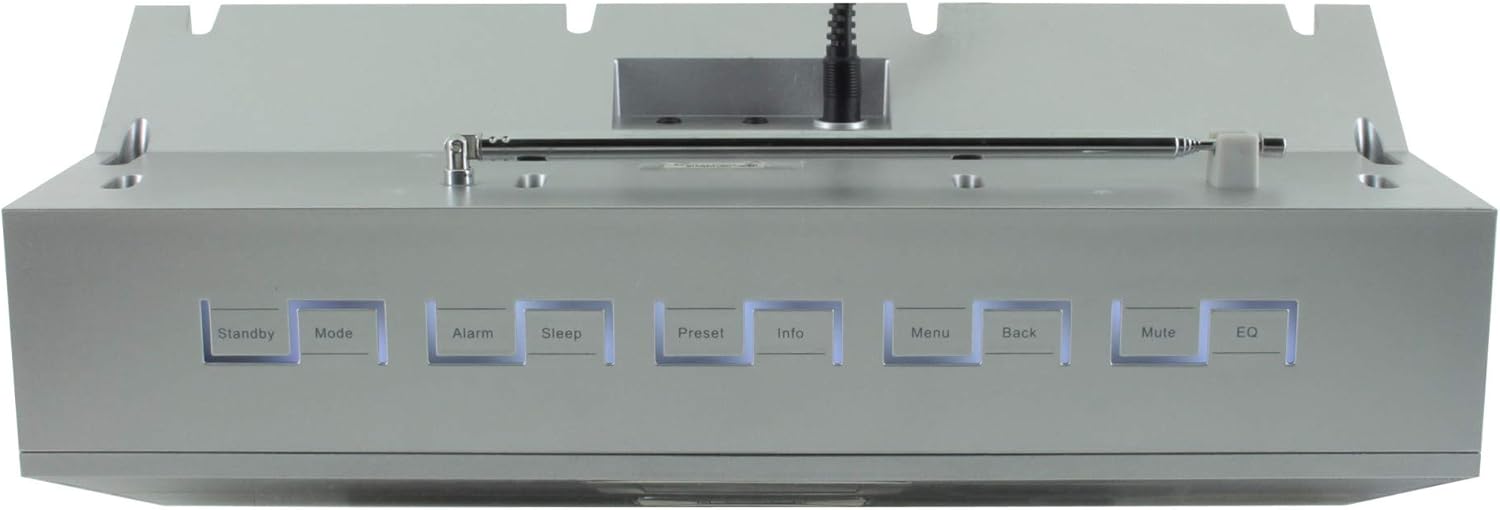
ຮູບທີ 4.2: ທາງເທິງ view of the Soundmaster IR300SI radio, highlighting the control buttons: Standby, Mode, Alarm, Sleep, Preset, Info, Menu, Back, Mute, and EQ.
ແຜງໜ້າ
- 2.4" / 6 cm TFT Color Display: Shows station information, menus, and time.
- ລໍາໂພງ: ຜົນຜະລິດສຽງສະເຕີລິໂອ.
- ປຸ່ມ/ໜ້າປັດຄວບຄຸມ: ສຳລັບການນຳທາງ ແລະ ການເລືອກ.
ການຄວບຄຸມກະດານເທິງ
- ສະແຕນບາຍ: ເປີດ/ປິດ.
- ໂໝດ: Switch between Internet Radio, DAB+, FM, Bluetooth, USB, AUX.
- ໂມງປຸກ: ຕັ້ງແລະຈັດການໂມງປຸກ.
- ນອນ: Activate sleep timer.
- ກຳນົດລ່ວງໜ້າ: Access and save favorite stations.
- ຂໍ້ມູນ: Display additional information about the current broadcast.
- ເມນູ: Access system settings and options.
- ກັບຄືນໄປບ່ອນ: ກັບຄືນໄປຫາເມນູທີ່ຜ່ານມາ.
- ປິດສຽງ: ປິດສຽງ/ປິດສຽງ.
- EQ: ເລືອກທີ່ຕັ້ງໄວ້ສະເຫມີພາບ.
Rear/Side Panel Connections
- ການປ້ອນຂໍ້ມູນພະລັງງານ: ເຊື່ອມຕໍ່ອຸປະກອນໄຟຟ້າທີ່ສະ ໜອງ ໃຫ້.
- ເສົາອາກາດ Telescopic: For DAB+ and FM reception.
- ພອດ USB: ສຳລັບການຫຼິ້ນ MP3 ຈາກອຸປະກອນເກັບຂໍ້ມູນ USB.
- 3.5mm Aux-In Port: ເຊື່ອມຕໍ່ແຫຼ່ງສຽງພາຍນອກ.
- ຫູຟັງ Jack: ສໍາລັບການຟັງສ່ວນຕົວ.
5. ຕັ້ງຄ່າ
5.1 ການເຊື່ອມຕໍ່ພະລັງງານ
- Connect the power adapter to the DC input on the rear of the radio.
- ສຽບອະແດບເຕີໄຟໃສ່ກັບປລັກສຽບໃສ່ຝາ.
- ກົດ ສະແຕນບາຍ button on the top panel or remote control to turn on the radio.
5.2 ການຕິດຕັ້ງເສົາອາກາດ
ຂະຫຍາຍເສົາອາກາດແບບຍືດຫົດໄດ້ຢ່າງເຕັມທີ່ເພື່ອການຮັບວິທະຍຸ DAB+ ແລະ FM ທີ່ດີທີ່ສຸດ.
5.3 Initial Wi-Fi Network Setup
Upon first power-on, the radio will guide you through the initial setup wizard:
- Select your preferred language using the control dial and confirm.
- ວິທະຍຸຈະສະແກນຫາເຄືອຂ່າຍ Wi-Fi ທີ່ມີຢູ່.
- ເລືອກເຄືອຂ່າຍຂອງທ່ານຈາກບັນຊີລາຍຊື່.
- Enter your Wi-Fi password using the on-screen keyboard and control dial. Confirm to connect.
- Once connected, the radio will display the main menu.
6. ຄໍາແນະນໍາການດໍາເນີນງານ
ໃຊ້ ໂໝດ button to switch between different audio sources.
6.1 ວິທະຍຸອິນເຕີເນັດ
- ກົດ ໂໝດ to select "Internet Radio".
- Navigate through categories (e.g., Location, Genre, Popular) using the control dial.
- ເລືອກສະຖານີເພື່ອເລີ່ມຫຼິ້ນຄືນ.
- ເພື່ອບັນທຶກສະຖານີເປັນຄ່າທີ່ຕັ້ງໄວ້ລ່ວງໜ້າ, ໃຫ້ກົດປຸ່ມຄ້າງໄວ້ ຕັ້ງໄວ້ລ່ວງໜ້າ button, then select a preset number.
6.2 DAB+ ວິທະຍຸ
- ກົດ ໂໝດ to select "DAB+ Radio".
- The radio will automatically scan for available DAB+ stations.
- Use the control dial to browse and select stations.
- ກົດຄ້າງໄວ້ ຕັ້ງໄວ້ລ່ວງໜ້າ to save a station.
ວິທະຍຸ 6.3 FM
- ກົດ ໂໝດ to select "FM Radio".
- The radio will automatically scan for available FM stations.
- Use the control dial to browse and select stations.
- ກົດຄ້າງໄວ້ ຕັ້ງໄວ້ລ່ວງໜ້າ to save a station.
6.4 ການເຊື່ອມຕໍ່ Bluetooth
- ກົດ ໂໝດ to select "Bluetooth". The radio will enter pairing mode.
- ໃນອຸປະກອນມືຖືຂອງທ່ານ (ໂທລະສັບສະຫຼາດ, ແທັບເລັດ), ເປີດໃຊ້ Bluetooth ແລະຄົ້ນຫາອຸປະກອນທີ່ມີຢູ່.
- Select "Soundmaster IR300SI" from the list to pair.
- ເມື່ອເຊື່ອມຕໍ່ແລ້ວ, ທ່ານສາມາດຖ່າຍທອດສຽງຈາກອຸປະກອນຂອງທ່ານໄປຫາວິທະຍຸໄດ້.
6.5 ການຫຼິ້ນ USB
- ໃສ່ອຸປະກອນເກັບຂໍ້ມູນ USB (ຟໍແມັດເປັນ FAT32) ທີ່ມີ MP3 files ເຂົ້າໄປໃນພອດ USB.
- ກົດ ໂໝດ to select "USB".
- Navigate through folders and select tracks using the control dial.
6.6 AUX Input
- Connect an external audio device (e.g., MP3 player) to the 3.5mm Aux-In port using an audio cable (not supplied).
- ກົດ ໂໝດ to select "AUX".
- ຄວບຄຸມການຫຼິ້ນຄືນຈາກອຸປະກອນພາຍນອກຂອງທ່ານ.
6.7 ໂມງປຸກ ແລະ ໂມງຈັບເວລານອນ
- ການແຈ້ງເຕືອນ: ກົດ ປຸກ button to set up to two alarms. Configure time, source (buzzer, radio), and frequency (daily, weekdays, weekends).
- ເຄື່ອງຈັບເວລານອນ: ກົດ ນອນ button to set a countdown timer (e.g., 15, 30, 60 minutes) after which the radio will automatically turn off.
6.8 ຄວາມສະເໝີພາບ (EQ)
ກົດ EQ button to cycle through pre-programmed sound settings (e.g., Normal, Jazz, Rock, Classical, Pop, News) to optimize audio output for different content.
6.9 Amazon Alexa and UNDOK App Control
- Amazon Alexa: The radio is compatible with Amazon Alexa. Follow the instructions in the Alexa app to link your Soundmaster IR300SI for voice control functionalities.
- UNDOK App: Download the UNDOK app from your mobile device's app store. Ensure your mobile device and the radio are on the same Wi-Fi network. The app allows you to control the radio, browse stations, and manage settings remotely.
7. ບໍາລຸງຮັກສາ
7.1 ການທໍາຄວາມສະອາດ
- ຖອດສາຍວິທະຍຸອອກຈາກປລັກສຽບໄຟກ່ອນທຳຄວາມສະອາດທຸກຄັ້ງ.
- ໃຊ້ຜ້າປຽກອ່ອນໆເຊັດພື້ນຜິວພາຍນອກ.
- ຢ່າໃຊ້ເຄື່ອງເຮັດຄວາມສະອາດຂັດ, ຂີ້ເຜີ້ງ, ຫຼືສານລະລາຍເພາະວ່າພວກມັນອາດຈະທໍາລາຍການສໍາເລັດຮູບ.
7.2 ການເກັບຮັກສາ
If you plan to store the radio for an extended period, unplug it from the power source and store it in a cool, dry place, away from direct sunlight and extreme temperatures.
8. ການແກ້ໄຂບັນຫາ
ຖ້າຫາກທ່ານພົບບັນຫາ, ເບິ່ງບັນຫາທົ່ວໄປດັ່ງຕໍ່ໄປນີ້ແລະການແກ້ໄຂ:
| ບັນຫາ | ສາເຫດທີ່ເປັນໄປໄດ້ | ການແກ້ໄຂ |
|---|---|---|
| ບໍ່ມີພະລັງງານ | ອະແດບເຕີໄຟບໍ່ໄດ້ເຊື່ອມຕໍ່ ຫຼືປລັກສຽບເກີດຄວາມຜິດພາດ. | Check power connections. Try a different outlet. |
| ບໍ່ມີສຽງ | Volume too low, muted, or incorrect source selected. | ເພີ່ມປະລິມານ. ກົດ ປິດສຽງ. Ensure correct mode (Internet Radio, DAB+, etc.) is selected. |
| ບໍ່ສາມາດເຊື່ອມຕໍ່ກັບ Wi-Fi ໄດ້ | ລະຫັດຜ່ານບໍ່ຖືກຕ້ອງ, ສັນຍານອ່ອນ ຫຼືບັນຫາເຣົາເຕີ. | Verify password. Move radio closer to router. Restart router. |
| ການຮັບສັນຍານ DAB+/FM ບໍ່ດີ | ເສົາອາກາດບໍ່ໄດ້ຂະຫຍາຍ ຫຼືພື້ນທີ່ສັນຍານບໍ່ດີ. | Fully extend the telescopic antenna. Reposition the radio. |
| ການຈັບຄູ່ Bluetooth ລົ້ມເຫລວ | Radio not in pairing mode, or device too far. | Ensure radio is in Bluetooth mode. Move devices closer. Restart Bluetooth on both devices. |
9. ຂໍ້ມູນຈໍາເພາະ
| ຄຸນສົມບັດ | ຂໍ້ມູນຈໍາເພາະ |
|---|---|
| ຊື່ຕົວແບບ | IR300SI |
| ຍີ່ຫໍ້ | ເຈົ້າຂອງສຽງ |
| ເຕັກໂນໂລຊີການເຊື່ອມຕໍ່ | Bluetooth, USB, Wi-Fi |
| ຄຸນນະສົມບັດພິເສດ | Integrated Clock, Internet Radio, DAB+, FM, Bluetooth, USB MP3 Playback, AUX-In, Headphone Jack, 2 Alarms with Weekend Function, Sleep Timer, Equalizer, Amazon Alexa Compatible, UNDOK App Control, Network Music Player (DLNA) |
| ຮູບແບບການອອກສຽງ | ສະເຕຣິໂອ |
| ລຳໂພງສຽງອອກສູງສຸດ | 2 x 10 ວັດ RMS |
| ຈໍສະແດງຜົນ | 2.4" / 6 cm TFT Color Display |
| ວິທີການຄວບຄຸມ | Remote Control, UNDOK App, On-device Buttons |
| ແຫຼ່ງພະລັງງານ | AC Powered (100 Volts input) |
| ຂະໜາດສິນຄ້າ (L x W x H) | 17 x 18 x 15 cm |
| ນ້ໍາຫນັກລາຍການ | 2.3 ກິໂລກຣາມ |
| ສີ | ເງິນ |
| ອຸປະກອນທີ່ເຂົ້າກັນໄດ້ | Personal Computer, Television, Tablet, Smartphone, Laptop |
| ປະເພດການຕິດຕັ້ງ | ໂຕະ |
10. ການຮັບປະກັນແລະການສະຫນັບສະຫນູນ
The Soundmaster Eliteline IR300SI comes with a spare parts availability period of 1 year from the date of purchase. For technical support, warranty claims, or further assistance, please contact your retailer or the Soundmaster customer service department. Refer to the contact information provided with your purchase documentation.


